
Admanage AI vs Gleem.AI Studio
Side-by-side comparison to help you choose the right AI tool.

Launch your ads 10x faster across all platforms with AdManage AI's seamless, user-friendly interface.
Last updated: February 28, 2026

Gleem.AI Studio is your all-in-one mobile app to generate and edit AI images in a single workspace.
Last updated: February 28, 2026
Visual Comparison
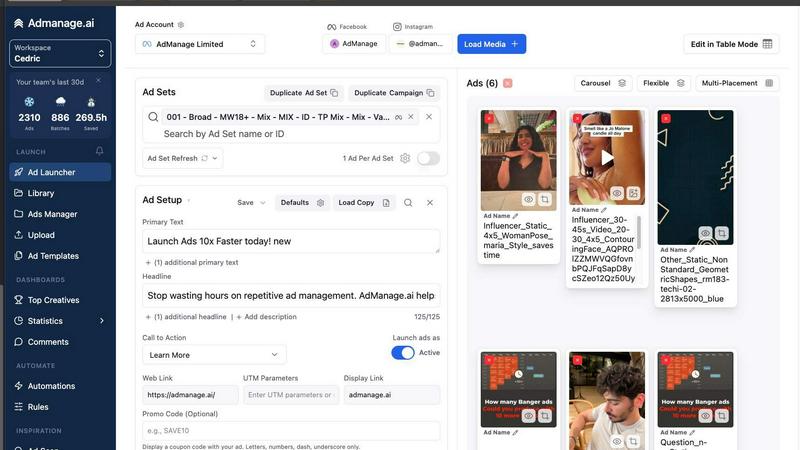
Admanage AI
Gleem.AI Studio

Feature Comparison
Admanage AI
Purpose-Built Interface
Admanage AI features a sleek, user-friendly interface that allows marketers to launch ads in seconds. This design prioritizes speed and efficiency, enabling users to navigate effortlessly through the ad creation process.
Google Sheets Integration
With a free Google Sheets plugin, Admanage AI makes bulk ad launches a breeze. Users can import and manage their ad data directly from Sheets, streamlining the workflow and eliminating the need for cumbersome manual uploads.
One-Click Ad Templates
Standardize your ad execution with one-click templates based on your best-performing ads. This feature allows marketers to replicate successful campaigns quickly and efficiently, reducing the time spent on ad creation.
Automated Multi-Format Grouping
Admanage AI automatically groups ads into various formats such as 9:16, 4:5, and 1:1. This ensures that your ads are optimized for different platforms without any extra effort, allowing for seamless deployment across channels.
Gleem.AI Studio
Unified AI Image Workspace
This core feature brings generation and editing into one cohesive environment. Instead of switching between separate apps for creating and modifying images, everything happens in a single, streamlined workflow. You can generate an image and then immediately edit it, add elements, adjust poses, or apply filters without exporting or importing files. This seamless integration is designed to maintain creative momentum and drastically reduce the time spent on technical processes.
Text-to-Image Generator with Prompt Enhance
Transform your ideas into visuals using simple, natural language. You don't need to be a prompt engineering expert. Describe your vision, and Gleem's built-in Prompt Enhance feature refines your words to produce better, more professional results. The tool also provides controls for aspect ratio and style, giving you guided creative control to generate stunning images that match your initial concept closely.
AI-Powered Image Editing
Edit any image directly within the studio using simple text prompts. This feature allows you to perform complex edits naturally, such as adding or removing objects from a scene, adjusting a subject's pose, applying artistic filters, or restoring old photos. The AI understands your intent, making sophisticated photo manipulation accessible without requiring skills in traditional editing software like Photoshop.
AI Avatars
Create and personalize your own digital avatar that can be placed into any generated scene. This powerful tool lets you appear in any photo, adjust your avatar's pose, or try on different outfits—all without the need for a physical photoshoot. It's ideal for creating consistent personal branding across marketing materials, social media, or professional profiles, offering limitless flexibility and creative possibility.
Use Cases
Admanage AI
Rapid Ad Launching
Marketers can launch hundreds of ads in just seconds, which is essential for campaigns requiring fast iterations and testing. This capability allows teams to adapt their strategies promptly based on real-time performance data.
Enhanced Creative Testing
Admanage AI empowers users to test multiple creatives at scale, enabling performance marketers to identify which ads resonate best with their audiences. This leads to more effective campaigns and higher ROI.
Streamlined Campaign Management
With features like bulk edits and Post ID relaunching, managing existing campaigns becomes effortless. Marketers can make quick adjustments without disrupting their workflow, ensuring campaigns remain agile and responsive.
Improved Collaboration
Admanage AI's cloud integrations facilitate better collaboration among team members. With tools like Drive and Dropbox, teams can share assets and data seamlessly, enhancing productivity and coordination on advertising efforts.
Gleem.AI Studio
Social Media Content Creation
Creators and social media managers can rapidly produce a high volume of engaging, on-brand visuals for platforms like Instagram, Facebook, and Twitter. The unified workspace allows for quick generation of base images, easy editing to fit specific post formats (like Stories or Reels), and the creation of variations for A/B testing—all from a mobile or desktop app, enabling content creation on the go.
Marketing & Advertising Asset Production
Marketing teams and small businesses can efficiently create professional marketing assets such as blog graphics, email headers, digital ad banners, and promotional flyers. The ability to iterate quickly on concepts, maintain visual consistency across campaigns, and edit images directly with AI saves significant time and resources compared to using multiple disparate design tools.
E-commerce Product Visualization
Online retailers can generate and enhance product images, create lifestyle shots by placing products in different scenes, and produce multiple visual variations for listings. The AI editing capabilities are perfect for removing backgrounds, adding complementary objects, or adjusting lighting to make products more appealing, all without expensive photography shoots for every new idea.
Personal Branding & Avatar Development
Professionals, influencers, and entrepreneurs can build a strong visual identity by generating a custom AI avatar. This avatar can be used consistently across websites, speaker profiles, newsletters, and social media, appearing in various professional settings and outfits. It provides a scalable and flexible solution for personal branding without the ongoing cost and logistics of professional photography.
Overview
About Admanage AI
Admanage AI is a powerful ad management tool designed specifically for performance marketers who need to execute high-velocity creative testing without the hassle of traditional, slow native Ads Managers. It addresses the common pain points of launching ads at scale, making it possible to manage hundreds of ads simultaneously with incredible speed and efficiency. With an intuitive interface and integrations with popular tools like Google Sheets, Drive, and Dropbox, Admanage AI streamlines the ad launching process, allowing marketers to focus on strategy rather than manual uploads and error corrections. It empowers teams by enabling them to launch approximately 1,000,000 ads per month, providing a game-changing solution for brands like Bolt, Naked Wines, and Wonderbly. With features that include one-click templates, automated multi-format grouping, and bulk edits, Admanage AI stands out as the world's number one ad launching platform, saving time and reducing errors.
About Gleem.AI Studio
Gleem.AI Studio is a unified, mobile-first AI image workspace designed for creators who want to focus on their vision, not on technical configuration. It streamlines the entire creative process by combining AI image generation, advanced editing, and avatar management into a single, intuitive environment. This eliminates the need to juggle multiple fragmented tools, allowing for a seamless workflow where you can generate an image, edit it with natural language prompts, and iterate on variations without ever losing context or starting over. The platform is built specifically for marketers, content creators, and small teams who need to produce consistent, high-quality visuals quickly. By removing unnecessary complexity, advanced settings, and endless parameters, Gleem.AI Studio empowers users to maintain their creative flow, make visual decisions faster, and iterate effortlessly. Whether you're crafting marketing assets, social media content, product images, or exploring creative concepts, it provides a simple, fast, and all-in-one toolkit that keeps the entire project—from initial prompt to final edit—organized and accessible in one place.
Frequently Asked Questions
Admanage AI FAQ
How does Admanage AI reduce the time spent on ad launches?
Admanage AI streamlines the ad creation process with its intuitive interface and automation features, allowing users to launch ads in seconds rather than hours.
Is it easy to integrate Admanage AI with existing workflows?
Yes, Admanage AI is designed for easy integration with existing workflows. The Google Sheets plugin and cloud integrations ensure a smooth transition, requiring minimal onboarding time.
Can I customize ad templates in Admanage AI?
Absolutely! Admanage AI allows users to create and customize one-click ad templates based on their best-performing ads, enabling quick replication of successful campaigns.
What types of ads can I launch with Admanage AI?
Admanage AI supports various ad formats, including video and image ads, across multiple platforms such as Meta, TikTok, Google, and more. This versatility makes it suitable for a wide range of advertising strategies.
Gleem.AI Studio FAQ
What is Gleem.AI Studio?
Gleem.AI Studio is an all-in-one AI image workspace that combines text-to-image generation, AI-powered editing, and avatar creation in a single, unified platform. It is designed to simplify the creative process for marketers, creators, and teams by eliminating the need to switch between multiple tools, allowing for fast iteration and seamless workflow from idea to final visual.
Who is Gleem.AI Studio for?
It is built for anyone who needs to create visuals quickly and consistently without deep technical expertise. The primary users are marketers, content creators, social media managers, small business owners, and design teams who value speed, simplicity, and an unbroken creative workflow over configuring complex, standalone professional software.
How does the Prompt Enhance feature work?
When you type a natural language description into the text-to-image generator, the Prompt Enhance feature automatically refines and optimizes your input. It interprets your intent and improves the phrasing to communicate more effectively with the AI image model, leading to higher-quality, more accurate, and visually consistent results without requiring you to learn advanced prompt engineering techniques.
How does the platform keep projects organized?
Gleem.AI Studio organizes work into dedicated project spaces. Each idea or campaign gets its own project where all related assets, saved prompts, edit histories, and image versions are stored together. This system makes it easy to revisit previous work, build upon iterations, and maintain version control, ensuring everything is accessible and your creative process remains structured.
Alternatives
Admanage AI Alternatives
AdManage.ai is a powerful tool designed for performance marketers, helping them launch advertisements across multiple platforms like Meta, TikTok, and Google at an accelerated pace. This software falls under the marketing category, specifically tailored for high-velocity creative testing. Users often seek alternatives due to factors such as pricing, desired features, or specific platform compatibility that may not align with their advertising strategies. When choosing an alternative, it's essential to consider the ease of use, integration capabilities, and the ability to manage and optimize ad workflows efficiently.
Gleem.AI Studio Alternatives
Gleem.AI Studio is an all-in-one AI image workspace designed for marketers and creators. It combines image generation and editing into a single, streamlined workflow, removing technical complexity to help users focus on creative decisions and fast iteration. Users often explore alternatives for various reasons. This could be due to budget constraints, a need for more advanced or specific features, or a preference for a different platform or ecosystem. Some may require tools that integrate deeply with other software in their existing stack. When evaluating other options, consider your core needs. Look for a tool that balances power with ease of use, fits your budget, and supports your specific creative workflow. The goal is to find a solution that enhances your productivity without introducing unnecessary friction or a steep learning curve.