
APIMCP.dev vs LuxSign
Side-by-side comparison to help you choose the right AI tool.

APIMCP.dev
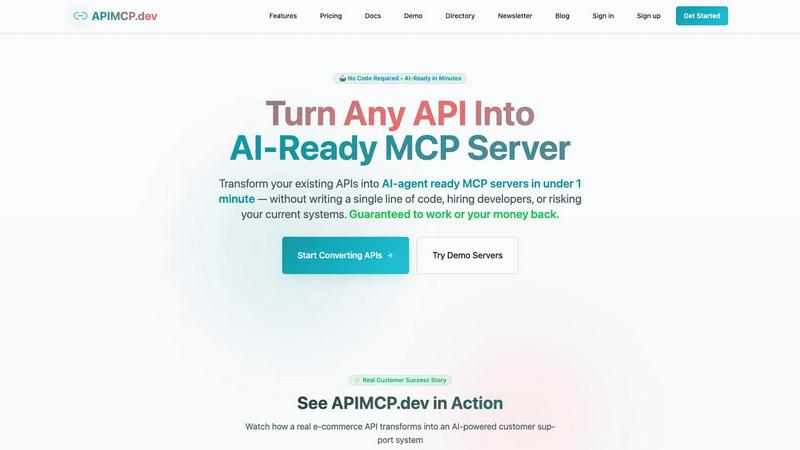
APIMCP.dev instantly turns any REST API into an AI-ready MCP server with no code required.
Last updated: March 1, 2026

LuxSign lets you securely sign and manage documents online in minutes, compliant with EU regulations and hosted in.
Last updated: February 27, 2026
Visual Comparison
APIMCP.dev
LuxSign

Feature Comparison
APIMCP.dev
No-Code Instant Conversion
Transform your REST API into a live MCP server in under 60 seconds without writing a single line of code. Simply connect your OpenAPI specification, and our platform handles the entire conversion process automatically. This feature removes the need for specialized MCP knowledge or hiring developers, putting powerful AI integration directly into the hands of product managers and business users. It's designed for speed and simplicity, ensuring you can go from concept to a working AI-ready endpoint faster than scheduling a development meeting.
Enterprise-Grade Security & Isolation
Your core systems remain completely untouched and secure. APIMCP.dev acts as a secure middleware layer, handling all authentication, token management, and request routing between the AI agent and your API. This built-in security layer means you never have to expose sensitive credentials or internal endpoints directly to AI tools. The platform provides enterprise-grade protection for your data flows, giving you the confidence to connect even business-critical systems to AI agents without compromising your existing infrastructure's integrity.
Automatic Tool Description Generation
For AI agents to effectively use your API, they need clear, natural-language descriptions of each available function. APIMCP.dev intelligently analyzes your OpenAPI spec and automatically generates these precise, usable tool descriptions. This eliminates the manual, error-prone task of documenting every endpoint for AI consumption. The generated descriptions ensure agents like Claude understand exactly what each API tool does, how to use it, and what parameters are required, leading to accurate and reliable autonomous interactions.
Real-Time Analytics & Monitoring
Gain immediate visibility into how your AI-enhanced API is performing. The dashboard provides real-time analytics on API usage, AI agent interaction patterns, response times, and system performance metrics. Monitor which tools are most frequently used by agents, track latency, and identify potential bottlenecks. This data is crucial for optimizing both your API performance and the prompts guiding your AI agents, allowing for continuous improvement and ensuring your AI integrations deliver maximum value and reliability.
LuxSign
Multiple Signature Methods
LuxSign offers a variety of signature methods to accommodate user preferences. Users can draw their signature with a mouse, type their name, or upload an image. This flexibility ensures that signing documents is quick and personalized, making the process straightforward and user-friendly.
Advanced Security
Security is paramount at LuxSign. The platform employs industry-standard encryption to protect your documents during upload, storage, and transmission. With secure hosting in Luxembourg, all data is safeguarded against unauthorized access, ensuring peace of mind for users handling sensitive information.
Complete Audit Trail
LuxSign provides a comprehensive audit trail that logs every action taken with a document. This includes timestamps, IP addresses, and signer information, making it easy to verify and ensure compliance. Users can track the entire signing process, enhancing transparency and accountability.
Collaboration Workspaces
LuxSign includes collaboration workspaces that allow teams to work together efficiently. Users can create shared folders, manage member access, and collaborate on signing workflows. This feature streamlines teamwork, making it easier for businesses to manage multiple documents and signers in one centralized location.
Use Cases
APIMCP.dev
AI-Powered Customer Support Automation
Instantly convert your e-commerce or CRM API (like Shopify or Salesforce) into an AI customer support agent. Customers can ask natural questions like "What's the status of my order #12345?" or "Update my shipping address." The AI agent, connected via the MCP server, automatically calls the correct endpoints (GET /orders/12345, PUT /customers/address) and returns a conversational, accurate response. This provides 24/7 support, reduces ticket volume, and delivers instant resolutions without any human intervention or custom coding.
Intelligent Internal Data Querying
Empower every team member to be a data analyst. Connect your internal databases, project management, or BI tools via their APIs to APIMCP.dev. Employees can then ask Claude or ChatGPT questions like "What were Q3 sales figures for the Western region?" or "List all open bugs with high priority." The AI agent uses the generated MCP tools to fetch and synthesize data from multiple systems in seconds, creating reports and answering complex queries on-demand without needing SQL knowledge or dashboard navigation.
Dynamic Content Generation & Management
Transform your Content Management System (CMS) or marketing platform API into a creative AI co-pilot. Content teams can instruct an AI agent to "Draft a blog post about our new product using last quarter's performance data" or "Schedule a social media post for tomorrow at 2 PM." The agent leverages the MCP server to pull data from your analytics API, draft copy, and then use the CMS API to create and schedule the content directly, streamlining the entire content creation workflow.
Automated Workflow and Notification Triggers
Create smart, proactive business processes. Connect APIs from communication tools (Slack, email), monitoring software, or IoT platforms. Set up AI agents to monitor for specific conditions, such as a server downtime alert or a new high-value lead in your CRM. The agent can then autonomously execute workflows via the MCP server, like posting a detailed incident report to a Slack channel, assigning the lead to a sales rep, and sending a personalized follow-up email—all without manual setup or complex Zapier-style rules.
LuxSign
Streamlined Contract Management
Businesses can utilize LuxSign to streamline their contract management process. By enabling electronic signatures, organizations can quickly sign, send, and store contracts without the need for physical paperwork, saving time and resources.
Compliance for Financial Institutions
Financial institutions can leverage LuxSign to ensure compliance with regulatory requirements. The platform’s robust security features and audit trails provide necessary documentation for compliance audits, making it easier to adhere to legal standards.
Efficient HR Processes
Human Resources departments can use LuxSign to manage employee onboarding and documentation efficiently. With the ability to send multiple documents for signature simultaneously, HR can expedite processes such as employment contracts and policy acknowledgments.
Remote Work Solutions
As remote work becomes increasingly common, LuxSign is ideal for businesses looking to facilitate secure document signing from anywhere. With its mobile-friendly design, employees can sign documents on their smartphones or tablets, ensuring flexibility and convenience.
Overview
About APIMCP.dev
APIMCP.dev is the revolutionary platform that instantly bridges the gap between your existing APIs and the world of AI. It transforms any standard REST API into a fully functional Model Context Protocol (MCP) server in under 60 seconds, with absolutely no code required. Designed for developers, product teams, and businesses of all sizes, it eliminates the traditional, time-consuming hurdles of custom integration development. Instead of spending weeks writing bespoke code to connect your API to AI agents like Claude, ChatGPT, or Cursor, you simply provide your OpenAPI specification. APIMCP.dev's intelligent engine then automatically generates a secure, AI-ready MCP server endpoint. This slashes development cycles from 40-80 hours down to mere minutes, dramatically reducing costs and accelerating your ability to leverage artificial intelligence. The core value proposition is clear: empower your business to create AI-augmented applications—like automated customer support, intelligent data analysis, or dynamic content generation—by making your proprietary data and services instantly accessible to leading AI tools, all without touching your existing backend systems.
About LuxSign
LuxSign is a cutting-edge electronic signature platform designed for businesses that prioritize security and compliance. Originating from Luxembourg, it provides a secure, cloud-based solution that ensures all documents are encrypted end-to-end and stored exclusively within the country. This guarantees full compliance with GDPR regulations, making it an ideal choice for organizations operating within the European Union. LuxSign is built to support eIDAS Simple Electronic Signature (SES) standards, ensuring legal validity for contracts across all EU member states. With features like customizable signing workflows, automated notifications, and an intuitive interface, LuxSign simplifies the signing process. This platform is perfect for professionals, small businesses, and enterprises seeking a reliable, efficient way to manage electronic signatures while maintaining the utmost security and compliance.
Frequently Asked Questions
APIMCP.dev FAQ
What is an MCP server and why do I need it?
MCP (Model Context Protocol) is a standard that allows AI applications like Claude Desktop and Cursor IDE to securely connect to external tools, data sources, and services. An MCP server acts as a bridge, providing these AI agents with a set of defined "tools" (your API endpoints) they can use. APIMCP.dev automatically creates this server for your API, so you don't need to build it from scratch. You need it to give AI agents direct, structured, and safe access to your live business data and functionality.
Is my API data and authentication secure?
Absolutely. Security is a foundational principle. Your original API credentials and infrastructure are never exposed to the AI agent. APIMCP.dev securely stores your authentication details (like API keys) on its platform and acts as a proxy. All communication is encrypted. The AI agent only interacts with the secure MCP endpoint we generate, which then handles authentication and makes the call to your actual API, keeping your core systems completely isolated and protected.
Which AI tools and agents are compatible?
APIMCP.dev generates standard-compliant MCP servers, making them compatible with any application that supports the MCP standard. This includes popular AI platforms like Anthropic's Claude Desktop, OpenAI's ChatGPT with relevant plugins, the Cursor IDE, and any other agent built on the open MCP framework. This future-proofs your integration, as any new tool adopting MCP will automatically be able to connect to your converted API.
What happens if my API specification changes?
The platform is built for agility. If you update your OpenAPI specification (Swagger file), you can easily re-import it into APIMCP.dev. The system will intelligently regenerate the MCP server tools and descriptions to reflect the new endpoints, parameters, or changes. This ensures your AI agents always have access to the latest version of your API's capabilities without requiring manual updates or code changes to the integration layer.
LuxSign FAQ
What types of documents can I sign with LuxSign?
LuxSign supports various document formats, including PDF, DOC, and DOCX. Users can easily upload files up to 10MB, making it simple to handle different types of documents.
Is LuxSign compliant with GDPR?
Yes, LuxSign is fully compliant with GDPR regulations. All documents are encrypted and stored securely in Luxembourg, ensuring that user data is protected in accordance with EU data protection laws.
How does LuxSign ensure the security of my documents?
LuxSign employs end-to-end encryption during the upload, storage, and transmission of documents. Additionally, all data is hosted on secure servers in Luxembourg, providing a high level of security against unauthorized access.
Can I track the signing process in LuxSign?
Absolutely! LuxSign allows users to track the signing process in real-time. You will receive automatic email notifications to keep you informed when documents are sent, viewed, and signed, enhancing transparency throughout the process.
Alternatives
APIMCP.dev Alternatives
APIMCP.dev is a productivity and management tool that instantly converts any REST API into an AI-ready MCP server in under a minute, requiring no coding. It bridges the gap between existing APIs and modern AI agents like Claude, streamlining a process that traditionally takes dozens of hours. Users often explore alternatives for various reasons. Some may have specific budget constraints or need a different pricing model. Others might require advanced features, integrations with particular platforms, or more granular control over the deployment environment beyond what a standard solution offers. When evaluating other options, key considerations include the speed and simplicity of setup, the depth of security features for enterprise data, and the availability of a robust resource library or community. The core goal is to find a tool that minimizes development friction while maximizing secure, AI-ready connectivity for your specific business needs.
LuxSign Alternatives
LuxSign is an electronic signature platform designed to facilitate secure and legally valid signing of documents across the European Union. As a cloud-based solution, it provides businesses with a user-friendly way to manage contracts while ensuring compliance with eIDAS SES standards and GDPR regulations. Users often seek alternatives to LuxSign for various reasons, including pricing structures, feature sets, and specific platform needs that better align with their operational workflows. When exploring alternatives, it's essential to consider factors such as ease of use, security measures, integration capabilities with existing systems, and the availability of advanced features like document templates and audit trails. Evaluating these aspects will help users find a solution that meets their unique requirements and enhances their document management processes.