
AskFormulas vs Receipt Generator
Side-by-side comparison to help you choose the right AI tool.

AskFormulas
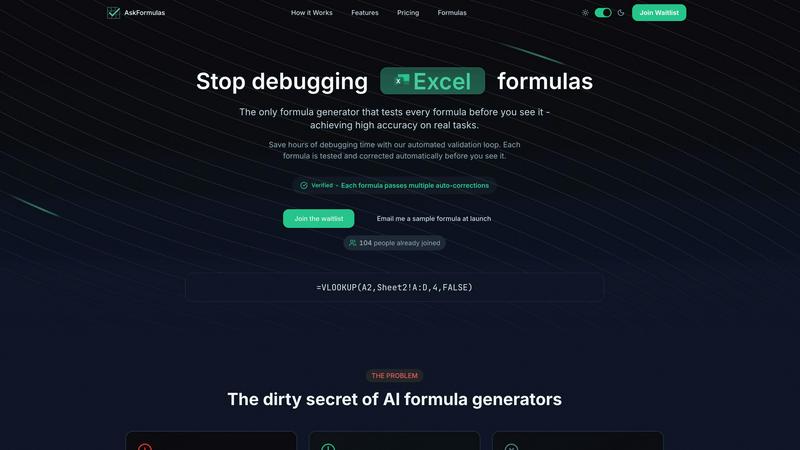
AskFormulas generates and validates Excel and Sheets formulas so they work perfectly every time.
Last updated: February 28, 2026

Receipt Generator
Create realistic custom receipts instantly with free AI and 400 plus store templates for any legitimate use.
Last updated: April 4, 2026
Visual Comparison
AskFormulas
Receipt Generator

Feature Comparison
AskFormulas
Automated Validation Loop
This is the defining feature of AskFormulas. Every formula you request goes through a rigorous, automated 3-step process. First, your natural language request is parsed for intent. Then, the generated formula is auto-tested on synthetic template data in a secure sandbox. If any errors are found, the system performs auto-corrections through iterative validation loops until the formula works perfectly. This process ensures you only ever see a "Verified" formula, eliminating the risk of broken syntax in your actual spreadsheet.
Natural Language to Formula
You don't need to know any formula syntax. Simply describe what you need in plain English, just like you would ask a colleague. For example, type "Sum all values in column B where column A contains the word Sales" into the single input field. AskFormulas' AI understands the context and intent behind your request, converting your everyday language into precise spreadsheet formula logic, making advanced functionality accessible to everyone.
Cross-Platform Syntax Toggle
AskFormulas seamlessly supports both Microsoft Excel and Google Sheets. A simple one-click toggle lets you switch between platforms. The system automatically adjusts the formula syntax for you, handling the differences between functions like VLOOKUP and ARRAYFORMULA. This means you get a perfectly formatted, validated formula for your specific spreadsheet software without any manual translation or adjustments required.
Smart Error Detection & Correction
The tool proactively identifies and fixes common spreadsheet errors before you ever see them. If a generated formula would result in a #REF!, #VALUE!, #N/A, or other error, the validation loop detects it. The system then automatically corrects the formula, such as fixing a range reference or adjusting a function argument, and retests it. This smart correction happens multiple times if necessary, guaranteeing the final output is error-free and ready for immediate use.
Receipt Generator
400+ Store-Specific Templates
Jumpstart your receipt creation with a vast, professionally designed library of templates from popular stores and restaurants. From Walmart and Target to Starbucks and Best Buy, each template replicates the authentic layout, fonts, and branding elements of the real store receipt. This saves you hours of design work and ensures your generated receipt looks genuine and credible for any use case you have in mind.
AI "Place in Scene" Feature
Go beyond a flat digital file with the groundbreaking AI "Place in Scene" tool. This feature allows you to generate a photorealistic image of your receipt placed on any surface you choose, such as a wooden desk, kitchen counter, or inside a wallet. It adds realistic shadows, lighting, and texture, making it appear as if the receipt was physically printed and photographed, all without ever needing a printer.
Full Customization & Drag-and-Drop Editor
Take complete control over every element of your receipt. The intuitive, mobile-friendly drag-and-drop editor lets you add, remove, and rearrange blocks for headers, line items, totals, barcodes, and dividers. You can edit all text, prices, taxes, store information, and payment details. This level of customization ensures the final receipt meets your exact specifications for any project.
Instant High-Resolution Export
Get your finished receipt ready to use in moments. With one click, export your creation as a high-resolution PNG or PDF file. The process is lightning-fast with no lag or waiting, enabling quick workflows. Pro plans offer unlimited, watermark-free downloads, making it ideal for users who need to generate multiple receipts regularly without any quality compromises.
Use Cases
AskFormulas
Financial Modeling & Analysis
Financial analysts and accountants can build complex, error-free models faster. Instead of manually writing and debugging nested IF statements, intricate INDEX-MATCH combinations, or sophisticated array formulas, they can describe the logic in plain language. AskFormulas delivers validated, accurate formulas, ensuring the integrity of financial forecasts, budget trackers, and valuation models, saving countless hours of painstaking verification.
Automated Business Reporting
Revenue managers, operations leads, and department heads can automate their weekly or monthly reports with confidence. Generate formulas to summarize sales data, calculate KPIs, merge information from multiple sheets, or create dynamic dashboards. Since every formula is pre-validated, you can automate processes knowing the underlying calculations are correct, leading to reliable and trustworthy automated reports.
Small Business Operations
Small business owners and freelancers who may not have deep Excel or Sheets expertise can now perform advanced data tasks independently. From creating an invoice tracker and calculating profit margins to managing inventory or analyzing customer data, AskFormulas acts as an on-demand expert. It empowers them to leverage the full power of spreadsheets for decision-making without the technical learning curve or fear of mistakes.
Data Cleaning & Preparation
Professionals across all fields spend significant time cleaning and organizing data. AskFormulas simplifies this by generating formulas to remove duplicates, split or combine text in cells, convert date formats, flag inconsistencies, or extract specific information. Getting a verified formula for these repetitive tasks streamlines the data preparation phase, allowing users to focus on analysis and insights instead of syntax troubleshooting.
Receipt Generator
Expense Reporting & Business Documentation
Small business owners, freelancers, and consultants can use Receipt Generator to create clear, professional mock receipts for expense reports, client billing, or tax documentation. It helps visualize costs, fill in gaps for lost receipts, and create uniform financial records without the clutter of physical paper, streamlining accounting and reimbursement processes.
Content Creation & Social Media Mockups
Digital marketers, influencers, and social media content creators can generate realistic receipt props for tutorials, haul videos, budgeting content, or promotional posts. The AI "Place in Scene" feature is particularly valuable here, creating engaging, authentic-looking photos that enhance storytelling and production value without the need for physical props.
E-commerce & Resale Verification
Online resellers on platforms like eBay, Poshmark, or Facebook Marketplace can use the tool to create proof of purchase for high-value items. Generating a customized receipt with specific item details, dates, and prices helps build trust with buyers, verify authenticity, and facilitate smoother transactions by providing necessary documentation.
Personal Finance & Budgeting Visualization
Individuals managing their personal finances can use Receipt Generator to mock up spending scenarios, visualize monthly budgets, or create educational materials for financial literacy. It's a practical way to create tangible examples of spending habits or to plan future purchases in a clear, itemized format.
Overview
About AskFormulas
AskFormulas is the AI-powered assistant that transforms how you work with spreadsheets. It's designed for anyone who needs accurate, ready-to-use formulas for Microsoft Excel or Google Sheets but wants to skip the frustration of debugging errors. The core innovation is its automated validation loop, a process that sets it apart from other AI tools. While typical generators have error rates of 40-60%, AskFormulas tests every single formula it creates on real, synthetic data within a secure sandbox. If an error like #REF! or #VALUE! is detected, the system automatically corrects it through iterative validation. Only after passing these tests is a formula presented to you, marked with a distinctive green "Verified" badge. This guarantees you receive a working solution, not a guess. It turns complex formula creation from a task requiring deep technical syntax knowledge into a simple, conversational experience. AskFormulas is perfect for financial analysts building intricate models, revenue managers automating reports, small business owners without technical expertise, and any professional who values reliability and wants to reclaim hours of weekly debugging time.
About Receipt Generator
Receipt Generator is the ultimate mobile-first, web-based tool for creating authentic, store-specific receipts in seconds. Designed for a seamless user experience, it eliminates the need for complex software or physical printing. Whether you're a small business owner documenting expenses, a freelancer creating client invoices, a content creator needing props, or a reseller verifying inventory, this app provides a comprehensive solution. Its core value lies in an extensive library of over 400 meticulously designed templates from major retailers like Walmart, Target, Starbucks, and CVS, allowing you to generate a perfectly formatted receipt for virtually any scenario. Every detail is customizable, from line items and prices to dates and payment methods, giving you full control. The standout feature is the AI-powered "Place in Scene" technology, which transforms your digital receipt into a photorealistic image placed on any surface like a desk or wallet, perfect for mockups. With instant downloads, no mandatory account creation, and a straightforward interface optimized for on-the-go use, Receipt Generator is the most efficient and versatile receipt creation platform available for legitimate business, creative, and personal projects.
Frequently Asked Questions
AskFormulas FAQ
How accurate are the generated formulas?
AskFormulas achieves significantly higher accuracy than standard AI formula generators through its automated validation loop. While other tools can have error rates of 40-60%, AskFormulas tests and auto-corrects every formula in a real spreadsheet sandbox environment. The result is a "Verified" formula that is guaranteed to work without #REF! or #VALUE! errors, providing near-perfect accuracy for real-world tasks.
Does it work with both Excel and Google Sheets?
Yes, AskFormulas is built as a cross-platform solution. It fully supports both Microsoft Excel and Google Sheets. You can easily switch between the two with a single toggle. The system automatically adjusts the formula syntax to match the correct function names and structure for your chosen platform, delivering a ready-to-paste, validated formula for either application.
How does the validation loop work?
The validation loop is a 3-step automated process. Step 1: Your natural language request is analyzed and converted into formula syntax. Step 2: This formula is immediately run on synthetic test data within a secure sandbox that mimics a real spreadsheet. Step 3: If any errors are detected, the system automatically corrects the formula and retests it. This iterative loop continues until the formula executes flawlessly, at which point it is marked "Verified" and presented to you.
What happens if my request is too complex or ambiguous?
The AI is designed to understand context and ask for clarification if needed. For complex requests, it breaks down the logic into core components to build an accurate formula. If a request is truly ambiguous, the system may prompt you with follow-up questions to ensure it generates the correct solution. The validation loop further safeguards complexity by testing the final logic, ensuring the output is functionally sound even for advanced scenarios.
Receipt Generator FAQ
Is Receipt Generator free to use?
Yes, Receipt Generator offers a free tier that allows you to create and download receipts. However, free downloads include a watermark. To access unlimited, watermark-free downloads, save custom templates, and use AI credits for the "Place in Scene" feature, you can upgrade to a paid Pro plan or a one-time Lifetime plan.
What is the AI "Place in Scene" feature?
The AI "Place in Scene" is an advanced feature that uses artificial intelligence to generate a photorealistic image of your digital receipt placed onto a real-world surface. You can choose scenes like a desk, countertop, or hand, and the AI will realistically blend the receipt into the image with proper lighting and perspective, creating a convincing photo without any printing.
Can I customize every part of the receipt?
Absolutely. Receipt Generator provides full customization control. You can edit all text, including store names, addresses, item descriptions, prices, taxes, dates, and payment methods. The drag-and-drop editor also lets you add or remove structural blocks like barcodes, QR codes, and dividers, and adjust styling elements to match your needs perfectly.
Do I need to create an account to start?
No, you can start creating receipts immediately without signing up for an account. This makes the tool incredibly accessible for quick, one-time projects. However, creating a free account allows you to save your progress and access your custom templates later, which is recommended for regular users.
Alternatives
AskFormulas Alternatives
AskFormulas is an AI-powered productivity tool that generates and validates spreadsheet formulas for Excel and Google Sheets. It stands out by automatically testing and correcting formulas to ensure they work perfectly, saving users from frustrating debugging sessions. People often explore alternatives for various reasons, such as budget constraints, needing a different feature set, or requiring integration with other specific platforms or workflows. It's a common step in finding the perfect tool for one's individual needs. When evaluating other options, key factors to consider include the tool's accuracy and reliability, the simplicity of its user interface, whether it supports your specific spreadsheet platform, and the overall value it provides for the price. The goal is to find a solution that makes formula creation effortless and trustworthy.
Receipt Generator Alternatives
Receipt Generator is a leading online tool in the productivity and management category, designed to create custom, professional-looking receipts instantly. Users often explore alternatives for various reasons, such as needing different pricing models, specific features not offered, or a platform that better integrates with their existing business apps or mobile workflow. When searching for a different solution, it's crucial to consider your primary needs. Key factors include the quality and variety of receipt templates, the flexibility of customization, output format options, and whether the tool offers unique features like AI-enhanced visual mockups. Also, evaluate the user experience, especially on mobile devices, and the transparency of the pricing structure. Ultimately, the best choice depends on your specific use case, whether for business documentation, content creation, or personal finance tracking. A tool that balances ease of use with powerful editing capabilities often provides the greatest long-term value.