
ClipMake vs CoPilly
Side-by-side comparison to help you choose the right AI tool.

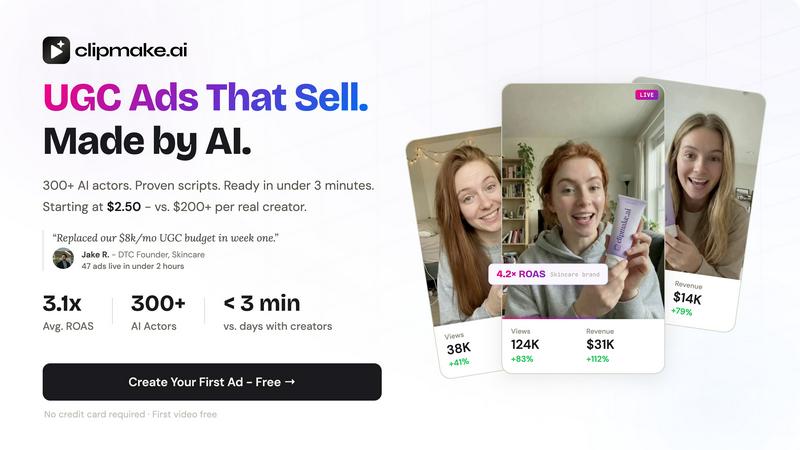
Create stunning AI-generated video ads in minutes with ClipMake's 300+ actors, starting at just $2.50 per video.
Last updated: April 13, 2026

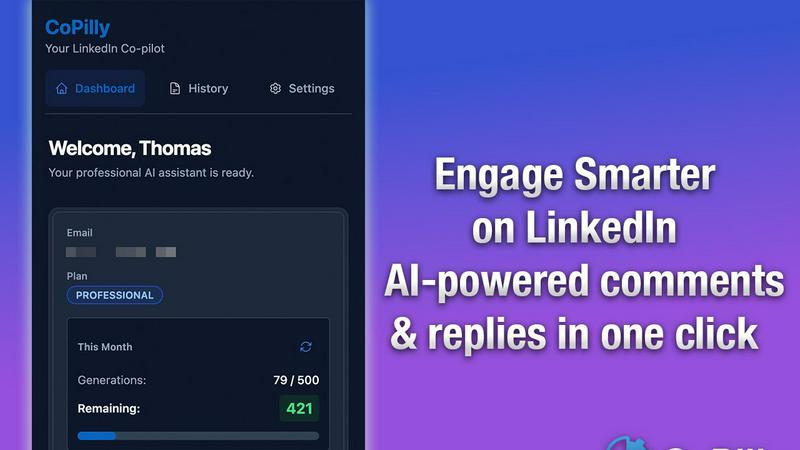
CoPilly is an AI Chrome extension that generates LinkedIn comments and messages safely in just 2 seconds.
Last updated: February 28, 2026
Visual Comparison
ClipMake
CoPilly
Feature Comparison
ClipMake
AI Actor Selection
Choose from a diverse library of over 300 AI actors or create custom avatars to represent your brand. This feature allows you to select the personality and energy that best aligns with your product, ensuring that your video ads resonate with your target audience.
Script and Hook Generation
ClipMake automatically generates hooks and scripts based on high-performing ad formats. This feature leverages data from successful campaigns across Meta and TikTok, ensuring that your content is not only engaging but also strategically crafted to drive conversions.
Scene Templates
With 20+ customizable scene templates available, users can easily select formats like unboxing, testimonials, tutorials, and lifestyle showcases. This variety allows for creative flexibility, helping brands to tell their stories in the most compelling way possible.
Batch Video Creation
ClipMake supports batch generation, enabling users to create dozens of ad variations in a single session. This feature is essential for testing different hooks, actors, and scripts, maximizing the potential for discovering high-performing creatives at an incredibly low cost.
CoPilly
Context-Aware Comments
CoPilly generates human-like comments that are tailored to the context of the post, allowing you to engage meaningfully with your network. This feature ensures that your comments resonate with the original content, enhancing the quality of your interactions.
Quick Reply Suggestions
With the quick reply feature, CoPilly provides you with multiple engaging response options in seconds. This eliminates the hassle of crafting replies from scratch, allowing you to stay responsive to messages and engage in conversations effortlessly.
Personalized Connection Invites
Craft personalized connection invites that stand out in a crowded LinkedIn space. CoPilly helps you create tailored invites that reflect your unique voice and style, increasing the chances of acceptance from potential connections.
Safe Manual Trigger Workflow
CoPilly operates on a 100% manual trigger workflow, which means you control every action taken. This architecture is designed to remain undetectable as automation, ensuring your account stays safe from bans and penalties associated with bot-like behavior.
Use Cases
ClipMake
E-Commerce Product Launches
When launching new products, brands can quickly create multiple video ads to showcase features and benefits. ClipMake's fast turnaround time ensures that marketing efforts can keep pace with product availability, maximizing promotional impact.
Social Media Advertising
Performance marketers can leverage ClipMake to generate a high volume of ads tailored for platforms like TikTok and Meta. This allows for continuous testing and optimization, leading to improved return on ad spend (ROAS) by identifying winning creatives quickly.
Brand Awareness Campaigns
ClipMake can be utilized to produce videos aimed at increasing brand awareness. By using appealing AI actors and engaging scripts, brands can create memorable content that resonates with potential customers, enhancing overall brand visibility.
Seasonal Promotions
For seasonal sales or special promotions, ClipMake enables brands to generate timely and relevant video ads that capture the spirit of the occasion. With the ability to customize scenes and scripts, brands can effectively communicate their promotional messages.
CoPilly
Elevating Engagement on Posts
Professionals can use CoPilly to generate thoughtful and context-aware comments on posts within their network. This boosts visibility and encourages interactions, making it easier to expand their reach on LinkedIn.
Streamlining Direct Messaging
CoPilly is perfect for managing direct messages, allowing users to respond quickly and effectively. With tailored suggestions, you can maintain conversations without the stress of crafting each reply manually.
Expanding Your Network
As a recruiter or entrepreneur, CoPilly helps in drafting personalized connection invites that capture the attention of potential candidates or partners. This personalized approach increases the likelihood of connecting with the right people.
Enhancing Personal Branding
For professionals looking to elevate their personal brand, CoPilly provides tools to engage authentically with others. By generating high-quality content that reflects your voice, you can build a strong presence on LinkedIn without compromising safety.
Overview
About ClipMake
ClipMake is a revolutionary AI-driven platform designed to automate the creation of user-generated content (UGC) style video ads. Tailored specifically for e-commerce brands and performance marketers, ClipMake eliminates the need for traditional video production, allowing users to generate high-volume ad creatives without the hassle of hiring creators, organizing shoots, or handling complex editing processes. With an extensive library of over 300 AI actors, users can simply input their product details and receive a polished video ad in under three minutes. Each ad features natural voiceovers, product visuals, and proven ad structures optimized for platforms like Meta and TikTok. The primary value proposition of ClipMake lies in its ability to significantly reduce the time and cost associated with video content creation while boosting the overall effectiveness of ad campaigns.
About CoPilly
CoPilly is a cutting-edge Chrome extension designed to enhance your LinkedIn experience while prioritizing account safety. It stands apart from traditional automation tools that put your account at risk due to their reliance on automation. Instead, CoPilly utilizes a manual trigger workflow, allowing users to create high-quality, engaging content without violating LinkedIn's Terms of Service. This innovative tool caters to a diverse audience including sales teams, entrepreneurs, recruiters, and professionals eager to broaden their networks. CoPilly offers context-aware comments, quick reply suggestions, and personalized connection invites, making engagement seamless and effective. Its primary value proposition lies in the balance it strikes between boosting your LinkedIn interactions and safeguarding your account, enabling users to grow their professional brand authentically and safely.
Frequently Asked Questions
ClipMake FAQ
How long does it take to create a video ad with ClipMake?
Creating a video ad with ClipMake takes less than three minutes. Simply select your AI actor, input your product details, and choose your desired scene template to get started.
Can I use my own product images?
Yes, ClipMake allows users to upload product images. The AI actors can hold or interact with these images in the video scenes, ensuring that the product is prominently featured.
Is there a limit to how many videos I can create?
ClipMake supports batch generation, meaning you can create dozens of video variations in one session. This allows for extensive testing without the constraints typically associated with video production.
What languages are supported for voiceovers?
ClipMake offers voice-matched dubbing in over 20 languages, preserving the natural voice qualities of the AI actors. This feature ensures that your video ads can reach a global audience effectively.
CoPilly FAQ
Is CoPilly safe to use on LinkedIn?
Yes, CoPilly uses a manual trigger workflow which ensures that all interactions are conducted safely without the risks associated with automation tools. This design helps protect your account from bans.
How quickly can I generate comments and replies?
CoPilly allows you to generate high-quality comments and replies in under two seconds. This rapid response time enables you to engage promptly with your network.
Can I customize the tone of my comments and invites?
Absolutely! CoPilly offers customizable tones, allowing you to choose from professional, casual, or friendly styles that match your unique voice and the context of your interactions.
Is CoPilly compliant with GDPR?
Yes, CoPilly is fully GDPR compliant, ensuring that your data and privacy are protected while you use the tool to enhance your LinkedIn engagement.
Alternatives
ClipMake Alternatives
ClipMake is an AI-powered user-generated content (UGC) video generator designed specifically for marketers and e-commerce brands. It enables users to create hyper-realistic video ads in just a few minutes using a library of over 300 AI actors, eliminating the need for costly shoots or complex editing. Despite its innovative features, users often seek alternatives due to concerns over pricing, specific feature sets, or compatibility with other platforms they may be using. When considering an alternative to ClipMake, it's essential to evaluate several factors including the range of available AI actors, the quality of video output, ease of use, and additional features such as script generation and language support. Ultimately, the best alternative will align with your marketing goals and provide a seamless user experience that meets your content creation needs.
CoPilly Alternatives
CoPilly is an innovative AI-driven Chrome extension designed to enhance your LinkedIn engagement by generating comments, DM replies, and connection invites in mere seconds. As a tool in the marketing category, it focuses on optimizing professional interactions while ensuring user account safety. Many users seek alternatives to CoPilly for various reasons, including pricing concerns, specific feature needs, or compatibility with different platforms. When searching for an alternative, consider factors such as ease of use, level of customization, security measures, and how well the tool aligns with your professional objectives. It's essential to find a solution that not only enhances your LinkedIn presence but also fits seamlessly into your workflow, ensuring a positive user experience.