
CloudBurn vs Yardyly
Side-by-side comparison to help you choose the right AI tool.

CloudBurn
CloudBurn shows AWS costs before you deploy to prevent surprise bills.
Last updated: March 1, 2026

Yardyly is the mobile app that streamlines your landscaping business operations.
Last updated: March 4, 2026
Visual Comparison
CloudBurn

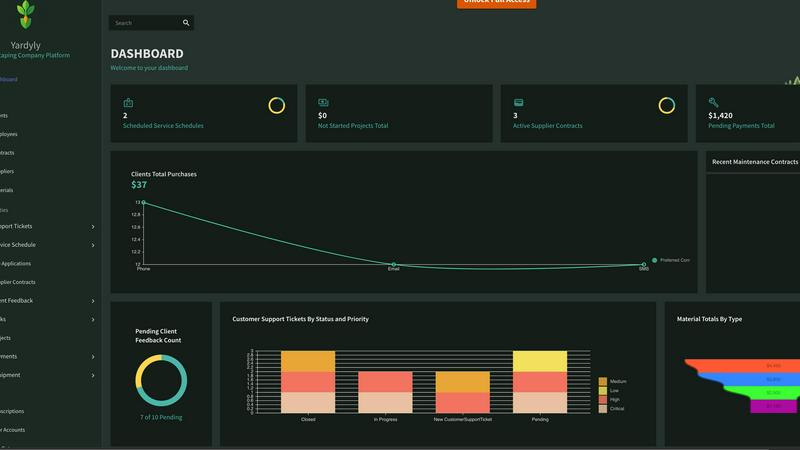
Yardyly
Feature Comparison
CloudBurn
Automated Pull Request Cost Analysis
CloudBurn integrates directly into your GitHub workflow to provide instant cost intelligence. Whenever a developer opens a pull request with Terraform or AWS CDK changes, CloudBurn automatically detects the infrastructure diff. It processes this data, calculates the exact monthly cost delta for the new or modified resources, and posts a detailed, easy-to-read cost report as a comment on the PR. This happens within seconds, giving your team immediate financial context without any manual intervention, making cost awareness a natural part of every code review.
Real-Time AWS Pricing Data
Your cost estimates are always accurate and up-to-date. CloudBurn does not rely on stale, averaged, or estimated pricing. Instead, it pulls real-time pricing data directly from AWS Price List API for the specific region and service you are deploying to. This ensures that the monthly cost projections in your pull requests reflect the actual rates you will be charged, accounting for nuances like instance types, storage volumes, and data transfer costs, so you can make decisions with complete confidence.
Detailed & Actionable Cost Reports
The platform goes beyond a simple total. Each CloudBurn PR comment breaks down the cost impact per resource, showing the current cost, the new projected cost, and the delta. It lists the specific AWS service, usage type, description, and hourly rate for complete transparency. This granular detail helps developers understand exactly which line of code is driving cost increases and facilitates productive conversations about optimization alternatives right at the point of change.
Seamless GitHub Integration & Security
Getting started is incredibly simple and secure. You install CloudBurn directly from the GitHub Marketplace, and all billing, setup, and permissions are handled 100% through GitHub. There are no separate logins, API keys to manage for the core service, or complex IAM roles required on your AWS account initially. This GitHub-native approach minimizes setup friction, leverages your existing security model, and gets your team protected from cost overruns in minutes.
Yardyly
Centralized Drag-and-Drop Scheduling
Optimize your daily and weekly workflow with an intuitive, visual scheduler. Easily drag and drop jobs to assign crews, adjust timelines, and manage resources in real-time. This mobile-friendly feature allows for on-the-fly changes from any device, ensuring your schedule is always accurate and your team knows exactly where to be, eliminating confusion and missed appointments.
Integrated Customer Management & Invoicing
Keep all client details, communication history, and service records in one secure place. Yardyly’s built-in CRM lets you track customer preferences and job history effortlessly. Coupled with seamless invoicing and payment tracking, you can generate estimates, send invoices, and monitor transactions from a single platform, ensuring precise financial control and faster payments.
Real-Time Team Coordination & Task Management
Enhance field crew productivity with instant updates and clear task delegation. Assign jobs, share customer notes, and update job statuses directly through the app. Your team in the field can mark tasks complete, log hours, and request materials, while you gain live visibility into progress, all from your mobile device, keeping everyone aligned and accountable.
Automated Client Communication & Feedback Loop
Improve customer experience with automated notifications for booking confirmations, service reminders, and invoice alerts. More importantly, Yardyly incorporates a direct feedback channel, allowing clients to provide input that is instantly integrated into project management. This ensures high satisfaction and enables you to make informed, data-driven decisions for service improvements.
Use Cases
CloudBurn
Preventing Costly Misconfigurations in PR Reviews
The primary use case is catching expensive mistakes before they deploy. A developer might accidentally specify a t3.xlarge instance instead of a t3.micro, or provision a storage volume with excessive provisioned IOPS. Without CloudBurn, this error would silently go live and rack up thousands of dollars. With CloudBurn, the $200+ monthly cost spike is highlighted directly in the pull request, allowing the team to question and correct the configuration during review, preventing a budget surprise.
Enabling Cost-Aware Architecture Decisions
CloudBurn provides the data needed for informed trade-offs between performance, resilience, and cost. During a PR review for a new microservice, teams can discuss whether the proposed Fargate configuration with 4 vCPUs is necessary or if 2 vCPUs would be sufficient, using the immediate cost difference provided by CloudBurn. This embeds FinOps principles directly into the design phase, fostering a culture where cost efficiency is a key architectural consideration.
Streamlining Infrastructure Code Refactoring
When teams need to upgrade, scale, or refactor existing infrastructure, CloudBurn provides clear cost impact analysis. Whether you're migrating to Graviton instances, changing database tiers, or modifying auto-scaling rules, you can create a pull request and instantly see the financial implication of the change. This removes guesswork and spreadsheets, making refactoring projects predictable and financially accountable.
Educating Developers on Cloud Costs
CloudBurn serves as a continuous learning tool for engineering teams. By exposing the direct cost of every EC2 instance, RDS cluster, and Lambda function in the context of their code, developers build an intuitive understanding of cloud pricing. Over time, this leads to developers naturally selecting more cost-effective resources and designs from the outset, reducing the need for post-deployment optimization and creating a sustainably efficient cloud environment.
Yardyly
Streamlining Operations for a Growing Landscaping Crew
A small but expanding landscaping business uses Yardyly to move from paper-based scheduling to a digital system. The owner can now assign jobs via drag-and-drop, send automated route details to crew phones, and instantly update clients on arrival times. This reduces daily planning from hours to minutes, minimizes drive time, and supports scaling operations without administrative chaos.
Managing Seasonal Peaks for a Lawn Care Company
During the busy spring and summer seasons, a lawn care company leverages Yardyly to handle a surge in weekly recurring appointments. The automated scheduling and reminder system prevents double-booking and no-shows. Integrated invoicing ensures timely billing after each service, while the mobile app allows crews to quickly close out jobs and move to the next, maximizing daily revenue.
Enhancing Client Relations for a Design-Build Firm
A high-end outdoor design and installation firm uses Yardyly’s CRM and feedback tools to deliver premium service. They track detailed client preferences, project phases, and material selections in one profile. After project milestones, they solicit direct client feedback through the platform, using the insights to adjust plans in real-time, fostering trust and leading to more referral business.
Coordinating Subcontractors and Supplier Orders
For complex projects requiring multiple trades, a project manager uses Yardyly to coordinate subcontractor schedules and track supplier contracts. They can schedule different teams sequentially, share site access notes, and monitor material delivery timelines against the project schedule. This central oversight prevents delays, ensures budget compliance, and streamlines communication with all stakeholders.
Overview
About CloudBurn
CloudBurn is a proactive cost intelligence platform built for modern engineering teams. It is specifically designed for developers and DevOps engineers who use Infrastructure-as-Code (IaC) tools like Terraform or AWS CDK to manage their cloud infrastructure. The core mission of CloudBurn is to shift cloud cost management left, integrating it directly into the developer's existing workflow. The traditional model of cloud spending is broken: teams are often blindsided by budget overruns weeks after deployment, when costly resources are already running and the money is spent. CloudBurn changes this reactive paradigm by providing immediate, actionable cost feedback during the code review process. It automatically analyzes infrastructure changes in pull requests, calculates the precise monthly cost impact using real-time AWS pricing data, and posts a clear report as a comment. This empowers developers to have informed discussions about cost versus performance, optimize configurations, and prevent expensive mistakes before code is merged and deployed. By embedding cost visibility seamlessly into GitHub, CloudBurn enables automated FinOps, fosters a cost-aware engineering culture, and delivers immediate return on investment by catching misconfigurations that would otherwise silently inflate the AWS bill.
About Yardyly
Yardyly is the all-in-one mobile-first platform built specifically to run a smarter, more efficient landscaping, lawn care, or outdoor service business. Designed as your digital partner, it replaces the chaotic jumble of spreadsheets, paper notes, and disconnected apps with a single, intuitive cloud hub. Yardyly combines the essential tools you need for daily operations, including online booking, drag-and-drop job scheduling, customer management (CRM), invoicing, and team coordination. This unified approach gives you clarity and control, whether you're a solo operator just starting out or managing a growing team. The core value proposition is simple: automate repetitive tasks, drastically reduce manual admin work, and improve communication with both your crew and your clients. With its mobile-friendly design, you can manage routes, check schedules, update job statuses, and track revenue directly from your truck or on-site. Ultimately, Yardyly helps you cultivate success by letting you spend less time on logistics and more time doing what you do best—creating beautiful outdoor spaces and growing your business.
Frequently Asked Questions
CloudBurn FAQ
How does CloudBurn calculate the cost estimates?
CloudBurn calculates estimates by analyzing the infrastructure diff from your Terraform plan or AWS CDK synthesis output. It identifies the specific AWS resources being created, modified, or destroyed. Then, it queries the real-time AWS Price List API using the resource's attributes (like instance type, region, and storage size) to fetch the exact On-Demand hourly rate. It extrapolates this to a monthly cost based on 730 hours of continuous operation, providing a clear and accurate projection for planning purposes.
Is my code or cloud credentials secure with CloudBurn?
Yes, security is a foundational principle. CloudBurn is installed via GitHub Marketplace and uses GitHub's OAuth for authentication. Your infrastructure code (the diff/plan output) is sent securely to CloudBurn's service for analysis. Importantly, CloudBurn does not require direct access to your AWS account or production cloud credentials to generate cost estimates. All pricing data is sourced from AWS's public Price List API, keeping your cloud environment isolated.
What IaC tools and cloud providers do you support?
Currently, CloudBurn provides deep, native integration for the two most popular Infrastructure-as-Code frameworks: HashiCorp Terraform and AWS Cloud Development Kit (CDK). It is built specifically for AWS, as it leverages the AWS Price List API for accurate, real-time pricing. Support for additional cloud providers like Azure or GCP would depend on future development and community demand.
What is the difference between the Community and Pro plans?
The Community plan is free forever and provides core cost analysis for pull requests, perfect for getting started. The Pro plan trial unlocks advanced features for 14 days, which may include historical cost tracking, trend analysis, cost allocation tagging insights, and team management features. The Pro plan is designed for teams that need deeper FinOps capabilities and organization-wide visibility to maximize their cloud savings and governance.
Yardyly FAQ
Is Yardyly easy to set up and use?
Absolutely. Yardyly is designed with a user-experience-first approach, featuring an intuitive drag-and-drop interface. You can tailor the platform with customizable fields to match your business workflow. The mobile-friendly design means you and your team can learn quickly and manage operations from anywhere, with no complex training required.
Can I use Yardyly on my phone or tablet?
Yes, Yardyly is built as a mobile-first, cloud-based platform. It is fully accessible and optimized for use on smartphones and tablets. You can schedule jobs, update task statuses, communicate with your team and clients, and handle invoicing directly from your mobile device, giving you complete control while in the field.
How does Yardyly help with customer communication?
Yardyly automates key touchpoints by sending booking confirmations and service reminders to clients. It also provides a professional channel for updates and a structured system for collecting client feedback directly within the platform. This improves transparency, reduces missed calls, and helps you proactively address client needs.
Is my business data secure with Yardyly?
Yes. Yardyly meets high industry standards for security. The platform is SSL secured, ensuring all data transmitted is encrypted. Your business and customer information is stored securely in the cloud, with reliable access controls. You can operate with confidence knowing your data is protected.
Alternatives
CloudBurn Alternatives
CloudBurn is a proactive cost intelligence platform for developers, specifically designed to shift cloud cost management left into the code review process. It belongs to the category of FinOps and developer tools that integrate directly into the engineering workflow. Users often explore alternatives for various reasons, such as budget constraints, needing support for different cloud providers or infrastructure tools, or requiring a different set of features like historical analysis or team management capabilities. Finding the right fit depends on your team's specific workflow and goals. When evaluating alternatives, consider how well the tool integrates with your existing development pipeline, the accuracy and depth of its cost estimations, and whether it provides actionable insights that developers can immediately use. The best solution is one that your team will actually adopt and use consistently to prevent cost overruns.
Yardyly Alternatives
Yardyly is a comprehensive business management software designed specifically for landscaping, lawn care, and outdoor service companies. It falls into the productivity and management software category, helping owners streamline operations like scheduling, customer communication, and invoicing from a single, mobile-friendly platform. Users often explore alternatives for various reasons. These can include budget constraints, a need for different or more specialized features, or a preference for a platform that integrates with other specific tools they already use. The search for the right fit is a normal part of finding software that aligns perfectly with a business's unique workflow and growth stage. When evaluating other options, focus on core needs like ease of use on mobile devices, the quality of customer support, and how well the software handles your most critical daily tasks. The goal is to find a solution that reduces administrative chaos, saving you time to focus on your craft and client relationships.