
Decode This Text vs SupaSidebar
Side-by-side comparison to help you choose the right AI tool.

Decode This Text
Decode This Text delivers quick, human-like insights to help you understand confusing conversations in just 30 seconds.
Last updated: February 28, 2026

SupaSidebar
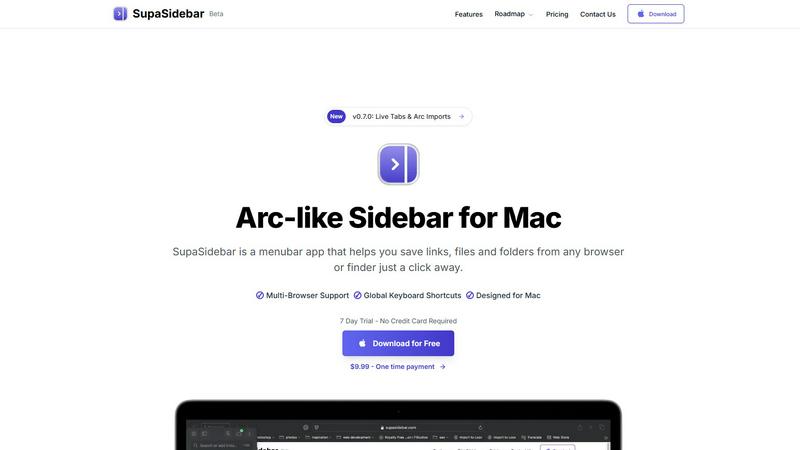
SupaSidebar is your all-in-one Mac sidebar for quickly saving and accessing links, files, and folders with ease.
Last updated: February 28, 2026
Visual Comparison
Decode This Text

SupaSidebar
Feature Comparison
Decode This Text
Simple Input Method
Users can easily share their conversation by pasting text, uploading screenshots, or describing the situation in their own words. This flexibility allows for a seamless user experience, regardless of the format of the communication.
Emotional Tone Analysis
Decode This Text analyzes the emotional tone of messages, determining whether they come across as friendly, sarcastic, or indifferent. This feature helps users avoid misinterpretations, ensuring they respond appropriately to the emotional context of the conversation.
Intent Detection
The tool identifies the true intentions behind messages, whether the sender is interested, annoyed, or simply busy. This insight helps users respond in ways that align with the sender's state of mind, fostering better communication.
Response Suggestions
When users are unsure how to reply, Decode This Text provides three tailored response options—calm, direct, or firm. This feature equips users with the confidence to engage in conversations, knowing they have the right words at their fingertips.
SupaSidebar
Universal Command Center
SupaSidebar acts as a universal command center in your menubar, providing easy access to links, files, and folders across all your applications. You can quickly save or copy URLs with just a few keyboard shortcuts, streamlining your workflow and reducing time spent switching between apps.
Recent Activity Tracking
With the Recents feature, SupaSidebar tracks every website you have visited in the last 48 hours. This allows you to find your work instantly, ensuring that you never lose track of important information, making research and browsing much more efficient.
Fast Search Functionality
SupaSidebar includes a powerful search capability that lets you locate any file, folder, website, or app at lightning speed. By pressing CMD + CTRL + K and typing in your query, you can quickly access whatever you need, eliminating the hassle of digging through multiple tabs or applications.
Customizable Spaces
Organize your digital workspace exactly how you want it with SupaSidebar's customizable spaces. You can have unlimited spaces in the Pro version, allowing for tailored organization that fits your unique workflow needs. This feature is perfect for users juggling different projects and tasks.
Use Cases
Decode This Text
Understanding Ambiguous Friendships
When friends send short or vague messages, it can create uncertainty. Decode This Text helps users decipher whether their friends are genuinely busy or losing interest, allowing for better relationship management.
Navigating Professional Communication
In professional settings, messages can often be terse or unclear. This tool helps users interpret the true meaning behind emails or texts from colleagues and superiors, ensuring that they respond appropriately and professionally.
Clarifying Family Dynamics
Family communication can be complex, especially during sensitive discussions. Decode This Text offers insights into the emotional tone and intent behind family messages, helping users approach conversations with greater empathy and understanding.
Managing Client Interactions
For professionals dealing with clients, understanding their messages is crucial for maintaining strong relationships. Decode This Text provides clarity on client communications, helping users tailor their responses to meet client needs effectively.
SupaSidebar
Efficient Research
For researchers, SupaSidebar serves as a centralized hub for gathering links, articles, and resources. The ability to quickly save URLs and access recent activity means that compiling information for papers or projects becomes a seamless process.
Creative Projects
Creators can utilize SupaSidebar to keep essential links, files, and inspiration at their fingertips. By pinning favorite resources and accessing them via keyboard shortcuts, they can maintain uninterrupted creative flow without constantly switching applications.
Student Workflow
Students benefit from SupaSidebar by organizing their study materials, assignments, and research. The Recents feature allows them to revisit previously accessed resources quickly, enhancing their learning experience and keeping them focused on their studies.
Professional Task Management
Professionals juggling multiple projects can use SupaSidebar to manage their tasks efficiently. By centralizing links, files, and recent activity, they can easily switch between different responsibilities, boosting their productivity without the frustration of scattered resources.
Overview
About Decode This Text
Decode This Text is a revolutionary communication tool that demystifies the often perplexing messages we encounter in our daily lives. Designed for anyone who struggles to interpret vague texts or cryptic emails, this tool provides clarity and insight, enabling users to navigate their interactions with confidence. Whether it's a puzzling text from a friend, a one-word email from a supervisor, or ambiguous messages from clients, Decode This Text helps users uncover the true intentions and emotional undertones of the communication. By simply pasting the conversation or describing the context, users receive a detailed analysis within seconds. This innovative tool empowers individuals to enhance their communication skills, improve personal and professional relationships, and eliminate misunderstandings, all while maintaining anonymity. With its intuitive interface and rapid response time, Decode This Text is the perfect solution for anyone looking to communicate more effectively without the stress of overthinking every word.
About SupaSidebar
SupaSidebar is a beautifully crafted, native macOS application designed to enhance your productivity by bringing the powerful, organized, and flow-centric experience of the Arc browser's sidebar to your entire Mac. It serves as a universal command center that resides in your menubar, providing instant, keyboard-driven access to everything you need, including links, files, and folders. Whether you are a researcher, creator, student, or a professional managing multiple projects, SupaSidebar helps you break free from the silos of apps and browsers. Its main value proposition lies in keeping your digital workspace organized and your focus intact. With seamless integration across all major browsers like Safari, Chrome, Arc, Firefox, and Brave, as well as Finder, SupaSidebar allows users to save, search, and open items from anywhere using simple global shortcuts. Everything remains on your Mac, ensuring privacy and speed, while centralizing your tabs, recent history, and pinned items for a smoother workflow.
Frequently Asked Questions
Decode This Text FAQ
What kind of messages can Decode This Text analyze?
Decode This Text can analyze a variety of messages, including texts, emails, and chat conversations. Users can paste the text directly or upload screenshots for analysis.
Is my information kept confidential?
Yes, Decode This Text maintains a strict privacy policy. No human reads your texts, and all analyses are conducted anonymously, ensuring your conversations remain private.
How quickly can I expect a response?
The tool is designed to provide analysis within 30 seconds of submitting your message. This quick turnaround allows users to receive insights promptly and respond in real time.
Can I use Decode This Text for professional purposes?
Absolutely! Decode This Text is ideal for both personal and professional communication. It helps users decipher messages from colleagues, clients, and superiors, ensuring effective and confident responses.
SupaSidebar FAQ
Is SupaSidebar a browser extension?
No, SupaSidebar is a standalone menubar application designed specifically for macOS. It integrates with all major browsers and Finder but does not function as a browser extension.
Which browsers does SupaSidebar work with?
SupaSidebar is compatible with all major browsers, including Safari, Chrome, Firefox, Arc, and Brave. This ensures that users can access their resources regardless of their preferred browsing platform.
What macOS version do I need?
SupaSidebar requires macOS 13 or later to function properly. This ensures compatibility with the latest features and security updates offered by Apple.
Where is my data stored?
All data remains on your Mac with SupaSidebar. This means you retain full control over your information, ensuring both privacy and speed in accessing your resources.
Alternatives
Decode This Text Alternatives
Decode This Text is a cutting-edge tool designed to help users decipher the often perplexing nuances of communication. Falling under the category of productivity and management, it enables users to quickly analyze messages that may leave them confused or unsure. Many individuals seek alternatives to Decode This Text for various reasons, including pricing, specific features that better suit their needs, or compatibility with different platforms. When searching for an alternative, users should consider the ease of use, response time, and the depth of analysis provided. Additionally, evaluating the tool's ability to enhance communication skills and foster better relationships can be crucial in making the right choice.
SupaSidebar Alternatives
SupaSidebar is a powerful productivity application designed specifically for macOS, functioning as a universal sidebar to help users organize and access links, files, and folders effortlessly. It falls under the productivity and management category, catering to individuals who require a streamlined workflow across various applications and browsers. Users often seek alternatives to SupaSidebar due to factors such as pricing, specific feature requirements, or compatibility with different platforms. When considering alternatives, it’s essential to evaluate the ease of use, integration capabilities with existing tools, and the ability to enhance your workflow without causing disruption. Look for applications that offer similar functionalities, such as quick access to multiple resources, a user-friendly interface, and robust performance.