
dmaya vs SimpleDraw
Side-by-side comparison to help you choose the right AI tool.

dmaya
dMaya is the AI design platform that helps teams generate client-ready UI and export to code.
Last updated: April 13, 2026

SimpleDraw
Create precise scale drawings and floor plans instantly online with SimpleDraw, no experience or downloads needed.
Last updated: March 1, 2026
Visual Comparison
dmaya
SimpleDraw
Feature Comparison
dmaya
Conversational AI Design Generation
Describe your vision for a SaaS dashboard, e-commerce flow, or mobile app in plain text. dMaya's AI agent interprets your description and generates complete, professional UI designs with proper layouts, component systems, and responsive considerations in seconds. This foundational feature turns abstract ideas into tangible visual starting points instantly, eliminating the blank canvas problem.
Real-Time Iteration via Chat
Refine your designs through natural conversation. Simply ask the AI to change colors, swap layouts, adjust typography, or add new sections. Every change is applied instantly and precisely, allowing for rapid exploration of different visual directions without manual dragging, dropping, or styling. This conversational interface makes iteration feel intuitive and fast.
Client Review & Feedback Links
Share any design with clients or stakeholders through a single, secure preview link. Recipients can view the interactive design in their browser and leave feedback directly, with no account or login required. This feature centralizes communication, eliminates email chains, and dramatically accelerates the approval process, ensuring everyone is aligned before development begins.
Design-to-Code Export
Once a design is approved, export it as clean, well-structured HTML, CSS, and JavaScript code. This output is specifically formatted to be easily picked up by AI coding assistants like Cursor, Claude Code, or your development team. It provides the perfect bridge to build the final product in React, Next.js, Flutter, or any other framework, ensuring design fidelity in the final build.
SimpleDraw
Accurate Measurements & Scale Drawing
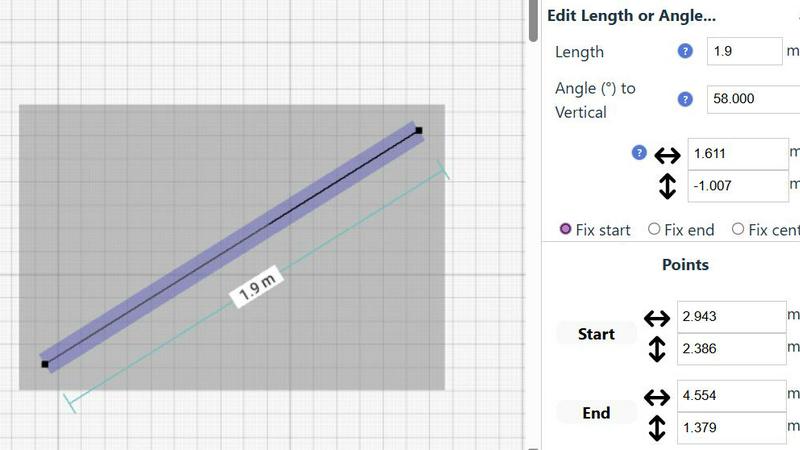
SimpleDraw excels in providing precise measurements and scale drawing capabilities. With smart alignment features, users can ensure that their drawings are not only accurate but also perfectly to scale, allowing for professional-quality results without the need for specialized training.
Specialized Floor Plan Creator
The dedicated Floor Plan Mode allows users to create detailed layouts with walls, doors, and furniture in just a few clicks. This feature streamlines the design process, making it easy to visualize spaces before embarking on any renovation or decoration project.
Smart Alignment System
This intelligent system assists users in placing points and lines exactly where they want them. By providing visual indicators and contextual help, it enhances precision and control, making it easier to achieve the desired layout without frustration.
Comprehensive Measurement System
SimpleDraw includes a robust measurement system that allows users to choose between metric and standard US units. Dynamic contextual measurements display as you work, ensuring that your drawings are as accurate as possible and tailored to your specifications.
Use Cases
dmaya
Agency Pitch & Concept Development
Agencies can use dMaya to generate multiple high-fidelity design concepts during initial client discovery calls or shortly after. This allows them to present tangible visual directions to stakeholders in hours, not weeks, significantly improving pitch success rates and project velocity from the very start.
Product Team Ideation & Prototyping
Product managers and designers can rapidly prototype different UI approaches for new features or products before committing engineering resources. This enables faster internal alignment, user testing with realistic prototypes, and more confident decision-making, reducing costly changes later in the development cycle.
Freelancer Project Delivery
Freelancers and solo designers can leverage dMaya to take on more client projects without increasing their workload. The speed of generation and iteration allows for quicker turnarounds, while the professional output and streamlined client review process enhance perceived value, enabling them to deliver more and charge appropriately.
Cross-Functional Team Collaboration
Design, product, and engineering teams can collaborate in a shared workspace. Designers generate and iterate, product managers give feedback via comments, and engineers preview the export-ready code output. This shared source of truth reduces miscommunication and ensures the final build matches the approved design vision.
SimpleDraw
Kitchen & Bathroom Planning
Users can plan their kitchen and bathroom renovations with accurate measurements to visualize layouts before beginning any work. This practical use of SimpleDraw allows for better decision-making and efficient design.
Room Layouts & Furniture Planning
Designing room layouts becomes effortless with SimpleDraw. Users can experiment with different furniture arrangements in bedrooms, living rooms, or offices, ensuring that everything fits perfectly before making any purchases.
House & Apartment Plans
Create complete floor plans for various home projects, whether for personal use or rental listings. SimpleDraw provides the tools necessary to generate comprehensive layouts, aiding in effective space planning.
DIY and Home Renovation Projects
For DIY enthusiasts, SimpleDraw offers a platform to sketch out home improvement ideas. From initial layouts to detailed designs, users can refine their concepts and visualize the final outcome without needing extensive drafting skills.
Overview
About dmaya
dMaya is the AI-powered design platform built for the modern, collaborative, and fast-paced creative workflow. It is purpose-built for agencies, product teams, and freelancers who understand that intentional design must come before code. Unlike other AI tools that skip directly to generating code, dMaya focuses on the critical visual design phase, enabling professionals to make deliberate decisions, align stakeholders, and catch problems early. The core value proposition is speed and precision: you describe a UI concept in plain language, and dMaya generates polished, production-ready screen designs in seconds. From there, you converse with the AI to iterate on colors, layouts, and typography instantly. The platform streamlines client collaboration by allowing you to share interactive previews via a simple link for feedback and approval, turning review cycles that took days into minutes. Finally, approved designs can be exported as clean HTML, CSS, and JS, ready to be handed off to AI coding agents like Cursor or Claude Code for development in any framework. dMaya is the missing link for teams that need to present, approve, and ship with confidence.
About SimpleDraw
SimpleDraw is an innovative, free online tool that democratizes the art of scale drawing, making it accessible for everyone from DIY enthusiasts to casual users. With its intuitive interface, SimpleDraw simplifies the complexities of technical drafting, allowing users to create precise floor plans and architectural drawings directly from their web browser. No installation or login is required, making it easy to dive right into your projects without any prior CAD experience. Whether you are sketching a layout for your new kitchen or planning a detailed renovation, SimpleDraw offers professional-grade precision in a user-friendly package. The platform is designed to empower users with features like real-time measurements and smart alignment, ensuring that your drawings are both accurate and visually appealing. With SimpleDraw, you can effortlessly bring your ideas to life, creating clear visual plans that cater to any project, whether it be home improvement, rental listings, or interior design.
Frequently Asked Questions
dmaya FAQ
How is dMaya different from other AI design tools?
Most AI tools are built for solo builders and focus on generating code directly, skipping the crucial design and stakeholder alignment phase. dMaya is built specifically for professional teams where design comes first. It focuses on generating and iterating high-quality visual designs through conversation, facilitating client review, and then providing clean code for development, respecting the entire agency and product team workflow.
What kind of designs can I create with dMaya?
dMaya is built to handle a wide range of professional UI design projects. You can generate and refine complete user interfaces for web and mobile applications, including SaaS dashboards, e-commerce product flows, mobile app screens, landing pages, and internal admin panels. The AI understands complex component systems and responsive design principles.
Do clients need an account to review my designs?
No, clients and stakeholders do not need any account whatsoever. You simply generate a shareable preview link from within dMaya and send it to them. They can view the interactive design in their web browser and leave feedback directly on the design, making the review process frictionless and fast.
What code frameworks can I export to?
You export your designs as clean, vanilla HTML, CSS, and JavaScript. This agnostic output is intentionally structured to be easily interpreted and converted by any modern AI coding agent (like Cursor or Claude Code) or developer into your preferred framework, including React, Next.js, Vue, Flutter, or React Native. Direct framework-specific export is on the roadmap.
SimpleDraw FAQ
Is SimpleDraw free to use?
Yes, SimpleDraw is completely free to use. There are no hidden fees, and you do not need to sign up or download any software to start drawing.
Do I need any prior CAD experience to use SimpleDraw?
No, SimpleDraw is designed for everyone, including those with no prior CAD experience. Its intuitive interface makes it easy for beginners to create professional-quality drawings.
Can I access SimpleDraw on my mobile device?
Yes, SimpleDraw works directly in your web browser, making it accessible on various devices, including smartphones and tablets, for a seamless drawing experience on the go.
How can I provide feedback or request new features?
Users are encouraged to join the SimpleDraw Discord community, where they can share feedback and suggest new features. The team actively listens to user input to continuously improve the platform.
Alternatives
dmaya Alternatives
dmaya is an AI-powered vibe design platform that helps agencies, teams, and freelancers create professional UI designs through conversation. It belongs to the growing category of AI design tools that bridge the gap between concept and code, focusing on the visual design and client approval stages. Users often explore alternatives for various reasons. Some may have specific budget constraints or need features tailored to different workflows. Others might require integration with particular development platforms or seek tools with different collaboration models for their team structure. When evaluating other options, consider the core workflow. Look for a tool that facilitates rapid visual iteration, streamlines client feedback, and provides usable output for your development stack. The ideal platform should enhance your team's ability to make intentional design decisions and get alignment before any code is written.
SimpleDraw Alternatives
SimpleDraw is an innovative online design tool that enables users to create accurate scale drawings and detailed floor plans directly in their web browser, all for free. As a part of the design tools category, it caters to casual users, DIY enthusiasts, and anyone looking to visualize their space without the need for complex software. However, many users may seek alternatives for various reasons, including the need for additional features, specific platform compatibility, or different pricing structures. When searching for an alternative, consider the ease of use, the range of functionalities offered, and whether it meets your specific project requirements. Choosing the right alternative also involves evaluating how well the tool can adapt to your workflow and whether it offers robust support for the types of projects you undertake. Look for features that enhance your design process, such as smart alignment systems, flexibility in zooming, and precision control. Ultimately, the goal is to find a tool that not only meets your technical needs but also enhances your overall user experience.