
BlitzCut vs Dubvid
Side-by-side comparison to help you choose the right AI tool.

BlitzCut
BlitzCut instantly transforms raw videos into polished content with auto silence removal and stylish captions in.
Last updated: February 27, 2026

Dubvid
Dubvid quickly dubs your audio and video into multiple languages using natural voices and optional lip-sync for global.
Last updated: February 27, 2026
Visual Comparison
BlitzCut

Dubvid
Feature Comparison
BlitzCut
Automatic Silence Removal
BlitzCut's Automatic Silence Removal feature leverages advanced AI to identify and eliminate pauses in videos. This functionality significantly reduces editing time, allowing users to focus on their storytelling rather than tedious manual cuts. The AI processes each video clip in seconds, ensuring a smooth and engaging viewing experience.
AI Captions
With AI Captions, BlitzCut generates captions with over 95% accuracy, providing creators with stylishly formatted text that enhances engagement. This feature not only saves time but also helps users reach a wider audience by making their content accessible to viewers who prefer watching videos without sound.
Text-Based Editing
BlitzCut’s Text-Based Editing feature allows users to edit their videos by simply deleting sentences from the transcription. This innovative approach streamlines the editing process, enabling creators to make precise cuts without having to scrub through the footage manually. It’s an intuitive way to enhance the final product quickly.
2-Minute Workflow
The 2-Minute Workflow is a standout feature that encapsulates BlitzCut's efficiency. From importing a clip to exporting the final video, the entire process takes less than two minutes. This speed is crucial for content creators who need to post regularly and keep their audience engaged with fresh content.
Dubvid
AI Voice Dubbing
Dubvid offers advanced AI voice dubbing, allowing users to select from natural-sounding voices or even clone their own. This feature ensures that the emotional nuances and pacing of the original video are preserved, resulting in a high-quality dubbing experience.
Multi-Language Support
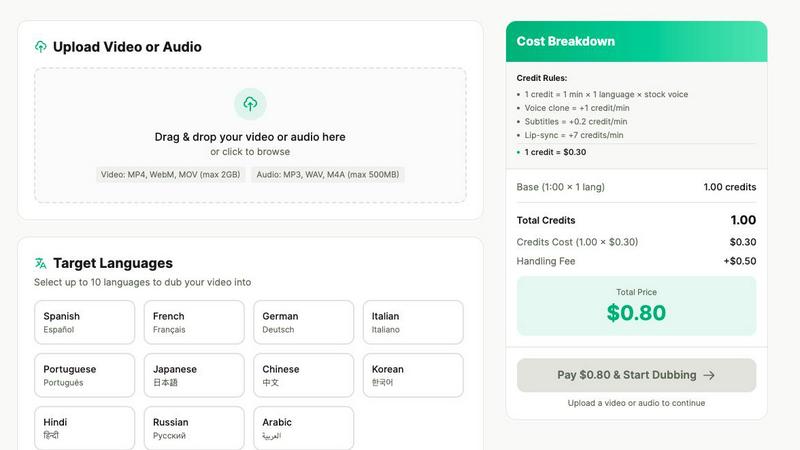
With support for over 10 languages, Dubvid allows creators to reach a vast audience. You can easily select target languages and cater to global viewers, ensuring that your content resonates with people from different backgrounds.
Simple Upload Process
The upload process is designed to be user-friendly. Users can drag and drop their video files or click to browse, supporting multiple formats such as MP4, MOV, and WebM. This simplicity makes it easy for anyone to get started without technical hurdles.
Customization Options
Dubvid provides various customization options, including the ability to add subtitles and lip-syncing features. These enhancements improve the viewing experience, making the dubbed content more engaging and realistic, perfect for professional settings.
Use Cases
BlitzCut
Speedy Social Media Posting
BlitzCut is perfect for creators who need to post content daily. With the ability to edit videos in under five minutes, users can maintain a consistent posting schedule without sacrificing quality, making it easier to engage with their audience.
Efficient TikTok Creation
TikTok creators can benefit immensely from BlitzCut's features. The app allows users to quickly remove silence and add captions, turning raw footage into captivating TikTok videos that capture viewers’ attention and encourage interaction.
Streamlined YouTube Shorts Production
For YouTube Shorts, BlitzCut simplifies the editing process. Creators can import their raw clips, and with just a tap, they can remove any unnecessary pauses and add stylish captions, ensuring their content stands out in a crowded platform.
Quick Instagram Reels Editing
With the rise of Instagram Reels, BlitzCut offers a fast solution for creators looking to enhance their video content. The app’s mobile-first design ensures that editing is possible on the go, making it ideal for busy creators who need to produce high-quality videos quickly.
Dubvid
Content Creators
Short-form creators can utilize Dubvid to dub their YouTube Shorts, Instagram Reels, and TikTok videos into multiple languages, significantly expanding their reach and engagement with international audiences.
Educational Institutions
Educators can translate lessons and tutorials in minutes, enabling global learners to access valuable educational content. This feature is particularly useful for online courses and webinars, enhancing learning opportunities worldwide.
Customer Support Teams
Customer support teams can reduce ticket volumes by localizing walkthroughs and help videos for various regions. This proactive approach helps users find solutions quickly, improving overall customer satisfaction.
Podcasters
Podcasters can dub their audio or video episodes into new languages without the hassle of additional production work. This allows them to release their content in multiple languages, attracting a broader listener base and fostering community growth.
Overview
About BlitzCut
BlitzCut is a revolutionary AI-powered video editing app designed specifically for content creators who prioritize speed and efficiency. With a mission to make professional video editing accessible, BlitzCut allows creators to transform their raw video clips into polished social media content in under two minutes. It caters to a diverse audience, including TikTok, Instagram, and YouTube creators, enabling them to focus on their creative process rather than the intricate details of video editing. By automating tedious tasks like silence removal and caption creation, BlitzCut empowers users to produce high-quality videos quickly and effortlessly. The app is mobile-first, ensuring seamless editing experiences on iPhone, iPad, and Mac.
About Dubvid
Dubvid is an innovative AI-powered platform that revolutionizes the way creators, businesses, and brands approach video and audio dubbing. Designed for seamless integration into any workflow, Dubvid empowers users to connect with global audiences effortlessly. By simply uploading your original video, selecting from multiple target languages, and letting Dubvid automatically translate and recreate your voice, you can maintain the natural tone, pacing, and emotion of the original content. This eliminates the need for traditional studios, voice actors, or complex editing workflows, making it accessible to anyone, regardless of technical expertise. Whether you're a YouTuber aiming to expand your reach, an educator looking to share lessons globally, or a marketing team that needs rapid localization, Dubvid enables you to scale your content internationally in just minutes. With support for over 10 languages, Dubvid bridges language barriers and fosters engagement with diverse audiences, making it an essential tool in today's interconnected world.
Frequently Asked Questions
BlitzCut FAQ
How does BlitzCut remove silence from videos?
BlitzCut uses advanced AI technology to detect silent gaps in video footage and removes them automatically. This process is quick and ensures that the final cut maintains a smooth flow without awkward pauses.
Can I use BlitzCut for free?
Yes, BlitzCut is free to download and start using. Users can access essential features without the need to create an account, making it accessible for anyone looking to enhance their video editing capabilities.
What platforms does BlitzCut support?
BlitzCut is designed for mobile use and is available on iPhone, iPad, and Mac. This mobile-first approach ensures creators can edit their videos anytime and anywhere, aligning with the needs of today's content creators.
How accurate are the captions generated by BlitzCut?
BlitzCut boasts a caption accuracy of over 95%, ensuring that the text is not only correct but also styled in a way that enhances viewer engagement. This feature helps creators reach a broader audience by making their videos more accessible.
Dubvid FAQ
How long does it take to dub a video?
The dubbing process with Dubvid is incredibly fast. Once you upload your video and select your desired languages, the AI works efficiently to produce the dubbed version, often within minutes.
Can I try Dubvid for free?
Yes! Dubvid offers a free trial that includes 2 credits, allowing you to dub up to 60 seconds of audio or video without requiring a credit card. This gives you the chance to experience the quality before committing.
What file formats does Dubvid support?
Dubvid supports a variety of file formats including MP4, MOV, WebM, MP3, and WAV, making it easy for users to upload their content regardless of the format.
Is there a limit to the number of languages I can dub into?
While Dubvid supports over 10 languages, you can choose multiple target languages for your project. The platform is designed to cater to diverse audience needs, helping you reach as many people as possible.
Alternatives
BlitzCut Alternatives
BlitzCut is an AI-powered video editor designed to streamline the video creation process, particularly for social media content. It excels in removing silences, transcribing speech, and adding subtitles automatically, making it a valuable tool for content creators looking to produce engaging videos quickly. However, as users explore their options, they often seek alternatives due to various reasons, such as pricing, specific feature sets, or compatibility with different platforms. When considering alternatives, users should focus on several key factors: the speed of editing, ease of use, mobile compatibility, and the ability to automate tedious tasks while still allowing for creative expression. A good alternative should cater to the unique needs of content creators, ensuring they can maintain their focus on producing compelling content rather than getting bogged down in the editing process.
Dubvid Alternatives
Dubvid is an AI-driven platform that specializes in dubbing audio and video content into multiple languages, allowing creators and businesses to engage with diverse audiences worldwide. By simplifying the dubbing process through seamless uploads and automatic translations, Dubvid eliminates the need for traditional voice actors and complex editing, making it a popular choice in the content creation category. Users often seek alternatives to Dubvid due to varying needs such as pricing, feature sets, or specific platform requirements. When considering an alternative, it's essential to evaluate its ease of use, language support, voice quality, and any additional features that might enhance your content creation process.