
HeyVid vs Learniverse
Side-by-side comparison to help you choose the right AI tool.

HeyVid is your all-in-one mobile app that instantly creates professional videos and images with AI.
Last updated: April 4, 2026

Learniverse
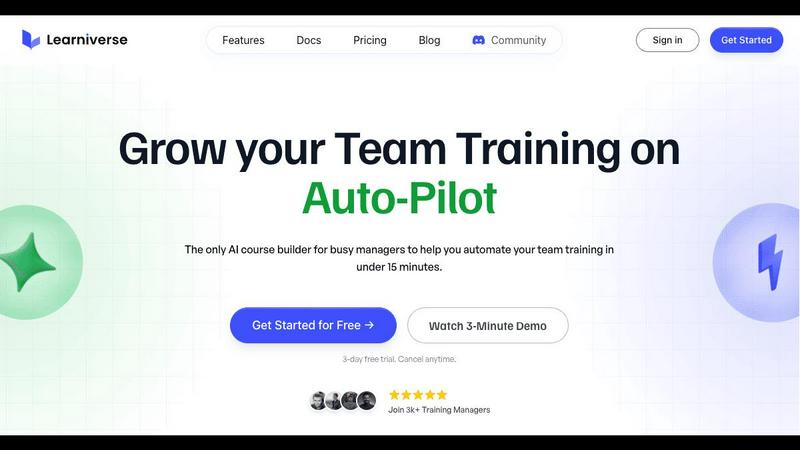
Learniverse instantly turns your team's knowledge into engaging AI-powered training courses.
Last updated: February 28, 2026
Visual Comparison
HeyVid

Learniverse
Feature Comparison
HeyVid
Unified AI Model Access
HeyVid consolidates top-tier AI models into one platform. You don't need separate subscriptions for different tools. For video, choose from leaders like Kling AI, Veo 3.1, Sora 2, and Runway. For images, select from Midjourney, Dall-E, Stable Diffusion, and more. This feature lets you pick the perfect model for your specific project's style and quality needs directly within the app, streamlining your workflow and ensuring you always use the best technology available.
Multi-Format Generation Engine
The platform supports a wide range of creation methods to fit any starting point. Go from text to video, animate an image into a video, generate an image from a text prompt, or refine an existing image into a new style. This flexibility means you can create content whether you have a detailed script, a single photo, or just a creative concept, making it an incredibly versatile tool for any content creation task.
Professional-Grade Customization
Even with AI doing the heavy lifting, you maintain creative control. For videos, customize the resolution up to 4K, select aspect ratios like 16:9 or 9:16 for different platforms, use an optional seed for consistent results, and add a custom watermark. The interface presents these advanced options in a simple, mobile-friendly way, allowing both beginners and pros to fine-tune their outputs for a polished, professional finish.
Integrated Creative Workflow Tools
HeyVid is more than just a generator; it's a complete studio. It integrates AI voice and AI music generation alongside video and image creation. This all-in-one approach streamlines your entire process-from initial idea and scriptwriting to adding voiceovers, soundtracks, and final visuals-eliminating the need to switch between multiple apps and significantly speeding up production time.
Learniverse
AI-Powered Course Creation
Simply upload your existing training materials—PDFs, videos, documents, or even meeting recordings—and Learniverse's AI assistant takes over. It automatically analyzes the content, structures it into logical, interactive lessons, and generates key elements like quizzes and progress tracking. This feature eliminates manual content formatting, allowing you to build a comprehensive course from scattered files in minutes, not weeks.
Branded Academy Portal
Launch a fully customized, professional training portal that reflects your company's identity. Learniverse allows you to apply your logo, brand colors, and even use a custom domain, ensuring your training academy looks polished and credible. This creates a cohesive and engaging learning environment for your team, moving far beyond the generic feel of outdated or cheap training tools.
Conversational AI Training Assistant
Interact with a dedicated AI assistant to build and modify courses conversationally. Need to add a module on a new process? Just describe what you want. Want to highlight key points from a recent video? Ask your AI to build lessons around them. This feature puts a dynamic, collaborative tool at your fingertips, handling the heavy lifting of instructional design on the fly.
Integrated Progress & Analytics Dashboard
Gain clear, actionable insights without spreadsheet nightmares. The dashboard provides a centralized view of team progress, engagement metrics, assessment scores, and overall training impact. See who has completed courses, identify where learners are getting stuck, and track completion rates across departments, all in a clean, mobile-optimized interface.
Use Cases
HeyVid
Social Media Content Creation
Creators and influencers can rapidly produce engaging content for platforms like YouTube, TikTok, and Instagram. Generate eye-catching short-form videos, design custom thumbnails, and create podcast clips all from your phone. The quick turnaround and professional quality help maintain a consistent posting schedule and grow your audience without spending hours on editing.
Marketing and Advertising Campaigns
Digital marketers and agencies can produce high-impact ad creatives, social media campaigns, and landing page videos at scale. Quickly test different visual concepts, localize content for various regions, and create product launch videos with cinematic effects. This speeds up campaign iteration and reduces production costs while delivering agency-quality visuals.
Educational and Training Material
Educators and course creators can transform lessons into engaging video content. Easily produce tutorial videos, animated presentations, and training modules. The ability to explain a concept via text and have it visualized as a professional video makes complex topics easier to understand and more accessible for students and trainees.
Business Communication and Pitches
Entrepreneurs and businesses can create compelling pitch videos for investors, product demos for clients, and internal communication like team updates or onboarding content. HeyVid helps craft a professional brand narrative, allowing companies to tell their story effectively and make a strong impression without a large video production budget.
Learniverse
Onboarding New Hires Rapidly
Eliminate the slow, inconsistent onboarding process. Upload your employee handbook, SOPs, and welcome videos to Learniverse. The AI instantly creates a structured onboarding course with interactive checkpoints. New hires get a single, engaging portal for all essential training, drastically reducing ramp-up time and ensuring everyone receives the same core knowledge.
Centralizing Scattered Company Knowledge
Stop the endless hunt for documents in Slack, Drive, or email. Learniverse acts as a single source of truth. Training managers can gather all disparate process guides, policy PDFs, and tutorial videos into one platform. The AI then organizes this "knowledge pile" into searchable, well-structured courses, making company know-how easily accessible and perpetually up-to-date.
Converting Meetings into Actionable Training
Turn valuable company discussions into lasting learning resources. After an all-hands meeting or a crucial team training session, simply upload the recording to Learniverse. The AI can analyze the transcript, identify key topics and decisions, and transform them into bite-sized lesson modules. This ensures important live information is captured and retained by the entire team.
Compliance and Certification Training
Streamline mandatory training for compliance, safety, or industry certifications. Upload regulatory documents and procedure manuals. Learniverse's AI builds standardized courses with integrated quizzes to verify understanding. The platform tracks completion and assessment results automatically, providing an audit-ready report for managers and ensuring consistent company-wide compliance.
Overview
About HeyVid
HeyVid is your all-in-one, mobile-first creative studio powered by artificial intelligence. Designed for content creators, marketers, entrepreneurs, and businesses of all sizes, it simplifies the entire video and image production process. The core value proposition is providing a single, intuitive platform where you can access the world's most advanced AI models-like Sora 2, Veo 3.1, Midjourney, and Flux AI-without needing technical expertise. Whether you start with a text prompt, an existing image, or a simple idea, HeyVid transforms it into high-quality, professional content in moments. It eliminates the complexity of traditional editing software, making professional-grade video marketing, social media content, educational materials, and brand storytelling fast, simple, and accessible to everyone. The app-centric design ensures a seamless user experience from any device, putting a full creative suite right in your pocket.
About Learniverse
Learniverse is the zero-effort, AI-powered training platform built for busy teams and training managers who need results, not complexity. It transforms the chaotic process of creating and managing employee training from a weeks-long project into a task that takes mere minutes. The core value proposition is stunningly simple: stop juggling scattered Google Docs, SOPs, and video recordings. Instead, upload any existing content—PDFs, documents, videos, or manuals—and let Learniverse's AI instantly structure it into a complete, interactive, and branded learning course. This platform is designed for organizations of all sizes that want to launch a professional, branded academy without any design skills or technical setup. It automates the entire training hub, from course creation with built-in quizzes to progress tracking and analytics, freeing managers to focus on strategic work while ensuring teams have consistent, engaging, and up-to-date knowledge at their fingertips. Learniverse delivers a mobile-first, polished user experience that mirrors modern apps, making training something employees actually want to complete.
Frequently Asked Questions
HeyVid FAQ
What AI models are available on HeyVid?
HeyVid provides access to a leading selection of AI models. For video generation, this includes Sora 2, Veo 3.1, Kling AI, Runway, and Pika. For image generation, you can use models like Midjourney, Flux AI, Dall-E, and Stable Diffusion. The platform constantly updates its model library to give users the best and latest in AI generation technology.
Do I need video editing skills to use HeyVid?
No, you do not need any prior editing skills. HeyVid is designed to be intuitive and user-friendly. The process is as simple as choosing a model, typing or uploading your input, and hitting generate. The AI handles the complex creation process, allowing anyone to produce professional-quality videos and images directly from their mobile device or computer.
What kind of videos can I create with HeyVid?
You can create a wide variety of videos, including marketing ads, social media clips, product launch animations, educational explainers, brand story videos, and pitch presentations. The platform supports different aspect ratios for various platforms and allows for customization in resolution and style, making it suitable for virtually any video need.
How does the credit system work?
HeyVid uses a credit-based system to generate content. Each video or image generation requires a certain number of credits, which varies based on the model used, video length, and resolution. For example, generating a video with the Veo 3.1 model may cost 80 credits. Users purchase plans that provide a set amount of credits per month.
Learniverse FAQ
What types of files can I upload to create a course?
Learniverse is designed to work with the content you already have. You can upload a wide variety of file formats including PDFs, Word documents, PowerPoint presentations, video files (like MP4), and audio recordings. The AI will process the content within these files to extract text, identify key concepts, and structure it into interactive learning modules.
Do I need any design or technical skills to use Learniverse?
No, that's the core benefit of the platform. Learniverse is built for training managers and team leaders who are experts in their content, not in graphic design or software development. The AI handles all the course structuring, formatting, and interactive element creation. The branded academy portal also uses simple, intuitive tools for customization, requiring no coding or design experience.
How does the AI training assistant work?
The AI assistant functions like a collaborative partner within the platform. You can chat with it using natural language to give instructions. For example, you can ask it to "create a module on our new customer service protocol" or "add a quiz to the end of the safety course." It can also analyze uploaded content, like a video, and suggest or auto-generate lesson outlines based on the key topics it detects.
Can I track my team's progress and engagement?
Absolutely. Learniverse includes a comprehensive analytics dashboard that provides real-time insights. You can track individual and team-wide course completion rates, see assessment scores, identify modules where learners are spending the most time or struggling, and monitor overall engagement. This data is presented in clear, visual reports, eliminating the need for manual tracking via spreadsheets.
Alternatives
HeyVid Alternatives
HeyVid is an all-in-one AI video and image generator designed for productivity and content creation. It allows users to quickly produce professional-quality visual content using artificial intelligence, streamlining workflows for marketers, creators, and businesses. Users often explore alternatives for various reasons. Some may need a different pricing model or a free tier with more generous limits. Others might seek specialized features, like advanced editing tools or integration with specific platforms, that better match their unique project requirements. When evaluating other options, consider your primary needs. Key factors include the quality and style of AI-generated output, the speed of generation, ease of use on mobile or desktop, and the overall value of the subscription plan. The right tool should fit seamlessly into your creative process.
Learniverse Alternatives
Learniverse is an AI-powered Learning Management System (LMS) designed for fast, automated course creation. It falls into the productivity and management category, helping teams transform documents and videos into branded training academies in minutes. Users often explore alternatives for various reasons. These can include budget constraints, the need for more advanced or specific features, or a requirement for deeper integration with a particular tech stack. The ideal platform depends heavily on your team's unique workflow and scale. When evaluating other options, focus on core needs. Key considerations are the ease of content import and AI automation, the depth of customization and branding controls, the quality of progress analytics, and how well the platform connects with your team's daily communication apps.