
Decode This Text vs HuntingPad
Side-by-side comparison to help you choose the right AI tool.

Decode This Text
Decode This Text delivers quick, human-like insights to help you understand confusing conversations in just 30 seconds.
Last updated: February 28, 2026

HuntingPad
HuntingPad is your AI job search assistant to organize and land roles faster.
Last updated: March 1, 2026
Visual Comparison
Decode This Text

HuntingPad
Feature Comparison
Decode This Text
Simple Input Method
Users can easily share their conversation by pasting text, uploading screenshots, or describing the situation in their own words. This flexibility allows for a seamless user experience, regardless of the format of the communication.
Emotional Tone Analysis
Decode This Text analyzes the emotional tone of messages, determining whether they come across as friendly, sarcastic, or indifferent. This feature helps users avoid misinterpretations, ensuring they respond appropriately to the emotional context of the conversation.
Intent Detection
The tool identifies the true intentions behind messages, whether the sender is interested, annoyed, or simply busy. This insight helps users respond in ways that align with the sender's state of mind, fostering better communication.
Response Suggestions
When users are unsure how to reply, Decode This Text provides three tailored response options—calm, direct, or firm. This feature equips users with the confidence to engage in conversations, knowing they have the right words at their fingertips.
HuntingPad
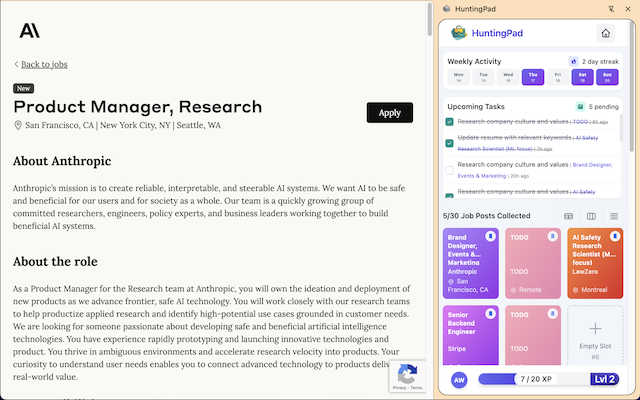
One-Click Job Capture & Organization
Instantly save any job posting you find across the web with a single click. Whether you're on LinkedIn, Indeed, or a company's career page, HuntingPad captures all the key details—title, company, description, and link—and organizes it neatly within the extension. This eliminates the chaos of endless browser bookmarks and forgotten tabs, creating a single, searchable database of every opportunity you're interested in, all without ever leaving your browser.
AI-Powered Resume Matching & Customization
Go beyond generic applications. HuntingPad's AI analyzes the job description you've saved and compares it to your uploaded resume. It then provides intelligent insights and suggestions on how to tailor your resume and cover letter to better match the specific role. This feature helps you highlight the most relevant skills and experiences, increasing your chances of getting past automated tracking systems and catching a recruiter's eye with a personalized application.
Automated Application Tracking & Reminders
Never lose track of where you've applied or what comes next. HuntingPad automatically logs every application you submit and allows you to set custom statuses (e.g., Applied, Interviewing, Offer). Its smart reminder system alerts you about critical follow-up dates, interview schedules, and when it's time to send a thank-you note or check-in email, ensuring you never miss a deadline or opportunity to engage.
Local-Data Privacy & Security
Your job search is personal and private. HuntingPad is built with a fundamental commitment to data security. All your information—saved jobs, resumes, application history, and notes—is stored locally on your own computer. Nothing is sent to or stored on external servers. This means your sensitive career data remains completely under your control, giving you peace of mind while you conduct your search.
Use Cases
Decode This Text
Understanding Ambiguous Friendships
When friends send short or vague messages, it can create uncertainty. Decode This Text helps users decipher whether their friends are genuinely busy or losing interest, allowing for better relationship management.
Navigating Professional Communication
In professional settings, messages can often be terse or unclear. This tool helps users interpret the true meaning behind emails or texts from colleagues and superiors, ensuring that they respond appropriately and professionally.
Clarifying Family Dynamics
Family communication can be complex, especially during sensitive discussions. Decode This Text offers insights into the emotional tone and intent behind family messages, helping users approach conversations with greater empathy and understanding.
Managing Client Interactions
For professionals dealing with clients, understanding their messages is crucial for maintaining strong relationships. Decode This Text provides clarity on client communications, helping users tailor their responses to meet client needs effectively.
HuntingPad
The High-Volume Applicant
For professionals applying to 100+ roles in a competitive market, organization is non-negotiable. HuntingPad provides the system to track every single application from save to final decision, preventing duplicate applications and ensuring timely follow-ups. It turns an overwhelming numbers game into a manageable, strategic campaign where no opportunity slips through the cracks due to simple disorganization.
The Career Transitioner
When switching fields or industries, you likely need to customize your resume differently for various role types. HuntingPad's AI insights help you identify transferable skills and rephrase your experience to align with new industries. The ability to save jobs and tailor applications from one dashboard makes testing different narratives across multiple job families efficient and organized.
The Passive Job Seeker
Even if you're not in an active, daily search, great opportunities can appear at any time. HuntingPad allows you to quickly save interesting postings you encounter during your regular browsing without disrupting your workflow. You can build a curated list of potential roles to revisit later, all organized and ready for when you decide to start applying seriously.
The Networked Professional
For those who combine direct applications with referrals and outreach, context is key. HuntingPad helps you remember which connection works at a company where you just saved a job. By keeping all job details and your application notes in one place, you can craft more informed and personalized messages when asking for a referral, making your networking efforts more effective and less awkward.
Overview
About Decode This Text
Decode This Text is a revolutionary communication tool that demystifies the often perplexing messages we encounter in our daily lives. Designed for anyone who struggles to interpret vague texts or cryptic emails, this tool provides clarity and insight, enabling users to navigate their interactions with confidence. Whether it's a puzzling text from a friend, a one-word email from a supervisor, or ambiguous messages from clients, Decode This Text helps users uncover the true intentions and emotional undertones of the communication. By simply pasting the conversation or describing the context, users receive a detailed analysis within seconds. This innovative tool empowers individuals to enhance their communication skills, improve personal and professional relationships, and eliminate misunderstandings, all while maintaining anonymity. With its intuitive interface and rapid response time, Decode This Text is the perfect solution for anyone looking to communicate more effectively without the stress of overthinking every word.
About HuntingPad
HuntingPad is the essential Chrome extension for ambitious professionals navigating the modern, high-volume job market. It transforms the chaotic and time-consuming process of applying to dozens—or even hundreds—of roles into a streamlined, intelligent, and organized system. Built directly into your browser, HuntingPad eliminates the need to juggle multiple tabs, spreadsheets, and apps, creating a centralized command center for your entire search. It’s designed for successful individuals who are managing 50 to 150+ applications and need their job hunt to be a strategic advantage, not an administrative nightmare. With one-click job capture from any site like LinkedIn or Indeed, AI-powered resume matching and customization, and automatic application tracking, HuntingPad gives you back hours every week. It prioritizes your privacy by storing all your sensitive career data locally on your device. For professionals who refuse to let disorganization stand in the way of their next role, HuntingPad is the right tool.
Frequently Asked Questions
Decode This Text FAQ
What kind of messages can Decode This Text analyze?
Decode This Text can analyze a variety of messages, including texts, emails, and chat conversations. Users can paste the text directly or upload screenshots for analysis.
Is my information kept confidential?
Yes, Decode This Text maintains a strict privacy policy. No human reads your texts, and all analyses are conducted anonymously, ensuring your conversations remain private.
How quickly can I expect a response?
The tool is designed to provide analysis within 30 seconds of submitting your message. This quick turnaround allows users to receive insights promptly and respond in real time.
Can I use Decode This Text for professional purposes?
Absolutely! Decode This Text is ideal for both personal and professional communication. It helps users decipher messages from colleagues, clients, and superiors, ensuring effective and confident responses.
HuntingPad FAQ
Is HuntingPad really free to use?
Yes, HuntingPad offers a free version with core functionality to get you started. You can install the Chrome extension at no cost, capture job postings, and track your applications. This allows you to experience the fundamental organizational benefits without any commitment. Some advanced AI-powered features may be part of premium tiers, but the essential job hunt organization is free.
How does the AI resume matching work?
When you save a job posting, HuntingPad's AI analyzes the text of the job description to identify key skills, qualifications, and keywords. It then compares this against the content of your uploaded resume. The tool provides you with a match analysis and actionable suggestions, such as which skills to emphasize or how to rephrase certain experiences to better align with what the employer is seeking.
Where is my data stored? Is it private?
Your privacy is a top priority. All data you enter into HuntingPad—including your saved jobs, resume, and application notes—is stored locally on your own computer via your Chrome browser's storage. It is not uploaded to HuntingPad's servers or any external cloud service. This local-first approach ensures you have complete control over your sensitive career information.
Can I use HuntingPad on sites other than LinkedIn?
Absolutely. HuntingPad is designed to work on virtually any website that has a job posting. This includes major boards like Indeed and Glassdoor, as well as company-specific career pages (e.g., careers.google.com). If you can view a job in your browser, you can likely save it to HuntingPad with one click.
Alternatives
Decode This Text Alternatives
Decode This Text is a cutting-edge tool designed to help users decipher the often perplexing nuances of communication. Falling under the category of productivity and management, it enables users to quickly analyze messages that may leave them confused or unsure. Many individuals seek alternatives to Decode This Text for various reasons, including pricing, specific features that better suit their needs, or compatibility with different platforms. When searching for an alternative, users should consider the ease of use, response time, and the depth of analysis provided. Additionally, evaluating the tool's ability to enhance communication skills and foster better relationships can be crucial in making the right choice.
HuntingPad Alternatives
HuntingPad is a Chrome extension that falls into the productivity and job search management category. It helps ambitious professionals organize their search by capturing jobs, matching resumes with AI, and tracking applications all from within the browser. Users often explore alternatives for various reasons. They might need a tool that works on mobile or different browsers, require a different pricing model, or seek specific integrations that fit their unique workflow. Some may prefer a standalone app over a browser extension. When evaluating other options, consider your core needs. Look for robust job capture, intelligent application tracking, and features that save you time, like automated insights. Prioritize tools that integrate smoothly into your existing routine and respect the privacy of your sensitive career data.