
HuntingPad vs LuxSign
Side-by-side comparison to help you choose the right AI tool.

HuntingPad
HuntingPad is your AI job search assistant to organize and land roles faster.
Last updated: March 1, 2026

LuxSign lets you securely sign and manage documents online in minutes, compliant with EU regulations and hosted in.
Last updated: February 27, 2026
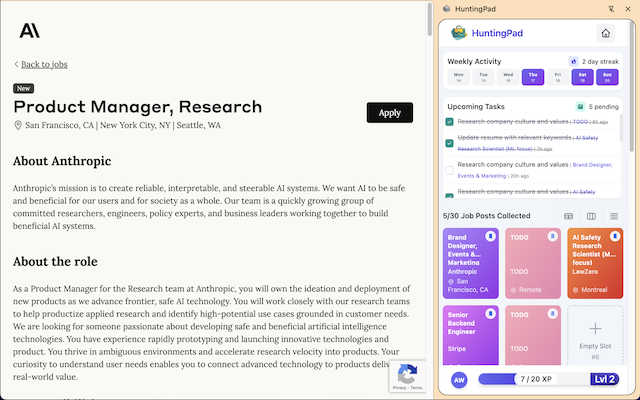
Visual Comparison
HuntingPad
LuxSign

Feature Comparison
HuntingPad
One-Click Job Capture & Organization
Instantly save any job posting you find across the web with a single click. Whether you're on LinkedIn, Indeed, or a company's career page, HuntingPad captures all the key details—title, company, description, and link—and organizes it neatly within the extension. This eliminates the chaos of endless browser bookmarks and forgotten tabs, creating a single, searchable database of every opportunity you're interested in, all without ever leaving your browser.
AI-Powered Resume Matching & Customization
Go beyond generic applications. HuntingPad's AI analyzes the job description you've saved and compares it to your uploaded resume. It then provides intelligent insights and suggestions on how to tailor your resume and cover letter to better match the specific role. This feature helps you highlight the most relevant skills and experiences, increasing your chances of getting past automated tracking systems and catching a recruiter's eye with a personalized application.
Automated Application Tracking & Reminders
Never lose track of where you've applied or what comes next. HuntingPad automatically logs every application you submit and allows you to set custom statuses (e.g., Applied, Interviewing, Offer). Its smart reminder system alerts you about critical follow-up dates, interview schedules, and when it's time to send a thank-you note or check-in email, ensuring you never miss a deadline or opportunity to engage.
Local-Data Privacy & Security
Your job search is personal and private. HuntingPad is built with a fundamental commitment to data security. All your information—saved jobs, resumes, application history, and notes—is stored locally on your own computer. Nothing is sent to or stored on external servers. This means your sensitive career data remains completely under your control, giving you peace of mind while you conduct your search.
LuxSign
Multiple Signature Methods
LuxSign offers a variety of signature methods to accommodate user preferences. Users can draw their signature with a mouse, type their name, or upload an image. This flexibility ensures that signing documents is quick and personalized, making the process straightforward and user-friendly.
Advanced Security
Security is paramount at LuxSign. The platform employs industry-standard encryption to protect your documents during upload, storage, and transmission. With secure hosting in Luxembourg, all data is safeguarded against unauthorized access, ensuring peace of mind for users handling sensitive information.
Complete Audit Trail
LuxSign provides a comprehensive audit trail that logs every action taken with a document. This includes timestamps, IP addresses, and signer information, making it easy to verify and ensure compliance. Users can track the entire signing process, enhancing transparency and accountability.
Collaboration Workspaces
LuxSign includes collaboration workspaces that allow teams to work together efficiently. Users can create shared folders, manage member access, and collaborate on signing workflows. This feature streamlines teamwork, making it easier for businesses to manage multiple documents and signers in one centralized location.
Use Cases
HuntingPad
The High-Volume Applicant
For professionals applying to 100+ roles in a competitive market, organization is non-negotiable. HuntingPad provides the system to track every single application from save to final decision, preventing duplicate applications and ensuring timely follow-ups. It turns an overwhelming numbers game into a manageable, strategic campaign where no opportunity slips through the cracks due to simple disorganization.
The Career Transitioner
When switching fields or industries, you likely need to customize your resume differently for various role types. HuntingPad's AI insights help you identify transferable skills and rephrase your experience to align with new industries. The ability to save jobs and tailor applications from one dashboard makes testing different narratives across multiple job families efficient and organized.
The Passive Job Seeker
Even if you're not in an active, daily search, great opportunities can appear at any time. HuntingPad allows you to quickly save interesting postings you encounter during your regular browsing without disrupting your workflow. You can build a curated list of potential roles to revisit later, all organized and ready for when you decide to start applying seriously.
The Networked Professional
For those who combine direct applications with referrals and outreach, context is key. HuntingPad helps you remember which connection works at a company where you just saved a job. By keeping all job details and your application notes in one place, you can craft more informed and personalized messages when asking for a referral, making your networking efforts more effective and less awkward.
LuxSign
Streamlined Contract Management
Businesses can utilize LuxSign to streamline their contract management process. By enabling electronic signatures, organizations can quickly sign, send, and store contracts without the need for physical paperwork, saving time and resources.
Compliance for Financial Institutions
Financial institutions can leverage LuxSign to ensure compliance with regulatory requirements. The platform’s robust security features and audit trails provide necessary documentation for compliance audits, making it easier to adhere to legal standards.
Efficient HR Processes
Human Resources departments can use LuxSign to manage employee onboarding and documentation efficiently. With the ability to send multiple documents for signature simultaneously, HR can expedite processes such as employment contracts and policy acknowledgments.
Remote Work Solutions
As remote work becomes increasingly common, LuxSign is ideal for businesses looking to facilitate secure document signing from anywhere. With its mobile-friendly design, employees can sign documents on their smartphones or tablets, ensuring flexibility and convenience.
Overview
About HuntingPad
HuntingPad is the essential Chrome extension for ambitious professionals navigating the modern, high-volume job market. It transforms the chaotic and time-consuming process of applying to dozens—or even hundreds—of roles into a streamlined, intelligent, and organized system. Built directly into your browser, HuntingPad eliminates the need to juggle multiple tabs, spreadsheets, and apps, creating a centralized command center for your entire search. It’s designed for successful individuals who are managing 50 to 150+ applications and need their job hunt to be a strategic advantage, not an administrative nightmare. With one-click job capture from any site like LinkedIn or Indeed, AI-powered resume matching and customization, and automatic application tracking, HuntingPad gives you back hours every week. It prioritizes your privacy by storing all your sensitive career data locally on your device. For professionals who refuse to let disorganization stand in the way of their next role, HuntingPad is the right tool.
About LuxSign
LuxSign is a cutting-edge electronic signature platform designed for businesses that prioritize security and compliance. Originating from Luxembourg, it provides a secure, cloud-based solution that ensures all documents are encrypted end-to-end and stored exclusively within the country. This guarantees full compliance with GDPR regulations, making it an ideal choice for organizations operating within the European Union. LuxSign is built to support eIDAS Simple Electronic Signature (SES) standards, ensuring legal validity for contracts across all EU member states. With features like customizable signing workflows, automated notifications, and an intuitive interface, LuxSign simplifies the signing process. This platform is perfect for professionals, small businesses, and enterprises seeking a reliable, efficient way to manage electronic signatures while maintaining the utmost security and compliance.
Frequently Asked Questions
HuntingPad FAQ
Is HuntingPad really free to use?
Yes, HuntingPad offers a free version with core functionality to get you started. You can install the Chrome extension at no cost, capture job postings, and track your applications. This allows you to experience the fundamental organizational benefits without any commitment. Some advanced AI-powered features may be part of premium tiers, but the essential job hunt organization is free.
How does the AI resume matching work?
When you save a job posting, HuntingPad's AI analyzes the text of the job description to identify key skills, qualifications, and keywords. It then compares this against the content of your uploaded resume. The tool provides you with a match analysis and actionable suggestions, such as which skills to emphasize or how to rephrase certain experiences to better align with what the employer is seeking.
Where is my data stored? Is it private?
Your privacy is a top priority. All data you enter into HuntingPad—including your saved jobs, resume, and application notes—is stored locally on your own computer via your Chrome browser's storage. It is not uploaded to HuntingPad's servers or any external cloud service. This local-first approach ensures you have complete control over your sensitive career information.
Can I use HuntingPad on sites other than LinkedIn?
Absolutely. HuntingPad is designed to work on virtually any website that has a job posting. This includes major boards like Indeed and Glassdoor, as well as company-specific career pages (e.g., careers.google.com). If you can view a job in your browser, you can likely save it to HuntingPad with one click.
LuxSign FAQ
What types of documents can I sign with LuxSign?
LuxSign supports various document formats, including PDF, DOC, and DOCX. Users can easily upload files up to 10MB, making it simple to handle different types of documents.
Is LuxSign compliant with GDPR?
Yes, LuxSign is fully compliant with GDPR regulations. All documents are encrypted and stored securely in Luxembourg, ensuring that user data is protected in accordance with EU data protection laws.
How does LuxSign ensure the security of my documents?
LuxSign employs end-to-end encryption during the upload, storage, and transmission of documents. Additionally, all data is hosted on secure servers in Luxembourg, providing a high level of security against unauthorized access.
Can I track the signing process in LuxSign?
Absolutely! LuxSign allows users to track the signing process in real-time. You will receive automatic email notifications to keep you informed when documents are sent, viewed, and signed, enhancing transparency throughout the process.
Alternatives
HuntingPad Alternatives
HuntingPad is a Chrome extension that falls into the productivity and job search management category. It helps ambitious professionals organize their search by capturing jobs, matching resumes with AI, and tracking applications all from within the browser. Users often explore alternatives for various reasons. They might need a tool that works on mobile or different browsers, require a different pricing model, or seek specific integrations that fit their unique workflow. Some may prefer a standalone app over a browser extension. When evaluating other options, consider your core needs. Look for robust job capture, intelligent application tracking, and features that save you time, like automated insights. Prioritize tools that integrate smoothly into your existing routine and respect the privacy of your sensitive career data.
LuxSign Alternatives
LuxSign is an electronic signature platform designed to facilitate secure and legally valid signing of documents across the European Union. As a cloud-based solution, it provides businesses with a user-friendly way to manage contracts while ensuring compliance with eIDAS SES standards and GDPR regulations. Users often seek alternatives to LuxSign for various reasons, including pricing structures, feature sets, and specific platform needs that better align with their operational workflows. When exploring alternatives, it's essential to consider factors such as ease of use, security measures, integration capabilities with existing systems, and the availability of advanced features like document templates and audit trails. Evaluating these aspects will help users find a solution that meets their unique requirements and enhances their document management processes.