
Learniverse vs LuxSign
Side-by-side comparison to help you choose the right AI tool.

Learniverse
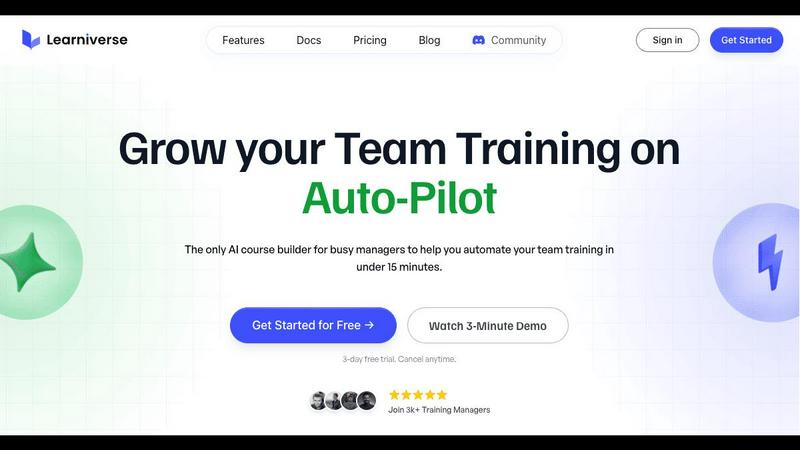
Learniverse instantly turns your team's knowledge into engaging AI-powered training courses.
Last updated: February 28, 2026

LuxSign lets you securely sign and manage documents online in minutes, compliant with EU regulations and hosted in.
Last updated: February 27, 2026
Visual Comparison
Learniverse
LuxSign

Feature Comparison
Learniverse
AI-Powered Course Creation
Simply upload your existing training materials—PDFs, videos, documents, or even meeting recordings—and Learniverse's AI assistant takes over. It automatically analyzes the content, structures it into logical, interactive lessons, and generates key elements like quizzes and progress tracking. This feature eliminates manual content formatting, allowing you to build a comprehensive course from scattered files in minutes, not weeks.
Branded Academy Portal
Launch a fully customized, professional training portal that reflects your company's identity. Learniverse allows you to apply your logo, brand colors, and even use a custom domain, ensuring your training academy looks polished and credible. This creates a cohesive and engaging learning environment for your team, moving far beyond the generic feel of outdated or cheap training tools.
Conversational AI Training Assistant
Interact with a dedicated AI assistant to build and modify courses conversationally. Need to add a module on a new process? Just describe what you want. Want to highlight key points from a recent video? Ask your AI to build lessons around them. This feature puts a dynamic, collaborative tool at your fingertips, handling the heavy lifting of instructional design on the fly.
Integrated Progress & Analytics Dashboard
Gain clear, actionable insights without spreadsheet nightmares. The dashboard provides a centralized view of team progress, engagement metrics, assessment scores, and overall training impact. See who has completed courses, identify where learners are getting stuck, and track completion rates across departments, all in a clean, mobile-optimized interface.
LuxSign
Multiple Signature Methods
LuxSign offers a variety of signature methods to accommodate user preferences. Users can draw their signature with a mouse, type their name, or upload an image. This flexibility ensures that signing documents is quick and personalized, making the process straightforward and user-friendly.
Advanced Security
Security is paramount at LuxSign. The platform employs industry-standard encryption to protect your documents during upload, storage, and transmission. With secure hosting in Luxembourg, all data is safeguarded against unauthorized access, ensuring peace of mind for users handling sensitive information.
Complete Audit Trail
LuxSign provides a comprehensive audit trail that logs every action taken with a document. This includes timestamps, IP addresses, and signer information, making it easy to verify and ensure compliance. Users can track the entire signing process, enhancing transparency and accountability.
Collaboration Workspaces
LuxSign includes collaboration workspaces that allow teams to work together efficiently. Users can create shared folders, manage member access, and collaborate on signing workflows. This feature streamlines teamwork, making it easier for businesses to manage multiple documents and signers in one centralized location.
Use Cases
Learniverse
Onboarding New Hires Rapidly
Eliminate the slow, inconsistent onboarding process. Upload your employee handbook, SOPs, and welcome videos to Learniverse. The AI instantly creates a structured onboarding course with interactive checkpoints. New hires get a single, engaging portal for all essential training, drastically reducing ramp-up time and ensuring everyone receives the same core knowledge.
Centralizing Scattered Company Knowledge
Stop the endless hunt for documents in Slack, Drive, or email. Learniverse acts as a single source of truth. Training managers can gather all disparate process guides, policy PDFs, and tutorial videos into one platform. The AI then organizes this "knowledge pile" into searchable, well-structured courses, making company know-how easily accessible and perpetually up-to-date.
Converting Meetings into Actionable Training
Turn valuable company discussions into lasting learning resources. After an all-hands meeting or a crucial team training session, simply upload the recording to Learniverse. The AI can analyze the transcript, identify key topics and decisions, and transform them into bite-sized lesson modules. This ensures important live information is captured and retained by the entire team.
Compliance and Certification Training
Streamline mandatory training for compliance, safety, or industry certifications. Upload regulatory documents and procedure manuals. Learniverse's AI builds standardized courses with integrated quizzes to verify understanding. The platform tracks completion and assessment results automatically, providing an audit-ready report for managers and ensuring consistent company-wide compliance.
LuxSign
Streamlined Contract Management
Businesses can utilize LuxSign to streamline their contract management process. By enabling electronic signatures, organizations can quickly sign, send, and store contracts without the need for physical paperwork, saving time and resources.
Compliance for Financial Institutions
Financial institutions can leverage LuxSign to ensure compliance with regulatory requirements. The platform’s robust security features and audit trails provide necessary documentation for compliance audits, making it easier to adhere to legal standards.
Efficient HR Processes
Human Resources departments can use LuxSign to manage employee onboarding and documentation efficiently. With the ability to send multiple documents for signature simultaneously, HR can expedite processes such as employment contracts and policy acknowledgments.
Remote Work Solutions
As remote work becomes increasingly common, LuxSign is ideal for businesses looking to facilitate secure document signing from anywhere. With its mobile-friendly design, employees can sign documents on their smartphones or tablets, ensuring flexibility and convenience.
Overview
About Learniverse
Learniverse is the zero-effort, AI-powered training platform built for busy teams and training managers who need results, not complexity. It transforms the chaotic process of creating and managing employee training from a weeks-long project into a task that takes mere minutes. The core value proposition is stunningly simple: stop juggling scattered Google Docs, SOPs, and video recordings. Instead, upload any existing content—PDFs, documents, videos, or manuals—and let Learniverse's AI instantly structure it into a complete, interactive, and branded learning course. This platform is designed for organizations of all sizes that want to launch a professional, branded academy without any design skills or technical setup. It automates the entire training hub, from course creation with built-in quizzes to progress tracking and analytics, freeing managers to focus on strategic work while ensuring teams have consistent, engaging, and up-to-date knowledge at their fingertips. Learniverse delivers a mobile-first, polished user experience that mirrors modern apps, making training something employees actually want to complete.
About LuxSign
LuxSign is a cutting-edge electronic signature platform designed for businesses that prioritize security and compliance. Originating from Luxembourg, it provides a secure, cloud-based solution that ensures all documents are encrypted end-to-end and stored exclusively within the country. This guarantees full compliance with GDPR regulations, making it an ideal choice for organizations operating within the European Union. LuxSign is built to support eIDAS Simple Electronic Signature (SES) standards, ensuring legal validity for contracts across all EU member states. With features like customizable signing workflows, automated notifications, and an intuitive interface, LuxSign simplifies the signing process. This platform is perfect for professionals, small businesses, and enterprises seeking a reliable, efficient way to manage electronic signatures while maintaining the utmost security and compliance.
Frequently Asked Questions
Learniverse FAQ
What types of files can I upload to create a course?
Learniverse is designed to work with the content you already have. You can upload a wide variety of file formats including PDFs, Word documents, PowerPoint presentations, video files (like MP4), and audio recordings. The AI will process the content within these files to extract text, identify key concepts, and structure it into interactive learning modules.
Do I need any design or technical skills to use Learniverse?
No, that's the core benefit of the platform. Learniverse is built for training managers and team leaders who are experts in their content, not in graphic design or software development. The AI handles all the course structuring, formatting, and interactive element creation. The branded academy portal also uses simple, intuitive tools for customization, requiring no coding or design experience.
How does the AI training assistant work?
The AI assistant functions like a collaborative partner within the platform. You can chat with it using natural language to give instructions. For example, you can ask it to "create a module on our new customer service protocol" or "add a quiz to the end of the safety course." It can also analyze uploaded content, like a video, and suggest or auto-generate lesson outlines based on the key topics it detects.
Can I track my team's progress and engagement?
Absolutely. Learniverse includes a comprehensive analytics dashboard that provides real-time insights. You can track individual and team-wide course completion rates, see assessment scores, identify modules where learners are spending the most time or struggling, and monitor overall engagement. This data is presented in clear, visual reports, eliminating the need for manual tracking via spreadsheets.
LuxSign FAQ
What types of documents can I sign with LuxSign?
LuxSign supports various document formats, including PDF, DOC, and DOCX. Users can easily upload files up to 10MB, making it simple to handle different types of documents.
Is LuxSign compliant with GDPR?
Yes, LuxSign is fully compliant with GDPR regulations. All documents are encrypted and stored securely in Luxembourg, ensuring that user data is protected in accordance with EU data protection laws.
How does LuxSign ensure the security of my documents?
LuxSign employs end-to-end encryption during the upload, storage, and transmission of documents. Additionally, all data is hosted on secure servers in Luxembourg, providing a high level of security against unauthorized access.
Can I track the signing process in LuxSign?
Absolutely! LuxSign allows users to track the signing process in real-time. You will receive automatic email notifications to keep you informed when documents are sent, viewed, and signed, enhancing transparency throughout the process.
Alternatives
Learniverse Alternatives
Learniverse is an AI-powered Learning Management System (LMS) designed for fast, automated course creation. It falls into the productivity and management category, helping teams transform documents and videos into branded training academies in minutes. Users often explore alternatives for various reasons. These can include budget constraints, the need for more advanced or specific features, or a requirement for deeper integration with a particular tech stack. The ideal platform depends heavily on your team's unique workflow and scale. When evaluating other options, focus on core needs. Key considerations are the ease of content import and AI automation, the depth of customization and branding controls, the quality of progress analytics, and how well the platform connects with your team's daily communication apps.
LuxSign Alternatives
LuxSign is an electronic signature platform designed to facilitate secure and legally valid signing of documents across the European Union. As a cloud-based solution, it provides businesses with a user-friendly way to manage contracts while ensuring compliance with eIDAS SES standards and GDPR regulations. Users often seek alternatives to LuxSign for various reasons, including pricing structures, feature sets, and specific platform needs that better align with their operational workflows. When exploring alternatives, it's essential to consider factors such as ease of use, security measures, integration capabilities with existing systems, and the availability of advanced features like document templates and audit trails. Evaluating these aspects will help users find a solution that meets their unique requirements and enhances their document management processes.