
Learniverse vs Zovo
Side-by-side comparison to help you choose the right AI tool.

Learniverse
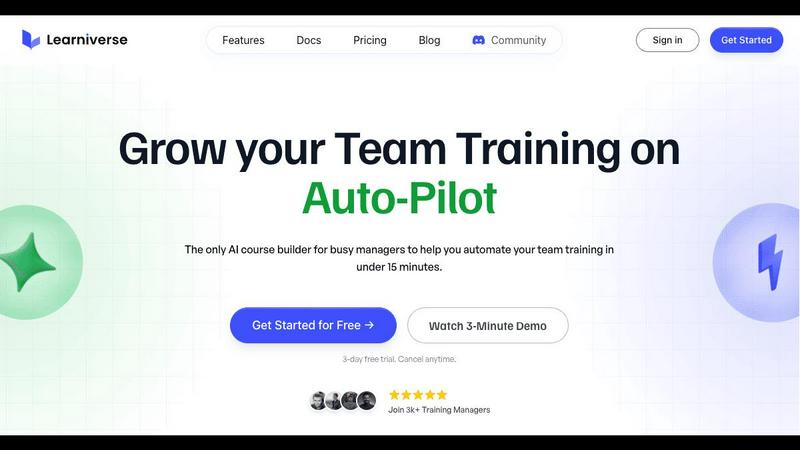
Learniverse instantly turns your team's knowledge into engaging AI-powered training courses.
Last updated: February 28, 2026

Unlock 20 privacy-first Chrome extensions for developers and writers, all from one dedicated solo developer.
Last updated: February 28, 2026
Visual Comparison
Learniverse
Zovo

Feature Comparison
Learniverse
AI-Powered Course Creation
Simply upload your existing training materials—PDFs, videos, documents, or even meeting recordings—and Learniverse's AI assistant takes over. It automatically analyzes the content, structures it into logical, interactive lessons, and generates key elements like quizzes and progress tracking. This feature eliminates manual content formatting, allowing you to build a comprehensive course from scattered files in minutes, not weeks.
Branded Academy Portal
Launch a fully customized, professional training portal that reflects your company's identity. Learniverse allows you to apply your logo, brand colors, and even use a custom domain, ensuring your training academy looks polished and credible. This creates a cohesive and engaging learning environment for your team, moving far beyond the generic feel of outdated or cheap training tools.
Conversational AI Training Assistant
Interact with a dedicated AI assistant to build and modify courses conversationally. Need to add a module on a new process? Just describe what you want. Want to highlight key points from a recent video? Ask your AI to build lessons around them. This feature puts a dynamic, collaborative tool at your fingertips, handling the heavy lifting of instructional design on the fly.
Integrated Progress & Analytics Dashboard
Gain clear, actionable insights without spreadsheet nightmares. The dashboard provides a centralized view of team progress, engagement metrics, assessment scores, and overall training impact. See who has completed courses, identify where learners are getting stuck, and track completion rates across departments, all in a clean, mobile-optimized interface.
Zovo
BeLikeNative
BeLikeNative is Zovo's flagship extension that helps users write like native speakers with just a keystroke. Supporting 80 languages, it simplifies communication for non-native speakers, making it an invaluable tool for anyone who writes in a foreign language. The extension adjusts tone, style, and phrasing, enabling users to convey their messages more effectively and naturally.
Tab Suspender Pro
Tab Suspender Pro helps manage browser memory usage by automatically suspending inactive tabs. This feature is especially beneficial for users who tend to keep many tabs open, as it reduces memory consumption, enhances browser performance, and prolongs battery life on laptops. It ensures a smoother browsing experience without manual tab management.
Clipboard History Pro
This extension keeps a history of copied items, allowing users to retrieve previously copied text and images easily. With Clipboard History Pro, you can access up to 100 items, making it a reliable tool for anyone who regularly copies and pastes information. It saves time and enhances productivity by reducing the need to recopy frequently used items.
Form Filler Pro
Form Filler Pro streamlines the process of filling out online forms by auto-generating random data or using previously saved information. This feature is particularly useful for users who frequently register for services or complete surveys, as it saves time and minimizes the frustration often associated with tedious form filling.
Use Cases
Learniverse
Onboarding New Hires Rapidly
Eliminate the slow, inconsistent onboarding process. Upload your employee handbook, SOPs, and welcome videos to Learniverse. The AI instantly creates a structured onboarding course with interactive checkpoints. New hires get a single, engaging portal for all essential training, drastically reducing ramp-up time and ensuring everyone receives the same core knowledge.
Centralizing Scattered Company Knowledge
Stop the endless hunt for documents in Slack, Drive, or email. Learniverse acts as a single source of truth. Training managers can gather all disparate process guides, policy PDFs, and tutorial videos into one platform. The AI then organizes this "knowledge pile" into searchable, well-structured courses, making company know-how easily accessible and perpetually up-to-date.
Converting Meetings into Actionable Training
Turn valuable company discussions into lasting learning resources. After an all-hands meeting or a crucial team training session, simply upload the recording to Learniverse. The AI can analyze the transcript, identify key topics and decisions, and transform them into bite-sized lesson modules. This ensures important live information is captured and retained by the entire team.
Compliance and Certification Training
Streamline mandatory training for compliance, safety, or industry certifications. Upload regulatory documents and procedure manuals. Learniverse's AI builds standardized courses with integrated quizzes to verify understanding. The platform tracks completion and assessment results automatically, providing an audit-ready report for managers and ensuring consistent company-wide compliance.
Zovo
Enhancing Language Skills
For users learning a new language, BeLikeNative provides instant rewrites that make it easier to compose messages and documents. This application is perfect for students, professionals, or anyone looking to improve their writing skills in a foreign language, enabling them to communicate more confidently.
Boosting Productivity
Tab Suspender Pro is ideal for busy professionals who juggle multiple projects. By automatically suspending inactive tabs, it allows users to focus on the task at hand without being distracted by unnecessary tabs, thus enhancing overall productivity and efficiency.
Streamlining Copying and Pasting
Clipboard History Pro is beneficial for writers, researchers, and anyone who frequently needs to copy text from various sources. By maintaining a history of copied items, users can quickly retrieve and paste information, making their workflow smoother and more efficient.
Simplifying Online Registrations
Form Filler Pro is particularly useful for users who often sign up for online services or complete surveys. By auto-filling forms with generated or saved data, it saves time and reduces the likelihood of errors, allowing users to navigate the web more seamlessly.
Overview
About Learniverse
Learniverse is the zero-effort, AI-powered training platform built for busy teams and training managers who need results, not complexity. It transforms the chaotic process of creating and managing employee training from a weeks-long project into a task that takes mere minutes. The core value proposition is stunningly simple: stop juggling scattered Google Docs, SOPs, and video recordings. Instead, upload any existing content—PDFs, documents, videos, or manuals—and let Learniverse's AI instantly structure it into a complete, interactive, and branded learning course. This platform is designed for organizations of all sizes that want to launch a professional, branded academy without any design skills or technical setup. It automates the entire training hub, from course creation with built-in quizzes to progress tracking and analytics, freeing managers to focus on strategic work while ensuring teams have consistent, engaging, and up-to-date knowledge at their fingertips. Learniverse delivers a mobile-first, polished user experience that mirrors modern apps, making training something employees actually want to complete.
About Zovo
Zovo is a comprehensive suite of 20 Chrome extensions developed by a dedicated solo developer with over a decade of experience and an impressive track record of earning over $400K on Upwork, boasting a 100% success rate. The flagship extension, BeLikeNative, empowers more than 3,300 users to write like native speakers, offering one-keystroke rewrites in as many as 80 languages. The diverse collection of tools includes essential utilities such as Tab Suspender Pro, JSON Formatter Pro, Clipboard History Pro, and Form Filler Pro, among others. Each extension prioritizes user privacy, ensuring that no data leaves your device—there are no investors, no data harvesting, and no corporate interference. Users actively participate in shaping the roadmap by voting on features, fostering a community-driven approach to development. With new extensions rolling out monthly and early access for members, Zovo caters to users who seek powerful, privacy-first tools for their browsers. Many of these tools are also available for free online at zovo.one, making Zovo a compelling choice for anyone looking to enhance their browsing experience without compromising on privacy.
Frequently Asked Questions
Learniverse FAQ
What types of files can I upload to create a course?
Learniverse is designed to work with the content you already have. You can upload a wide variety of file formats including PDFs, Word documents, PowerPoint presentations, video files (like MP4), and audio recordings. The AI will process the content within these files to extract text, identify key concepts, and structure it into interactive learning modules.
Do I need any design or technical skills to use Learniverse?
No, that's the core benefit of the platform. Learniverse is built for training managers and team leaders who are experts in their content, not in graphic design or software development. The AI handles all the course structuring, formatting, and interactive element creation. The branded academy portal also uses simple, intuitive tools for customization, requiring no coding or design experience.
How does the AI training assistant work?
The AI assistant functions like a collaborative partner within the platform. You can chat with it using natural language to give instructions. For example, you can ask it to "create a module on our new customer service protocol" or "add a quiz to the end of the safety course." It can also analyze uploaded content, like a video, and suggest or auto-generate lesson outlines based on the key topics it detects.
Can I track my team's progress and engagement?
Absolutely. Learniverse includes a comprehensive analytics dashboard that provides real-time insights. You can track individual and team-wide course completion rates, see assessment scores, identify modules where learners are spending the most time or struggling, and monitor overall engagement. This data is presented in clear, visual reports, eliminating the need for manual tracking via spreadsheets.
Zovo FAQ
Is Zovo free to use?
Zovo offers many extensions for free, allowing users to access essential features without any cost. For additional capabilities, users can upgrade to a Pro subscription.
How does Zovo ensure my privacy?
Zovo is built with privacy in mind. All extensions run locally on your device, meaning no data is collected, stored, or transmitted. This guarantees that your browsing activity remains private and secure.
Can I suggest new features for Zovo extensions?
Absolutely! Zovo encourages user feedback and suggestions. You can submit feature requests directly, and the most requested features are prioritized for development.
How often are new extensions released?
New extensions are released monthly, with early access provided to members. This ensures that users can benefit from the latest tools and features as soon as they become available.
Alternatives
Learniverse Alternatives
Learniverse is an AI-powered Learning Management System (LMS) designed for fast, automated course creation. It falls into the productivity and management category, helping teams transform documents and videos into branded training academies in minutes. Users often explore alternatives for various reasons. These can include budget constraints, the need for more advanced or specific features, or a requirement for deeper integration with a particular tech stack. The ideal platform depends heavily on your team's unique workflow and scale. When evaluating other options, focus on core needs. Key considerations are the ease of content import and AI automation, the depth of customization and branding controls, the quality of progress analytics, and how well the platform connects with your team's daily communication apps.
Zovo Alternatives
Zovo is a suite of 20 privacy-first Chrome extensions designed for developers and writers, providing tools that enhance productivity and streamline various tasks. With extensions like Tab Suspender, JSON Formatter, and Clipboard History, Zovo caters to users looking for efficient ways to manage their workflow without compromising their privacy. The platform is built on a foundation of user feedback, ensuring that the features evolve according to the needs of its community. Users often seek alternatives to Zovo for reasons such as pricing, feature sets, or specific platform compatibility. When evaluating alternatives, it's essential to consider the core functionalities offered, the level of privacy protection, and the overall user experience. Additionally, look for platforms that prioritize user input in their development roadmap, as this fosters a more tailored and satisfying experience.