
FanPage vs Melograph
Side-by-side comparison to help you choose the right AI tool.

FanPage
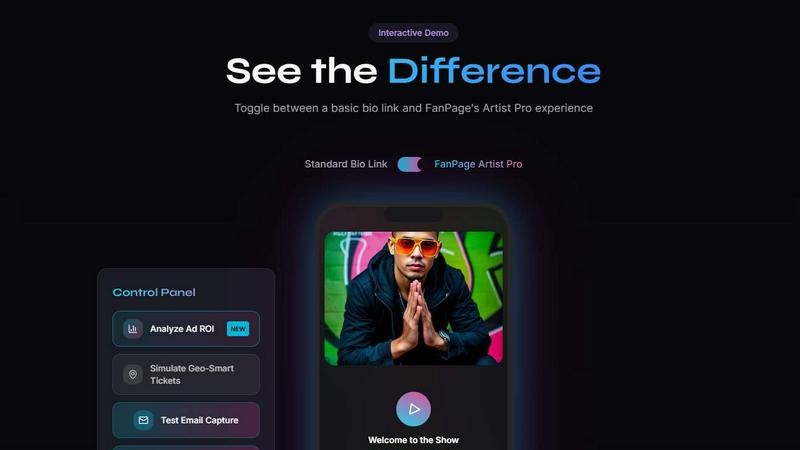
FanPage is the all-in-one link-in-bio platform designed for musicians to engage fans, track growth, and manage tours.
Last updated: February 28, 2026

Melograph
Melograph effortlessly turns your music tracks into stunning, customizable videos in minutes, ready for any platform.
Last updated: February 28, 2026
Visual Comparison
FanPage
Melograph

Feature Comparison
FanPage
Smart Deep Linking
Smart Deep Linking automatically directs fans to their preferred music apps like Spotify, Apple Music, and YouTube instead of redirecting them to a browser. This seamless experience boosts engagement and makes it easier for listeners to access your music.
Geo-Fenced Tour Dates
With geo-fenced tour dates, FanPage automatically displays the nearest shows to fans based on their location. This feature includes a buy tickets button, making it simple for fans to purchase tickets and attend events, enhancing your concert turnout.
Social Unlocks
Social Unlocks allow you to engage your audience by trading exclusive content for follows, email signups, or subscriptions. This feature helps grow your fanbase organically while creating a more meaningful connection with your audience.
Playlist Tracker
The Playlist Tracker feature enables you to monitor your Spotify playlist follower growth in real-time. With detailed analytics and beautiful charts, you can understand your audience better and fine-tune your marketing strategies for maximum impact.
Melograph
Template Variety
Melograph offers an extensive collection of beautifully designed templates that cater to various musical genres and aesthetics. Users can choose from minimalistic, cinematic, retro, and futuristic styles, ensuring that the visuals perfectly complement their unique sound.
Audio-Reactive Visuals
With Melograph, users can instantly see their audio waveforms react to the music. This feature enhances the engagement factor of the videos, making them more dynamic and visually appealing, perfect for capturing the audience’s attention.
Customizable Outputs
Users can personalize their videos by adding artist and song titles, as well as logos or album covers on selected templates. This customization ensures that the visuals not only match the music but also represent the artist's brand effectively.
Quick Export Options
Melograph provides fast export capabilities, generating high-quality MP4 videos in 1080p directly from the browser without the need for lengthy uploads. This feature enables users to create and share their content quickly and efficiently, ideal for today’s fast-paced digital landscape.
Use Cases
FanPage
Promoting New Music Releases
Artists can utilize FanPage to announce new music releases through a dedicated link page that showcases their latest tracks. By integrating Smart Deep Linking, fans can instantly listen to the music on their favorite platforms.
Selling Digital Products
Musicians can create and manage a digital storefront directly on their FanPage. This allows them to sell merchandise, courses, or exclusive content without any transaction fees on Pro plans, enhancing their revenue streams.
Building a Community
Using the Marketplace feature, artists can build paid communities where dedicated fans can engage with exclusive content, participate in Q&A sessions, or access behind-the-scenes material, fostering deeper connections.
Tracking Marketing Campaign Success
With server-side tracking and cost-per-follower calculators, artists can accurately assess the effectiveness of their marketing campaigns. This allows them to make informed decisions and optimize their advertising spend.
Melograph
Independent Music Artists
Indie artists can utilize Melograph to create captivating music videos that enhance their singles or albums. The easy-to-use templates allow them to produce professional-looking visuals without extensive video editing experience.
Music Producers
Producers can leverage Melograph to create engaging audio-reactive videos for their projects. This helps them present their work to clients or share on social media, showcasing their production skills alongside stunning visuals.
Record Labels
Labels can use Melograph to maintain a consistent visual identity for their artists. By using the same templates across various releases, they can establish brand recognition and professionalism in their marketing efforts.
DJs
DJs can create vibrant visuals for their mixes and sets, allowing them to stand out during performances or livestreams. The quick export feature ensures they have shareable content ready to promote their events or music.
Overview
About FanPage
FanPage is an innovative link-in-bio tool designed specifically for musicians, elevating the way artists connect with their fans. Unlike traditional bio links that treat all visitors uniformly, FanPage employs intelligent automation to create a personalized experience for each user. With features like Smart Deep Linking, which allows direct access to Spotify, Apple Music, and YouTube apps, artists can streamline fan engagement. Additionally, geo-fenced tour dates ensure that fans see the nearest shows, while server-side tracking provides accurate ad attribution, enabling artists to measure their return on investment with precision. Beyond serving as a mere link aggregator, FanPage transforms your bio link into a robust digital storefront and community hub. The integrated Marketplace empowers artists to sell digital products, courses, and cultivate paid communities, all with 0% transaction fees on Pro plans. This makes FanPage not only a growth engine but a comprehensive solution for artists seeking to build and monetize their fanbase effectively.
About Melograph
Melograph is a revolutionary web-based music visualizer designed specifically for musicians, producers, and creators who want to craft visually stunning content without the hassle of traditional video editing. This innovative tool simplifies the process of creating eye-catching audio-reactive videos by offering a user-friendly interface that allows for quick and easy video creation. Users can select from a diverse set of premium templates that suit various musical styles, including chill, cinematic, retro, and futuristic vibes. With just a few clicks, you can upload your audio track, enter your artist name and song title, and swiftly generate a high-quality video ready for export. Melograph is ideal for indie artists, producers, labels, and DJs who want to enhance their music releases with consistent, professional visuals while saving valuable time and effort. The main value proposition of Melograph lies in its ability to streamline the visual creation process, enabling users to concentrate on their music while effortlessly producing captivating content perfect for social media and other platforms.
Frequently Asked Questions
FanPage FAQ
Can I cancel my subscription anytime?
Yes, FanPage offers a 100% satisfaction guarantee, allowing you to cancel your subscription at any time without any penalties.
Can I switch between monthly and annual billing?
Absolutely! FanPage provides the flexibility to switch between monthly and annual billing options, ensuring you can manage your subscription in a way that suits your needs.
What happens when I upgrade from Free to a paid plan?
When you upgrade from the Free plan to a paid plan, you gain access to additional features such as custom backgrounds, video messaging, and advanced analytics, enhancing your FanPage experience.
Is there a fee for selling digital products?
On the Free plan, there is a 10% fee on direct digital sales. However, if you upgrade to the Pro plan, you can enjoy 0% transaction fees, maximizing your revenue potential.
Melograph FAQ
Do I need editing experience?
No, Melograph is designed for users of all skill levels. If you can select a template and type in your title, you can create visually stunning videos without any editing experience.
Will this work for TikTok, Reels, or Shorts?
Absolutely! Melograph exports videos in platform-friendly formats that are perfect for sharing on TikTok, Instagram Reels, and YouTube Shorts, making it easy to reach your audience.
Can I use it for multiple songs?
Yes, Melograph supports multiple uploads. You can create visuals for any number of tracks, allowing you to promote your entire catalog with captivating videos.
What do I get after payment?
After payment, you gain access to all premium templates, export credits based on your chosen plan, and the ability to create professional-quality music visuals without watermarks.
Alternatives
FanPage Alternatives
FanPage is a cutting-edge link-in-bio platform specifically designed for musicians, allowing them to track playlist growth, manage tour RSVPs, and sell digital products from a single location. In a digital landscape where competition is fierce, artists often seek alternatives to meet their unique needs, whether due to pricing, specific features, or compatibility with other platforms. Each musician’s requirements can vary, prompting them to explore options that better align with their goals and budget. When searching for an alternative to FanPage, users should consider factors such as ease of use, the ability to integrate with other marketing tools, and the effectiveness of analytics offered. It's essential to evaluate the features that cater to musicians, including personalized user experiences, automated marketing capabilities, and any transaction fees associated with selling products. A suitable alternative should enhance an artist's ability to connect with their audience and drive growth effectively.
Melograph Alternatives
Melograph is a cutting-edge web-based music visualizer designed for musicians and creators who want to elevate their audio tracks with stunning visuals. It simplifies the video creation process by offering customizable templates that cater to various styles, allowing users to produce high-quality, audio-reactive videos quickly and efficiently. Users often seek alternatives to Melograph for various reasons, including pricing, specific features, or platform compatibility. When choosing an alternative, it's essential to consider factors like user interface, template variety, export quality, and overall ease of use. A good alternative should not only meet your visual needs but also enhance your creative process without unnecessary complications.