
Proofapp vs SimpleDraw
Side-by-side comparison to help you choose the right AI tool.

Proofapp
Stop endless email feedback by pinning comments directly on your website.
Last updated: March 4, 2026

SimpleDraw
Create precise scale drawings and floor plans instantly online with SimpleDraw, no experience or downloads needed.
Last updated: March 1, 2026
Visual Comparison
Proofapp

SimpleDraw
Feature Comparison
Proofapp
Visual Commenting
This is the heart of Proofapp. Instead of describing changes in lengthy emails, reviewers simply click on any part of the captured website screenshot to leave a comment. This pins the feedback directly to the exact pixel, eliminating confusing instructions like "move the button a bit to the left, under the header." Comments support rich threads, allowing for back-and-forth discussion directly on the design element in question, ensuring perfect clarity and context for every piece of feedback.
Multi-Breakpoint Testing
Proofapp understands modern web design requires a responsive approach. When you submit a URL, it automatically generates screenshots for both desktop and mobile views in one go. This allows teams and clients to review the user experience across critical breakpoints simultaneously, catching layout or functionality issues specific to each device without needing to manually resize browsers or take separate screenshots.
Secure, Account-Free Sharing
Streamlining client collaboration is a priority. With Proofapp, you can share a review project by generating a secure, shareable link. The powerful feature is that your clients or external stakeholders do not need to create an account or log in to view the screenshots and leave comments. This drastically reduces friction in the feedback collection process, making it as easy as sending a link, while you maintain control over project access.
Real-Time Collaboration & Resolution
Feedback becomes a live conversation. Team members and clients see new comments and replies appear in real-time, fostering a dynamic collaborative environment. Each comment can be marked as "resolved" once the feedback has been addressed, providing a clear, visual progress tracker for the entire project. This feature turns a static list of notes into an actionable workflow, ensuring nothing falls through the cracks.
SimpleDraw
Accurate Measurements & Scale Drawing
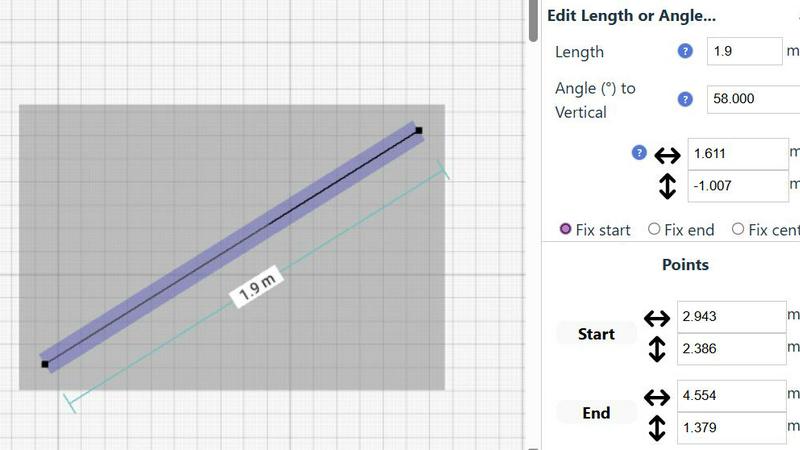
SimpleDraw excels in providing precise measurements and scale drawing capabilities. With smart alignment features, users can ensure that their drawings are not only accurate but also perfectly to scale, allowing for professional-quality results without the need for specialized training.
Specialized Floor Plan Creator
The dedicated Floor Plan Mode allows users to create detailed layouts with walls, doors, and furniture in just a few clicks. This feature streamlines the design process, making it easy to visualize spaces before embarking on any renovation or decoration project.
Smart Alignment System
This intelligent system assists users in placing points and lines exactly where they want them. By providing visual indicators and contextual help, it enhances precision and control, making it easier to achieve the desired layout without frustration.
Comprehensive Measurement System
SimpleDraw includes a robust measurement system that allows users to choose between metric and standard US units. Dynamic contextual measurements display as you work, ensuring that your drawings are as accurate as possible and tailored to your specifications.
Use Cases
Proofapp
Freelancer-Client Website Approvals
Freelancers and independent contractors can use Proofapp to present website drafts to clients professionally. Instead of exchanging dozens of emails with attached, annotated images, they share a single Proofapp link. Clients click to give precise visual feedback, which the freelancer can then address and mark as resolved. This use case saves hours per project, reduces miscommunication, and presents a polished, efficient workflow that enhances client trust and satisfaction.
In-House Design & Development Handoff
Internal teams can streamline the handoff process between designers and developers. A designer can upload a live prototype or staging site URL to Proofapp. Developers can then click directly on elements to ask specific implementation questions, report bugs visually, or confirm design specs, all within the context of the design itself. This visual thread creates a clear audit trail and reduces back-and-forth in chat apps.
Marketing Team Landing Page Reviews
Marketing teams often need collective input on campaign landing pages from copywriters, designers, and managers. Proofapp allows the entire team to collaborate on a single page simultaneously. Stakeholders can pin comments on headlines, call-to-action buttons, or form fields, ensuring all feedback is consolidated visually in one place, speeding up the revision process before the page goes live.
Agency Managing Multiple Client Projects
Digital agencies managing several client websites can use Proofapp as a centralized feedback hub for all projects. They can organize reviews by client or project, using the platform's dashboard to track open and resolved comments across all active work. The account-free sharing for clients simplifies their process, while the agency benefits from a standardized, professional review system that scales with their workload.
SimpleDraw
Kitchen & Bathroom Planning
Users can plan their kitchen and bathroom renovations with accurate measurements to visualize layouts before beginning any work. This practical use of SimpleDraw allows for better decision-making and efficient design.
Room Layouts & Furniture Planning
Designing room layouts becomes effortless with SimpleDraw. Users can experiment with different furniture arrangements in bedrooms, living rooms, or offices, ensuring that everything fits perfectly before making any purchases.
House & Apartment Plans
Create complete floor plans for various home projects, whether for personal use or rental listings. SimpleDraw provides the tools necessary to generate comprehensive layouts, aiding in effective space planning.
DIY and Home Renovation Projects
For DIY enthusiasts, SimpleDraw offers a platform to sketch out home improvement ideas. From initial layouts to detailed designs, users can refine their concepts and visualize the final outcome without needing extensive drafting skills.
Overview
About Proofapp
Proofapp is a visual feedback and collaboration platform designed to eliminate the chaos of traditional website and design review processes. It transforms how designers, developers, marketers, and their clients work together by making feedback visual, contextual, and organized. The core idea is simple: stop the endless email chains and vague notes. Instead, users paste any website URL, and Proofapp automatically captures clean screenshots at both desktop and mobile breakpoints. Reviewers can then click directly on the image to pin comments, creating a precise, visual dialogue that leaves no room for misinterpretation. Built with a mobile-first and user-centric approach, the platform requires no accounts for clients, offers real-time notifications, and integrates seamlessly into existing workflows. Whether you're a solo freelancer needing to collect client sign-off or an in-house team managing multiple project stakeholders, Proofapp's value proposition is clear: save significant time, reduce revision cycles by up to 60%, and ship higher-quality work faster by keeping all feedback actionable and in one centralized, visual dashboard.
About SimpleDraw
SimpleDraw is an innovative, free online tool that democratizes the art of scale drawing, making it accessible for everyone from DIY enthusiasts to casual users. With its intuitive interface, SimpleDraw simplifies the complexities of technical drafting, allowing users to create precise floor plans and architectural drawings directly from their web browser. No installation or login is required, making it easy to dive right into your projects without any prior CAD experience. Whether you are sketching a layout for your new kitchen or planning a detailed renovation, SimpleDraw offers professional-grade precision in a user-friendly package. The platform is designed to empower users with features like real-time measurements and smart alignment, ensuring that your drawings are both accurate and visually appealing. With SimpleDraw, you can effortlessly bring your ideas to life, creating clear visual plans that cater to any project, whether it be home improvement, rental listings, or interior design.
Frequently Asked Questions
Proofapp FAQ
How do reviewers leave comments without an account?
The process is designed for maximum ease. When you create a project in Proofapp and share the generated secure link, anyone with that link can view the screenshots. They can click anywhere on the image to leave a comment, add attachments, and reply to threads immediately, without any sign-up form or login barrier. Account management is handled solely by the project creator.
Does Proofapp work on live websites or just static images?
Proofapp works directly on live websites. You simply paste any publicly accessible URL into the platform. It then uses its system to capture fresh, current screenshots of that live page at the defined breakpoints. This ensures feedback is always based on the most up-to-date version of the site or web app.
Can I review more than one page at a time?
Yes, Proofapp supports multi-page projects. You can add multiple URLs to a single project, and it will capture screenshots for each page. This is ideal for reviewing user flows, entire website sections, or a set of landing pages, keeping all related feedback organized together in one collaborative workspace.
What kind of files can I attach to comments?
To provide complete context, Proofapp allows users to attach various files directly to their comments. This typically includes images (like alternative design mockups), documents (PDFs, Word files), and other common file types. This ensures that all relevant reference material is pinned directly to the discussion point, avoiding separate email attachments.
SimpleDraw FAQ
Is SimpleDraw free to use?
Yes, SimpleDraw is completely free to use. There are no hidden fees, and you do not need to sign up or download any software to start drawing.
Do I need any prior CAD experience to use SimpleDraw?
No, SimpleDraw is designed for everyone, including those with no prior CAD experience. Its intuitive interface makes it easy for beginners to create professional-quality drawings.
Can I access SimpleDraw on my mobile device?
Yes, SimpleDraw works directly in your web browser, making it accessible on various devices, including smartphones and tablets, for a seamless drawing experience on the go.
How can I provide feedback or request new features?
Users are encouraged to join the SimpleDraw Discord community, where they can share feedback and suggest new features. The team actively listens to user input to continuously improve the platform.
Alternatives
Proofapp Alternatives
Proofapp is a visual feedback and website review platform in the design tools category. It streamlines collaboration by letting teams and clients pin comments directly on live website screenshots, eliminating messy email threads and vague feedback. Users often explore alternatives for various reasons. These can include budget constraints, the need for specific integrations like project management apps, or requirements for more advanced features such as video feedback or user testing capabilities beyond static review. When choosing a different tool, prioritize a mobile-friendly experience and seamless workflow integration. Look for core functionality like in-context commenting, real-time notifications, and a simple review process for clients. The right platform should centralize feedback visually to keep projects moving fast.
SimpleDraw Alternatives
SimpleDraw is an innovative online design tool that enables users to create accurate scale drawings and detailed floor plans directly in their web browser, all for free. As a part of the design tools category, it caters to casual users, DIY enthusiasts, and anyone looking to visualize their space without the need for complex software. However, many users may seek alternatives for various reasons, including the need for additional features, specific platform compatibility, or different pricing structures. When searching for an alternative, consider the ease of use, the range of functionalities offered, and whether it meets your specific project requirements. Choosing the right alternative also involves evaluating how well the tool can adapt to your workflow and whether it offers robust support for the types of projects you undertake. Look for features that enhance your design process, such as smart alignment systems, flexibility in zooming, and precision control. Ultimately, the goal is to find a tool that not only meets your technical needs but also enhances your overall user experience.