
ScopeSnap vs SupaSidebar
Side-by-side comparison to help you choose the right AI tool.

ScopeSnap
ScopeSnap uses AI to turn your project notes into client-ready proposals and estimates in minutes.
Last updated: March 18, 2026

SupaSidebar
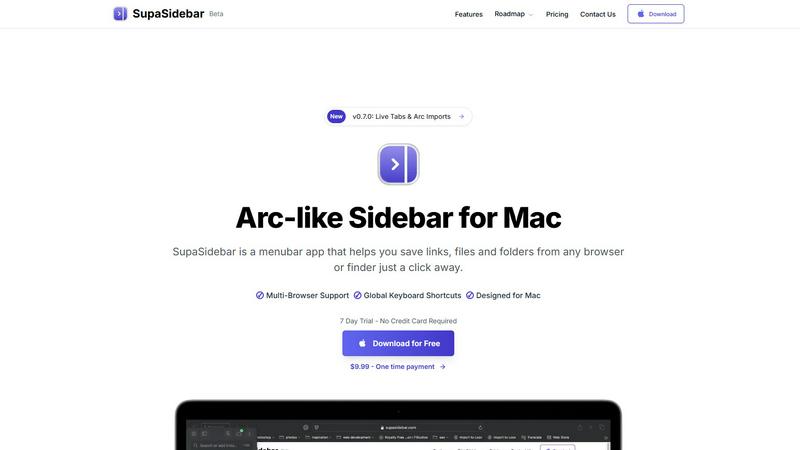
SupaSidebar is your all-in-one Mac sidebar for quickly saving and accessing links, files, and folders with ease.
Last updated: February 28, 2026
Visual Comparison
ScopeSnap

SupaSidebar
Feature Comparison
ScopeSnap
AI-Powered Scope Generation
Paste in your unstructured discovery notes, meeting transcripts, or email threads. ScopeSnap's AI instantly analyzes the text to identify key requirements, breaking them down into a structured backlog of epics and individual scope items. It intelligently surfaces critical open questions and flags underlying assumptions that need clarification, giving you a powerful head start and ensuring nothing important is overlooked from the initial conversation.
Interactive Scope Refinement Board
The generated scope is presented in a clear, interactive board where you can review, edit, and organize every item. Drag and drop to prioritize, split large items into smaller tasks, and add detailed descriptions. You can assign roles (e.g., frontend, backend) and attach time or cost estimates directly to each scope item. This visual, tactile interface makes collaborative refinement simple and ensures every feature is well-understood before estimation.
Automated Proposal & SOW Creation
Once your scope and estimates are finalized, ScopeSnap automates the most tedious part. With a single click, it compiles all your structured work into a polished, client-ready document. You can generate formal Proposals for new projects or detailed Statements of Work for existing clients. This feature eliminates hours of copying, pasting, and formatting, delivering a professional document that builds trust and clarity from the outset.
Centralized Project Context Hub
ScopeSnap acts as a single source of truth for your project's definition. It securely stores all your initial discovery notes, the evolving scope backlog, all resolved questions, and the final estimates and proposals. This centralized hub makes it easy to reference original context during development, onboard team members, and maintain alignment with clients, preventing scope creep and misunderstandings later in the project lifecycle.
SupaSidebar
Universal Command Center
SupaSidebar acts as a universal command center in your menubar, providing easy access to links, files, and folders across all your applications. You can quickly save or copy URLs with just a few keyboard shortcuts, streamlining your workflow and reducing time spent switching between apps.
Recent Activity Tracking
With the Recents feature, SupaSidebar tracks every website you have visited in the last 48 hours. This allows you to find your work instantly, ensuring that you never lose track of important information, making research and browsing much more efficient.
Fast Search Functionality
SupaSidebar includes a powerful search capability that lets you locate any file, folder, website, or app at lightning speed. By pressing CMD + CTRL + K and typing in your query, you can quickly access whatever you need, eliminating the hassle of digging through multiple tabs or applications.
Customizable Spaces
Organize your digital workspace exactly how you want it with SupaSidebar's customizable spaces. You can have unlimited spaces in the Pro version, allowing for tailored organization that fits your unique workflow needs. This feature is perfect for users juggling different projects and tasks.
Use Cases
ScopeSnap
For Freelance Developers Closing New Clients
Independent developers can use ScopeSnap to quickly transform a post-discovery call mess of ideas into a compelling, detailed proposal. Instead of spending a full day writing a Scope of Work from scratch, they can generate a structured scope in minutes, refine it with confidence, and send a professional document that demonstrates expertise and thoroughness, significantly increasing their chances of winning the project.
For Software Agencies Streamlining Pre-Sales
Small to mid-sized agencies can standardize their scoping process across their entire team. ScopeSnap ensures every project manager or lead developer follows the same rigorous methodology, turning varied discovery notes into consistently structured scopes. This leads to more accurate estimations, reduces internal review time, and allows the agency to present a unified, high-quality front to all potential clients.
For Consultants Defining Project Phases
Technical consultants who need to break large, complex engagements into distinct phases use ScopeSnap to create clear deliverables for each stage. The AI helps identify logical milestones and dependencies, while the refinement board allows for easy grouping of tasks into Phase 1, Phase 2, etc. This makes it easy to create phased proposals with clear objectives and costs for each step.
For Managing Scope Changes Mid-Project
When a client requests new features or changes during development, ScopeSnap provides a framework to assess the impact. You can quickly add the new requirements to the existing scope board, estimate the additional work, and generate a formal change order or amended SOW. This professional approach manages client expectations and protects against uncompensated scope creep.
SupaSidebar
Efficient Research
For researchers, SupaSidebar serves as a centralized hub for gathering links, articles, and resources. The ability to quickly save URLs and access recent activity means that compiling information for papers or projects becomes a seamless process.
Creative Projects
Creators can utilize SupaSidebar to keep essential links, files, and inspiration at their fingertips. By pinning favorite resources and accessing them via keyboard shortcuts, they can maintain uninterrupted creative flow without constantly switching applications.
Student Workflow
Students benefit from SupaSidebar by organizing their study materials, assignments, and research. The Recents feature allows them to revisit previously accessed resources quickly, enhancing their learning experience and keeping them focused on their studies.
Professional Task Management
Professionals juggling multiple projects can use SupaSidebar to manage their tasks efficiently. By centralizing links, files, and recent activity, they can easily switch between different responsibilities, boosting their productivity without the frustration of scattered resources.
Overview
About ScopeSnap
ScopeSnap is an AI-powered scoping and proposal platform designed specifically for freelance developers, consultants, and software agencies. It tackles the most tedious and error-prone part of the project lifecycle: turning chaotic discovery notes into a clear, actionable plan. The core problem it solves is the slow, risky process of manual scoping, where important requirements are often missed, estimates are guesswork, and creating client-ready proposals takes hours of repetitive work.
The app provides a structured, mobile-friendly workflow that guides you from raw input to a finalized deliverable. You start by feeding it context from discovery calls, like meeting transcripts, emails, or notes. ScopeSnap's AI then analyzes this information to automatically generate a structured project backlog with epics, scope items, open questions, and flagged assumptions. Within the app, you can iteratively refine this scope, assign roles, and set confident estimates. Finally, with one click, it transforms your polished scope into a professional Proposal or Statement of Work, ready to send to your client. The main value proposition is saving significant time, reducing risk, and increasing win rates by delivering exceptionally clear and professional scopes from the very start of a project.
About SupaSidebar
SupaSidebar is a beautifully crafted, native macOS application designed to enhance your productivity by bringing the powerful, organized, and flow-centric experience of the Arc browser's sidebar to your entire Mac. It serves as a universal command center that resides in your menubar, providing instant, keyboard-driven access to everything you need, including links, files, and folders. Whether you are a researcher, creator, student, or a professional managing multiple projects, SupaSidebar helps you break free from the silos of apps and browsers. Its main value proposition lies in keeping your digital workspace organized and your focus intact. With seamless integration across all major browsers like Safari, Chrome, Arc, Firefox, and Brave, as well as Finder, SupaSidebar allows users to save, search, and open items from anywhere using simple global shortcuts. Everything remains on your Mac, ensuring privacy and speed, while centralizing your tabs, recent history, and pinned items for a smoother workflow.
Frequently Asked Questions
ScopeSnap FAQ
What kind of input does ScopeSnap need to work?
ScopeSnap is designed to work with the raw, unstructured text you already have from discovery. You can paste in notes from your notepad, transcripts from meeting recording tools, or email chains discussing the project. The AI analyzes this text to identify requirements, goals, and features, so the more context you provide, the more accurate the initial scope generation will be.
How accurate are the AI-generated estimates?
ScopeSnap's AI is designed to help you create a structured scope, not to provide final estimates on its own. The primary value is in breaking down the project into clear, estimatable tasks. You, as the expert, review and assign the final estimates to each task based on your experience. This human-in-the-loop process ensures accuracy while saving you the time of building the entire breakdown manually.
Can I customize the generated proposals?
Yes. The automated proposals and Statements of Work are generated from templates that incorporate your refined scope, estimates, and project details. You have full control to edit the final document before sending it. You can adjust language, add terms and conditions, include your branding, and modify any section to perfectly fit your client engagement style and contract needs.
Is my client data secure within ScopeSnap?
Security is a priority. ScopeSnap employs industry-standard measures to protect your data and your clients' information. This includes encryption in transit and at rest. We do not use your project data to train public AI models. For specific details on data handling, storage, and privacy practices, please refer to the comprehensive Privacy Policy available on the ScopeSnap website.
SupaSidebar FAQ
Is SupaSidebar a browser extension?
No, SupaSidebar is a standalone menubar application designed specifically for macOS. It integrates with all major browsers and Finder but does not function as a browser extension.
Which browsers does SupaSidebar work with?
SupaSidebar is compatible with all major browsers, including Safari, Chrome, Firefox, Arc, and Brave. This ensures that users can access their resources regardless of their preferred browsing platform.
What macOS version do I need?
SupaSidebar requires macOS 13 or later to function properly. This ensures compatibility with the latest features and security updates offered by Apple.
Where is my data stored?
All data remains on your Mac with SupaSidebar. This means you retain full control over your information, ensuring both privacy and speed in accessing your resources.
Alternatives
ScopeSnap Alternatives
ScopeSnap is an AI-powered productivity tool designed to streamline the project scoping and proposal process for software developers and agencies. It helps turn initial client conversations into structured, estimatable tasks and professional documents, saving significant time and reducing risk. Users often explore alternatives for various reasons. Some may need different pricing models, specific integrations with their existing project management stack, or more advanced features for larger teams. Others might simply prefer a different user interface or workflow approach. When evaluating other options, consider the core value: how effectively the tool translates vague requirements into clear, actionable scopes. Look for solutions that offer collaborative features, flexibility in estimation, and the ability to generate client-ready proposals directly, ensuring the tool fits seamlessly into your mobile and desktop workflow.
SupaSidebar Alternatives
SupaSidebar is a powerful productivity application designed specifically for macOS, functioning as a universal sidebar to help users organize and access links, files, and folders effortlessly. It falls under the productivity and management category, catering to individuals who require a streamlined workflow across various applications and browsers. Users often seek alternatives to SupaSidebar due to factors such as pricing, specific feature requirements, or compatibility with different platforms. When considering alternatives, it’s essential to evaluate the ease of use, integration capabilities with existing tools, and the ability to enhance your workflow without causing disruption. Look for applications that offer similar functionalities, such as quick access to multiple resources, a user-friendly interface, and robust performance.