
Gleem.AI Studio vs SimpleDraw
Side-by-side comparison to help you choose the right AI tool.

Gleem.AI Studio
Gleem.AI Studio is your all-in-one mobile app to generate and edit AI images in a single workspace.
Last updated: February 28, 2026

SimpleDraw
Create precise scale drawings and floor plans instantly online with SimpleDraw, no experience or downloads needed.
Last updated: March 1, 2026
Visual Comparison
Gleem.AI Studio

SimpleDraw
Feature Comparison
Gleem.AI Studio
Unified AI Image Workspace
This core feature brings generation and editing into one cohesive environment. Instead of switching between separate apps for creating and modifying images, everything happens in a single, streamlined workflow. You can generate an image and then immediately edit it, add elements, adjust poses, or apply filters without exporting or importing files. This seamless integration is designed to maintain creative momentum and drastically reduce the time spent on technical processes.
Text-to-Image Generator with Prompt Enhance
Transform your ideas into visuals using simple, natural language. You don't need to be a prompt engineering expert. Describe your vision, and Gleem's built-in Prompt Enhance feature refines your words to produce better, more professional results. The tool also provides controls for aspect ratio and style, giving you guided creative control to generate stunning images that match your initial concept closely.
AI-Powered Image Editing
Edit any image directly within the studio using simple text prompts. This feature allows you to perform complex edits naturally, such as adding or removing objects from a scene, adjusting a subject's pose, applying artistic filters, or restoring old photos. The AI understands your intent, making sophisticated photo manipulation accessible without requiring skills in traditional editing software like Photoshop.
AI Avatars
Create and personalize your own digital avatar that can be placed into any generated scene. This powerful tool lets you appear in any photo, adjust your avatar's pose, or try on different outfits—all without the need for a physical photoshoot. It's ideal for creating consistent personal branding across marketing materials, social media, or professional profiles, offering limitless flexibility and creative possibility.
SimpleDraw
Accurate Measurements & Scale Drawing
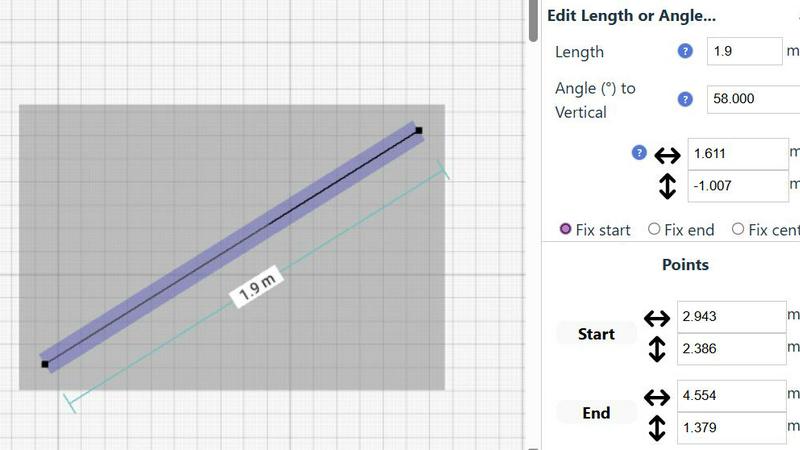
SimpleDraw excels in providing precise measurements and scale drawing capabilities. With smart alignment features, users can ensure that their drawings are not only accurate but also perfectly to scale, allowing for professional-quality results without the need for specialized training.
Specialized Floor Plan Creator
The dedicated Floor Plan Mode allows users to create detailed layouts with walls, doors, and furniture in just a few clicks. This feature streamlines the design process, making it easy to visualize spaces before embarking on any renovation or decoration project.
Smart Alignment System
This intelligent system assists users in placing points and lines exactly where they want them. By providing visual indicators and contextual help, it enhances precision and control, making it easier to achieve the desired layout without frustration.
Comprehensive Measurement System
SimpleDraw includes a robust measurement system that allows users to choose between metric and standard US units. Dynamic contextual measurements display as you work, ensuring that your drawings are as accurate as possible and tailored to your specifications.
Use Cases
Gleem.AI Studio
Social Media Content Creation
Creators and social media managers can rapidly produce a high volume of engaging, on-brand visuals for platforms like Instagram, Facebook, and Twitter. The unified workspace allows for quick generation of base images, easy editing to fit specific post formats (like Stories or Reels), and the creation of variations for A/B testing—all from a mobile or desktop app, enabling content creation on the go.
Marketing & Advertising Asset Production
Marketing teams and small businesses can efficiently create professional marketing assets such as blog graphics, email headers, digital ad banners, and promotional flyers. The ability to iterate quickly on concepts, maintain visual consistency across campaigns, and edit images directly with AI saves significant time and resources compared to using multiple disparate design tools.
E-commerce Product Visualization
Online retailers can generate and enhance product images, create lifestyle shots by placing products in different scenes, and produce multiple visual variations for listings. The AI editing capabilities are perfect for removing backgrounds, adding complementary objects, or adjusting lighting to make products more appealing, all without expensive photography shoots for every new idea.
Personal Branding & Avatar Development
Professionals, influencers, and entrepreneurs can build a strong visual identity by generating a custom AI avatar. This avatar can be used consistently across websites, speaker profiles, newsletters, and social media, appearing in various professional settings and outfits. It provides a scalable and flexible solution for personal branding without the ongoing cost and logistics of professional photography.
SimpleDraw
Kitchen & Bathroom Planning
Users can plan their kitchen and bathroom renovations with accurate measurements to visualize layouts before beginning any work. This practical use of SimpleDraw allows for better decision-making and efficient design.
Room Layouts & Furniture Planning
Designing room layouts becomes effortless with SimpleDraw. Users can experiment with different furniture arrangements in bedrooms, living rooms, or offices, ensuring that everything fits perfectly before making any purchases.
House & Apartment Plans
Create complete floor plans for various home projects, whether for personal use or rental listings. SimpleDraw provides the tools necessary to generate comprehensive layouts, aiding in effective space planning.
DIY and Home Renovation Projects
For DIY enthusiasts, SimpleDraw offers a platform to sketch out home improvement ideas. From initial layouts to detailed designs, users can refine their concepts and visualize the final outcome without needing extensive drafting skills.
Overview
About Gleem.AI Studio
Gleem.AI Studio is a unified, mobile-first AI image workspace designed for creators who want to focus on their vision, not on technical configuration. It streamlines the entire creative process by combining AI image generation, advanced editing, and avatar management into a single, intuitive environment. This eliminates the need to juggle multiple fragmented tools, allowing for a seamless workflow where you can generate an image, edit it with natural language prompts, and iterate on variations without ever losing context or starting over. The platform is built specifically for marketers, content creators, and small teams who need to produce consistent, high-quality visuals quickly. By removing unnecessary complexity, advanced settings, and endless parameters, Gleem.AI Studio empowers users to maintain their creative flow, make visual decisions faster, and iterate effortlessly. Whether you're crafting marketing assets, social media content, product images, or exploring creative concepts, it provides a simple, fast, and all-in-one toolkit that keeps the entire project—from initial prompt to final edit—organized and accessible in one place.
About SimpleDraw
SimpleDraw is an innovative, free online tool that democratizes the art of scale drawing, making it accessible for everyone from DIY enthusiasts to casual users. With its intuitive interface, SimpleDraw simplifies the complexities of technical drafting, allowing users to create precise floor plans and architectural drawings directly from their web browser. No installation or login is required, making it easy to dive right into your projects without any prior CAD experience. Whether you are sketching a layout for your new kitchen or planning a detailed renovation, SimpleDraw offers professional-grade precision in a user-friendly package. The platform is designed to empower users with features like real-time measurements and smart alignment, ensuring that your drawings are both accurate and visually appealing. With SimpleDraw, you can effortlessly bring your ideas to life, creating clear visual plans that cater to any project, whether it be home improvement, rental listings, or interior design.
Frequently Asked Questions
Gleem.AI Studio FAQ
What is Gleem.AI Studio?
Gleem.AI Studio is an all-in-one AI image workspace that combines text-to-image generation, AI-powered editing, and avatar creation in a single, unified platform. It is designed to simplify the creative process for marketers, creators, and teams by eliminating the need to switch between multiple tools, allowing for fast iteration and seamless workflow from idea to final visual.
Who is Gleem.AI Studio for?
It is built for anyone who needs to create visuals quickly and consistently without deep technical expertise. The primary users are marketers, content creators, social media managers, small business owners, and design teams who value speed, simplicity, and an unbroken creative workflow over configuring complex, standalone professional software.
How does the Prompt Enhance feature work?
When you type a natural language description into the text-to-image generator, the Prompt Enhance feature automatically refines and optimizes your input. It interprets your intent and improves the phrasing to communicate more effectively with the AI image model, leading to higher-quality, more accurate, and visually consistent results without requiring you to learn advanced prompt engineering techniques.
How does the platform keep projects organized?
Gleem.AI Studio organizes work into dedicated project spaces. Each idea or campaign gets its own project where all related assets, saved prompts, edit histories, and image versions are stored together. This system makes it easy to revisit previous work, build upon iterations, and maintain version control, ensuring everything is accessible and your creative process remains structured.
SimpleDraw FAQ
Is SimpleDraw free to use?
Yes, SimpleDraw is completely free to use. There are no hidden fees, and you do not need to sign up or download any software to start drawing.
Do I need any prior CAD experience to use SimpleDraw?
No, SimpleDraw is designed for everyone, including those with no prior CAD experience. Its intuitive interface makes it easy for beginners to create professional-quality drawings.
Can I access SimpleDraw on my mobile device?
Yes, SimpleDraw works directly in your web browser, making it accessible on various devices, including smartphones and tablets, for a seamless drawing experience on the go.
How can I provide feedback or request new features?
Users are encouraged to join the SimpleDraw Discord community, where they can share feedback and suggest new features. The team actively listens to user input to continuously improve the platform.
Alternatives
Gleem.AI Studio Alternatives
Gleem.AI Studio is an all-in-one AI image workspace designed for marketers and creators. It combines image generation and editing into a single, streamlined workflow, removing technical complexity to help users focus on creative decisions and fast iteration. Users often explore alternatives for various reasons. This could be due to budget constraints, a need for more advanced or specific features, or a preference for a different platform or ecosystem. Some may require tools that integrate deeply with other software in their existing stack. When evaluating other options, consider your core needs. Look for a tool that balances power with ease of use, fits your budget, and supports your specific creative workflow. The goal is to find a solution that enhances your productivity without introducing unnecessary friction or a steep learning curve.
SimpleDraw Alternatives
SimpleDraw is an innovative online design tool that enables users to create accurate scale drawings and detailed floor plans directly in their web browser, all for free. As a part of the design tools category, it caters to casual users, DIY enthusiasts, and anyone looking to visualize their space without the need for complex software. However, many users may seek alternatives for various reasons, including the need for additional features, specific platform compatibility, or different pricing structures. When searching for an alternative, consider the ease of use, the range of functionalities offered, and whether it meets your specific project requirements. Choosing the right alternative also involves evaluating how well the tool can adapt to your workflow and whether it offers robust support for the types of projects you undertake. Look for features that enhance your design process, such as smart alignment systems, flexibility in zooming, and precision control. Ultimately, the goal is to find a tool that not only meets your technical needs but also enhances your overall user experience.