
Melograph vs Sovideo
Side-by-side comparison to help you choose the right AI tool.

Melograph effortlessly turns your music tracks into stunning, customizable videos in minutes, ready for any platform.
Last updated: February 28, 2026

Sovideo lets you effortlessly create stunning AI images and videos using top models all in one powerful app.
Last updated: February 28, 2026
Visual Comparison
Melograph

Sovideo
Feature Comparison
Melograph
Template Variety
Melograph offers an extensive collection of beautifully designed templates that cater to various musical genres and aesthetics. Users can choose from minimalistic, cinematic, retro, and futuristic styles, ensuring that the visuals perfectly complement their unique sound.
Audio-Reactive Visuals
With Melograph, users can instantly see their audio waveforms react to the music. This feature enhances the engagement factor of the videos, making them more dynamic and visually appealing, perfect for capturing the audience’s attention.
Customizable Outputs
Users can personalize their videos by adding artist and song titles, as well as logos or album covers on selected templates. This customization ensures that the visuals not only match the music but also represent the artist's brand effectively.
Quick Export Options
Melograph provides fast export capabilities, generating high-quality MP4 videos in 1080p directly from the browser without the need for lengthy uploads. This feature enables users to create and share their content quickly and efficiently, ideal for today’s fast-paced digital landscape.
Sovideo
AI Video Generator
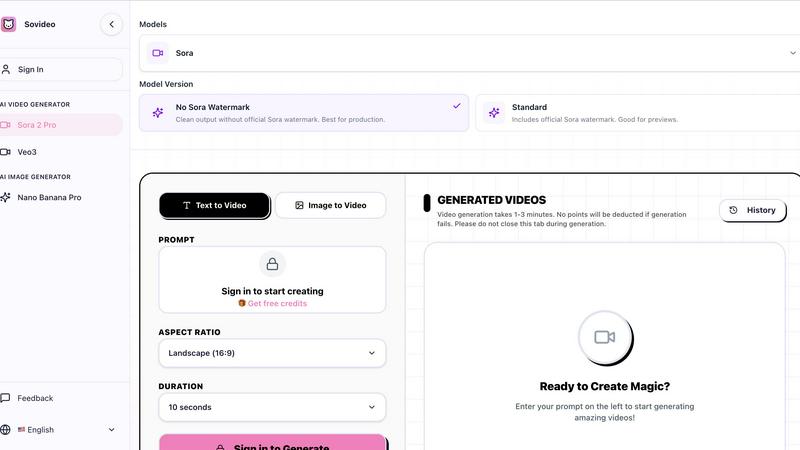
Sovideo's AI Video Generator utilizes advanced models like Sora 2 and Veo 3 to create high-quality videos from simple text prompts or images. Users can generate cinematic visuals with synchronized audio, ensuring that their content is not only visually appealing but also engaging.
AI Image Generator
The AI Image Generator combines the capabilities of Seedream 4.5 and Nano Banana Pro, enabling users to create stunning images effortlessly. This feature allows for the generation of various artistic styles and photorealistic images, catering to diverse creative needs without the hassle of switching applications.
Intuitive User Interface
Sovideo boasts an intuitive user interface designed for a seamless experience. The platform is built to accommodate both novice and experienced creators, making it easy to navigate through the tools, templates, and workflows necessary for generating high-quality visual content.
Unified Model Access
With Sovideo, users gain unified access to some of the most powerful AI models in the market, including Sora 2, Veo 3, Nano Banana Pro, and Seedream 4.5. This feature empowers creators to produce a wide range of content types without the need for multiple subscriptions or software installations.
Use Cases
Melograph
Independent Music Artists
Indie artists can utilize Melograph to create captivating music videos that enhance their singles or albums. The easy-to-use templates allow them to produce professional-looking visuals without extensive video editing experience.
Music Producers
Producers can leverage Melograph to create engaging audio-reactive videos for their projects. This helps them present their work to clients or share on social media, showcasing their production skills alongside stunning visuals.
Record Labels
Labels can use Melograph to maintain a consistent visual identity for their artists. By using the same templates across various releases, they can establish brand recognition and professionalism in their marketing efforts.
DJs
DJs can create vibrant visuals for their mixes and sets, allowing them to stand out during performances or livestreams. The quick export feature ensures they have shareable content ready to promote their events or music.
Sovideo
Social Media Content Creation
Sovideo is perfect for social media managers looking to generate eye-catching posts quickly. By transforming text ideas into engaging videos or images, users can keep their content fresh and relevant, boosting engagement and follower interactions.
Marketing Campaigns
Marketers can leverage Sovideo to create compelling promotional materials in a fraction of the time. By using the AI-driven tools, they can produce high-quality visuals that resonate with target audiences, enhancing campaign effectiveness and brand visibility.
Filmmaking and Video Production
Independent filmmakers can utilize Sovideo for video production, from concept to final edit. The platform allows for rapid prototyping of scenes and visual effects, significantly speeding up the creative process and reducing costs associated with traditional filmmaking.
Artistic Exploration
Hobbyists and artists can explore their creative boundaries using Sovideo's robust features. By experimenting with AI-generated images and videos, they can discover new artistic styles and techniques, pushing the limits of traditional media.
Overview
About Melograph
Melograph is a revolutionary web-based music visualizer designed specifically for musicians, producers, and creators who want to craft visually stunning content without the hassle of traditional video editing. This innovative tool simplifies the process of creating eye-catching audio-reactive videos by offering a user-friendly interface that allows for quick and easy video creation. Users can select from a diverse set of premium templates that suit various musical styles, including chill, cinematic, retro, and futuristic vibes. With just a few clicks, you can upload your audio track, enter your artist name and song title, and swiftly generate a high-quality video ready for export. Melograph is ideal for indie artists, producers, labels, and DJs who want to enhance their music releases with consistent, professional visuals while saving valuable time and effort. The main value proposition of Melograph lies in its ability to streamline the visual creation process, enabling users to concentrate on their music while effortlessly producing captivating content perfect for social media and other platforms.
About Sovideo
Sovideo is the ultimate all-in-one AI creative suite that revolutionizes the way creators generate high-quality visual content. With a user-friendly, browser-based platform, it consolidates powerful image and video generation models into a single interface, eliminating the need for multiple tools and complex workflows. Ideal for social media managers, marketers, filmmakers, and hobbyists alike, Sovideo enables users to transform text prompts or images into stunning visuals effortlessly. The platform's core strength is its integration of cutting-edge models such as Sora 2, Veo 3, Nano Banana Pro, and Seedream 4.5, allowing creators to produce everything from photorealistic scenes and captivating cinematic videos to artistic illustrations without switching tools. By streamlining the creative process from ideation to iteration, Sovideo significantly cuts down production time and costs, empowering users to experiment freely, scale their content creation, and realize their most ambitious ideas faster than ever.
Frequently Asked Questions
Melograph FAQ
Do I need editing experience?
No, Melograph is designed for users of all skill levels. If you can select a template and type in your title, you can create visually stunning videos without any editing experience.
Will this work for TikTok, Reels, or Shorts?
Absolutely! Melograph exports videos in platform-friendly formats that are perfect for sharing on TikTok, Instagram Reels, and YouTube Shorts, making it easy to reach your audience.
Can I use it for multiple songs?
Yes, Melograph supports multiple uploads. You can create visuals for any number of tracks, allowing you to promote your entire catalog with captivating videos.
What do I get after payment?
After payment, you gain access to all premium templates, export credits based on your chosen plan, and the ability to create professional-quality music visuals without watermarks.
Sovideo FAQ
What type of content can I create with Sovideo?
With Sovideo, you can create a variety of content, including high-quality images, cinematic videos, and artistic illustrations, all generated from text prompts or existing images.
Do I need to download any software to use Sovideo?
No, Sovideo operates entirely within your web browser. This means you can access all of its features without the need for downloads or installations, providing a hassle-free experience.
How long does it take to generate content?
The content generation process typically takes 1-3 minutes. Users are encouraged to stay on the page during this time to ensure a smooth experience, even if the generation fails.
Can I use Sovideo for commercial purposes?
Yes, Sovideo allows users to create content for commercial use. You can produce promotional materials, advertisements, and social media posts without worrying about licensing issues.
Alternatives
Melograph Alternatives
Melograph is a cutting-edge web-based music visualizer designed for musicians and creators who want to elevate their audio tracks with stunning visuals. It simplifies the video creation process by offering customizable templates that cater to various styles, allowing users to produce high-quality, audio-reactive videos quickly and efficiently. Users often seek alternatives to Melograph for various reasons, including pricing, specific features, or platform compatibility. When choosing an alternative, it's essential to consider factors like user interface, template variety, export quality, and overall ease of use. A good alternative should not only meet your visual needs but also enhance your creative process without unnecessary complications.
Sovideo Alternatives
Sovideo is an all-in-one app designed for creating AI images and videos, making it a popular choice among content creators, marketers, and hobbyists. This platform integrates multiple top-tier models into a single, intuitive workspace, allowing users to efficiently generate high-quality visual content. However, users often seek alternatives due to varying needs such as pricing, feature sets, and platform compatibility. Some may require specific functionalities or different pricing structures that better align with their budget and project requirements. When searching for an alternative to Sovideo, consider factors like the variety of AI models offered, ease of use, and whether the platform is browser-based or requires installation. It's essential to evaluate the specific features that are critical to your creative process, as well as the overall user experience to ensure that the alternative meets your expectations and enhances your productivity.