
voicebrief.io vs Zovo
Side-by-side comparison to help you choose the right AI tool.

voicebrief.io
Transform dense PDFs into engaging audio lectures and get instant AI tutoring for on-the-go learning.
Last updated: February 28, 2026

Unlock 20 privacy-first Chrome extensions for developers and writers, all from one dedicated solo developer.
Last updated: February 28, 2026
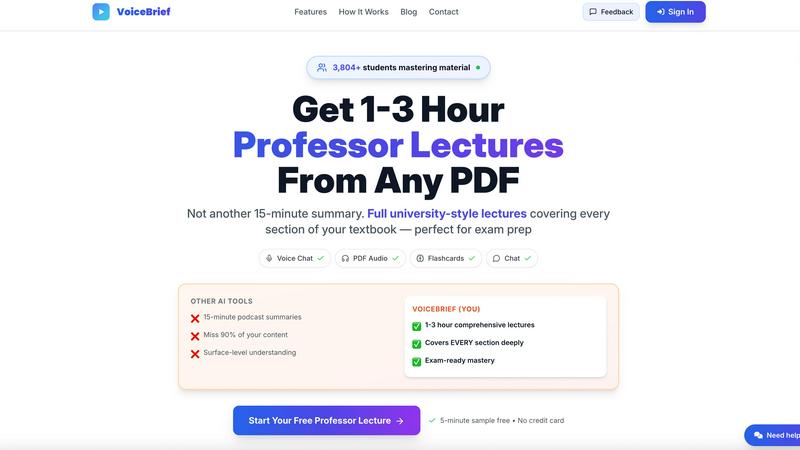
Visual Comparison
voicebrief.io
Zovo

Feature Comparison
voicebrief.io
AI-Powered Audio Lectures
Voicebrief.io utilizes advanced AI technology to convert any PDF document into engaging audio lectures. This feature allows users to absorb complex materials through a natural-sounding voice, making learning feel more interactive and accessible.
Interactive Voice Q&A
With the voice-activated Q&A feature, users can engage directly with their documents. This allows for instant clarifications and deeper understanding of challenging concepts, enhancing the overall learning experience.
Smart Quizzes
Voicebrief generates AI-powered quizzes based on the uploaded content, facilitating active recall and spaced repetition. This feature helps users to test their knowledge and reinforce learning, ensuring that the material is absorbed effectively.
AI Summaries
In addition to full-length lectures, Voicebrief provides concise AI-generated summaries of any document. This feature enables users to quickly grasp the essential points of lengthy texts, making it easier to prioritize study material.
Zovo
BeLikeNative
BeLikeNative is Zovo's flagship extension that helps users write like native speakers with just a keystroke. Supporting 80 languages, it simplifies communication for non-native speakers, making it an invaluable tool for anyone who writes in a foreign language. The extension adjusts tone, style, and phrasing, enabling users to convey their messages more effectively and naturally.
Tab Suspender Pro
Tab Suspender Pro helps manage browser memory usage by automatically suspending inactive tabs. This feature is especially beneficial for users who tend to keep many tabs open, as it reduces memory consumption, enhances browser performance, and prolongs battery life on laptops. It ensures a smoother browsing experience without manual tab management.
Clipboard History Pro
This extension keeps a history of copied items, allowing users to retrieve previously copied text and images easily. With Clipboard History Pro, you can access up to 100 items, making it a reliable tool for anyone who regularly copies and pastes information. It saves time and enhances productivity by reducing the need to recopy frequently used items.
Form Filler Pro
Form Filler Pro streamlines the process of filling out online forms by auto-generating random data or using previously saved information. This feature is particularly useful for users who frequently register for services or complete surveys, as it saves time and minimizes the frustration often associated with tedious form filling.
Use Cases
voicebrief.io
Student Study Aid
Students can convert their textbooks and lecture notes into audio format, allowing them to study while on the go. This is particularly beneficial for auditory learners who retain information better through listening.
Professional Development
Professionals can stay updated with the latest industry reports, whitepapers, and research papers by converting these documents into audio. This allows them to utilize commuting time for continuous learning and skill enhancement.
Exam Preparation
Voicebrief is an excellent tool for those preparing for significant exams like the CPA, CFA, or MCAT. Users can listen to comprehensive audio lectures that cover all relevant material, maximizing their study efficiency.
Lifelong Learning
For lifelong learners, Voicebrief transforms any PDF into an audiobook, covering a wide range of topics from self-help to science. This feature supports ongoing education and personal growth, allowing users to explore new interests at their convenience.
Zovo
Enhancing Language Skills
For users learning a new language, BeLikeNative provides instant rewrites that make it easier to compose messages and documents. This application is perfect for students, professionals, or anyone looking to improve their writing skills in a foreign language, enabling them to communicate more confidently.
Boosting Productivity
Tab Suspender Pro is ideal for busy professionals who juggle multiple projects. By automatically suspending inactive tabs, it allows users to focus on the task at hand without being distracted by unnecessary tabs, thus enhancing overall productivity and efficiency.
Streamlining Copying and Pasting
Clipboard History Pro is beneficial for writers, researchers, and anyone who frequently needs to copy text from various sources. By maintaining a history of copied items, users can quickly retrieve and paste information, making their workflow smoother and more efficient.
Simplifying Online Registrations
Form Filler Pro is particularly useful for users who often sign up for online services or complete surveys. By auto-filling forms with generated or saved data, it saves time and reduces the likelihood of errors, allowing users to navigate the web more seamlessly.
Overview
About voicebrief.io
Voicebrief.io is an innovative AI-powered study platform that redefines the way students and professionals engage with dense academic materials. By transforming traditional reading into immersive audio learning, Voicebrief addresses the common challenges of information overload and lack of focus. The platform excels in converting complex content such as textbooks, research papers, and lecture notes into detailed audio lectures that mimic the style of a professor. This approach ensures that users grasp critical details while studying. Ideal for students in demanding fields like medicine, law, and engineering, as well as those preparing for high-stakes exams, Voicebrief seamlessly turns idle time—whether during commutes, workouts, or household chores—into productive learning sessions. With features like voice-activated Q&A and auto-generated study aids, Voicebrief acts as a 24/7 AI tutor, enabling users to learn efficiently, understand deeply, and potentially save hundreds of dollars on traditional tutoring services.
About Zovo
Zovo is a comprehensive suite of 20 Chrome extensions developed by a dedicated solo developer with over a decade of experience and an impressive track record of earning over $400K on Upwork, boasting a 100% success rate. The flagship extension, BeLikeNative, empowers more than 3,300 users to write like native speakers, offering one-keystroke rewrites in as many as 80 languages. The diverse collection of tools includes essential utilities such as Tab Suspender Pro, JSON Formatter Pro, Clipboard History Pro, and Form Filler Pro, among others. Each extension prioritizes user privacy, ensuring that no data leaves your device—there are no investors, no data harvesting, and no corporate interference. Users actively participate in shaping the roadmap by voting on features, fostering a community-driven approach to development. With new extensions rolling out monthly and early access for members, Zovo caters to users who seek powerful, privacy-first tools for their browsers. Many of these tools are also available for free online at zovo.one, making Zovo a compelling choice for anyone looking to enhance their browsing experience without compromising on privacy.
Frequently Asked Questions
voicebrief.io FAQ
How does Voicebrief convert PDFs into audio?
Voicebrief employs advanced AI algorithms to analyze and extract content from PDF documents. It then synthesizes this information into natural-sounding audio lectures, allowing users to learn while listening.
Can I interact with the audio content?
Yes, Voicebrief offers an interactive voice Q&A feature. Users can ask questions related to their documents and receive instant answers, providing a more engaging and personalized learning experience.
Is Voicebrief suitable for all types of learners?
Absolutely! Voicebrief caters to various learning styles, particularly those who benefit from auditory learning. It is designed for students, professionals, and anyone interested in lifelong learning.
What kind of documents can I upload?
Voicebrief accepts a wide range of document types, including PDFs, images of handwritten notes (using OCR), and URLs. This versatility ensures that users can convert various materials into audio for effective learning.
Zovo FAQ
Is Zovo free to use?
Zovo offers many extensions for free, allowing users to access essential features without any cost. For additional capabilities, users can upgrade to a Pro subscription.
How does Zovo ensure my privacy?
Zovo is built with privacy in mind. All extensions run locally on your device, meaning no data is collected, stored, or transmitted. This guarantees that your browsing activity remains private and secure.
Can I suggest new features for Zovo extensions?
Absolutely! Zovo encourages user feedback and suggestions. You can submit feature requests directly, and the most requested features are prioritized for development.
How often are new extensions released?
New extensions are released monthly, with early access provided to members. This ensures that users can benefit from the latest tools and features as soon as they become available.
Alternatives
voicebrief.io Alternatives
Voicebrief.io is an innovative AI-powered study platform that transforms dense academic materials into engaging audio lectures. Designed to cater to students and professionals in demanding fields, it provides a unique solution for turning idle time into productive learning sessions. Users often seek alternatives to Voicebrief.io for various reasons, including pricing considerations, specific feature sets, or compatibility with their preferred platforms. When choosing an alternative, it's essential to look for comprehensive audio content, interactive learning features, and the ability to personalize the study experience to meet individual needs.
Zovo Alternatives
Zovo is a suite of 20 privacy-first Chrome extensions designed for developers and writers, providing tools that enhance productivity and streamline various tasks. With extensions like Tab Suspender, JSON Formatter, and Clipboard History, Zovo caters to users looking for efficient ways to manage their workflow without compromising their privacy. The platform is built on a foundation of user feedback, ensuring that the features evolve according to the needs of its community. Users often seek alternatives to Zovo for reasons such as pricing, feature sets, or specific platform compatibility. When evaluating alternatives, it's essential to consider the core functionalities offered, the level of privacy protection, and the overall user experience. Additionally, look for platforms that prioritize user input in their development roadmap, as this fosters a more tailored and satisfying experience.