

Easymotion - AI Motion Graphic Generator
Turn static images, data, or ideas into professional motion graphics and map animations in minutes using simple chat prompts.
AI tool Details
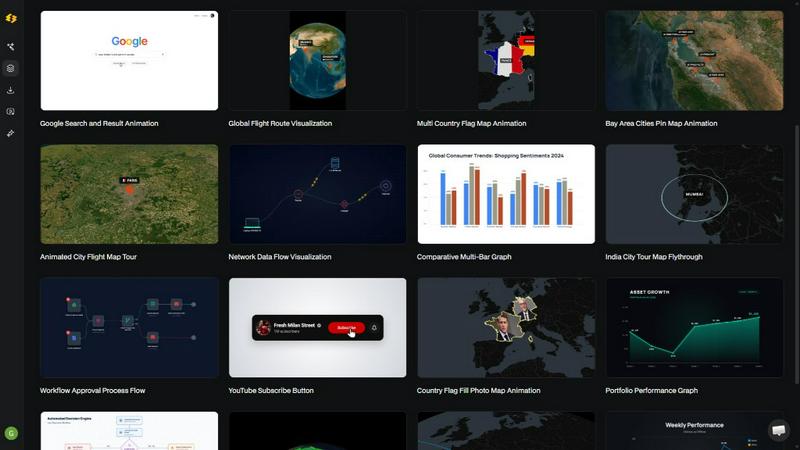
About Easymotion - AI Motion Graphic Generator
Easymotion is an AI-powered motion graphics generator and map animation platform designed for content creators, video editors, marketers, founders, and data storytellers who need to produce polished animated videos without the steep learning curve of traditional editing software like After Effects. The platform transforms ideas, static visuals, and data files into professional motion graphics in minutes, all through a simple chat interface. Instead of wrestling with timeline editors and keyframes, users simply describe what they want in plain English, and the AI handles the animation curves, transitions, and visual effects. Easymotion supports a wide range of motion graphic formats including SaaS product promos, animated flowcharts, dynamic charts, UI explainers, quizzes, and social media videos. It also excels as a map animation maker for flight routes, location pins, flag fill highlights, and geographic storytelling. Users can start from a text prompt, upload an image to animate, or import CSV and XLSX spreadsheets to turn boring data into engaging animated visuals. After generation, every element remains editable through chat commands, allowing users to adjust colors, pacing, labels, layout, and visual style without any design skills. With a premium template library, transparent background export, and support for all major aspect ratios, Easymotion is built for anyone who needs to create reusable video assets quickly and directly in the browser.
Features
AI-Powered Chat Creation
Describe your animation in natural language and let the AI generate professional motion graphics instantly. Simply type what you want, such as "design a social media promo video for my coffee shop," and Easymotion produces a complete animated scene with appropriate pacing, transitions, and visual elements. This eliminates the need for any timeline editing or keyframe manipulation.
Image to Animation Conversion
Upload any static image and watch as AI brings it to life with stunning motion effects. Whether it is a product photo, logo, infographic, or screenshot, Easymotion analyzes the visual content and applies intelligent animations that highlight key elements, create smooth transitions, and add professional polish without manual effort.
Data to Animated Visuals
Transform boring spreadsheets into engaging animated charts and graphs by uploading CSV or XLSX files. The AI automatically parses your data, selects the most appropriate visualization format, and creates animated bar charts, line graphs, pie charts, and more. This feature is perfect for data storytellers who want their insights to stop the scroll on social media.
Map Animation Studio
Create stunning geographic animations including flight routes, location pins, flag fill highlights, and globe fly-throughs with ease. The platform handles complex map rendering and animation automatically, allowing users to produce travel reels, global business visualizations, and geographic storytelling content that previously required specialized GIS software or hours of After Effects work.
Use Cases
Social Media Content Creation
YouTubers, TikTok creators, and Instagram influencers can rapidly produce polished video content for any platform. With support for 16:9, 9:16, 1:1, and 4:5 aspect ratios, users can create channel trailers, milestone celebrations, travel reels, and promotional videos that are optimized for each platform. The average video takes under five minutes to produce, enabling creators to post more frequently and grow their audience faster.
Marketing Campaign Production
Marketing teams can ship video campaigns the same day without waiting on designers or external agencies. Easymotion enables marketers to create branded product promos, animated explainers, and social ads independently, iterating on messaging and visuals through simple chat commands. This self-service approach eliminates back-and-forth email chains and keeps campaigns moving at the speed of modern marketing.
Data Storytelling and Reporting
Analysts, consultants, and educators can turn static charts and spreadsheets into animated data stories that capture audience attention. Video posts featuring animated data visualizations generate up to five times more engagement than static images. Easymotion makes it simple to create animated line graphs, bar charts, and flowcharts that clearly communicate trends, comparisons, and processes.
Video Editing and Post-Production
Professional video editors can use Easymotion to accelerate their motion graphics workflow. The platform exports videos with transparent backgrounds, allowing editors to drop animated elements directly into Premiere Pro, Final Cut Pro, or DaVinci Resolve without additional compositing work. This integration helps editors complete projects three times faster by eliminating the need to build custom motion graphics from scratch.
Frequently Asked Questions
What is Easymotion?
Easymotion is an AI-powered motion graphics generator that lets you create professional animated videos simply by chatting. You can instantly generate map animations, animate static images, turn spreadsheets into data visualizations, and create social media videos without needing complex software like After Effects. It is built for creators, editors, marketers, and founders who need fast, high-quality results.
How does AI motion graphics generation work?
It works in three simple steps. First, describe the animation you want in plain English, such as "create a flight route map animation from New York to London." Second, refine the result using chat commands to adjust colors, timing, map styles, or assets. Finally, export your completed video as an MP4 or with a transparent background. The AI handles all the keyframes and animation curves automatically.
What types of videos can I create?
You can create a wide variety of motion graphics including SaaS product promos, animated flowcharts, data charts and graphs, UI explainers, quizzes, social media videos, and map animations. Specific examples include flight route visualizations, globe fly-throughs, travel reels, YouTube milestone videos, WhatsApp chat animations, workflow charts, and line graphs. The platform also supports image-to-animation and data-to-animation workflows.
What export formats and aspect ratios are supported?
Easymotion supports MP4 and MOV export formats, including videos with transparent backgrounds for editing workflows. Aspect ratio options include 16:9 for YouTube and landscape content, 9:16 for TikTok and Instagram Reels, 1:1 for square social posts, and 4:5 for feed-friendly vertical formats. This flexibility ensures your videos are ready to post on any platform without additional editing.
Similar to Easymotion - AI Motion Graphic Generator
ImageAgent
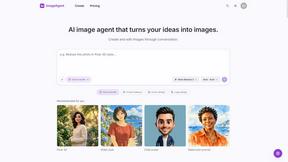
Create and edit AI images through conversation, using text or reference images and refining results in chat.

Qwen Image 2.1
Qwen Image 2.1 is an AI image-generation and editing studio for turning ideas into vivid visuals, from portraits to product shots.

Hotel Lobby AI
Turn two separate portraits into an orange-booth duet video with motion transfer, lip-sync, and audio.

airapvideo
Turn two portraits into a short vertical, lip-synced AI rap music video.

GenX
All-in-one AI workspace to generate images, videos, and audio with multiple leading AI models.

Bloom
An adaptive AI tutor that turns topics or your materials into courses, lessons, and answers tailored to how you learn.

AppIconGenerator
Generate iOS and Android app icons from any image and export all platform sizes for free.
FreeCreate
Free AI image and video studio with no sign-up: generate images from text or photos, turn prompts into short videos, plus editing and upscaling.