

MeetingMind
MeetingMind captures, transcribes, and summarizes your Zoom meetings automatically, ensuring you never miss a detail.
AI tool Details
Alternatives
About MeetingMind
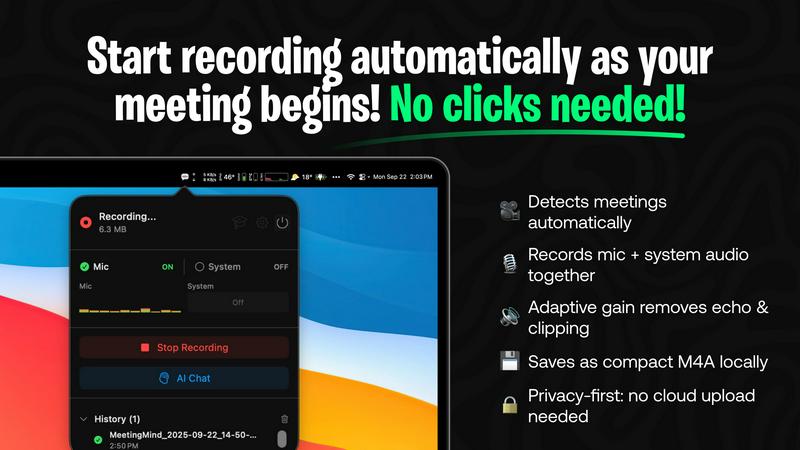
MeetingMind is an innovative intelligent meeting assistant crafted specifically for individuals and teams who seek to maximize productivity during meetings. Designed to seamlessly integrate with Zoom, MeetingMind automatically detects and records meetings without the need for manual intervention, allowing users to concentrate on what truly matters: the conversation. This powerful tool excels at transforming spoken dialogue into searchable and interactive notes, delivering real-time, speaker-attributed transcripts in a clean markdown format. MeetingMind is ideal for professionals, teams, and organizations aiming to enhance meeting efficiency and accountability. With its on-device AI technology, users can fully engage in discussions while benefiting from instant AI-generated summaries, action items, and the ability to query the conversation live. Prioritizing privacy and security, MeetingMind processes all data locally on your Mac, ensuring that sensitive information remains confidential and secure.
Features
Automatic Detection
MeetingMind automatically detects Zoom meetings without requiring any clicks from the user. This feature ensures that your meetings are recorded effortlessly, allowing you to stay focused on the discussion rather than managing recording settings.
Comprehensive Recording
The tool captures both microphone and system audio, delivering a complete record of what was discussed during your meetings. This adaptive gain feature ensures that all voices are heard clearly, providing a faithful representation of the meeting dialogue.
AI Assistant Integration
With MeetingMind, you have the option to choose between a local AI assistant or a cloud-based service for generating summaries and insights. This flexibility allows users to customize their experience based on their preferences for speed and data privacy.
Markdown Export
Once your meeting concludes, MeetingMind generates AI-driven summaries and transcripts that are saved in a clean, formatted markdown file. This makes it easy to reference, share, or integrate into other documents, enhancing accessibility and collaboration.
Use Cases
Efficient Team Meetings
Teams can use MeetingMind to streamline their meetings by automatically capturing discussions and action items. This ensures everyone stays on the same page, enhancing accountability and follow-up on tasks.
Remote Work Collaboration
For remote teams, MeetingMind serves as a vital tool to bridge communication gaps. It allows team members to revisit conversations and decisions, fostering a collaborative environment even when working from different locations.
Client Consultations
Consultants and freelancers can leverage MeetingMind during client meetings to ensure no detail is missed. The ability to access transcripts and summaries allows for better follow-up and client management, ultimately improving service delivery.
Academic Discussions
Researchers and educators can utilize MeetingMind to record lectures, seminars, or academic discussions. The searchable transcripts make it easy to reference specific points, aiding in study and research efforts.
Frequently Asked Questions
How does MeetingMind ensure my data privacy?
MeetingMind processes all data locally on your Mac, meaning that your meetings and sensitive information never leave your device, ensuring maximum privacy and security.
Can I use MeetingMind for meetings other than Zoom?
Currently, MeetingMind is designed to work specifically with Zoom meetings. Future updates may include support for additional platforms, but as of now, Zoom integration is its primary focus.
What is the benefit of using the local AI assistant vs. the cloud option?
Choosing the local AI assistant means your data stays on your device, enhancing privacy. The cloud option may offer faster processing times but involves sending data to external servers, which some users may prefer to avoid.
Is there a limit to the free version of MeetingMind?
Yes, the free version of MeetingMind allows for 60 minutes of recording per day. This is perfect for short meetings or daily standups, with the option to upgrade for unlimited recording capabilities.
Similar to MeetingMind
GetYouTubeTranscript
Free YouTube transcripts on the web, a Chrome extension, and an API + MCP server so AI assistants can read YouTube.
Product Launch Checklist
A free launch checklist for SaaS, apps, AI tools and more. Every step says why it matters and when you can skip it.
Kody Tools
Free collection of online developer utilities, code formatters, and digital converters designed to streamline your daily workflow.


Forms Plugin
The #1 Native Form Builder Plugin for Framer - No Code, No Embeds, No External Platforms.

