

Prompt Builder
Prompt Builder lets you quickly create, refine, and manage AI prompts for any model, streamlining your workflow in one easy app.
AI tool Details
Explore More
Alternatives
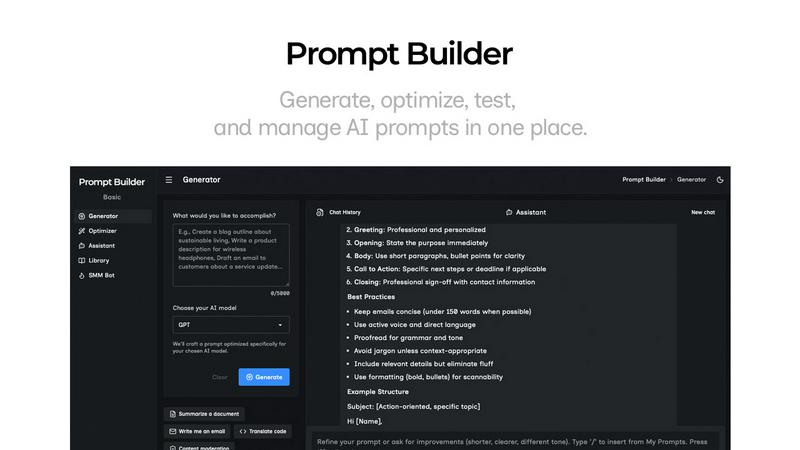
About Prompt Builder
Prompt Builder is an innovative workspace designed specifically for prompt engineering, making it easier for users to write, test, and save prompts tailored to various AI models. Whether you are a developer, content creator, or AI enthusiast, this tool streamlines the process of crafting high-quality prompts. It allows you to start with a draft, engage in a chat for refinement, and then save or pin your best versions for future use—ensuring that you have easy access to your most effective prompts. Prompt Builder supports a wide range of AI models, including GPT, Claude, Gemini, Llama, Mistral, DeepSeek, Grok, and Perplexity, enhancing its versatility. The platform also features an Optimizer for quick adjustments, a library for reusable prompts and community templates, and a user-friendly interface that turns ideas into ready-to-use prompts in mere seconds. With Prompt Builder, you can eliminate the hassle of rewriting prompts and focus on achieving better results.
Features
Prompt Generator
The Prompt Generator is a powerful feature that allows users to describe their ideas, select a target AI model, and generate a professional-grade prompt. This tool ensures that your prompts are specifically tuned for the model you choose, such as Gemini or Claude, saving you time and effort in the crafting process.
Chat Refinement
Built into the platform is a chat workspace that facilitates quick refinement of your prompts. You can engage in real-time dialogue to make adjustments and improvements, ensuring that the final version meets your expectations before saving it.
Prompt Library
The Prompt Library serves as a centralized hub for all your saved prompts. You can organize, search, and filter your prompts by category or model, making it easy to find the right prompt for any project. This feature also allows you to pin your favorites for quick access.
Prompt Optimizer
The Prompt Optimizer enhances existing prompts by providing structured improvements. Simply paste a prompt, and the Optimizer will help you achieve greater clarity and better output formats. This feature also keeps a history of your optimizations for easy reference.
Use Cases
Content Creation
Prompt Builder is perfect for content creators looking to generate engaging articles, blog posts, or social media content. By using tailored prompts for specific models, you can streamline your writing process and produce high-quality materials quickly.
AI Training
Developers and researchers can use Prompt Builder to create effective training prompts for AI models. This ensures that the models receive clear and concise instructions, enhancing their learning and output quality.
Marketing Campaigns
Marketers can utilize the platform to generate tailored prompts for various social media campaigns. With options for platform-specific content, this tool helps streamline the creation of posts that resonate with different audiences.
Collaborative Projects
Teams working on collaborative projects can benefit from the Prompt Library, which allows for easy sharing and organizing of prompts. This collaborative feature helps maintain consistency across different team members while ensuring everyone has access to the best prompts.
Frequently Asked Questions
How does Prompt Builder improve prompt quality?
Prompt Builder improves prompt quality by allowing users to generate tailored prompts for specific AI models, refine them in a chat workspace, and optimize existing prompts for clarity and effectiveness.
Can I use Prompt Builder for any AI model?
Yes, Prompt Builder supports a wide range of AI models, including GPT, Claude, Gemini, Llama, Mistral, DeepSeek, Grok, and Perplexity, making it a versatile tool for various needs.
Is there a limit to how many prompts I can create?
While there is no specific limit to how many prompts you can create, the platform does offer 25 assistant requests per month for free users. This allows you to test and refine prompts before committing to a paid plan.
How do I access the community prompt library?
You can access the community prompt library directly within the Prompt Builder platform. This feature allows you to explore prompts created by other users and add your favorites to your own Library for reuse.
Similar to Prompt Builder
GetYouTubeTranscript
Free YouTube transcripts on the web, a Chrome extension, and an API + MCP server so AI assistants can read YouTube.




amaze.directory
AI tools somebody actually used before writing about them.

benchmark.directory
An AI tools directory that turns down money. 146 listings, 20 categories, no sponsored placement and no affiliate ordering.

saasgrow.ai
Submit your SaaS growth tool free. Pass screening and get a permanent listing page, a dofollow link, and real visibility.

Tools Network
Tools Network is a curated directory that brings the internet's best AI tools together in one organized, easy-to-navigate place.