

SVG to 3D
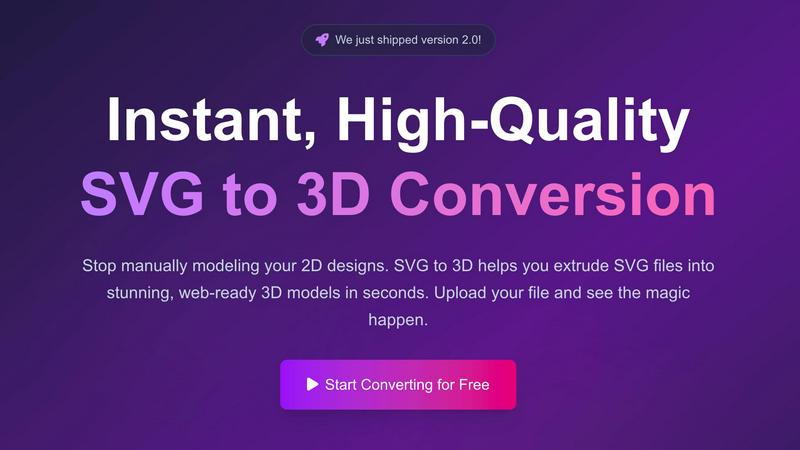
Easily transform your SVG files into stunning 3D models with advanced controls and lightning-fast processing.
AI tool Details
Explore More
Alternatives
About SVG to 3D
SVG to 3D is a revolutionary tool designed to effortlessly convert 2D SVG vector graphics into stunning, high-quality 3D models. This tool caters to a range of users, including web developers, graphic designers, and 3D printing enthusiasts, who often find traditional modeling software cumbersome for simple tasks. With SVG to 3D, you can transform your designs in seconds without the need for heavyweight applications like Blender or Cinema 4D. The primary value proposition lies in its simplicity, speed, and the ability to produce professional-grade 3D models ready for web integration or 3D printing. Users can upload their SVG files, adjust relevant parameters, and export their creations in multiple formats, making it an invaluable asset for anyone looking to enhance their digital projects or physical creations.
Features
One-Click GLB Export
With a single click, you can convert SVG files into web-optimized GLB formats. This feature is specifically tailored for web developers, allowing seamless integration into Three.js or React Three Fiber projects, enhancing the interactive experience of websites.
3D-Print Ready STL Exports
SVG to 3D provides clean STL exports that are directly compatible with slicer software for 3D printing. This feature ensures that designs can be brought to life physically without the need for complex CAD software, making the process straightforward and efficient.
Advanced 3D Modeling Controls
Users have the ability to go beyond basic extrusion with SVG to 3D. The tool offers options to adjust thickness, add bevels, and apply realistic PBR materials, all while providing a real-time 3D preview. This level of control ensures high-quality output that meets professional standards.
Lightning-Fast Processing
The tool is engineered with optimized algorithms that allow for near-instantaneous SVG to 3D conversions. Users can expect their files to be processed in seconds, making it one of the fastest online conversion tools available, ideal for busy designers and developers.
Use Cases
Create Interactive 3D Logos
Designers can easily transform their SVG logos into interactive 3D models, perfect for enhancing web projects. The GLB export is optimized for frameworks like Three.js, allowing for dynamic and engaging user experiences.
Rapid Prototyping for 3D Printing
SVG to 3D serves as an efficient tool for creating prototypes from 2D designs. Users can generate STL files ready for 3D printing, streamlining the workflow from digital design to physical object.
UI/UX Design Enhancement
By converting SVG elements into 3D models, designers can add depth and realism to their mockups. This not only impresses clients and stakeholders but also enhances the overall user experience in digital interfaces.
Educational and Presentation Tools
Educators and presenters can utilize SVG to 3D to create visually impactful materials. Converting logos, diagrams, or infographics into 3D models can make presentations more engaging and informative.
Frequently Asked Questions
How does SVG to 3D work?
SVG to 3D converts 2D SVG files into 3D models using optimized algorithms. Users simply upload their SVG files, adjust settings, and then export their models in various formats, all within a web browser.
Is SVG to 3D free to use?
Yes, SVG to 3D offers a free version that allows users to convert SVG files into 3D models without any registration required. There may be additional features in premium versions, but basic usage is completely free.
What file formats can I export my 3D models to?
Users can export their 3D models in multiple formats including GLB, GLTF, OBJ, and STL. This flexibility ensures compatibility across various 3D frameworks and applications.
Are my designs secure when using SVG to 3D?
Yes, SVG to 3D prioritizes user privacy and security. Files are processed locally in your browser where possible, ensuring that your designs are not uploaded to external servers and remain confidential.
Similar to SVG to 3D
GetYouTubeTranscript
Free YouTube transcripts on the web, a Chrome extension, and an API + MCP server so AI assistants can read YouTube.



amaze.directory
AI tools somebody actually used before writing about them.

benchmark.directory
An AI tools directory that turns down money. 146 listings, 20 categories, no sponsored placement and no affiliate ordering.

saasgrow.ai
Submit your SaaS growth tool free. Pass screening and get a permanent listing page, a dofollow link, and real visibility.

Tools Network
Tools Network is a curated directory that brings the internet's best AI tools together in one organized, easy-to-navigate place.