

TemplateCat
TemplateCat is your friendly AI assistant that effortlessly curates and filters professional website templates for you.
AI tool Details
About TemplateCat
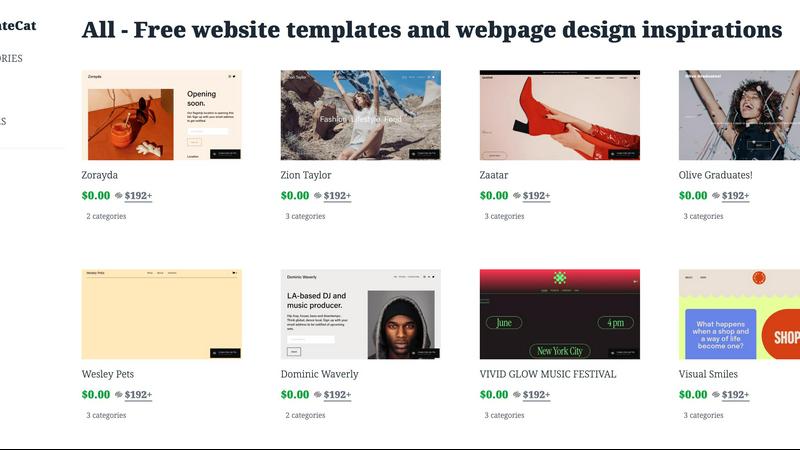
TemplateCat is your ultimate mobile-first hub for discovering and comparing high-quality website templates across the most popular design platforms. It emerged from the real-world frustration of designers and developers who found themselves constantly switching between tabs to compare templates from platforms like Framer, Webflow, and Squarespace. TemplateCat consolidates this tedious search into one intuitive, app-like experience. It caters to freelancers, agencies, and entrepreneurs who need to quickly identify the perfect starting point for client projects or personal sites while ensuring professional design quality is never compromised. The platform's core value lies in saving users significant time and effort by offering a vast, curated library of templates. Users can browse by specific categories, styles, and features, while also previewing responsive behavior and comparing associated platform costs directly on the page. With plans to expand to over 10,000 templates, including options from Figma Sites and Readymag, TemplateCat is evolving into the most comprehensive template directory available, placing a wealth of design inspiration and practical starting points right at your fingertips.
Features
Extensive Template Library
TemplateCat boasts a vast library of over 10,000 templates, making it easy for users to find the right design for any project. This extensive selection means that whether you’re looking for something professional or creative, you’re likely to find a template that fits your needs.
Intuitive Filtering Options
Users can browse templates by 200 categories, 27 styles, and 38 features, allowing for targeted searches that save time. This intuitive filtering system helps users quickly narrow down their options, ensuring they find the perfect match without endless scrolling.
Mobile-First Design
TemplateCat is designed with mobile users in mind, providing an app-like experience that is responsive and easy to navigate. This mobile-first approach ensures that designers and developers can access high-quality templates on the go, making it a perfect tool for busy professionals.
Cost Comparison Feature
One of the standout features is the ability to compare associated platform costs directly on the page. Users can see how much different templates will cost across various platforms, allowing for informed decisions that fit their budget and project requirements.
Use Cases
Freelance Designers
Freelance designers can use TemplateCat to quickly find the right templates for their clients, saving time and enhancing productivity. With the ability to preview responsive designs and compare costs, they can present the best options to clients efficiently.
Agencies
Agencies managing multiple client projects can benefit from TemplateCat's extensive library and filtering options. The ability to browse templates by category and style allows teams to streamline their design process and meet client deadlines without compromising quality.
Entrepreneurs
Entrepreneurs looking to establish their online presence can utilize TemplateCat to find professional-grade templates that resonate with their brand. The platform’s curated selection helps them launch their websites quickly and effectively, providing a strong starting point.
Educators and Students
Educators and students in design courses can leverage TemplateCat to explore various design styles and features. It serves as a valuable resource for learning about web design trends and for using high-quality templates in their projects.
Frequently Asked Questions
What platforms does TemplateCat support?
TemplateCat supports popular design platforms including Framer, Webflow, and Squarespace, with plans to expand to include Figma Sites and Readymag, making it a versatile resource for various web design needs.
Is there a cost associated with using TemplateCat?
TemplateCat offers a range of templates for free, but users can expect to find premium templates priced in the range of $192 and above. This allows users to select options that fit their budget while ensuring quality.
How can I compare templates on TemplateCat?
TemplateCat provides a user-friendly interface that allows users to preview templates side by side. Users can easily compare design features, responsive behavior, and associated platform costs directly on the page.
Can I use TemplateCat on my mobile device?
Yes, TemplateCat is designed with a mobile-first approach, ensuring that users can access and navigate the platform seamlessly on their mobile devices, making it convenient for users on the go.