
AI Image Generator - Createimg.ai vs RemoveTexts
Side-by-side comparison to help you choose the right AI tool.

AI Image Generator - Createimg.ai
Createimg.ai instantly turns your ideas into stunning AI images for any project.
Last updated: March 1, 2026

RemoveTexts
RemoveTexts is a free AI app that erases any text from your images in seconds with just a tap.
Last updated: March 11, 2026
Visual Comparison
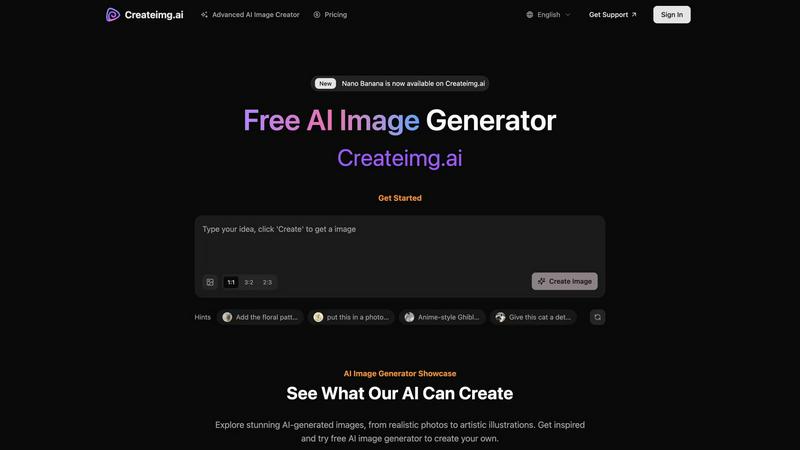
AI Image Generator - Createimg.ai
RemoveTexts

Feature Comparison
AI Image Generator - Createimg.ai
Diverse AI Model Library
Access a wide array of specialized AI models like Midjourney Turbo, Flux Kontext, and Wan 2.2 directly within the platform. Each model is fine-tuned for different styles, from hyper-realistic portraits and anime art to technical drawings and cyberpunk landscapes. This allows you to choose the perfect engine for your specific creative need without switching between different apps or services.
Intuitive Mobile-First Interface
The generator is built with a clean, focused design that prioritizes user experience on smartphones and tablets. Key controls like aspect ratio selection (1:1, 16:9, 9:16), generation mode (Standard/Advanced), and the prompt input are easily accessible. The layout minimizes clutter, making the image creation process straightforward and efficient for users of all skill levels.
Creative Prompt Hints and Showcase
Overcome creative block with built-in prompt hints that provide inspiration and examples to improve your results. The extensive image showcase gallery visually demonstrates what each AI model can do, offering direct examples of prompts and styles. This feature acts as both a learning tool and a source of inspiration to spark your own ideas.
Flexible Generation and Customization
Take control of your creations with advanced options. You can set specific parameters for your image, experiment with different artistic effects, and use the history feature to revisit and rework previous generations. This flexibility ensures you can iterate and refine your images until they match your exact requirements, all from a single, unified interface.
RemoveTexts
Paint to Remove
Take complete control with the intuitive brush tool. Simply paint over the specific text, watermark, or element you want to erase. The AI then works only on the selected areas, giving you pixel-perfect precision. This is perfect for when you only need to remove a certain caption or logo while keeping the rest of the image perfectly intact, all with a few taps on your screen.
Auto Remove All Text
Let the AI handle everything with a single click. This powerful mode automatically scans your entire image, detects every piece of text—regardless of language or font—and removes it all at once. It seamlessly reconstructs the background for each removed element, making it the ultimate tool for quickly cleaning screenshots, memes, or photos cluttered with multiple text overlays in seconds.
Edit & Replace Text
Go beyond simple removal and actively edit your images. This innovative feature allows you to select existing text and replace it with new words. The AI doesn't just overlay new text; it matches the original font style, color, and lighting, making the new text look like it was part of the original image. It’s perfect for updating prices, changing names, or correcting information without starting from scratch.
Remove Objects
While built for text, our AI is equally powerful at removing any unwanted object. Whether it's a stray person in the background, an unsightly trash can, a logo, or any other visual distraction, you can brush over it and watch the AI erase it completely. The technology fills in the space by intelligently analyzing the surrounding pixels, leaving a natural and seamless result.
Use Cases
AI Image Generator - Createimg.ai
Marketing and Advertising Material Creation
Quickly produce high-quality, branded visuals for social media ads, blog posts, email campaigns, and posters. Generate eye-catching product photos, conceptual illustrations for ad concepts, or lifestyle imagery that resonates with your target audience, significantly reducing the cost and time associated with traditional photoshoots or stock imagery.
Concept Art and Creative Inspiration
Artists, game developers, and writers can use the tool to visualize characters, scenes, and worlds. Generate isometric 3D scenes for game design, create epic fantasy knights for book covers, or explore anime-style transformations. It's an invaluable tool for brainstorming and developing visual concepts during the early creative process.
Professional Design and Mockups
Designers can accelerate their workflow by creating vector-style illustrations for branding, technical drawings for product documentation, or realistic mockups for packaging and merchandise. The ability to generate specific styles like pencil sketches or blueprint diagrams makes it a versatile assistant for various professional design tasks.
Personal Projects and Entertainment
Hobbyists can have fun and create personalized art, such as turning a pet photo into a 3D collectible figure, designing unique chibi characters, or generating stunning wallpapers and digital art. The free tier makes it perfect for casual exploration, learning about AI art, and bringing imaginative personal ideas to life without any financial commitment.
RemoveTexts
Cleaning Product Photos for E-Commerce
Online sellers can instantly remove watermarks, price tags, or promotional text from product images to create a clean, professional catalog. This helps in presenting products without distractions, leading to better customer focus and higher conversion rates on marketplaces like Amazon, Etsy, or Shopify stores.
Preparing Professional Screenshots and Presentations
Professionals and students can clean up software screenshots, UI mockups, or presentation slides by removing irrelevant menus, pop-ups, watermarks, or personal data. This results in polished, distraction-free visuals that communicate ideas clearly and maintain a professional appearance in reports and decks.
Creating Clean Social Media Content
Content creators and social media managers can repurpose images by removing dated captions, subtitles, meme text, or platform-specific overlays. This allows for the creation of fresh, on-brand visuals from existing assets, saving hours of design work and enabling more consistent and engaging content across all channels.
Redacting Sensitive Information
Individuals and professionals in legal, real estate, or administrative fields can use RemoveTexts to quickly and securely redact personal information like names, addresses, license plate numbers, or confidential data from documents and photos before sharing them, ensuring privacy and compliance with ease.
Overview
About AI Image Generator - Createimg.ai
Createimg.ai is a cutting-edge, mobile-friendly platform that puts the power of professional AI image generation directly in your hands. Designed for a seamless app-like experience, it allows anyone, from entrepreneurs and marketers to artists and hobbyists, to transform simple text prompts into stunning, high-definition visual content. The core value proposition is accessibility and creative freedom: a robust free tier lets you start creating immediately, while advanced models unlock professional-grade quality for branding, marketing, and artistic projects. With an intuitive interface that works beautifully on any device, Createimg.ai demystifies AI art, enabling you to effortlessly generate product photos, captivating posters, concept art, and more that perfectly align with your vision. It's your on-the-go creative studio, built to experiment with countless styles and bring your ideas to life with just a few clicks.
About RemoveTexts
RemoveTexts is your go-to mobile and web app for instantly cleaning up any image by removing unwanted text. It's a powerful, AI-powered image editing tool designed for simplicity and speed. Forget about complex software like Photoshop or tedious manual selection. With RemoveTexts, you simply upload your photo, and our advanced AI does the heavy lifting. It intelligently detects and erases text—including watermarks, subtitles, date stamps, captions, and branded overlays—while seamlessly reconstructing the original background so no one can tell anything was ever there. It delivers professional, 4K-quality results in under 30 seconds. Built for creators, marketers, social media managers, designers, and anyone who needs pristine visuals, RemoveTexts requires zero design skills. Trusted by over 100,000 users worldwide who have processed more than 100,000 images, it’s the fastest way to get clean, text-free photos directly from your phone or browser.
Frequently Asked Questions
AI Image Generator - Createimg.ai FAQ
Is Createimg.ai really free to use?
Yes, Createimg.ai offers a free tier that allows you to generate images using specific models. However, free generations may have lower output quality and slower processing speeds. For higher-quality results, faster generation, and access to premium AI models, you can sign in for additional benefits or purchase credits through their paid plans.
What kinds of images can I create with this AI tool?
You can create a vast range of images, including realistic photos, anime and Pixar-style art, sci-fi and cyberpunk landscapes, technical drawings, vector illustrations, food photography, fantasy concept art, hyper-realistic portraits, and 3D models. The platform's multiple AI models are each specialized for different artistic and practical styles.
How do I get the best results from the AI image generator?
For the best results, use clear, descriptive prompts. Utilize the provided "Hints" for inspiration and study the "Showcase" gallery to see effective prompt examples. Experiment with different AI models to find the one best suited for your desired style. Using the "Advanced" mode and signing in for higher-quality generations will also improve your outputs.
Can I use the AI-generated images for commercial purposes?
The provided context does not specify the exact licensing terms. Typically, AI image generators have specific usage rights attached to the images created. You should review Createimg.ai's official Terms of Service or licensing agreement to understand the permissions for using generated images in commercial projects, advertising, or for sale.
RemoveTexts FAQ
How does RemoveTexts work?
RemoveTexts uses advanced deep learning inpainting technology, similar to AI models pioneered by leading tech companies. When you paint over text or use auto-remove, the AI analyzes the pixels surrounding the selected area. It then intelligently reconstructs the background by generating new pixels that blend seamlessly with the original image, making the text disappear without a trace.
What image formats and sizes are supported?
The tool supports common web and mobile image formats including JPG, PNG, and WebP. You can upload images up to 10MB in size. The output maintains the original quality and resolution, with support for high-quality 4K results, ensuring your cleaned images look sharp and professional.
Is RemoveTexts really free to use?
Yes, RemoveTexts offers a free online tool that allows you to upload images and remove text without any cost. You can process your images and download the results with no watermarks. The website mentions active premium features, indicating there may be additional advanced capabilities available.
What can't I use RemoveTexts for?
RemoveTexts is designed for ethical editing. It does not support the removal of logos or trademarks for copyright infringement, nor does it support processing NSFW (Not Safe For Work) content. The tool is intended for personal, professional, and creative use to clean and edit your own images or those you have permission to modify.
Alternatives
AI Image Generator - Createimg.ai Alternatives
AI Image Generator - Createimg.ai is a powerful tool in the image and photo category that uses artificial intelligence to transform text prompts into high-definition visuals. It's designed for effortless creation, helping users generate product photos, posters, and concept art directly from their ideas with a focus on a smooth, user-friendly experience. Users often explore alternatives for various reasons. Some may seek different pricing models or free tiers with more generous limits. Others might need specific features, like certain artistic styles or advanced editing controls, that better match their project requirements. Platform preference also plays a role, as some creators prioritize mobile apps for on-the-go use or require integration with other design software. When evaluating other options, consider the core aspects that matter for your workflow. Look at the quality and resolution of the generated images, the diversity of available art styles, and how intuitive the app or interface feels to use. Also, assess the value proposition regarding cost, usage limits, and whether the tool's strengths align with your primary use cases, be it marketing, social media, or personal art projects.
RemoveTexts Alternatives
RemoveTexts is an AI-powered image editing tool that specializes in removing text and objects from any image in seconds. It belongs to the category of automated, user-friendly photo editing software designed for quick, professional-grade results without the complexity of traditional programs like Photoshop. Users often explore alternatives for various reasons. Some may seek different pricing models, such as a one-time purchase versus a subscription. Others might need specific features like batch processing, integration with other platforms, or support for different file formats. Platform availability, like a dedicated mobile app versus a web tool, is also a common deciding factor. When choosing an alternative, consider the core functionality you need. Look for reliable AI that can cleanly remove text and inpaint the background. Evaluate the user experience, especially on mobile if that's your primary device. Also, check output quality, processing speed, and the overall value relative to the cost to find the best fit for your workflow.