
AI Photo Generator vs poseup
Side-by-side comparison to help you choose the right AI tool.

AI Photo Generator
Create stunning, photorealistic AI photos from text or your own images in seconds, no design skills needed.
Last updated: March 11, 2026

poseup
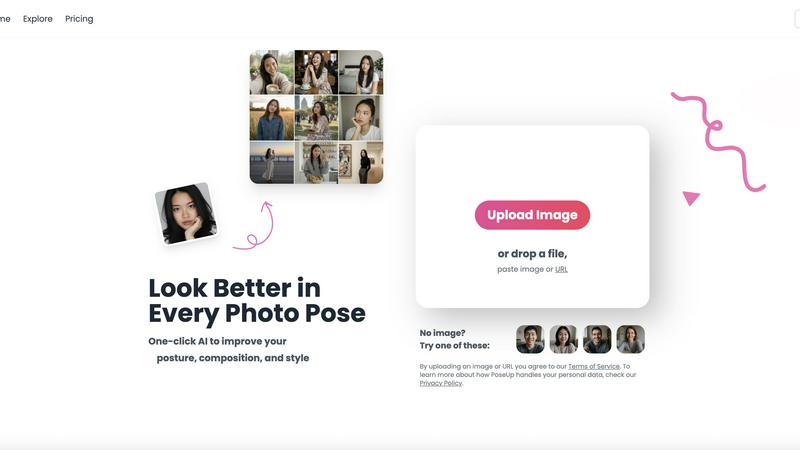
PoseUp uses AI to instantly improve your posture and composition in any photo with one click.
Last updated: March 1, 2026
Visual Comparison
AI Photo Generator

poseup
Feature Comparison
AI Photo Generator
Ultra-Fast, Multi-Model Generation
Choose from a curated selection of top AI models like Flux, Ideogram, Qwen, and Midjourney to match your specific need for speed, realism, or style. Our optimized cloud infrastructure processes your requests in seconds, not minutes, allowing for rapid iteration and A/B testing of visual concepts directly from your mobile or desktop browser without any lag.
Text-to-Image with High Prompt Fidelity
Describe your vision in natural language, detailing subjects, lighting, composition, and mood. Our platform is fine-tuned to interpret these prompts with high accuracy, delivering images that closely match your intent. It's perfect for generating product scenes, portraits, and campaign visuals with realistic lighting and material details right from the first prompt.
Advanced Image-to-Image Editing
Go beyond text by uploading a reference photo. This powerful workflow lets you restyle, edit, or completely transform existing images using natural language instructions. Change backgrounds, adjust composition, modify colors, or alter the scene's mood while preserving the core structure and identity of your original asset for brand consistency.
Free-First, Browser-Based Editor
Start creating immediately with no installation or commitment. The entirely browser-based AI photo editor offers a free plan to test prompts, compare model outputs, and refine concepts. This user-centric approach lets you learn the tool and produce initial assets before using production credits for final, high-resolution, commercially licensed batches.
poseup
One-Click AI Enhancement
The cornerstone of the PoseUp experience is its powerful one-tap enhancement. Simply upload your photo, and the app's AI instantly gets to work. It analyzes multiple elements like body posture, limb positioning, and overall composition to suggest and apply the most flattering corrections. This eliminates the need for manual tweaking or any technical skill, delivering professional-looking results in seconds, right from your mobile device.
Advanced Posture & Pose Correction
This intelligent feature specifically targets the human form in your photos. The AI detects subtle issues like slouching, uneven shoulders, or awkward arm placement. It then intelligently adjusts the pose to appear more natural, confident, and aesthetically pleasing. It can help straighten a back, refine a stance, or suggest a more dynamic posture, ensuring the subject always looks their best.
Intelligent Composition Optimization
Great photos are about more than just the subject. PoseUp's AI examines the entire frame to optimize composition. It can suggest cropping to improve the rule of thirds, adjust the framing to better highlight the subject, or correct minor alignment issues. This ensures your final image is balanced, engaging, and meets professional photographic standards, all automated within the app.
Multi-Scene Mode Support
PoseUp is versatile enough to handle any photo scenario you encounter in daily life. The app is optimized for a wide range of scenes including casual lifestyle shots, outdoor adventures, professional headshots, fitness photos, and even coffee shop work pictures. This means you get tailored enhancements that understand the context of your photo, providing appropriate adjustments whether you're in a gym or at a professional networking event.
Use Cases
AI Photo Generator
Social Media & Content Creation
Generate unique, eye-catching thumbnails, story graphics, and post visuals that stand out in crowded feeds. Content creators can produce a constant stream of copyright-free, on-brand assets for YouTube, Instagram, and TikTok without relying on stock photos or complex design software, all from a mobile device.
Marketing & Advertising Campaigns
Marketers and entrepreneurs can quickly produce stunning, professional visuals for ads, website banners, email campaigns, and presentations. The tool enables fast variant generation for A/B testing, allowing teams to ideate and finalize campaign visuals on a tight budget and timeline.
Professional Portraits & Personal Branding
Transform a simple selfie into a polished, professional headshot for LinkedIn, company websites, or speaker profiles. The AI Face Generator specialization ensures character-consistent, high-quality facial outputs that enhance personal and team branding without the cost of a photoshoot.
Product Visualization & E-commerce
Create realistic product photography and scene mockups for online stores and catalogs. Generate images of products in various settings, with different props or lighting, to showcase items in context and drive sales, even before a physical prototype or photoshoot is available.
poseup
Elevating Social Media Content
For influencers, bloggers, and everyday social media users, PoseUp is a game-changer. It ensures every selfie, outfit photo, or lifestyle shot posted to Instagram, TikTok, or Facebook looks polished and professional. The AI can fix unflattering angles from selfie sticks, improve posture in full-body shots, and optimize composition to make your feed visually cohesive and attractive, helping you grow your audience with high-quality content.
Perfecting Professional Portraits & Headshots
Job seekers, freelancers, and professionals can use PoseUp to enhance their LinkedIn profile pictures, portfolio headshots, or team website photos. The app corrects posture to convey confidence, ensures a straight and professional stance, and optimizes framing for a clean, corporate look. This allows anyone to achieve a photographer-quality headshot without the cost of a studio session, making a strong first impression.
Improving Group & Family Photos
Family gatherings, weddings, and outings with friends often result in photos where not everyone looks their best at the same time. PoseUp can analyze group photos and make subtle corrections to multiple individuals—straightening one person's posture, adjusting another's pose—to create a harmonious and flattering image where everyone looks great, preserving precious memories in the best light.
Enhancing Fitness & Wellness Photography
Fitness enthusiasts, athletes, and wellness coaches can use PoseUp to improve their action shots or progress photos. The AI can enhance muscle definition by optimizing lighting and shadows on the body, correct form in a workout pose to highlight technique, and improve the overall composition of outdoor running or yoga shots, making fitness content more inspiring and professional for social sharing or coaching portfolios.
Overview
About AI Photo Generator
AI Photo Generator is a cutting-edge, browser-based creative platform designed to transform your ideas into stunning visual reality with just a few taps. It leverages a suite of advanced AI models to generate professional-grade, photorealistic images from simple text descriptions or by editing your existing photos. The core mission is to democratize high-end visual creation, making it accessible to everyone from complete beginners to professional teams, without requiring any technical design skills. Whether you need a unique social media graphic, a product mockup, or a creative portrait, this tool provides a seamless, mobile-first experience that prioritizes speed, quality, and creative control. With a free plan to start, you can experiment and generate copyright-free visuals instantly, scaling up to commercial-grade outputs as your needs grow.
About poseup
PoseUp is a revolutionary mobile app that puts professional-grade photo enhancement in your pocket. It solves a universal problem: the frustration of taking a photo where something about the pose, posture, or composition just doesn't look right. Whether it's a selfie with an awkward angle, a group photo where someone is slouching, or a portrait with unflattering framing, PoseUp uses advanced artificial intelligence to analyze and correct these elements instantly. Built for mobile-first convenience, the app is designed for anyone who takes photos—from social media enthusiasts and content creators to professionals and families. Its core mission is to democratize high-quality photo editing. You don't need to learn complex software or hire a photographer. Simply upload your photo directly in the app, and PoseUp's sophisticated AI handles the intricate work of posture correction, pose refinement, and compositional optimization with a single tap. It transforms your ordinary, flawed snapshots into polished, stunning, and share-worthy images, empowering everyone to look their best in every photo.
Frequently Asked Questions
AI Photo Generator FAQ
Is there a free plan available?
Yes, AI Photo Generator offers a free-to-start plan that allows you to experience the core text-to-image and image-editing functionalities. This is perfect for testing prompts, exploring different AI models, and generating initial concepts without any financial commitment.
Can I use the generated images for commercial purposes?
Yes, images generated on the platform, depending on the plan and model used, are typically cleared for commercial use. This means you can use them in advertising, on your website, in products, and for other business purposes. Always check the specific licensing terms for the model you select.
How does the Image-to-Image feature work?
You start by uploading a reference photo. Then, you provide text instructions on what you want to change, such as "change the background to a beach" or "make the style look like an oil painting." The AI uses your original image as a structural guide and applies your edits to create a new, transformed version.
What makes this different from other AI image generators?
Our platform distinguishes itself with a mobile-first, user-experience-focused design that simplifies the workflow. It provides direct access to multiple state-of-the-art AI models in one place, offers both text and robust image-based editing, and is built for speed and commercial utility, all starting with a free, accessible entry point.
poseup FAQ
How does PoseUp's AI work?
PoseUp uses advanced computer vision and machine learning models trained on vast datasets of photographic principles. When you upload a photo, the AI analyzes key points on the human body, assesses the composition against aesthetic rules, and identifies areas for improvement like slouching or poor framing. It then applies subtle, realistic adjustments to correct posture and optimize the pose, all while keeping the edit natural and true to your original image.
What image formats and sizes does PoseUp support?
The PoseUp app supports common image formats including JPG, PNG, WEBP, and HEIC for maximum compatibility with photos from both Android and iOS devices. You can upload images up to 5MB in size. This ensures that high-quality photos from your smartphone camera can be processed quickly and efficiently within the app for instant enhancement.
Is my privacy protected when I upload photos?
Yes. PoseUp takes your privacy seriously. As stated in their Privacy Policy, uploaded images are processed securely to provide the enhancement service. The company has measures in place to handle your personal data responsibly. For specific details on data handling, storage, and usage, you should review the full Privacy Policy available on the PoseUp website or within the app.
Are there any free credits to try PoseUp?
Yes, new users can get started with free credits. The website mentions an offer to "Get 50 free credits," allowing you to try the core AI enhancement features on your own photos without any initial cost. This lets you experience the transformation firsthand and see the quality of results before deciding to purchase additional credits or a subscription plan.
Alternatives
AI Photo Generator Alternatives
AI Photo Generator is a leading platform in the AI image generation category, transforming text prompts and existing photos into professional digital art. It’s designed to make high-end visual creation accessible to everyone, regardless of technical skill. Users often explore alternatives for various reasons. Some may need a different pricing model, specific features not offered, or a platform better suited for a particular device or operating system. The search for the right tool is highly personal and depends on individual project needs and workflow. When evaluating other options, consider key factors like the quality and speed of image generation, the diversity of artistic styles available, and how well the tool integrates into your creative process. It's also wise to assess the overall user experience, especially if you plan to use it frequently on a mobile device.
poseup Alternatives
PoseUp is an AI-powered app in the photo enhancement category that instantly improves poses and posture with a single click. It transforms awkward or unflattering snapshots into polished, share-worthy images by automatically analyzing and correcting human subjects. Users often explore alternatives for various reasons. Some may seek different pricing models, like a one-time purchase versus a subscription. Others might need specific features PoseUp doesn't offer, require a desktop application, or simply want to compare the AI results and user experience of similar tools on the market. When choosing an alternative, consider the core functionality: reliable AI pose and posture correction. Evaluate the app's ease of use, output quality, and whether it works on your preferred platform (iOS, Android, or web). Also, review the cost structure and privacy policy to ensure it fits your budget and comfort level with data handling.