
BRCKS vs swiftRMS
Side-by-side comparison to help you choose the right AI tool.

BRCKS runs your construction projects from WhatsApp, keeping your team updated and organized without switching apps.
Last updated: April 4, 2026

swiftRMS
Generate UK-compliant RAMS in minutes from a simple video or description.
Last updated: February 28, 2026
Visual Comparison
BRCKS

swiftRMS
Feature Comparison
BRCKS
BRCKS Bot for WhatsApp
Update projects without ever leaving your chat app. Simply text the BRCKS Bot on WhatsApp to create tasks, check off checklist items, ask for project updates, or get instant answers. Every instruction sent via text is automatically logged and organized within the main BRCKS platform, ensuring nothing is lost while letting your team communicate in the tool they use every day. It eliminates app-switching and makes updating the project as easy as sending a message.
Checklists & Task Management
Create, assign, and monitor progress on tasks and daily checklists directly within BRCKS. Assign responsibilities to specific team members, set deadlines, and track completion in real-time. This feature replaces paper lists and scattered notes, providing a clear, digital record of what needs to be done, by whom, and by when, ensuring accountability and smooth progression from first fix to final sign-off.
Client Portal
Provide homeowners and clients with a beautiful, read-only window into their project's progress. They can view key milestones, latest photos, and important updates without gaining access to your internal tools, team chats, or sensitive documents. This keeps clients informed and engaged, building trust, while preventing them from disrupting the team's workflow with constant questions.
Free Subcontractor Access
Invite every trade and subcontractor to their relevant projects at no extra cost. They get full access to checklists, calendars, files, and schedules specific to their work, completely free. You only pay for your core internal team members. This removes the barrier to onboarding your entire supply chain, ensuring everyone has the information they need to stay on schedule.
swiftRMS
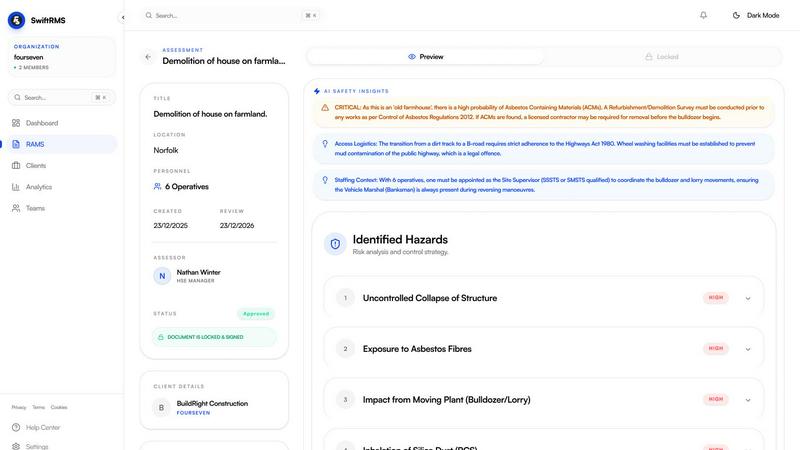
AI-Powered RAMS Generation
Describe your task in plain English, like "erecting scaffolding for a two-storey building," and swiftRMS's AI generates a complete, structured RAMS in minutes. It identifies all relevant hazards, proposes practical control measures, and drafts a clear method statement, cutting a traditionally hours-long process down to under 120 seconds. You can also upload a video of the worksite for the AI to analyse and base the assessment on.
Built-In UK Legislation & Compliance
Every document is automatically fortified with citations from the correct UK regulations. The system references key legislation like the Work at Height Regulations 2005, PUWER 1998, and COSHH 2002, ensuring your RAMS is audit-ready and demonstrates due diligence to clients and the HSE. This removes the guesswork and manual research from compliance.
Collaborative Document Hub
Invite team members, supervisors, or clients directly into swiftRMS to review, comment on, and sign off on RAMS documents. The platform maintains full version control, so you always know who made changes and when, with a complete audit trail. This streamlines approvals and ensures everyone is working from the latest, agreed-upon document.
Professional Branded PDF Export
Once finalised, export your RAMS as a polished PDF document. Add your company logo and branding for a professional finish that reinforces your brand identity when documents are shared with clients or displayed on-site. This creates a consistent, credible image for all your safety documentation.
Use Cases
BRCKS
Streamlining Daily Site Communication
Site managers and foremen use BRCKS to replace chaotic WhatsApp groups and emails. Daily instructions, photo updates of work completed, and urgent queries are all handled through the BRCKS Bot or app. This consolidates every conversation into a single project feed, saving over an hour a day previously spent searching through different apps and ensuring nothing gets missed.
Managing Subcontractor Deliverables
General contractors can invite all subcontractors for free, assigning them specific checklists and tasks within BRCKS. Each trade can see their scheduled work, access relevant files, and mark tasks as complete. This provides clear accountability, reduces the need for constant follow-up calls, and creates a transparent record of who did what and when.
Keeping Clients Updated and Happy
Builders and renovators use the Client Portal to proactively share progress. Instead of fielding daily "how's it going?" calls, they can direct clients to the portal to see recent photos, completed milestones, and next steps. This professional approach manages client expectations, reduces anxiety, and minimizes disruptive interruptions to the working team.
Centralizing Project Documentation
Project managers consolidate all meeting notes, site photos, material specifications, and change order discussions into BRCKS. The Project Files feature acts as a single source of truth for the entire project history, making it easy to find any document or recall any decision, which is crucial for handovers, compliance, and resolving any disputes.
swiftRMS
For Construction Site Managers
A site manager needs a RAMS for a new task, like electrical installation or confined space work, before the crew starts. Instead of drafting from scratch or waiting for a consultant, they use swiftRMS on their tablet, generate a compliant document in minutes, share it with the foreman for review, and have it approved and on-site the same morning.
For Security Contracting Firms
A security company bidding for a new event contract must submit detailed method statements and risk assessments as part of their tender. Using swiftRMS, they quickly generate professional, legislation-cited RAMS for crowd management, patrol routes, and incident response, impressing the client and speeding up their bidding process significantly.
For Facilities Management Teams
An FM technician is tasked with a complex maintenance job, such as cleaning high-level guttering or servicing HVAC units. They use swiftRMS to create a tailored RAMS that addresses specific site hazards, ensuring the work is planned safely and compliantly without needing deep health and safety expertise themselves.
For Local Authority Health & Safety Officers
A council H&S officer responsible for multiple departments uses swiftRMS to provide a standardised, efficient tool for all teams—from parks and recreation to building maintenance. It ensures consistent quality and compliance across all council operations while drastically reducing the administrative burden on the central safety team.
Overview
About BRCKS
BRCKS is the construction project management platform that works the way your team already does. Built specifically for residential builders, trades, and homeowners, it solves the communication chaos that plagues every project. Instead of forcing your team to learn a complicated new app, BRCKS integrates seamlessly into your existing workflow, especially WhatsApp. It automatically pulls every project conversation, photo, update, and file from scattered chats and emails into one organized, central platform that you control. This means no more lost instructions in endless message threads, no more chasing subcontractors for updates, and no more confusion over decisions. The core value proposition is powerful simplicity: zero disruption for your team, complete oversight for you. From daily task checklists and team scheduling to sharing polished updates with clients, BRCKS keeps the entire project team—directors, site managers, trades, and homeowners—perfectly aligned, saving teams an average of 2+ hours daily and dramatically reducing costly delays and miscommunication.
About swiftRMS
swiftRMS is the AI-powered web application that transforms the complex, time-consuming process of creating Risk Assessment and Method Statement (RAMS) documents. Built specifically for UK industries, it turns hours of manual writing and research into a task completed in under two minutes. The platform is intuitively designed for mobile and desktop: simply describe your work task in plain English or upload a short video. The intelligent AI engine instantly generates a comprehensive, professional RAMS document. This includes a full risk assessment with control measures, a detailed method statement, required PPE, and—crucially—automatic citations of the exact UK health and safety legislation that applies, such as CDM 2015 and HASAWA 1974. It’s the essential tool for construction firms, security contractors, facilities management teams, and local authorities, delivering immense time and cost savings by eliminating expensive consultants and freeing professionals to focus on the job site, not the paperwork.
Frequently Asked Questions
BRCKS FAQ
How does BRCKS work with WhatsApp?
Your team continues using WhatsApp as normal. You add the BRCKS Bot as a contact in your project group or message it directly. When you send a text, photo, or voice note to the bot, it intelligently logs that update to the correct project and category (like tasks or files) in the main BRCKS platform. Your team doesn't need to change habits; BRCKS organizes the chaos in the background.
Do my subcontractors really get free access?
Yes. You can invite an unlimited number of subcontractors and tradespeople to collaborate on projects. They will have full access to the features necessary for their work on that project—like checklists, calendars, and files—without any cost to you or them. You are only billed for the seats used by your direct, internal employees.
Is the Client Portal secure?
Absolutely. The Client Portal is a read-only, curated view of the project. Clients cannot see internal team conversations, financials, or sensitive documents. They only see the updates, photos, and milestones you choose to share, giving them transparency without compromising your operational privacy or security.
What if my team isn't tech-savvy?
BRCKS is designed for real construction teams. The primary interface for many can remain WhatsApp, which they already know how to use. The web and app platforms are built to be simple, intuitive, and practical. The focus is on ease of use, requiring minimal to no formal training to get started and see immediate benefits.
swiftRMS FAQ
How accurate is the AI-generated content?
The AI is trained on vast datasets of UK health and safety regulations and industry best practices. It generates highly accurate, context-aware risk assessments and method statements. However, it is designed as a powerful assistant; the final document should always be reviewed and signed off by a competent person familiar with the specific site and task to ensure all local variables are addressed.
Can I use swiftRMS on my mobile phone?
Absolutely. swiftRMS is built as a mobile-first web application, meaning it is fully optimised for use on smartphones and tablets. You can describe a task, upload a video from your site, review, and sign off on documents directly from your mobile browser, making it perfect for on-the-go use in the field.
What UK regulations does swiftRMS reference?
The system automatically cites a comprehensive range of core UK legislation, including but not limited to: The Construction (Design and Management) Regulations 2015 (CDM), Health and Safety at Work Act 1974 (HASAWA), Work at Height Regulations 2005, Provision and Use of Work Equipment Regulations 1998 (PUWER), and Control of Substances Hazardous to Health Regulations 2002 (COSHH). The relevant citations are embedded based on the hazards identified in your task.
Is there a free trial available?
Yes, you can get started completely free. The free trial allows you to generate your first professional RAMS documents with no credit card required and no contract. You can explore the core AI generation features and experience the time savings firsthand before choosing a plan that fits your business needs.
Alternatives
BRCKS Alternatives
BRCKS is a mobile-first construction project management app designed to centralize communication for residential builders, tradespeople, and homeowners. It tackles the common chaos of site coordination by replacing scattered emails, WhatsApp threads, and documents with a single, organized platform for tasks, photos, files, and updates. Users often explore alternatives for various reasons. These can include budget constraints, the need for different feature sets like advanced scheduling or accounting integrations, or a requirement for software that serves larger commercial projects or different team structures. The specific needs of your business and team are key drivers in the search. When evaluating other options, focus on core needs: seamless mobile usability for on-site teams, clarity in client communication, and robust tools for tracking tasks and decisions. The ideal alternative should streamline your daily workflow, reduce miscommunication, and create a reliable digital paper trail for the entire project lifecycle.
swiftRMS Alternatives
swiftRMS is an AI-powered productivity app that transforms how UK businesses create compliant Risk Assessment and Method Statement (RAMS) documents. It automates a traditionally manual process, generating professional drafts from a simple description or video in minutes. Users often explore alternatives for various reasons. Some need different pricing models, while others require specific integrations with existing project management tools. The search might also be driven by a need for features tailored to niche industries or a preference for a different user interface and mobile experience. When evaluating other options, key considerations include the depth of UK legislative compliance, the quality of AI-generated content, and collaborative features for team sign-off. It's also crucial to assess the platform's ease of use on mobile devices and the overall value in terms of time saved versus cost.