
Changeflow vs TinyFast
Side-by-side comparison to help you choose the right AI tool.

Changeflow
Changeflow delivers AI-driven insights on critical web page changes, keeping you informed without the noise.
Last updated: March 4, 2026

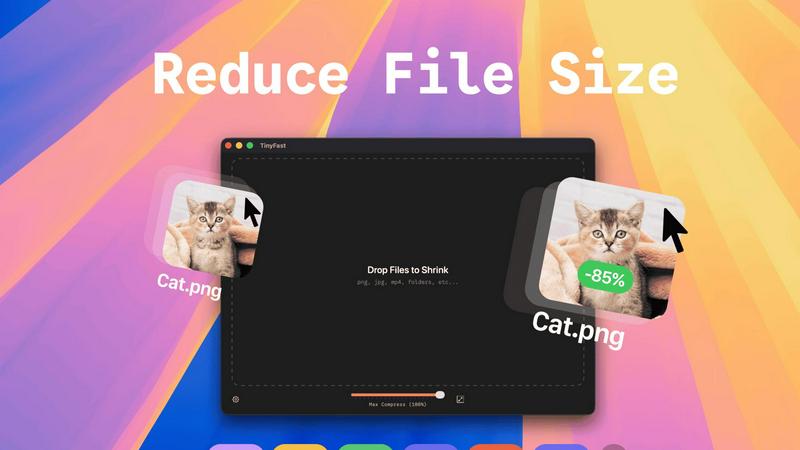
TinyFast instantly compresses images and videos privately on your Mac with simple drag and drop.
Last updated: February 28, 2026
Visual Comparison
Changeflow

TinyFast
Feature Comparison
Changeflow
AI-Powered Change Detection
Changeflow employs advanced AI algorithms that not only monitor web pages but also interpret the context of changes. This means you receive notifications about relevant updates without the clutter of unnecessary alerts.
Natural Language Setup
Forget about complex technical setups. Changeflow allows you to set up monitoring simply by describing what you want to track in plain English. This user-friendly approach makes it accessible for everyone.
Customized Summaries
Stay informed without sifting through extensive content. Changeflow generates concise summaries that explain what changed on a page and why it matters to your business, saving you valuable time.
Advanced Anti-Blocking Technology
Changeflow's sophisticated anti-blocking technology enables it to access web pages that other tools might struggle with. This ensures reliable monitoring even on sites with login walls or JavaScript, boasting a 99.9% success rate.
TinyFast
100% Local & Private Compression
Your files never leave your Mac. TinyFast processes everything directly on your device, ensuring total privacy by design. This is crucial for handling sensitive documents, proprietary designs, or any work covered by non-disclosure agreements, as there are no uploads to cloud servers and no risk of third-party data storage.
Blazing-Fast Drag & Drop Workflow
Experience compression at the speed of your workflow. Just drag your files or entire folders into the TinyFast app and get optimized output in seconds. The app uses optimized native engines built for macOS to shrink large files quickly, eliminating the long wait times associated with uploading and downloading from online tools.
Universal File Format Support
TinyFast supports a wide range of common file types used by creators and professionals. This includes images (PNG, JPG, WEBP, SVG, GIF), videos (MP4, MOV), documents (PDF), audio (MP3), and even code files (JS, CSS, JSON). This versatility means you can consolidate your compression tasks into one simple, always-available Mac app.
Batch Processing & Resolution Control
Boost your productivity by compressing multiple files at once. Drop an entire folder of images or videos, and TinyFast will process them all in a single batch. Additionally, for images and videos, you have the option to automatically resize the resolution during compression, giving you precise control over the final output size and quality.
Use Cases
Changeflow
Competitor Price Tracking
Businesses can utilize Changeflow to closely monitor competitor pricing strategies. This feature allows teams to stay competitive by receiving timely updates on price changes, helping to inform pricing decisions.
Regulatory Monitoring
Legal teams can track important regulatory updates by monitoring court dockets and legal citations. Changeflow ensures that compliance teams remain informed about changes in laws and regulations affecting their industry.
News Mentions Tracking
Changeflow helps businesses keep tabs on their online presence by monitoring news mentions. This is vital for reputation management and allows companies to quickly respond to any important news or media coverage.
Market Movement Monitoring
With Changeflow, teams can easily follow market movements and trends. By tracking vital updates, businesses can adapt their strategies to meet changing market conditions, ensuring they remain agile and informed.
TinyFast
Developers Preparing Assets for Deployment
Developers can use TinyFast to quickly optimize application assets like icons, screenshots, and UI graphics directly on their Mac before bundling or deployment. This ensures faster app load times and smaller download sizes while keeping proprietary code and assets completely secure and local throughout the process.
Designers Sharing Portfolios or Client Work
Graphic and UX designers often need to send high-quality proofs or portfolio pieces via email or messaging apps with file size limits. TinyFast allows them to compress images and videos locally without sacrificing critical detail, enabling fast, professional sharing while protecting unreleased client work.
Content Creators Managing Media Libraries
Video editors, bloggers, and social media managers dealing with large libraries of photos and videos can use TinyFast to free up significant storage space on their Mac. Compressing footage for edits or archiving projects becomes a quick, drag-and-drop task that doesn't require a slow internet connection or compromise original files.
Professionals Working Under Confidentiality
Lawyers, consultants, and engineers working with sensitive documents, schematics, or confidential reports can safely reduce file sizes for email or secure transfer. Since TinyFast operates entirely offline, there is zero risk of exposing private information to online compression services, ensuring compliance with strict privacy protocols.
Overview
About Changeflow
Changeflow is an innovative web monitoring tool designed to keep you updated on the changes that matter most. By utilizing advanced AI technology, Changeflow reads web pages and intelligently identifies significant updates, transforming the way businesses track vital information. Whether you're monitoring competitor pricing, regulatory changes, or news mentions, Changeflow provides you with clear summaries that highlight what is important, eliminating the noise of irrelevant updates. Its straightforward setup allows users to describe what they want to track in plain English without the need for complex configurations. Trusted by Fortune 500 companies and Am Law 200 firms, Changeflow is tailored for business professionals who require timely and accurate information to make informed decisions. With a 99.9% success rate in accessing challenging web pages, Changeflow ensures you never miss a critical update again.
About TinyFast
TinyFast is the ultimate, privacy-first file compression app built exclusively for macOS. It's designed for developers, designers, and creators who need to shrink files instantly and securely, right on their Mac. Forget slow, unreliable online tools that require uploading sensitive assets to unknown servers. With TinyFast, your entire workflow stays local and private. Simply drag and drop your files—including PNG, JPEG, MP4, MOV, PDF, SVG, WebP, MP3, or GIF—into the app and get optimized versions in seconds. Born from a developer's need to handle confidential files safely, TinyFast ensures your assets never leave your machine, making it perfect for anyone working under NDAs or with proprietary content. Engineered for speed with native compression engines, it handles large files without the lag of internet transfers. It's more than a compressor; it's a seamless extension of your creative suite that respects your privacy and turbocharges your productivity by keeping everything fast, simple, and on your device.
Frequently Asked Questions
Changeflow FAQ
How does Changeflow work?
Changeflow works by allowing users to specify URLs and the types of updates they want to track. The AI then monitors these pages, identifying and summarizing significant changes.
Is the setup process complicated?
Not at all. Changeflow offers a natural language setup process that enables users to describe what they want to track without any technical jargon or complex configurations.
Can I track multiple pages at once?
Yes, Changeflow allows you to monitor multiple pages simultaneously. You can add several URLs quickly and easily using the platform's intuitive interface.
What kind of support does Changeflow offer?
Changeflow provides dedicated support, including email and chat options, along with onboarding calls to assist users in getting started efficiently.
TinyFast FAQ
Is TinyFast really free to use?
Yes, TinyFast offers a free forever plan that allows you to compress up to 5 files per day with access to all core features. This is perfect for testing the app or for users with light compression needs. For unlimited use, you can upgrade to a monthly subscription or a one-time lifetime purchase.
What happens to my original files after compression?
TinyFast is non-destructive. The app creates a new, optimized version of your file. Your original, full-quality file remains untouched and saved in its original location on your Mac. You are always in complete control of your source assets.
How does TinyFast compare to online compression tools?
Unlike online tools, TinyFast works 100% locally on your Mac. This means your files are never uploaded to unknown servers, your privacy is guaranteed, and compression is instant—no waiting for uploads, processing queues, or downloads. It's faster, more reliable, and completely secure.
Can I compress an entire folder of files at once?
Absolutely. TinyFast supports batch processing. You can simply drag and drop an entire folder containing supported file types into the app, and it will automatically compress all the compatible files within it, saving you considerable time and effort compared to processing files one by one.
Alternatives
Changeflow Alternatives
Changeflow is an AI-driven tool designed for market and competitor insights, specializing in tracking changes on web pages. It falls under the productivity and management category, catering to diverse business needs including competitor analysis, regulatory monitoring, and legal citations. Users often seek alternatives for various reasons such as pricing concerns, specific feature requirements, or integration capabilities that better fit their existing workflows. When choosing an alternative to Changeflow, consider factors like ease of use, the accuracy of insights, and the breadth of features offered. Look for solutions that provide robust tracking options, seamless integration with your current tools, and a user-friendly interface to enhance team collaboration and efficiency.
TinyFast Alternatives
TinyFast is a privacy-first, Mac-exclusive app that instantly compresses images, videos, and documents locally on your device. It belongs to the category of desktop utility and productivity tools, designed for creators and professionals who prioritize security and a streamlined workflow. Users often explore alternatives for various reasons. Some may need a cross-platform solution for Windows or web use, while others might seek different pricing models or more advanced, format-specific tuning options. The need for a tool that integrates with specific cloud services or offers different feature balances is also common. When evaluating other options, key considerations include the compression engine's privacy policy (local vs. cloud), supported file formats, processing speed, and overall ease of use. The ideal tool should fit seamlessly into your existing creative or development process without compromising on your core requirements.