
ClipMake vs Master Metrics
Side-by-side comparison to help you choose the right AI tool.

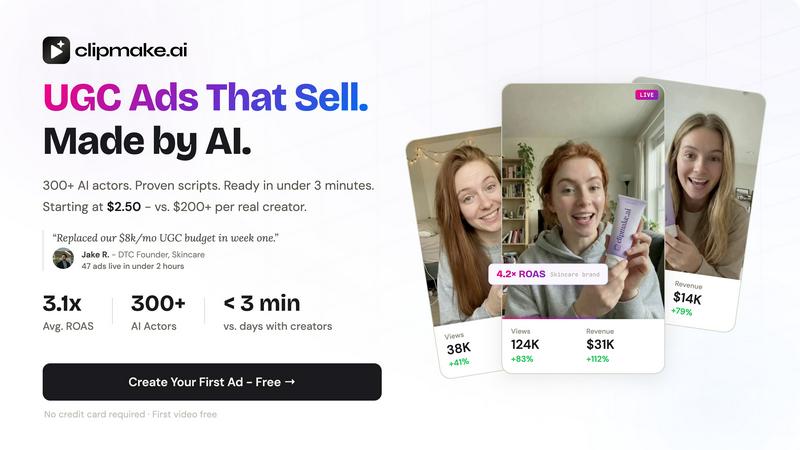
Create stunning AI-generated video ads in minutes with ClipMake's 300+ actors, starting at just $2.50 per video.
Last updated: April 13, 2026

Master Metrics
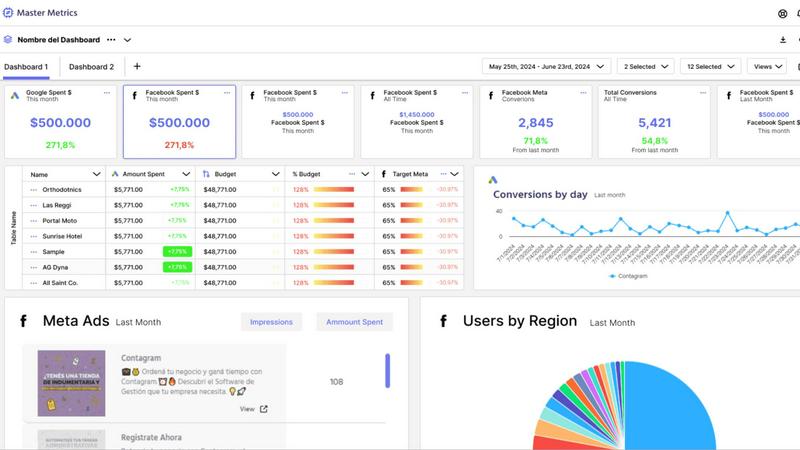
Master Metrics is your AI command center for unified marketing analytics and automated insights.
Last updated: February 28, 2026
Visual Comparison
ClipMake
Master Metrics
Feature Comparison
ClipMake
AI Actor Selection
Choose from a diverse library of over 300 AI actors or create custom avatars to represent your brand. This feature allows you to select the personality and energy that best aligns with your product, ensuring that your video ads resonate with your target audience.
Script and Hook Generation
ClipMake automatically generates hooks and scripts based on high-performing ad formats. This feature leverages data from successful campaigns across Meta and TikTok, ensuring that your content is not only engaging but also strategically crafted to drive conversions.
Scene Templates
With 20+ customizable scene templates available, users can easily select formats like unboxing, testimonials, tutorials, and lifestyle showcases. This variety allows for creative flexibility, helping brands to tell their stories in the most compelling way possible.
Batch Video Creation
ClipMake supports batch generation, enabling users to create dozens of ad variations in a single session. This feature is essential for testing different hooks, actors, and scripts, maximizing the potential for discovering high-performing creatives at an incredibly low cost.
Master Metrics
Unified Overview Control Panel
Gain instant command over all your client accounts from a single, customizable dashboard on your mobile device. The Overview Table lets you see at a glance what needs immediate attention. You can tailor the view by choosing key metrics from all connected data sources, adding manual data, and even merging information using custom formulas, ensuring the most important KPIs are always front and center in a mobile-optimized layout.
AI-Powered Presentation Builder
Create stunning, data-rich Google Slides presentations for client reviews in just a few clicks, directly from the app. Simply select your data sources, key metrics, goals, and a design template. Master Metrics' AI then automatically generates a fully editable presentation, complete with charts and insights, streamlining your reporting process and impressing clients with professional, actionable summaries without leaving your workflow.
Custom Alerts & Automated Monitoring
Set up intelligent alerts to automatically monitor campaign health and business goals. Get notified via email, WhatsApp, or Slack when a campaign underperforms, sales dip, or a metric crosses a threshold. Crucially, control your ad spend with daily budget alerts to stay on track for monthly targets. This feature puts proactive campaign management in your pocket, ensuring you're always informed.
Seamless Data Integration & Templates
Connect to all your favorite marketing, sales, and analytics tools for automatic data refresh. Master Metrics allows you to extract and merge this data not only within its dashboards but also into Google Sheets and Looker Studio. Use pre-built templates to launch client dashboards in minutes, and clone them for new accounts with one click, dramatically speeding up onboarding and reporting setup.
Use Cases
ClipMake
E-Commerce Product Launches
When launching new products, brands can quickly create multiple video ads to showcase features and benefits. ClipMake's fast turnaround time ensures that marketing efforts can keep pace with product availability, maximizing promotional impact.
Social Media Advertising
Performance marketers can leverage ClipMake to generate a high volume of ads tailored for platforms like TikTok and Meta. This allows for continuous testing and optimization, leading to improved return on ad spend (ROAS) by identifying winning creatives quickly.
Brand Awareness Campaigns
ClipMake can be utilized to produce videos aimed at increasing brand awareness. By using appealing AI actors and engaging scripts, brands can create memorable content that resonates with potential customers, enhancing overall brand visibility.
Seasonal Promotions
For seasonal sales or special promotions, ClipMake enables brands to generate timely and relevant video ads that capture the spirit of the occasion. With the ability to customize scenes and scripts, brands can effectively communicate their promotional messages.
Master Metrics
For Digital Marketing Agencies
Agencies can manage dozens of client accounts from one mobile-friendly platform. Clone dashboard templates for new clients instantly, automate performance reports, and use AI to generate client-ready presentations. The overview panel provides a snapshot of all account health, enabling quick prioritization and scalable, efficient client management without switching between multiple apps.
For In-House Marketing Teams
Internal teams can consolidate data from ads, social media, web analytics, and the CRM into a single source of truth. Create custom dashboards for different departments, set alerts for campaign KPIs, and share insights via scheduled PDF reports or public links. This eliminates data silos and empowers the entire team with real-time, accessible performance data.
For Proactive Campaign Management
Marketers can move from reactive checking to proactive management using custom alerts. Receive instant mobile notifications if an ad spend exceeds its daily target, website conversions drop, or a social post goes viral. This allows for immediate optimization, protecting budgets and capitalizing on opportunities before critical moments pass.
For Streamlined Client Reporting
Automate the entire client reporting workflow. Pull live data from all connected platforms directly into beautiful, branded dashboards. Schedule these reports to be emailed weekly or monthly, or share a live link. For quarterly reviews, use the AI slides feature to build comprehensive presentations in minutes, saving hours of manual compilation and design work.
Overview
About ClipMake
ClipMake is a revolutionary AI-driven platform designed to automate the creation of user-generated content (UGC) style video ads. Tailored specifically for e-commerce brands and performance marketers, ClipMake eliminates the need for traditional video production, allowing users to generate high-volume ad creatives without the hassle of hiring creators, organizing shoots, or handling complex editing processes. With an extensive library of over 300 AI actors, users can simply input their product details and receive a polished video ad in under three minutes. Each ad features natural voiceovers, product visuals, and proven ad structures optimized for platforms like Meta and TikTok. The primary value proposition of ClipMake lies in its ability to significantly reduce the time and cost associated with video content creation while boosting the overall effectiveness of ad campaigns.
About Master Metrics
Master Metrics is the all-in-one mobile-first platform designed to end the chaos of fragmented marketing data. Built by marketers for marketers, it serves digital marketing agencies and in-house teams who are exhausted by juggling countless spreadsheets, reporting tools, and data sources. The core mission is to maximize your marketing and sales results by transforming complex, raw data into clear, actionable insights. Master Metrics consolidates information from over ten different platforms into a single, intuitive, and mobile-friendly interface. This empowers teams to shift from tedious manual data wrangling to automated, data-driven decision-making. Whether you need a unified view of all client accounts, AI-generated presentations, or real-time performance alerts, Master Metrics brings these critical functions into one powerful app. It automates the creation of beautiful dashboards and reports, saving countless hours and ensuring no critical insight is ever missed, directly from your phone or tablet.
Frequently Asked Questions
ClipMake FAQ
How long does it take to create a video ad with ClipMake?
Creating a video ad with ClipMake takes less than three minutes. Simply select your AI actor, input your product details, and choose your desired scene template to get started.
Can I use my own product images?
Yes, ClipMake allows users to upload product images. The AI actors can hold or interact with these images in the video scenes, ensuring that the product is prominently featured.
Is there a limit to how many videos I can create?
ClipMake supports batch generation, meaning you can create dozens of video variations in one session. This allows for extensive testing without the constraints typically associated with video production.
What languages are supported for voiceovers?
ClipMake offers voice-matched dubbing in over 20 languages, preserving the natural voice qualities of the AI actors. This feature ensures that your video ads can reach a global audience effectively.
Master Metrics FAQ
What data sources can I connect to Master Metrics?
Master Metrics integrates with over ten key marketing, analytics, and sales platforms. This includes major ad networks like Google Ads and Meta Ads, analytics tools like Google Analytics, social media platforms, and e-commerce systems. You can also bring ad creative images into reports and push merged data into Google Sheets and Looker Studio for further analysis.
How does the AI Presentation Builder work?
The AI feature simplifies creating client presentations. Within the app, you select the client account, choose the specific metrics and time periods you want to highlight, and pick a visual design template. The AI then automatically generates a complete Google Slides deck with charts, graphs, and data narratives. This deck is fully editable in Google Slides, allowing for final customizations.
Can I control my budget automatically with alerts?
Yes, Master Metrics includes sophisticated budget alerting. You can set a monthly budget for a campaign, and the system will calculate the required daily spend. It will then send you alerts via your preferred channel (email, Slack, etc.) whenever your actual spend is significantly above or below that daily target, helping you manage cash flow and performance proactively.
Is there a limit to the number of dashboards I can create?
Dashboard limits depend on your chosen subscription plan. Plans range from the Freelancer tier to Pro Plus tiers, with the number of allowed dashboards increasing with each level. You can start with a 7-day free trial to test the dashboard creation and cloning features to see which plan capacity best fits your agency or team's needs.
Alternatives
ClipMake Alternatives
ClipMake is an AI-powered user-generated content (UGC) video generator designed specifically for marketers and e-commerce brands. It enables users to create hyper-realistic video ads in just a few minutes using a library of over 300 AI actors, eliminating the need for costly shoots or complex editing. Despite its innovative features, users often seek alternatives due to concerns over pricing, specific feature sets, or compatibility with other platforms they may be using. When considering an alternative to ClipMake, it's essential to evaluate several factors including the range of available AI actors, the quality of video output, ease of use, and additional features such as script generation and language support. Ultimately, the best alternative will align with your marketing goals and provide a seamless user experience that meets your content creation needs.
Master Metrics Alternatives
Master Metrics is an AI-powered marketing analytics platform designed to unify data and automate insights for agencies and in-house teams. It falls into the category of marketing intelligence and reporting software, helping users consolidate campaign data from multiple sources into a single, actionable command center. Users often explore alternatives for various reasons. Budget constraints or specific pricing models can be a primary driver. Others may seek platforms with different feature sets, deeper integrations with niche tools, or a user experience tailored to a particular workflow. The needs of a solo consultant differ vastly from those of a large enterprise, making platform scalability and customization key factors. When evaluating other options, focus on core capabilities. Look for robust data unification from your essential marketing channels, the quality of automated reporting and alerting, and the overall ease of use. Consider how well a potential solution aligns with your team's size, your clients' reporting needs, and your desire to move from manual data work to truly automated, insight-driven management.