
CMMC ROI vs Threat Watch
Side-by-side comparison to help you choose the right AI tool.

CMMC ROI
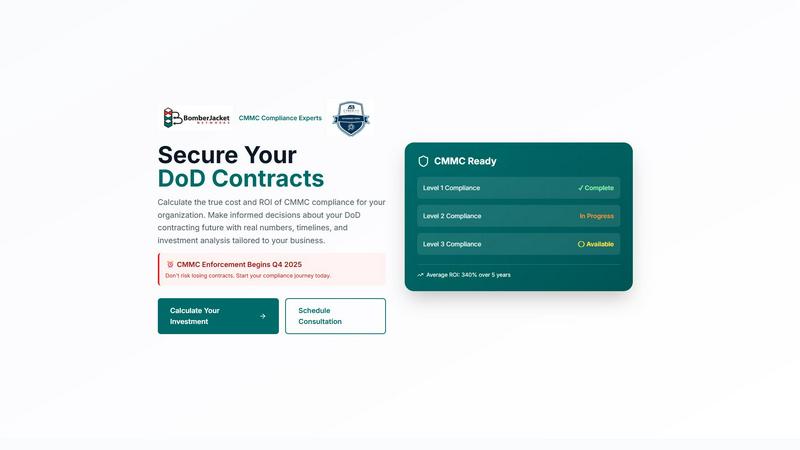
Calculate your CMMC compliance costs and ROI to secure DoD contracts.
Last updated: March 1, 2026

Threat Watch
Instantly check your cybersecurity health and get actionable insights to stay protected.
Last updated: March 1, 2026
Visual Comparison
CMMC ROI
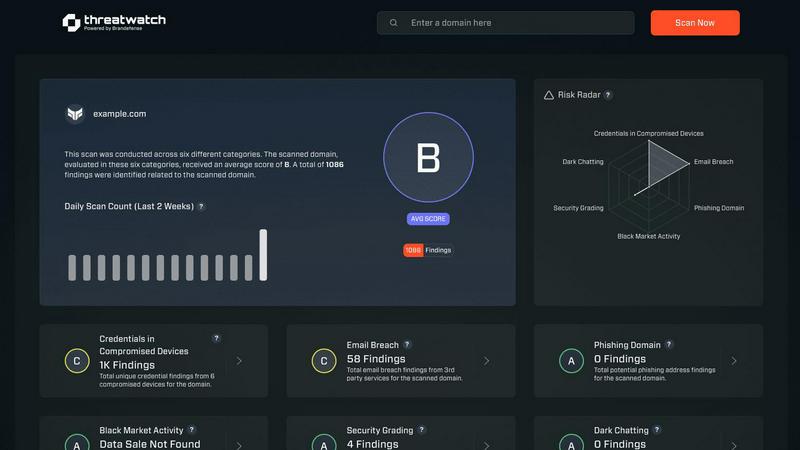
Threat Watch
Feature Comparison
CMMC ROI
Personalized 5-Year Financial Model
Get a tailored, comprehensive financial projection instantly. Simply input your company's specific details, and the app calculates your total 5-year investment range, projected ROI percentage, and exact payback period in months. This personalized model turns abstract compliance requirements into concrete, actionable numbers for your business planning.
Interactive Scenario Builder
Test different compliance strategies on the fly with pre-loaded example scenarios or by entering your own custom numbers. Adjust company size, DoD revenue, CMMC level, and even your current progress status to see how each variable impacts your investment and returns, enabling dynamic, what-if analysis directly in the app.
Visual ROI Timeline Projection
Understand your financial journey at a glance with an interactive, mobile-friendly chart. This visual tool maps your cumulative investment against your cumulative returns over 60 months, clearly highlighting your break-even point and the growth of your ROI over the full five-year period.
Detailed Risk & Value Breakdown
Move beyond cost to see the full value proposition. The app provides a clear breakdown of your contract value at risk, estimated breach cost avoidance, and potential win rate increase over non-certified competitors, giving you a holistic view of both the risks of inaction and the benefits of certification.
Threat Watch
Unified Mobile Dashboard
Gain instant, panoramic visibility into your cybersecurity health from a single, intuitive dashboard optimized for your phone. This centralized view consolidates alerts, risk scores, and critical insights across all monitored categories, eliminating the need to switch between disparate tools. Designed for quick comprehension on a smaller screen, it allows you to assess your organization's entire risk posture at a glance, anytime and anywhere.
Real-Time Exposure Detection
Continuously scan and analyze multiple threat vectors in real-time, including dark web markets, breach databases, and phishing campaigns. The platform automatically identifies if your corporate credentials, employee emails, or sensitive company data are being traded or discussed by malicious actors. This proactive surveillance turns your mobile device into an early-warning system, alerting you to exposures the moment they are discovered.
Automated Risk Prioritization
Stop wasting time on false positives or low-severity alerts. Threat Watch's intelligent engine automatically analyzes and prioritizes discovered threats based on their contextual relevance to your specific organization. It evaluates the potential impact and likelihood of exploitation, presenting you with a clear, actionable list of what needs immediate attention, so you can focus your efforts where they matter most.
On-the-Go Mitigation Workflow
Execute response actions directly from your mobile device to contain threats at speed. The app provides integrated, one-touch workflows to guide you through mitigation steps, such as forcing password resets for compromised accounts or isolating potentially breached devices. This seamless functionality ensures you can act decisively from a meeting, during a commute, or outside of the office, dramatically reducing your mean time to respond (MTTR).
Use Cases
CMMC ROI
Executive Budget Justification
CEOs and CFOs use the app to build a compelling, data-backed business case for the necessary CMMC compliance budget. The clear ROI projection and payback period help secure board approval and allocate resources confidently by framing compliance as a strategic investment, not just a cost.
Proposal and Bidding Strategy
Business development teams leverage the tool to understand the financial implications of pursuing contracts requiring specific CMMC levels. It helps assess whether the potential contract value justifies the compliance investment, informing smarter bidding decisions.
Compliance Project Planning
IT and security managers utilize the detailed cost ranges and 12-month implementation timeline to plan and phase their compliance projects effectively. It helps set realistic internal expectations, schedule resources, and track progress against financial milestones.
Consultant and C3PAO Client Onboarding
Authorized C3PAOs and compliance consultants use the app as a powerful engagement tool. It provides prospective clients with immediate, tangible value by delivering personalized estimates, establishing credibility, and framing the upcoming partnership around clear financial outcomes.
Threat Watch
Proactive Security Posture Management for CISOs
Chief Information Security Officers (CISOs) and business leaders can maintain continuous oversight of organizational risk without being tied to a desktop. The mobile-first dashboard provides an executive summary of security health, enabling informed decision-making and board reporting on-the-fly. It empowers leaders to demonstrate proactive risk management and validate security investments with real-time data.
Rapid Incident Response for Security Analysts
Security operations center (SOC) analysts can triage and respond to alerts from anywhere. When a critical alert about stolen credentials surfaces, analysts receive an immediate push notification. They can then use the app to investigate the exposure's context, assess its priority, and initiate containment protocols within minutes, all before even reaching their desk, significantly accelerating incident response.
Third-Party and Supply Chain Risk Monitoring
IT teams can extend their visibility beyond their immediate network to monitor for breaches involving vendors and partners. By tracking third-party domains and email addresses, Threat Watch alerts you if a supplier's compromised credentials could provide a backdoor into your systems. This allows for proactive communication and enforcement of security requirements before an attack chain is completed.
Employee Security Awareness and Training
Use actionable intelligence from Threat Watch to drive targeted security training. When the platform detects that employee credentials have appeared in a phishing list or breach, security teams can immediately notify the affected individuals with specific, contextual guidance. This turns a generic training exercise into a timely, personalized security lesson that has a far greater impact on behavior.
Overview
About CMMC ROI
CMMC ROI is your essential, interactive financial planning app designed specifically for Department of Defense (DoD) contractors. It transforms the complex and often overwhelming Cybersecurity Maturity Model Certification (CMMC) mandate into a clear, data-driven financial decision you can make on any device. Built by the experts at BomberJacket Networks, an authorized C3PAO, this tool goes beyond simple cost estimates. You input your specific company details—like size, DoD revenue, and target CMMC level—and instantly receive a personalized 5-year financial model. This includes your total investment range, projected return on investment (ROI), and precise payback period. The app calculates the true value of compliance by factoring in protected contract revenue, avoided breach costs, and competitive advantages. With the critical Q4 2025 enforcement deadline approaching, CMMC ROI empowers you to make informed, ROI-driven decisions to secure your DoD contracting future. It's the smart, strategic first step for any business seeking to navigate compliance with confidence and clarity, right from your phone or tablet.
About Threat Watch
Threat Watch is the definitive mobile command center for your organization's cybersecurity health. Built from the ground up for smartphones and tablets, it delivers a unified, real-time view of your digital risk posture directly into the hands of IT teams, security professionals, and business leaders. This platform moves beyond passive monitoring by actively analyzing your assets, vulnerabilities, and exposures across multiple critical fronts, including compromised credentials, breached accounts, phishing addresses, and dark web content. The core value is unparalleled speed and clarity: transform overwhelming data into a clear, actionable picture. Identify lurking threats, prioritize them based on your unique environment, and execute mitigation strategies faster than ever. With its intuitive, app-centric dashboard designed for on-the-go management, Threat Watch enables a decisive shift from reactive alert chasing to proactive, informed risk management, ensuring you're always one step ahead of potential breaches.
Frequently Asked Questions
CMMC ROI FAQ
How accurate are the cost estimates provided by the app?
The estimates are based on extensive real-world data from BomberJacket Networks' experience as an authorized C3PAO. They provide a reliable range (e.g., $721K-$881K) that accounts for variables like company size and target CMMC level. For a precise quote, a formal assessment is needed, but the app gives an excellent, data-driven starting point for planning.
What is included in the "Protected Value" for the ROI calculation?
The Protected Value is a key part of the ROI formula. It combines your total 5-year DoD contract revenue (which is at 100% risk without certification) with an average cost avoidance of $2.5M for potential data breaches and False Claims Act penalties. This creates a comprehensive view of the financial value CMMC certification protects.
Can I use the tool if my compliance project is already underway?
Absolutely. The app allows you to select your "Current Compliance Status" as "In Progress" or "Nearly Complete." It then applies a significant progress discount (30% or 60%) to the implementation cost estimate, reflecting the investment you've already made and providing a more accurate projection of your remaining costs and ROI.
Why is there a range for the total investment cost?
The investment is presented as a range (e.g., $721K-$881K) because actual costs can vary based on your company's specific existing IT infrastructure, security posture, and chosen implementation partners. The range provides a realistic expectation, with the lower end reflecting a more prepared organization and the higher end accounting for more extensive needed upgrades.
Threat Watch FAQ
How does Threat Watch discover my company's exposed data?
Threat Watch employs a sophisticated, automated scanning engine that continuously monitors a vast array of sources. This includes underground forums, dark web marketplaces, paste sites, public breach databases, and phishing kit repositories. Our system uses digital fingerprints of your organization (like domain names and key asset identifiers) to find and flag relevant exposures, ensuring you only see alerts that matter to you.
Is the Threat Watch app secure to use on a personal mobile device?
Absolutely. Security is our foundation. The Threat Watch app uses strong, end-to-end encryption for all data in transit and at rest. It also supports robust multi-factor authentication (MFA) and integrates with mobile device management (MDM) solutions. Access is strictly controlled via role-based permissions, ensuring that sensitive findings are only visible to authorized personnel on registered, secure devices.
What kind of threats can Threat Watch actually help me mitigate?
Threat Watch is specifically designed to uncover and help mitigate threats stemming from digital exposure. This includes credential compromise (passwords for sale), account takeovers, phishing campaigns targeting your domain, sensitive corporate data leaked on the dark web, and mentions of your infrastructure in hacker forums. It provides the intelligence and tools to reset credentials, block threats, and secure assets before they are exploited.
Can Threat Watch integrate with our existing security tools?
Yes, Threat Watch is built to fit into your existing security ecosystem. It offers seamless integrations with popular Security Information and Event Management (SIEM) systems, Identity and Access Management (IAM) platforms, and IT service management (ITSM) ticketing systems like ServiceNow. This allows alerts and risk data to flow directly into your central workflows, enabling automated response actions and enriched correlation.
Alternatives
CMMC ROI Alternatives
CMMC ROI is a specialized business intelligence tool designed to help DoD contractors calculate the financial impact of CMMC compliance. It transforms complex security requirements into a clear, data-driven investment model, projecting costs, ROI, and payback periods to support strategic planning. Users often explore alternatives for various reasons. Some may seek different pricing models or a more basic feature set. Others might need a tool that integrates with specific project management platforms or offers a different type of reporting dashboard. When evaluating any alternative, focus on core needs. Look for accuracy in cost modeling, ease of use on any device, and the credibility of the provider's cybersecurity expertise. The right tool should deliver clear, actionable financial insights tailored to your specific contracting scenario.
Threat Watch Alternatives
Threat Watch is a mobile-first cybersecurity health and business intelligence platform. It provides IT and security teams with a real-time, actionable view of their organization's digital risk directly from a smartphone or tablet, moving beyond traditional monitoring to proactive management. Users often explore alternatives for various reasons. These can include budget constraints, the need for specific integrations with existing security tools, or a requirement for a desktop-centric workflow instead of a mobile-first approach. Some organizations may also seek solutions with different reporting structures or more specialized feature sets. When evaluating other options, consider your core needs. Key factors include the platform's primary interface (mobile vs. desktop), the scope of its monitoring capabilities, the speed and clarity of its alerts, and how well it prioritizes risks for your specific environment. The goal is to find a solution that delivers actionable intelligence in a format that fits your team's workflow.