
Cosy vs Never Drop
Side-by-side comparison to help you choose the right AI tool.

Cosy automates Slack community onboarding and member connections to save you time.
Last updated: February 28, 2026

Never Drop
NeverDrop captures contacts and drafts personalized follow-ups instantly, turning handshakes into closed deals at.
Last updated: February 28, 2026
Visual Comparison
Cosy
Never Drop

Feature Comparison
Cosy
Automated Onboarding Sequences
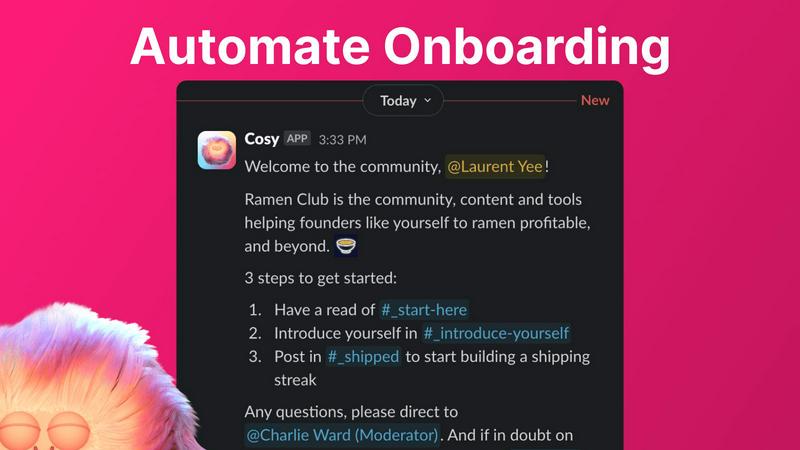
Create and automate up to 10 distinct welcome DM sequences for new members, sent from you, a team member, or the Cosy bot. Fully customize messages with names, links, and emojis, and set precise time delays—from immediately to months in the future. This ensures every new joiner feels welcomed personally, even if they join in the middle of the night, saving you hours of manual outreach and follow-up while ensuring no one is ever missed.
Smart Member Introductions
Grow engagement by automatically introducing opted-in community members to each other via DMs on a customizable cadence. Set the frequency (every 1-4 weeks), weekday, and time. Introductions happen in a 3-person DM with the Cosy bot, and members are randomly matched to enhance serendipity while avoiding recent connections. This feature fosters meaningful 1:1 connections on autopilot, turning a group of individuals into a tight-knit network.
Searchable Member Directory
Build a simple, searchable directory of all your community members without anyone leaving Slack. Create custom profile fields (text, single-select, or multi-select) and notify members to fill them out via a bot DM. Members can then search for keywords and filter profiles directly within Slack using the Cosy app or a /member-directory slash command, making it easy for people to find and connect with the right peers.
Content Highlights & Moderation
Instantly surface your community's most valuable conversations with simple slash commands. Use /most-engaged-messages to find top posts in a channel or /most-engaged-messages-all for insights across all public channels. The /unreplied-messages command helps you spot posts needing attention. Cosy also helps maintain a safe environment by allowing you to instantly flag abusive or spam messages for quick moderation action.
Never Drop
Instant Business Card Scanning
Never Drop allows users to snap a photo of any business card, utilizing AI-powered Optical Character Recognition (OCR) to extract essential contact details such as name, company, title, phone number, and email in mere seconds. This feature abolishes the need for manual data entry, saving valuable time and preventing errors.
Automatic Email Enrichment
Often, business cards feature generic emails or lack email information altogether. Never Drop automatically enriches contact profiles by sourcing verified work emails from the name and company provided on the card. This functionality ensures that your sales team always has accurate and reliable contact details without tedious manual searches.
Personalized AI Drafts
Based on the voice notes or text context you provide about your conversation, Never Drop generates a tailored follow-up email within two minutes. Unlike generic templates, these emails reflect your unique tone and conversation specifics, making every follow-up feel personal and relevant.
Team Collaboration Workspace
Never Drop is designed to enhance teamwork within sales environments. It allows users to organize scanned leads by event, reassign leads among team members, and track overall team activity through a comprehensive dashboard. This feature ensures that all team members stay aligned and no lead falls through the cracks.
Use Cases
Cosy
Professional Networks & Alumni Groups
For professional networks or alumni associations on Slack, Cosy automates the initial welcome and facilitates ongoing peer-to-peer connections. The automated introductions and searchable member directory help members find mentors, collaborators, or job opportunities within the community, transforming a simple contact list into an active, supportive professional ecosystem that adds continuous value.
Customer Success & Support Communities
Enhance your customer community by ensuring every new user is onboarded smoothly with personalized DMs that guide them to resources. The content highlights feature allows community managers to quickly identify and amplify helpful solutions or unanswered questions, improving overall customer experience and reducing support ticket volume by fostering peer-led help.
Founder & Startup Communities
Founder communities thrive on serendipitous connections and shared knowledge. Cosy's automated introductions create valuable collisions between founders at similar stages, while the ability to surface the most engaged posts helps curate top insights on fundraising, product development, and growth, ensuring the best content doesn't get lost in busy channels.
Internal Company Engagement
Use Cosy within internal company Slack workspaces to boost cross-departmental collaboration and engagement for remote or hybrid teams. Automate introductions between new hires and tenured employees, create a searchable internal skills directory, and highlight impactful team announcements or wins to strengthen company culture and connectivity.
Never Drop
Trade Shows
At bustling trade shows, Never Drop empowers sales teams to quickly capture leads by scanning business cards on the spot. This efficiency allows teams to engage with multiple prospects without the fear of losing valuable contact details.
Conferences
During conferences, where networking opportunities abound, Never Drop helps users efficiently collect and manage leads. By adding context to each scanned card, sales professionals can remember key details about their conversations, ensuring effective follow-ups later.
Networking Events
Networking events can often be overwhelming, with numerous contacts to remember. Never Drop simplifies this by allowing users to scan cards and add voice notes for reminders, enabling personalized follow-ups that resonate with new connections.
Business Meetings
In business dinners or meetings, Never Drop can be an indispensable tool for capturing contact information. Users can scan cards and generate follow-ups while still engaged in discussions, ensuring that critical details are not overlooked.
Overview
About Cosy
Cosy is a powerful, Slack-native application designed to transform your static Slack workspace into a vibrant, self-sustaining community. It automates the manual, time-consuming tasks that community managers face daily, freeing up hours every week while significantly boosting member engagement and connection. Built specifically for Slack, Cosy operates seamlessly within the platform your community already uses, eliminating the need for external tools or complicated workflows. It's the perfect solution for community leaders, founders, and managers of professional networks, alumni groups, customer communities, or any Slack workspace focused on fostering meaningful interactions. The core value proposition is simple: automate onboarding, facilitate connections, surface valuable content, and maintain a safe environment—all from within Slack. With a generous free tier for up to 250 members and an intuitive setup, Cosy makes advanced community management accessible and efficient, helping you cultivate a cosy, engaged, and thriving digital space without ever leaving the app your members love.
About Never Drop
Never Drop is an innovative lead-capture app specifically designed for sales teams navigating fast-paced environments such as trade shows, conferences, and networking events. This app streamlines the process of collecting and managing leads by enabling users to scan business cards directly using their smartphones. Once a card is scanned, users can enhance the captured data with voice notes or text context, ensuring they retain crucial details about each lead. The app harnesses advanced AI technology to generate personalized follow-up emails in under two minutes, significantly reducing the risk of losing potential leads. With seamless integration into popular CRMs like HubSpot, Never Drop keeps your sales pipeline organized and ready for action, allowing sales professionals to turn initial conversations into closed deals effortlessly. Say goodbye to lost leads and hello to efficient follow-ups that maximize conversion potential.
Frequently Asked Questions
Cosy FAQ
How does Cosy handle data privacy and security?
Cosy is a native Slack app, which means it operates within Slack's robust security and compliance framework. It only accesses the data and permissions you explicitly grant during installation. All data is processed securely, and you maintain full control over your community's information. You can review the specific scopes and permissions before installing the app.
Can I customize the messages sent by Cosy?
Yes, absolutely. For both onboarding sequences and member introductions, you have full control over the message content. You can personalize messages using merge tags (like the member's first name), include links and emojis, and set specific time delays for when messages are sent. A template is provided to make setup easy, but you can edit it to match your community's voice perfectly.
What happens if a member doesn't want to be introduced to others?
Member participation in automated introductions is entirely opt-in. Community members can choose not to participate. The system only matches members who have opted in, and it intelligently avoids matching people who have been recently introduced to ensure variety and comfort. Respect for member preferences is a core part of the Cosy experience.
Is there a limit to how many members can use the free tier?
Cosy offers a generous free plan that supports communities with up to 250 members. This includes access to core features like automated onboarding, member introductions, the directory, and content highlights. For communities larger than 250 members, you can start a 30-day free trial of the unlimited plan to explore all features before committing.
Never Drop FAQ
What is Never Drop?
Never Drop is a lead-capture app designed for sales teams at events. Users can scan business cards, add context via voice or text, and receive a personalized follow-up email in under two minutes. It also enriches contact profiles and integrates with popular CRMs.
How does business card scanning work?
Users can take a photo of any business card using the Never Drop app. The AI-powered OCR technology extracts key contact information such as name, company, title, phone number, and email almost instantly, eliminating the need for manual entry.
What types of events is Never Drop suitable for?
Never Drop is ideal for various events including trade shows, conferences, networking events, meetups, and business dinners. It allows users to organize leads by event, making it easy to track and manage contacts from different situations.
Do I need to use the mobile app?
Yes, the mobile app is essential for scanning business cards, recording voice context, and triggering follow-ups on the go. The accompanying web dashboard allows users to manage their team, review scans, and configure settings, providing a seamless experience across devices.
Alternatives
Cosy Alternatives
Cosy is a Slack-native automation tool in the productivity and management category. It helps community leaders save time by automating member onboarding, introductions, and engagement directly within their Slack workspace. Users often explore alternatives for various reasons. They might need a different pricing model, require features beyond Slack automation, or seek a platform-agnostic tool that works across multiple communication apps like Discord or Microsoft Teams. When evaluating alternatives, consider your core needs. Look for strong automation capabilities, seamless integration with your primary platform, and tools that genuinely foster member connections. The right solution should reduce manual work while making your community feel more engaged and personal.
Never Drop Alternatives
Never Drop is a cutting-edge lead-capture app tailored for sales teams who thrive in dynamic settings such as trade shows, conferences, and networking events. It empowers users to effortlessly collect and manage leads by scanning business cards with their smartphones, while also enriching each entry with personalized notes to ensure context is never lost. Users often seek alternatives to Never Drop for various reasons including budget constraints, unique feature requirements, or compatibility with specific platforms. When exploring alternatives, it's essential to consider factors like ease of use, integration capabilities with existing tools, and the overall value provided to ensure a seamless lead management experience.