

Cosy
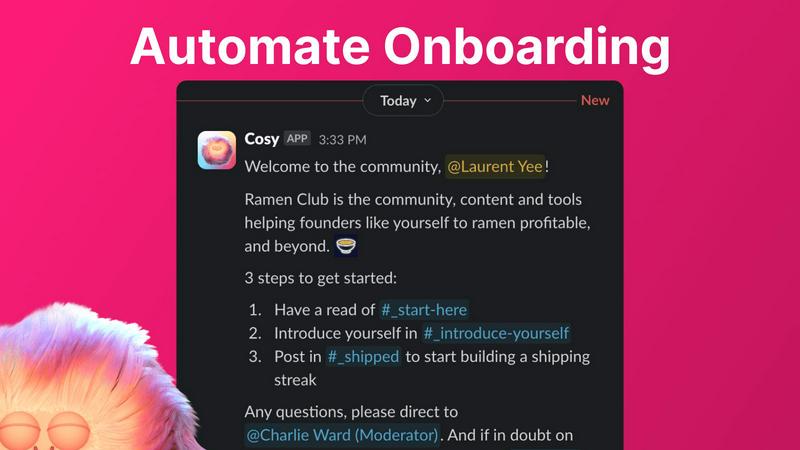
Cosy automates Slack community onboarding and member connections to save you time.
AI tool Details
Explore More
Alternatives
About Cosy
Cosy is a powerful, Slack-native application designed to transform your static Slack workspace into a vibrant, self-sustaining community. It automates the manual, time-consuming tasks that community managers face daily, freeing up hours every week while significantly boosting member engagement and connection. Built specifically for Slack, Cosy operates seamlessly within the platform your community already uses, eliminating the need for external tools or complicated workflows. It's the perfect solution for community leaders, founders, and managers of professional networks, alumni groups, customer communities, or any Slack workspace focused on fostering meaningful interactions. The core value proposition is simple: automate onboarding, facilitate connections, surface valuable content, and maintain a safe environment—all from within Slack. With a generous free tier for up to 250 members and an intuitive setup, Cosy makes advanced community management accessible and efficient, helping you cultivate a cosy, engaged, and thriving digital space without ever leaving the app your members love.
Features
Automated Onboarding Sequences
Create and automate up to 10 distinct welcome DM sequences for new members, sent from you, a team member, or the Cosy bot. Fully customize messages with names, links, and emojis, and set precise time delays—from immediately to months in the future. This ensures every new joiner feels welcomed personally, even if they join in the middle of the night, saving you hours of manual outreach and follow-up while ensuring no one is ever missed.
Smart Member Introductions
Grow engagement by automatically introducing opted-in community members to each other via DMs on a customizable cadence. Set the frequency (every 1-4 weeks), weekday, and time. Introductions happen in a 3-person DM with the Cosy bot, and members are randomly matched to enhance serendipity while avoiding recent connections. This feature fosters meaningful 1:1 connections on autopilot, turning a group of individuals into a tight-knit network.
Searchable Member Directory
Build a simple, searchable directory of all your community members without anyone leaving Slack. Create custom profile fields (text, single-select, or multi-select) and notify members to fill them out via a bot DM. Members can then search for keywords and filter profiles directly within Slack using the Cosy app or a /member-directory slash command, making it easy for people to find and connect with the right peers.
Content Highlights & Moderation
Instantly surface your community's most valuable conversations with simple slash commands. Use /most-engaged-messages to find top posts in a channel or /most-engaged-messages-all for insights across all public channels. The /unreplied-messages command helps you spot posts needing attention. Cosy also helps maintain a safe environment by allowing you to instantly flag abusive or spam messages for quick moderation action.
Use Cases
Professional Networks & Alumni Groups
For professional networks or alumni associations on Slack, Cosy automates the initial welcome and facilitates ongoing peer-to-peer connections. The automated introductions and searchable member directory help members find mentors, collaborators, or job opportunities within the community, transforming a simple contact list into an active, supportive professional ecosystem that adds continuous value.
Customer Success & Support Communities
Enhance your customer community by ensuring every new user is onboarded smoothly with personalized DMs that guide them to resources. The content highlights feature allows community managers to quickly identify and amplify helpful solutions or unanswered questions, improving overall customer experience and reducing support ticket volume by fostering peer-led help.
Founder & Startup Communities
Founder communities thrive on serendipitous connections and shared knowledge. Cosy's automated introductions create valuable collisions between founders at similar stages, while the ability to surface the most engaged posts helps curate top insights on fundraising, product development, and growth, ensuring the best content doesn't get lost in busy channels.
Internal Company Engagement
Use Cosy within internal company Slack workspaces to boost cross-departmental collaboration and engagement for remote or hybrid teams. Automate introductions between new hires and tenured employees, create a searchable internal skills directory, and highlight impactful team announcements or wins to strengthen company culture and connectivity.
Pricing
Cosy offers a straightforward pricing model to suit different community sizes. A generous Free Plan is available for communities with up to 250 members, providing access to all core features. For larger communities requiring unlimited members, a paid plan is available. You can start with a full-featured 30-day free trial for the unlimited plan to test everything Cosy offers before making a decision. All plans are billed per workspace, and you can install the app directly from the Slack App Directory to begin.
Frequently Asked Questions
How does Cosy handle data privacy and security?
Cosy is a native Slack app, which means it operates within Slack's robust security and compliance framework. It only accesses the data and permissions you explicitly grant during installation. All data is processed securely, and you maintain full control over your community's information. You can review the specific scopes and permissions before installing the app.
Can I customize the messages sent by Cosy?
Yes, absolutely. For both onboarding sequences and member introductions, you have full control over the message content. You can personalize messages using merge tags (like the member's first name), include links and emojis, and set specific time delays for when messages are sent. A template is provided to make setup easy, but you can edit it to match your community's voice perfectly.
What happens if a member doesn't want to be introduced to others?
Member participation in automated introductions is entirely opt-in. Community members can choose not to participate. The system only matches members who have opted in, and it intelligently avoids matching people who have been recently introduced to ensure variety and comfort. Respect for member preferences is a core part of the Cosy experience.
Is there a limit to how many members can use the free tier?
Cosy offers a generous free plan that supports communities with up to 250 members. This includes access to core features like automated onboarding, member introductions, the directory, and content highlights. For communities larger than 250 members, you can start a 30-day free trial of the unlimited plan to explore all features before committing.
Similar to Cosy
DebutPin
Indie product playground — ship, and collect pins

Product Launch Checklist
A free launch checklist for SaaS, apps, AI tools and more. Every step says why it matters and when you can skip it.
Kody Tools
Free collection of online developer utilities, code formatters, and digital converters designed to streamline your daily workflow.
Forms Plugin
The #1 Native Form Builder Plugin for Framer - No Code, No Embeds, No External Platforms.


amaze.directory
AI tools somebody actually used before writing about them.

benchmark.directory
An AI tools directory that turns down money. 146 listings, 20 categories, no sponsored placement and no affiliate ordering.