
Cosy vs Perkoon
Side-by-side comparison to help you choose the right AI tool.

Cosy automates Slack community onboarding and member connections to save you time.
Last updated: February 28, 2026

Send files directly to anyone for free with unlimited peer-to-peer transfers.
Last updated: March 4, 2026
Visual Comparison
Cosy
Perkoon

Feature Comparison
Cosy
Automated Onboarding Sequences
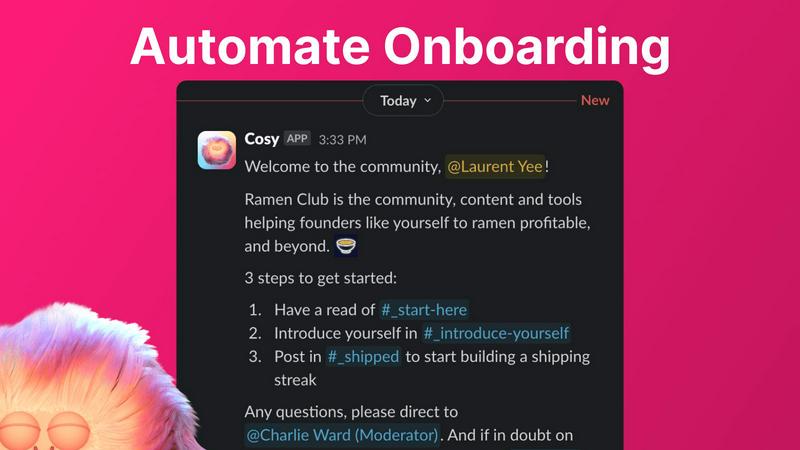
Create and automate up to 10 distinct welcome DM sequences for new members, sent from you, a team member, or the Cosy bot. Fully customize messages with names, links, and emojis, and set precise time delays—from immediately to months in the future. This ensures every new joiner feels welcomed personally, even if they join in the middle of the night, saving you hours of manual outreach and follow-up while ensuring no one is ever missed.
Smart Member Introductions
Grow engagement by automatically introducing opted-in community members to each other via DMs on a customizable cadence. Set the frequency (every 1-4 weeks), weekday, and time. Introductions happen in a 3-person DM with the Cosy bot, and members are randomly matched to enhance serendipity while avoiding recent connections. This feature fosters meaningful 1:1 connections on autopilot, turning a group of individuals into a tight-knit network.
Searchable Member Directory
Build a simple, searchable directory of all your community members without anyone leaving Slack. Create custom profile fields (text, single-select, or multi-select) and notify members to fill them out via a bot DM. Members can then search for keywords and filter profiles directly within Slack using the Cosy app or a /member-directory slash command, making it easy for people to find and connect with the right peers.
Content Highlights & Moderation
Instantly surface your community's most valuable conversations with simple slash commands. Use /most-engaged-messages to find top posts in a channel or /most-engaged-messages-all for insights across all public channels. The /unreplied-messages command helps you spot posts needing attention. Cosy also helps maintain a safe environment by allowing you to instantly flag abusive or spam messages for quick moderation action.
Perkoon
Unlimited Free P2P Transfers
Perkoon's core feature is its unlimited, free peer-to-peer file transfer. When both sender and recipient are online, files are beamed directly from one browser to another. This method imposes no file size limits, requires no accounts, and costs Perkoon nothing in server bandwidth—a saving they pass directly to you. Most importantly, because the data stream never passes through Perkoon's servers, it guarantees unparalleled privacy and speed for your transfers.
Encrypted Cloud Storage for Offline Sending
For when your recipient isn't online, Perkoon offers secure, encrypted cloud storage. This is a paid feature, and Perkoon is upfront about why: honestly covering the cost of running and maintaining the servers that hold your files. Your data is encrypted on their servers, providing a secure "hold" until the other person is ready to download, bridging the gap when instant P2P isn't possible.
Native AI & Automation Integration
Perkoon is built for the future of work. It features a native API (window.__perkoon) that allows AI assistants and automation scripts to interact with the service directly, without the need for inefficient screen-scraping. This means your workflows and AI agents can send and manage files through Perkoon programmatically, seamlessly integrating file transfer into automated processes.
Simple CLI & Browser Tool
Beyond the web interface, Perkoon provides a straightforward Command Line Interface (CLI) tool. This empowers developers, power users, and automated systems to initiate and manage file transfers directly from a terminal, offering flexibility and integration capabilities that go far beyond a standard web upload form.
Use Cases
Cosy
Professional Networks & Alumni Groups
For professional networks or alumni associations on Slack, Cosy automates the initial welcome and facilitates ongoing peer-to-peer connections. The automated introductions and searchable member directory help members find mentors, collaborators, or job opportunities within the community, transforming a simple contact list into an active, supportive professional ecosystem that adds continuous value.
Customer Success & Support Communities
Enhance your customer community by ensuring every new user is onboarded smoothly with personalized DMs that guide them to resources. The content highlights feature allows community managers to quickly identify and amplify helpful solutions or unanswered questions, improving overall customer experience and reducing support ticket volume by fostering peer-led help.
Founder & Startup Communities
Founder communities thrive on serendipitous connections and shared knowledge. Cosy's automated introductions create valuable collisions between founders at similar stages, while the ability to surface the most engaged posts helps curate top insights on fundraising, product development, and growth, ensuring the best content doesn't get lost in busy channels.
Internal Company Engagement
Use Cosy within internal company Slack workspaces to boost cross-departmental collaboration and engagement for remote or hybrid teams. Automate introductions between new hires and tenured employees, create a searchable internal skills directory, and highlight impactful team announcements or wins to strengthen company culture and connectivity.
Perkoon
Sending Large Project Files to Clients
Freelancers and agencies can use Perkoon's free P2P transfer to send massive video edits, design files, or code repositories to clients instantly. There's no need to compress files or split archives across multiple services. Just generate a link, share it, and the client downloads directly from you, with no size caps or wait times.
Secure Document Sharing for Teams
Teams handling sensitive documents, like legal contracts or financial reports, can leverage Perkoon's private P2P streaming. Since files never sit on a third-party server, the risk of a data breach is minimized. For asynchronous sharing, the encrypted cloud storage provides a secure dropbox that only the intended recipient can access.
Automating Backup & File Sync Tasks
Developers and IT professionals can use the Perkoon CLI to script automatic backups of logs, databases, or project assets. By integrating Perkoon into their cron jobs or automation pipelines, they can ensure critical data is transferred to another location without manual intervention, using a reliable and private service.
AI Agent File Management
An AI research assistant can be programmed to use Perkoon's native API to automatically fetch datasets, save processed results, or share generated reports. This turns Perkoon into an intelligent file transfer layer for autonomous agents, enabling them to handle file operations as part of a larger automated task without human oversight.
Overview
About Cosy
Cosy is a powerful, Slack-native application designed to transform your static Slack workspace into a vibrant, self-sustaining community. It automates the manual, time-consuming tasks that community managers face daily, freeing up hours every week while significantly boosting member engagement and connection. Built specifically for Slack, Cosy operates seamlessly within the platform your community already uses, eliminating the need for external tools or complicated workflows. It's the perfect solution for community leaders, founders, and managers of professional networks, alumni groups, customer communities, or any Slack workspace focused on fostering meaningful interactions. The core value proposition is simple: automate onboarding, facilitate connections, surface valuable content, and maintain a safe environment—all from within Slack. With a generous free tier for up to 250 members and an intuitive setup, Cosy makes advanced community management accessible and efficient, helping you cultivate a cosy, engaged, and thriving digital space without ever leaving the app your members love.
About Perkoon
Perkoon is a refreshingly honest file transfer service designed for the modern user who values simplicity, privacy, and genuine utility. It cuts through the noise of bloated platforms by focusing on one core job: moving your files from point A to point B without any hassle. Built for anyone tired of artificial limits, mandatory sign-ups, and services that monetize your data, Perkoon offers a powerful, privacy-first alternative. Its flagship feature is a completely free, unlimited peer-to-peer (P2P) transfer service that works directly between browsers when both parties are online, ensuring your data never touches a central server. For sending files to offline recipients, Perkoon provides encrypted, paid cloud storage, transparently covering the server costs. Uniquely, Perkoon is natively designed for the age of automation, with built-in tools for AI agents and a simple CLI, making it as accessible to machines as it is to people. It's the straightforward, powerful solution for real users who just want to share files, not become the product.
Frequently Asked Questions
Cosy FAQ
How does Cosy handle data privacy and security?
Cosy is a native Slack app, which means it operates within Slack's robust security and compliance framework. It only accesses the data and permissions you explicitly grant during installation. All data is processed securely, and you maintain full control over your community's information. You can review the specific scopes and permissions before installing the app.
Can I customize the messages sent by Cosy?
Yes, absolutely. For both onboarding sequences and member introductions, you have full control over the message content. You can personalize messages using merge tags (like the member's first name), include links and emojis, and set specific time delays for when messages are sent. A template is provided to make setup easy, but you can edit it to match your community's voice perfectly.
What happens if a member doesn't want to be introduced to others?
Member participation in automated introductions is entirely opt-in. Community members can choose not to participate. The system only matches members who have opted in, and it intelligently avoids matching people who have been recently introduced to ensure variety and comfort. Respect for member preferences is a core part of the Cosy experience.
Is there a limit to how many members can use the free tier?
Cosy offers a generous free plan that supports communities with up to 250 members. This includes access to core features like automated onboarding, member introductions, the directory, and content highlights. For communities larger than 250 members, you can start a 30-day free trial of the unlimited plan to explore all features before committing.
Perkoon FAQ
Is the P2P transfer really free forever?
Yes, Perkoon's peer-to-peer transfer service is completely free and unlimited, with no plans to charge for it. The company's stance is straightforward: since the data moves directly between users' browsers and costs them virtually nothing in server resources, they have no reason to charge you for it. It's free as a matter of principle, not as a temporary promotion.
What happens if the recipient is offline?
If the recipient is not online to receive the direct P2P transfer, Perkoon can hold the file for them using its encrypted cloud storage feature. This is a paid option because it involves Perkoon using its own servers to store your data temporarily. You can choose this method to ensure your file is delivered as soon as the recipient comes online.
Can Perkoon see what I'm sending via P2P?
No. During a peer-to-peer transfer, your file data is streamed directly between the two browsers (or devices) using a secure WebRTC data channel. Perkoon's servers only help establish the initial connection but do not intercept or have access to the actual file content. They literally cannot see what you are sending.
Which web browsers are supported?
Perkoon works best on Chromium-based browsers like Chrome, Edge, and Brave, which offer full, unrestricted support for the advanced P2P technology. Firefox and Safari can be used but have inherent browser limitations that may affect performance or file size capabilities for direct P2P transfers.
Alternatives
Cosy Alternatives
Cosy is a Slack-native automation tool in the productivity and management category. It helps community leaders save time by automating member onboarding, introductions, and engagement directly within their Slack workspace. Users often explore alternatives for various reasons. They might need a different pricing model, require features beyond Slack automation, or seek a platform-agnostic tool that works across multiple communication apps like Discord or Microsoft Teams. When evaluating alternatives, consider your core needs. Look for strong automation capabilities, seamless integration with your primary platform, and tools that genuinely foster member connections. The right solution should reduce manual work while making your community feel more engaged and personal.
Perkoon Alternatives
Perkoon is a straightforward file transfer service in the productivity category, designed to move files without mandatory accounts or artificial limits. Its core is a free, unlimited peer-to-peer transfer that works directly between browsers. Users often explore alternatives for various reasons. Some may need features Perkoon doesn't emphasize, like deep integration with specific cloud ecosystems or advanced team collaboration tools. Others might prioritize different pricing models or require guaranteed platform availability on all their devices. When evaluating other options, consider your primary needs. Key factors include transfer speed and reliability, the true cost structure (free tiers vs. subscriptions), platform support (web, mobile, desktop apps), and the provider's stance on privacy and data handling. The best choice aligns with your specific workflow.