
Crops vs KeywordKick
Side-by-side comparison to help you choose the right AI tool.

Crops is the AI workspace where creative teams organize assets, streamline approvals, and catch errors instantly.
Last updated: February 28, 2026

KeywordKick
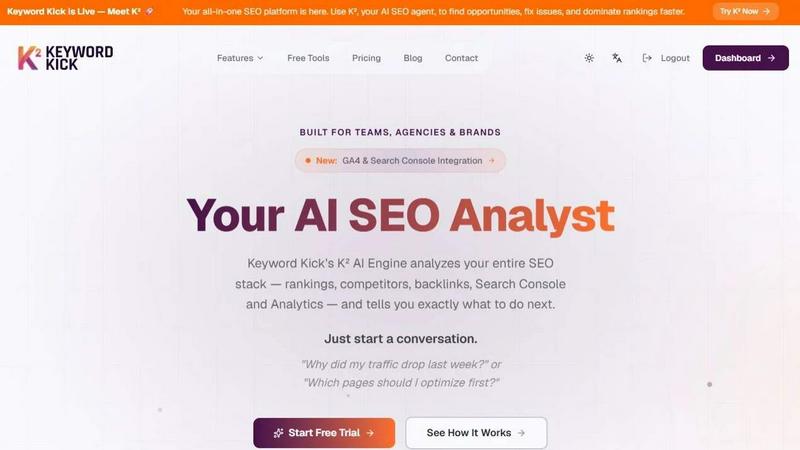
Talk to your AI SEO agent for clear, actionable insights from all your data in one app.
Last updated: April 13, 2026
Visual Comparison
Crops

KeywordKick
Feature Comparison
Crops
Smart Asset Organization
Crops uses AI to automatically tag and categorize every uploaded file, transforming a chaotic library into an instantly searchable database. Assets can be placed on multiple project boards without duplication, and complex searches that used to take hours are resolved in seconds. This intelligent organization ensures your team can immediately locate the right hero image, logo, or final design version, restoring creative momentum and ending the hunt through emails and disparate cloud drives.
Streamlined Approvals & Collaboration
This feature centralizes all feedback and approvals directly on the asset itself, eliminating scattered comments. Stakeholders can leave visual annotations and comments on designs via secure review links that require no login. Teams can track approval status with custom workflows, ensuring everyone knows what's finalized. This creates a single source of truth for feedback, accelerating review cycles and enabling faster campaign shipping with clear, contextual direction.
AI-Powered Quality Control
Crops deploys AI to act as an automated final inspector, scanning content instantly for a wide range of errors before they reach a client or go live. It checks for spelling and grammar mistakes, accessibility issues like poor color contrast, forgotten placeholder text like "Lorem ipsum," and brand inconsistencies. By integrating these checks into your workflow, you can catch what human eyes miss and deliver flawless, professional work with confidence every single time.
Secure & Simple Sharing
Designed for frictionless client and stakeholder interaction, this feature allows you to generate password-protected, expiring links for sharing assets. Recipients can review, download (based on permissions), and comment directly without needing to create an account. This professional approach eliminates email attachment chaos, speeds up feedback, and presents your brand securely, all while maintaining full control over your assets.
KeywordKick
K² AI SEO Agent
This is the intelligent heart of the platform. The K² AI agent acts as your personal SEO analyst. You interact with it through a conversational chat interface, asking questions about your SEO performance. It synthesizes data from all connected sources (rankings, backlinks, GA4, Search Console) to provide clear, context-aware answers and prioritized action steps, moving you from data to decision instantly.
Unified SEO Data Workspace
KeywordKick consolidates your entire SEO stack into a single, clean dashboard. You can connect and view data from Google Analytics 4, Google Search Console, daily rank tracking, backlink profiles, and technical site audits simultaneously. This eliminates the need to juggle multiple tools and provides a holistic, real-time view of your search performance health.
Intelligent Rank Tracking & SERP Analysis
Go beyond basic position tracking. This feature monitors daily keyword movements with historical trends and provides competitive context. It uniquely tracks visibility across key SERP features like Featured Snippets and "People Also Ask" boxes, giving you a complete picture of your search presence beyond traditional blue links.
Automated Site Audits & Health Scoring
The platform continuously monitors your website's technical SEO health. It runs automated audits, identifies critical issues, warnings, and passed checks, and presents them with a clear, overall Site Health Score (e.g., 94/100). This allows teams to quickly understand technical status and prioritize fixes that impact visibility.
Use Cases
Crops
Marketing Campaign Launch
For launching a multi-channel campaign, teams use Crops to centralize all final assets—from social media graphics to video files—in one organized workspace. They utilize streamlined approval workflows to gather fast, contextual feedback from stakeholders and leverage AI quality control to automatically catch typos or brand guideline deviations before anything goes public, ensuring a flawless and synchronized launch.
Creative Team Asset Management
In-house or agency creative teams implement Crops to end the chaos of managing thousands of images, logos, and templates. AI auto-tagging makes every asset searchable in moments. The ability to place assets on multiple boards without duplication allows for flexible project organization, saving countless hours previously wasted searching through emails, Slack, and disparate folders for the right file.
Client Review & Approval Process
Agencies and freelancers use Crops to transform a typically messy client review process. Instead of emailing large files and compiling feedback from multiple sources, they share a single, secure review link. Clients comment directly on the designs with visual annotations, and all feedback is tracked in one place, eliminating version confusion and ensuring the "final-final" file is clearly identified and approved.
Ensuring Brand Compliance & Accessibility
Brand managers and operations teams integrate Crops to enforce quality and compliance at scale. The AI quality control feature is configured to automatically audit all outgoing content for adherence to brand guidelines (like correct logo usage and colors) and to flag accessibility issues (like insufficient text contrast). This proactive check safeguards the brand and promotes inclusive design without manual, last-minute reviews.
KeywordKick
Diagnosing Traffic Drops & Identifying Causes
When organic traffic suddenly declines, instead of manually cross-referencing Analytics and Search Console, a user can ask K², "Why did my traffic drop last week?" The AI agent analyzes ranking changes, competitor movements, and technical issues across connected data to pinpoint the exact cause and recommend a recovery plan.
Prioritizing Page Optimization Efforts
SEO teams often struggle to decide which pages to optimize first for maximum impact. A user can ask K², "Which pages should I optimize first?" The agent will analyze ranking data, search volume, and competitive difficulty to provide a prioritized list of high-opportunity pages with specific recommendations for each.
Conducting Competitive Gap Analysis
Marketers can use KeywordKick to understand competitor advantages. By connecting competitor domains, the platform allows users to compare keyword rankings, identify content gaps where competitors rank but they don't, and uncover opportunities to capture valuable traffic and featured snippets.
Streamlining Agency & Team Reporting
For agencies and in-house SEO teams, the unified dashboard and clear AI recommendations simplify reporting and task delegation. The prioritized action list from K² gives team members clear, confident next steps, turning complex data into an executable workflow that everyone can understand and act upon.
Overview
About Crops
Crops is the AI-powered Digital Asset Management (DAM) platform engineered specifically for the dynamic, on-the-go nature of modern creative and marketing teams. It acts as a central, intelligent workspace designed to eliminate the chronic workflow frustrations that stifle productivity and creativity. The platform directly tackles the core issues of endless file searches, scattered feedback across emails and Slack, confusing version histories, and costly errors that slip through manual reviews. By bringing organization, collaboration, and automated quality control into one seamless environment, Crops gives creative professionals their most valuable asset back: time. Its mobile-first design ensures the experience is as intuitive and powerful on a smartphone as it is on a desktop, empowering teams to manage, review, and approve work from anywhere. The core value proposition is clear: transform chaotic, error-prone processes into a streamlined workflow where teams can find any asset in seconds, collaborate with clear context, and ship campaigns with absolute confidence, knowing every piece of content has been automatically vetted for typos, accessibility, and brand consistency.
About KeywordKick
KeywordKick is a revolutionary, AI-powered SEO platform designed to cut through the noise and deliver clear, actionable insights. At its core is K², your personal AI SEO agent. Instead of forcing you to navigate complex dashboards and interpret endless data reports, KeywordKick connects all your critical SEO data sources—like Google Search Console, Google Analytics (GA4), keyword rankings, competitor analysis, and backlink profiles—into one unified workspace. You simply ask K² questions in plain English, such as "Why did my traffic drop?" or "What should I optimize first?" The AI engine then analyzes your entire SEO ecosystem and responds with prioritized, executable recommendations to improve rankings and grow organic traffic. Built for founders, marketers, and SEO teams who value execution over mere data aggregation, KeywordKick transforms SEO from a technical chore into a streamlined, conversational process focused on tangible growth.
Frequently Asked Questions
Crops FAQ
How does Crops differ from using Google Drive or Dropbox?
While Google Drive and Dropbox are excellent for general file storage, Crops is built specifically for creative workflows. It adds intelligent, AI-powered organization with auto-tagging, dedicated tools for visual feedback and approvals directly on assets, and automated quality control for errors—features generic cloud storage lacks. Crops transforms a storage repository into an active, collaborative workspace that prevents workflow friction.
Is Crops really built for mobile use?
Absolutely. Crops is designed with a mobile-first philosophy, ensuring the entire experience—from browsing your asset library and reviewing designs to leaving feedback and approving work—is fully optimized and intuitive on smartphones and tablets. This allows creative and marketing teams to collaborate and keep projects moving seamlessly, whether they are in the office, at a client site, or working remotely.
What kind of errors can the AI Quality Control catch?
Crops' AI scans for a comprehensive range of common and costly errors. This includes spelling and grammar mistakes, readability issues, placeholder text like "Lorem ipsum" or "[INSERT HEADLINE]", and accessibility problems such as poor color contrast or text size. It can also be configured to check for brand guideline inconsistencies, helping ensure every asset is professional and on-brand before delivery.
How secure is the sharing feature for client work?
Security is a priority. When sharing assets, you can generate secure links with optional password protection and set expiration dates. You maintain control over download permissions, and recipients can view and comment without creating a Crops account, which simplifies their experience. All interactions are tracked within the platform, providing a secure and professional channel for client collaboration.
KeywordKick FAQ
What data sources does KeywordKick connect to?
KeywordKick integrates with all essential SEO data platforms. This includes Google Search Console for query and click data, Google Analytics 4 (GA4) for traffic and user behavior, major rank tracking services for keyword positions, backlink analysis tools, and its own crawler for technical site audits. All data syncs in real-time to the unified workspace.
How is the K² AI agent different from a standard SEO dashboard?
Traditional dashboards present raw data, leaving you to interpret charts and draw conclusions. The K² AI agent is conversational and analytical. You ask it questions about your data, and it does the heavy lifting—analyzing correlations, identifying root causes, and translating complex signals into plain-language, prioritized actions you can execute immediately.
Who is KeywordKick designed for?
KeywordKick is built for anyone who needs to drive organic growth but lacks time or expertise to decipher SEO data. Its primary users are founders, marketing managers, in-house SEO teams, and digital agencies. It benefits those who want to move faster from insight to action without needing deep technical SEO expertise.
Does KeywordKick help with keyword research?
Yes, keyword research is a core component. The platform provides keyword tracking and discovery tools. More importantly, the K² AI agent can analyze your current rankings and competitor keywords to suggest new, high-opportunity terms to target based on your existing content and competitive landscape, making research more strategic.
Alternatives
Crops Alternatives
Crops is an AI-powered Digital Asset Management (DAM) platform designed specifically for creative and marketing teams. It centralizes assets, streamlines approvals, and uses AI to catch errors, helping teams ship flawless work faster from any device. Users often explore alternatives for various reasons. Budget constraints, the need for different feature sets, or specific platform integrations can lead teams to look at other options. Some may require a tool more tailored to large enterprises or simpler solutions for very small teams. When evaluating an alternative, focus on your team's core needs. Key considerations include the platform's ability to organize and find assets quickly, the intuitiveness of its mobile and desktop review tools, and whether it offers automated quality checks for brand consistency and errors. The right fit should solve your biggest workflow pains without adding complexity.
KeywordKick Alternatives
KeywordKick is an AI-powered SEO agent that falls into the category of conversational and actionable SEO tools. It connects your key data sources and provides clear, prioritized instructions through a chat interface, moving beyond traditional dashboards. Users often explore alternatives for various reasons, such as budget constraints, the need for specific integrations, or a preference for more traditional reporting interfaces over a conversational AI. Different teams have unique workflows and platform requirements that influence their tool selection. When evaluating other options, consider the core value of actionable insights versus raw data presentation. Look for how a tool connects your data, the clarity of its recommendations, and whether it fits your team's preferred way of working—be it through dashboards, reports, or direct conversation.