
Decode This Text vs DocuExtractor
Side-by-side comparison to help you choose the right AI tool.

Decode This Text
Decode This Text delivers quick, human-like insights to help you understand confusing conversations in just 30 seconds.
Last updated: February 28, 2026

DocuExtractor
DocuExtractor instantly turns messy receipts and invoices into clean, structured data.
Last updated: February 28, 2026
Visual Comparison
Decode This Text

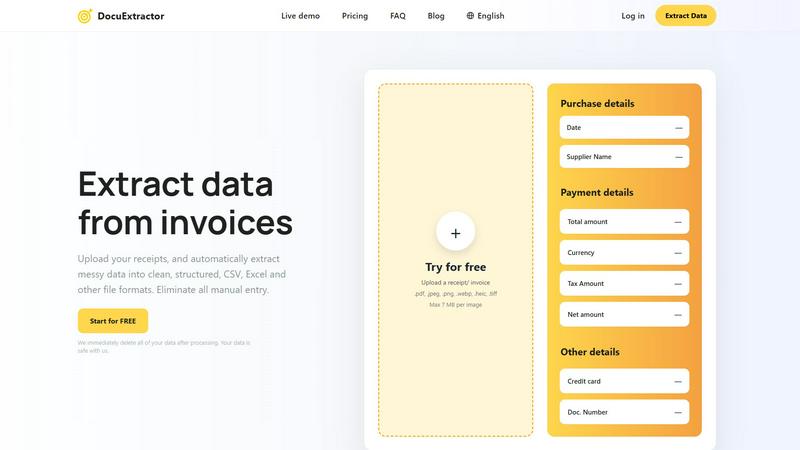
DocuExtractor
Feature Comparison
Decode This Text
Simple Input Method
Users can easily share their conversation by pasting text, uploading screenshots, or describing the situation in their own words. This flexibility allows for a seamless user experience, regardless of the format of the communication.
Emotional Tone Analysis
Decode This Text analyzes the emotional tone of messages, determining whether they come across as friendly, sarcastic, or indifferent. This feature helps users avoid misinterpretations, ensuring they respond appropriately to the emotional context of the conversation.
Intent Detection
The tool identifies the true intentions behind messages, whether the sender is interested, annoyed, or simply busy. This insight helps users respond in ways that align with the sender's state of mind, fostering better communication.
Response Suggestions
When users are unsure how to reply, Decode This Text provides three tailored response options—calm, direct, or firm. This feature equips users with the confidence to engage in conversations, knowing they have the right words at their fingertips.
DocuExtractor
AI-Powered Extraction with 99.6% Accuracy
At the core of DocuExtractor is a sophisticated AI engine that leverages Optical Character Recognition (OCR), deep learning, and Large Language Models (LLMs). This multi-layered technology doesn't just read text; it understands the context of financial documents. It automatically identifies, categorizes, and extracts key fields like date, supplier, total amount, tax, and document number from any uploaded file, delivering industry-leading accuracy that eliminates manual verification and costly errors.
Mobile-First, Drag-and-Drop Interface
Experience effortless data extraction designed for on-the-go productivity. The intuitive, mobile-optimized interface emphasizes simplicity with easy drag-and-drop functionality. You can upload documents directly from your phone's gallery or camera, process them in batches, and download results in seconds. This user-centric design requires minimal training, allowing you and your team to become productive immediately from anywhere.
Batch Processing & Instant Conversion
Say goodbye to processing documents one by one. DocuExtractor's powerful batch processing feature lets you upload multiple receipts, invoices, or PDFs simultaneously. The AI gets to work instantly, extracting data from all documents in parallel and delivering structured outputs in seconds. This dramatically speeds up month-end closes, expense reporting, and AP workflows, turning hours of work into a task that takes under a minute.
Enterprise-Grade Security & Data Privacy
Your financial data security is our top priority. DocuExtractor is built with enterprise-grade security protocols. We employ a strict data deletion policy where all uploaded documents and extracted data are permanently and automatically erased from our servers immediately after processing is complete. Your sensitive information never lingers, ensuring compliance and giving you complete peace of mind.
Use Cases
Decode This Text
Understanding Ambiguous Friendships
When friends send short or vague messages, it can create uncertainty. Decode This Text helps users decipher whether their friends are genuinely busy or losing interest, allowing for better relationship management.
Navigating Professional Communication
In professional settings, messages can often be terse or unclear. This tool helps users interpret the true meaning behind emails or texts from colleagues and superiors, ensuring that they respond appropriately and professionally.
Clarifying Family Dynamics
Family communication can be complex, especially during sensitive discussions. Decode This Text offers insights into the emotional tone and intent behind family messages, helping users approach conversations with greater empathy and understanding.
Managing Client Interactions
For professionals dealing with clients, understanding their messages is crucial for maintaining strong relationships. Decode This Text provides clarity on client communications, helping users tailor their responses to meet client needs effectively.
DocuExtractor
Automating Accounts Payable (AP) Processing
Finance teams can streamline their entire AP workflow by uploading batches of supplier invoices directly into DocuExtractor. The AI instantly extracts vendor details, invoice numbers, dates, line items, and totals, outputting a clean CSV file ready for import into QuickBooks, Xero, or NetSuite. This eliminates manual data entry, reduces processing time from days to minutes, and prevents human error in payment runs.
Simplifying Expense Reporting & Reconciliation
Employees can snap pictures of receipts on their mobile phones during business trips and upload them directly to DocuExtractor. The app extracts the merchant, date, amount, and tax, creating a perfectly formatted expense report. Managers can quickly verify and reconcile these reports against corporate card statements, saving countless hours of administrative work and speeding up reimbursements.
Digitizing and Organizing Historical Records
Accountants and bookkeepers often deal with boxes of old paper receipts or archived PDF statements. DocuExtractor provides a fast path to digitization. By uploading these historical documents in batches, professionals can convert years of unstructured financial data into searchable, structured Excel spreadsheets, making audits, analysis, and record-keeping efficient and organized.
Accelerating Bank Reconciliation
Matching bank statement transactions with internal records is a monthly chore. By uploading bank statements (PDF or scanned images) to DocuExtractor, the AI quickly extracts transaction dates, descriptions, and amounts. The output provides a clean data set that can be easily cross-referenced with ledger entries, cutting reconciliation time significantly and improving financial accuracy.
Overview
About Decode This Text
Decode This Text is a revolutionary communication tool that demystifies the often perplexing messages we encounter in our daily lives. Designed for anyone who struggles to interpret vague texts or cryptic emails, this tool provides clarity and insight, enabling users to navigate their interactions with confidence. Whether it's a puzzling text from a friend, a one-word email from a supervisor, or ambiguous messages from clients, Decode This Text helps users uncover the true intentions and emotional undertones of the communication. By simply pasting the conversation or describing the context, users receive a detailed analysis within seconds. This innovative tool empowers individuals to enhance their communication skills, improve personal and professional relationships, and eliminate misunderstandings, all while maintaining anonymity. With its intuitive interface and rapid response time, Decode This Text is the perfect solution for anyone looking to communicate more effectively without the stress of overthinking every word.
About DocuExtractor
DocuExtractor is the AI-powered document converter built for the mobile-first professional. It liberates accountants, bookkeepers, and finance teams from the tedious, error-prone grind of manual data entry. The app instantly transforms messy, unstructured documents like receipts, invoices, bank statements, and PDFs into clean, structured data ready for your accounting software. By combining advanced OCR, deep learning, and LLM technology, DocuExtractor automatically identifies and extracts all key financial details—dates, supplier names, totals, taxes, document numbers—with an exceptional 99.6% accuracy rate. The extracted data is perfectly organized into CSV or Excel formats with a simple tap. Designed with an intuitive, drag-and-drop interface, it allows you to process batches of documents in seconds from any device, saving hours every week. Built with enterprise-grade security that automatically deletes all data after processing, DocuExtractor delivers a fast, reliable, and secure solution to automate financial workflows for businesses of all sizes, putting powerful data extraction right in the palm of your hand.
Frequently Asked Questions
Decode This Text FAQ
What kind of messages can Decode This Text analyze?
Decode This Text can analyze a variety of messages, including texts, emails, and chat conversations. Users can paste the text directly or upload screenshots for analysis.
Is my information kept confidential?
Yes, Decode This Text maintains a strict privacy policy. No human reads your texts, and all analyses are conducted anonymously, ensuring your conversations remain private.
How quickly can I expect a response?
The tool is designed to provide analysis within 30 seconds of submitting your message. This quick turnaround allows users to receive insights promptly and respond in real time.
Can I use Decode This Text for professional purposes?
Absolutely! Decode This Text is ideal for both personal and professional communication. It helps users decipher messages from colleagues, clients, and superiors, ensuring effective and confident responses.
DocuExtractor FAQ
What file formats does DocuExtractor support?
DocuExtractor supports a wide range of common file formats to fit your workflow. You can upload PDF files, JPEG, PNG, WebP, HEIC, and TIFF images. The maximum file size per image is 7 MB. This flexibility allows you to process documents whether they are digital PDFs, scans, or photos taken directly with your mobile phone.
How accurate is the data extraction?
DocuExtractor delivers exceptional extraction accuracy of 99.6%. This high precision is achieved by combining advanced OCR technology with deep learning algorithms and Large Language Models (LLMs) that are specifically trained on financial documents. The AI understands context, not just text, ensuring key fields like totals, dates, and supplier names are captured correctly.
Is my data secure with DocuExtractor?
Absolutely. Security is a foundational principle of DocuExtractor. We employ enterprise-grade security measures and have a strict data privacy policy. Most importantly, all your uploaded documents and the extracted data are automatically and permanently deleted from our servers immediately after processing is complete. We do not store or use your data for any other purpose.
Can I process documents in different languages?
Yes. DocuExtractor supports over 45 languages and includes automatic language detection. You can upload receipts, invoices, and statements from around the world, and our AI will accurately extract the relevant financial data regardless of the language, making it an ideal tool for global businesses and teams.
Alternatives
Decode This Text Alternatives
Decode This Text is a cutting-edge tool designed to help users decipher the often perplexing nuances of communication. Falling under the category of productivity and management, it enables users to quickly analyze messages that may leave them confused or unsure. Many individuals seek alternatives to Decode This Text for various reasons, including pricing, specific features that better suit their needs, or compatibility with different platforms. When searching for an alternative, users should consider the ease of use, response time, and the depth of analysis provided. Additionally, evaluating the tool's ability to enhance communication skills and foster better relationships can be crucial in making the right choice.
DocuExtractor Alternatives
DocuExtractor is a leading app in the document automation and data extraction category. It uses advanced AI to instantly convert messy receipts and invoices into clean, structured data, saving finance teams hours of manual work. Users often explore alternatives for various reasons. Some need a different pricing model or a free tier for light use. Others might require specific integrations with niche software, or they may be looking for a tool that handles document types beyond standard financial forms. When evaluating other options, focus on core needs. Key factors include extraction accuracy, supported file formats, batch processing capabilities, and data security. Also, consider the user experience—look for a mobile-friendly, intuitive app that fits seamlessly into your existing workflow without a steep learning curve.