

DocuExtractor
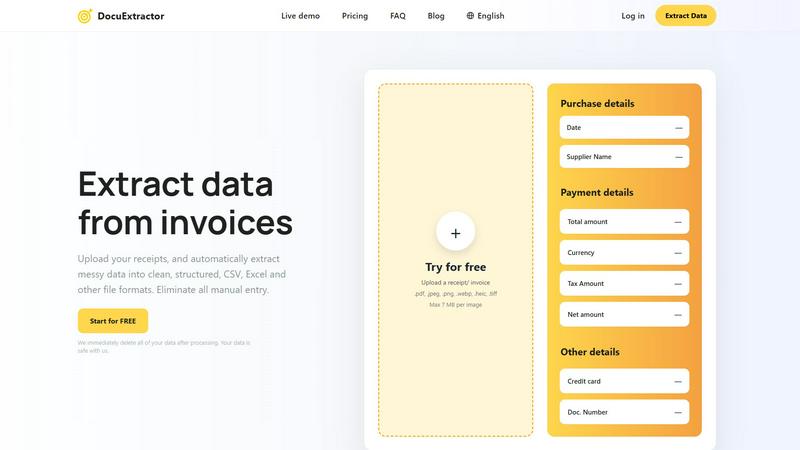
DocuExtractor instantly turns messy receipts and invoices into clean, structured data.
About DocuExtractor
DocuExtractor is the AI-powered document converter built for the mobile-first professional. It liberates accountants, bookkeepers, and finance teams from the tedious, error-prone grind of manual data entry. The app instantly transforms messy, unstructured documents like receipts, invoices, bank statements, and PDFs into clean, structured data ready for your accounting software. By combining advanced OCR, deep learning, and LLM technology, DocuExtractor automatically identifies and extracts all key financial details—dates, supplier names, totals, taxes, document numbers—with an exceptional 99.6% accuracy rate. The extracted data is perfectly organized into CSV or Excel formats with a simple tap. Designed with an intuitive, drag-and-drop interface, it allows you to process batches of documents in seconds from any device, saving hours every week. Built with enterprise-grade security that automatically deletes all data after processing, DocuExtractor delivers a fast, reliable, and secure solution to automate financial workflows for businesses of all sizes, putting powerful data extraction right in the palm of your hand.
Features
AI-Powered Extraction with 99.6% Accuracy
At the core of DocuExtractor is a sophisticated AI engine that leverages Optical Character Recognition (OCR), deep learning, and Large Language Models (LLMs). This multi-layered technology doesn't just read text; it understands the context of financial documents. It automatically identifies, categorizes, and extracts key fields like date, supplier, total amount, tax, and document number from any uploaded file, delivering industry-leading accuracy that eliminates manual verification and costly errors.
Mobile-First, Drag-and-Drop Interface
Experience effortless data extraction designed for on-the-go productivity. The intuitive, mobile-optimized interface emphasizes simplicity with easy drag-and-drop functionality. You can upload documents directly from your phone's gallery or camera, process them in batches, and download results in seconds. This user-centric design requires minimal training, allowing you and your team to become productive immediately from anywhere.
Batch Processing & Instant Conversion
Say goodbye to processing documents one by one. DocuExtractor's powerful batch processing feature lets you upload multiple receipts, invoices, or PDFs simultaneously. The AI gets to work instantly, extracting data from all documents in parallel and delivering structured outputs in seconds. This dramatically speeds up month-end closes, expense reporting, and AP workflows, turning hours of work into a task that takes under a minute.
Enterprise-Grade Security & Data Privacy
Your financial data security is our top priority. DocuExtractor is built with enterprise-grade security protocols. We employ a strict data deletion policy where all uploaded documents and extracted data are permanently and automatically erased from our servers immediately after processing is complete. Your sensitive information never lingers, ensuring compliance and giving you complete peace of mind.
Use Cases
Automating Accounts Payable (AP) Processing
Finance teams can streamline their entire AP workflow by uploading batches of supplier invoices directly into DocuExtractor. The AI instantly extracts vendor details, invoice numbers, dates, line items, and totals, outputting a clean CSV file ready for import into QuickBooks, Xero, or NetSuite. This eliminates manual data entry, reduces processing time from days to minutes, and prevents human error in payment runs.
Simplifying Expense Reporting & Reconciliation
Employees can snap pictures of receipts on their mobile phones during business trips and upload them directly to DocuExtractor. The app extracts the merchant, date, amount, and tax, creating a perfectly formatted expense report. Managers can quickly verify and reconcile these reports against corporate card statements, saving countless hours of administrative work and speeding up reimbursements.
Digitizing and Organizing Historical Records
Accountants and bookkeepers often deal with boxes of old paper receipts or archived PDF statements. DocuExtractor provides a fast path to digitization. By uploading these historical documents in batches, professionals can convert years of unstructured financial data into searchable, structured Excel spreadsheets, making audits, analysis, and record-keeping efficient and organized.
Accelerating Bank Reconciliation
Matching bank statement transactions with internal records is a monthly chore. By uploading bank statements (PDF or scanned images) to DocuExtractor, the AI quickly extracts transaction dates, descriptions, and amounts. The output provides a clean data set that can be easily cross-referenced with ledger entries, cutting reconciliation time significantly and improving financial accuracy.
Frequently Asked Questions
What file formats does DocuExtractor support?
DocuExtractor supports a wide range of common file formats to fit your workflow. You can upload PDF files, JPEG, PNG, WebP, HEIC, and TIFF images. The maximum file size per image is 7 MB. This flexibility allows you to process documents whether they are digital PDFs, scans, or photos taken directly with your mobile phone.
How accurate is the data extraction?
DocuExtractor delivers exceptional extraction accuracy of 99.6%. This high precision is achieved by combining advanced OCR technology with deep learning algorithms and Large Language Models (LLMs) that are specifically trained on financial documents. The AI understands context, not just text, ensuring key fields like totals, dates, and supplier names are captured correctly.
Is my data secure with DocuExtractor?
Absolutely. Security is a foundational principle of DocuExtractor. We employ enterprise-grade security measures and have a strict data privacy policy. Most importantly, all your uploaded documents and the extracted data are automatically and permanently deleted from our servers immediately after processing is complete. We do not store or use your data for any other purpose.
Can I process documents in different languages?
Yes. DocuExtractor supports over 45 languages and includes automatic language detection. You can upload receipts, invoices, and statements from around the world, and our AI will accurately extract the relevant financial data regardless of the language, making it an ideal tool for global businesses and teams.
Similar to DocuExtractor

Kody Tools
Free collection of online developer utilities, code formatters, and digital converters designed to streamline your daily workflow.
Forms Plugin
The #1 Native Form Builder Plugin for Framer - No Code, No Embeds, No External Platforms.





IZIPAY
IZIPAY is a virtual and physical crypto card service that lets users top up with digital assets and pay online like with a regular card.
