
Decode This Text vs Phishly
Side-by-side comparison to help you choose the right AI tool.

Decode This Text
Decode This Text delivers quick, human-like insights to help you understand confusing conversations in just 30 seconds.
Last updated: February 28, 2026

Phishly
Phishly instantly detects phishing emails with AI, ensuring your Gmail is secure with one-click scanning.
Visual Comparison
Decode This Text

Phishly
Feature Comparison
Decode This Text
Simple Input Method
Users can easily share their conversation by pasting text, uploading screenshots, or describing the situation in their own words. This flexibility allows for a seamless user experience, regardless of the format of the communication.
Emotional Tone Analysis
Decode This Text analyzes the emotional tone of messages, determining whether they come across as friendly, sarcastic, or indifferent. This feature helps users avoid misinterpretations, ensuring they respond appropriately to the emotional context of the conversation.
Intent Detection
The tool identifies the true intentions behind messages, whether the sender is interested, annoyed, or simply busy. This insight helps users respond in ways that align with the sender's state of mind, fostering better communication.
Response Suggestions
When users are unsure how to reply, Decode This Text provides three tailored response options—calm, direct, or firm. This feature equips users with the confidence to engage in conversations, knowing they have the right words at their fingertips.
Phishly
Instant Email Scanning
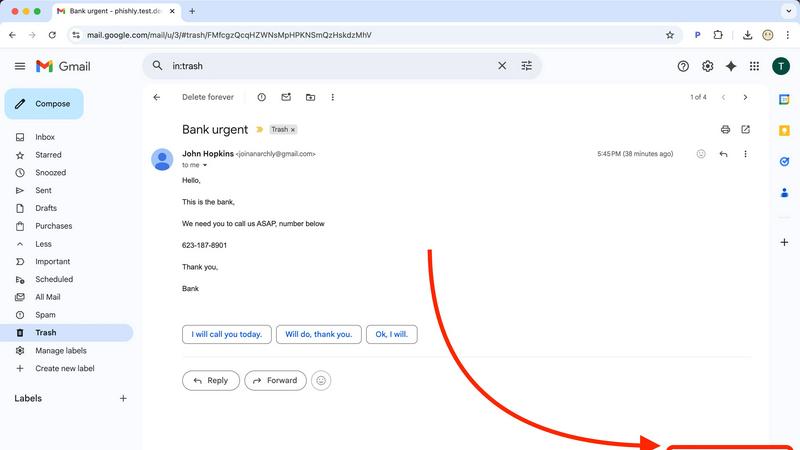
Phishly allows users to scan their emails instantly with a simple click of the "Scan with Phishly" button in Gmail or by pasting the email content on the website. This feature ensures that users can quickly ascertain the safety of any email without navigating complex menus.
AI-Powered Detection
Our platform utilizes advanced AI algorithms to detect a wide range of phishing indicators. This includes analyzing domain authenticity, scrutinizing the language for urgency and manipulation, and identifying spoofed sender addresses. This intelligent analysis helps users stay one step ahead of phishing attempts.
Detailed Risk Assessments
Phishly provides clear risk assessments that classify emails into three categories: Safe, Medium Risk, and High Risk. Each classification comes with an informative explanation, enabling users to understand why an email has been flagged and empowering them to make informed decisions about their correspondence.
Privacy-Focused Analysis
User privacy is paramount at Phishly. We only analyze the emails that users specifically choose to scan, ensuring that no unsolicited data is collected or processed. This commitment to privacy allows users to utilize the service confidently, knowing their information remains secure.
Use Cases
Decode This Text
Understanding Ambiguous Friendships
When friends send short or vague messages, it can create uncertainty. Decode This Text helps users decipher whether their friends are genuinely busy or losing interest, allowing for better relationship management.
Navigating Professional Communication
In professional settings, messages can often be terse or unclear. This tool helps users interpret the true meaning behind emails or texts from colleagues and superiors, ensuring that they respond appropriately and professionally.
Clarifying Family Dynamics
Family communication can be complex, especially during sensitive discussions. Decode This Text offers insights into the emotional tone and intent behind family messages, helping users approach conversations with greater empathy and understanding.
Managing Client Interactions
For professionals dealing with clients, understanding their messages is crucial for maintaining strong relationships. Decode This Text provides clarity on client communications, helping users tailor their responses to meet client needs effectively.
Phishly
Personal Email Protection
Individuals can use Phishly to safeguard their personal email accounts against phishing attacks. By scanning emails that seem suspicious, users can protect themselves from identity theft and financial fraud.
Small Business Email Security
Small businesses can integrate Phishly into their email practices to enhance security without the complexity of enterprise-level solutions. Employees can easily verify the legitimacy of emails, reducing the risk of phishing-related breaches.
Quick Verification for Urgent Emails
In situations where users receive urgent emails that require immediate attention, Phishly allows for swift verification. Users can quickly scan these emails to determine if they are legitimate, ensuring they do not fall victim to urgent phishing scams.
Educational Tool for Users
Phishly can serve as an educational resource, helping users recognize the signs of phishing. By analyzing various emails and learning from the detailed risk assessments, users can become more adept at identifying phishing attempts in the future.
Overview
About Decode This Text
Decode This Text is a revolutionary communication tool that demystifies the often perplexing messages we encounter in our daily lives. Designed for anyone who struggles to interpret vague texts or cryptic emails, this tool provides clarity and insight, enabling users to navigate their interactions with confidence. Whether it's a puzzling text from a friend, a one-word email from a supervisor, or ambiguous messages from clients, Decode This Text helps users uncover the true intentions and emotional undertones of the communication. By simply pasting the conversation or describing the context, users receive a detailed analysis within seconds. This innovative tool empowers individuals to enhance their communication skills, improve personal and professional relationships, and eliminate misunderstandings, all while maintaining anonymity. With its intuitive interface and rapid response time, Decode This Text is the perfect solution for anyone looking to communicate more effectively without the stress of overthinking every word.
About Phishly
Phishly is an innovative AI-powered phishing detection platform designed to enhance email security for individuals and small businesses. Available as a convenient Chrome extension for Gmail and a web tool, Phishly empowers users to identify phishing threats quickly and effectively. By simply opening an email in Gmail and clicking "Scan with Phishly" or pasting suspicious email content on our website, users receive instant analysis. Our advanced AI technology evaluates various phishing indicators, including suspicious domains, urgent language, spoofed senders, and social engineering tactics. Phishly provides clear risk assessments categorized as Safe, Medium Risk, or High Risk along with detailed explanations for each determination. With a focus on user privacy, we only analyze emails that users explicitly choose to scan, ensuring that your sensitive information remains confidential. Ideal for those who seek a straightforward and effective solution for phishing protection, Phishly requires no technical knowledge to use and is completely free, delivering immediate results and peace of mind when verifying the legitimacy of emails.
Frequently Asked Questions
Decode This Text FAQ
What kind of messages can Decode This Text analyze?
Decode This Text can analyze a variety of messages, including texts, emails, and chat conversations. Users can paste the text directly or upload screenshots for analysis.
Is my information kept confidential?
Yes, Decode This Text maintains a strict privacy policy. No human reads your texts, and all analyses are conducted anonymously, ensuring your conversations remain private.
How quickly can I expect a response?
The tool is designed to provide analysis within 30 seconds of submitting your message. This quick turnaround allows users to receive insights promptly and respond in real time.
Can I use Decode This Text for professional purposes?
Absolutely! Decode This Text is ideal for both personal and professional communication. It helps users decipher messages from colleagues, clients, and superiors, ensuring effective and confident responses.
Phishly FAQ
How does Phishly ensure email privacy?
Phishly prioritizes user privacy by only analyzing emails that users explicitly choose to scan. We do not collect or process any unsolicited data, ensuring that your sensitive information remains confidential.
Is Phishly free to use?
Yes, Phishly is completely free to use. Users can take advantage of the email scanning features without any subscription fees or hidden costs, making it accessible for everyone.
Do I need technical knowledge to use Phishly?
No, Phishly is designed to be user-friendly and requires no technical expertise. Anyone can easily scan emails and interpret the results without needing complex instructions.
What types of phishing indicators does Phishly detect?
Phishly detects a variety of phishing indicators, including suspicious domains, urgent language, spoofed senders, and social engineering tactics. This comprehensive analysis helps users identify potential threats effectively.