
Changeflow vs DocuExtractor
Side-by-side comparison to help you choose the right AI tool.

Changeflow
Changeflow delivers AI-driven insights on critical web page changes, keeping you informed without the noise.
Last updated: March 4, 2026

DocuExtractor
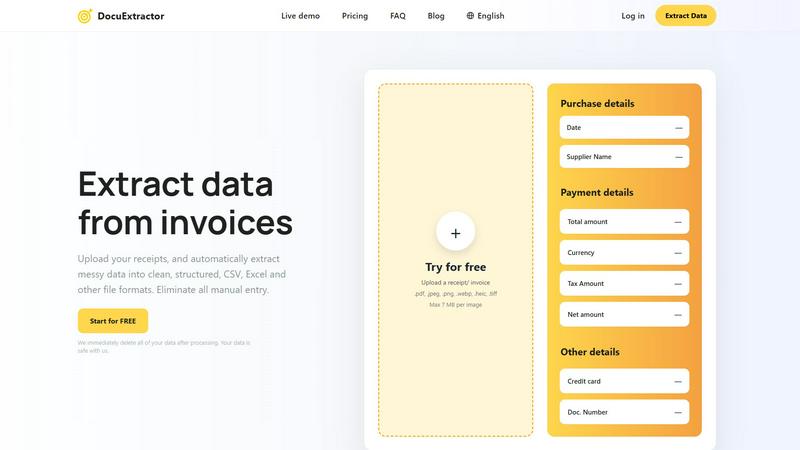
DocuExtractor instantly turns messy receipts and invoices into clean, structured data.
Last updated: February 28, 2026
Visual Comparison
Changeflow

DocuExtractor
Feature Comparison
Changeflow
AI-Powered Change Detection
Changeflow employs advanced AI algorithms that not only monitor web pages but also interpret the context of changes. This means you receive notifications about relevant updates without the clutter of unnecessary alerts.
Natural Language Setup
Forget about complex technical setups. Changeflow allows you to set up monitoring simply by describing what you want to track in plain English. This user-friendly approach makes it accessible for everyone.
Customized Summaries
Stay informed without sifting through extensive content. Changeflow generates concise summaries that explain what changed on a page and why it matters to your business, saving you valuable time.
Advanced Anti-Blocking Technology
Changeflow's sophisticated anti-blocking technology enables it to access web pages that other tools might struggle with. This ensures reliable monitoring even on sites with login walls or JavaScript, boasting a 99.9% success rate.
DocuExtractor
AI-Powered Extraction with 99.6% Accuracy
At the core of DocuExtractor is a sophisticated AI engine that leverages Optical Character Recognition (OCR), deep learning, and Large Language Models (LLMs). This multi-layered technology doesn't just read text; it understands the context of financial documents. It automatically identifies, categorizes, and extracts key fields like date, supplier, total amount, tax, and document number from any uploaded file, delivering industry-leading accuracy that eliminates manual verification and costly errors.
Mobile-First, Drag-and-Drop Interface
Experience effortless data extraction designed for on-the-go productivity. The intuitive, mobile-optimized interface emphasizes simplicity with easy drag-and-drop functionality. You can upload documents directly from your phone's gallery or camera, process them in batches, and download results in seconds. This user-centric design requires minimal training, allowing you and your team to become productive immediately from anywhere.
Batch Processing & Instant Conversion
Say goodbye to processing documents one by one. DocuExtractor's powerful batch processing feature lets you upload multiple receipts, invoices, or PDFs simultaneously. The AI gets to work instantly, extracting data from all documents in parallel and delivering structured outputs in seconds. This dramatically speeds up month-end closes, expense reporting, and AP workflows, turning hours of work into a task that takes under a minute.
Enterprise-Grade Security & Data Privacy
Your financial data security is our top priority. DocuExtractor is built with enterprise-grade security protocols. We employ a strict data deletion policy where all uploaded documents and extracted data are permanently and automatically erased from our servers immediately after processing is complete. Your sensitive information never lingers, ensuring compliance and giving you complete peace of mind.
Use Cases
Changeflow
Competitor Price Tracking
Businesses can utilize Changeflow to closely monitor competitor pricing strategies. This feature allows teams to stay competitive by receiving timely updates on price changes, helping to inform pricing decisions.
Regulatory Monitoring
Legal teams can track important regulatory updates by monitoring court dockets and legal citations. Changeflow ensures that compliance teams remain informed about changes in laws and regulations affecting their industry.
News Mentions Tracking
Changeflow helps businesses keep tabs on their online presence by monitoring news mentions. This is vital for reputation management and allows companies to quickly respond to any important news or media coverage.
Market Movement Monitoring
With Changeflow, teams can easily follow market movements and trends. By tracking vital updates, businesses can adapt their strategies to meet changing market conditions, ensuring they remain agile and informed.
DocuExtractor
Automating Accounts Payable (AP) Processing
Finance teams can streamline their entire AP workflow by uploading batches of supplier invoices directly into DocuExtractor. The AI instantly extracts vendor details, invoice numbers, dates, line items, and totals, outputting a clean CSV file ready for import into QuickBooks, Xero, or NetSuite. This eliminates manual data entry, reduces processing time from days to minutes, and prevents human error in payment runs.
Simplifying Expense Reporting & Reconciliation
Employees can snap pictures of receipts on their mobile phones during business trips and upload them directly to DocuExtractor. The app extracts the merchant, date, amount, and tax, creating a perfectly formatted expense report. Managers can quickly verify and reconcile these reports against corporate card statements, saving countless hours of administrative work and speeding up reimbursements.
Digitizing and Organizing Historical Records
Accountants and bookkeepers often deal with boxes of old paper receipts or archived PDF statements. DocuExtractor provides a fast path to digitization. By uploading these historical documents in batches, professionals can convert years of unstructured financial data into searchable, structured Excel spreadsheets, making audits, analysis, and record-keeping efficient and organized.
Accelerating Bank Reconciliation
Matching bank statement transactions with internal records is a monthly chore. By uploading bank statements (PDF or scanned images) to DocuExtractor, the AI quickly extracts transaction dates, descriptions, and amounts. The output provides a clean data set that can be easily cross-referenced with ledger entries, cutting reconciliation time significantly and improving financial accuracy.
Overview
About Changeflow
Changeflow is an innovative web monitoring tool designed to keep you updated on the changes that matter most. By utilizing advanced AI technology, Changeflow reads web pages and intelligently identifies significant updates, transforming the way businesses track vital information. Whether you're monitoring competitor pricing, regulatory changes, or news mentions, Changeflow provides you with clear summaries that highlight what is important, eliminating the noise of irrelevant updates. Its straightforward setup allows users to describe what they want to track in plain English without the need for complex configurations. Trusted by Fortune 500 companies and Am Law 200 firms, Changeflow is tailored for business professionals who require timely and accurate information to make informed decisions. With a 99.9% success rate in accessing challenging web pages, Changeflow ensures you never miss a critical update again.
About DocuExtractor
DocuExtractor is the AI-powered document converter built for the mobile-first professional. It liberates accountants, bookkeepers, and finance teams from the tedious, error-prone grind of manual data entry. The app instantly transforms messy, unstructured documents like receipts, invoices, bank statements, and PDFs into clean, structured data ready for your accounting software. By combining advanced OCR, deep learning, and LLM technology, DocuExtractor automatically identifies and extracts all key financial details—dates, supplier names, totals, taxes, document numbers—with an exceptional 99.6% accuracy rate. The extracted data is perfectly organized into CSV or Excel formats with a simple tap. Designed with an intuitive, drag-and-drop interface, it allows you to process batches of documents in seconds from any device, saving hours every week. Built with enterprise-grade security that automatically deletes all data after processing, DocuExtractor delivers a fast, reliable, and secure solution to automate financial workflows for businesses of all sizes, putting powerful data extraction right in the palm of your hand.
Frequently Asked Questions
Changeflow FAQ
How does Changeflow work?
Changeflow works by allowing users to specify URLs and the types of updates they want to track. The AI then monitors these pages, identifying and summarizing significant changes.
Is the setup process complicated?
Not at all. Changeflow offers a natural language setup process that enables users to describe what they want to track without any technical jargon or complex configurations.
Can I track multiple pages at once?
Yes, Changeflow allows you to monitor multiple pages simultaneously. You can add several URLs quickly and easily using the platform's intuitive interface.
What kind of support does Changeflow offer?
Changeflow provides dedicated support, including email and chat options, along with onboarding calls to assist users in getting started efficiently.
DocuExtractor FAQ
What file formats does DocuExtractor support?
DocuExtractor supports a wide range of common file formats to fit your workflow. You can upload PDF files, JPEG, PNG, WebP, HEIC, and TIFF images. The maximum file size per image is 7 MB. This flexibility allows you to process documents whether they are digital PDFs, scans, or photos taken directly with your mobile phone.
How accurate is the data extraction?
DocuExtractor delivers exceptional extraction accuracy of 99.6%. This high precision is achieved by combining advanced OCR technology with deep learning algorithms and Large Language Models (LLMs) that are specifically trained on financial documents. The AI understands context, not just text, ensuring key fields like totals, dates, and supplier names are captured correctly.
Is my data secure with DocuExtractor?
Absolutely. Security is a foundational principle of DocuExtractor. We employ enterprise-grade security measures and have a strict data privacy policy. Most importantly, all your uploaded documents and the extracted data are automatically and permanently deleted from our servers immediately after processing is complete. We do not store or use your data for any other purpose.
Can I process documents in different languages?
Yes. DocuExtractor supports over 45 languages and includes automatic language detection. You can upload receipts, invoices, and statements from around the world, and our AI will accurately extract the relevant financial data regardless of the language, making it an ideal tool for global businesses and teams.
Alternatives
Changeflow Alternatives
Changeflow is an AI-driven tool designed for market and competitor insights, specializing in tracking changes on web pages. It falls under the productivity and management category, catering to diverse business needs including competitor analysis, regulatory monitoring, and legal citations. Users often seek alternatives for various reasons such as pricing concerns, specific feature requirements, or integration capabilities that better fit their existing workflows. When choosing an alternative to Changeflow, consider factors like ease of use, the accuracy of insights, and the breadth of features offered. Look for solutions that provide robust tracking options, seamless integration with your current tools, and a user-friendly interface to enhance team collaboration and efficiency.
DocuExtractor Alternatives
DocuExtractor is a leading app in the document automation and data extraction category. It uses advanced AI to instantly convert messy receipts and invoices into clean, structured data, saving finance teams hours of manual work. Users often explore alternatives for various reasons. Some need a different pricing model or a free tier for light use. Others might require specific integrations with niche software, or they may be looking for a tool that handles document types beyond standard financial forms. When evaluating other options, focus on core needs. Key factors include extraction accuracy, supported file formats, batch processing capabilities, and data security. Also, consider the user experience—look for a mobile-friendly, intuitive app that fits seamlessly into your existing workflow without a steep learning curve.