
Dokie AI vs EVENTFLYER.AI
Side-by-side comparison to help you choose the right AI tool.

Dokie AI
Dokie AI empowers you to create stunning professional presentations in minutes, transforming ideas into captivating PPT slides effortlessly.
Last updated: March 19, 2026

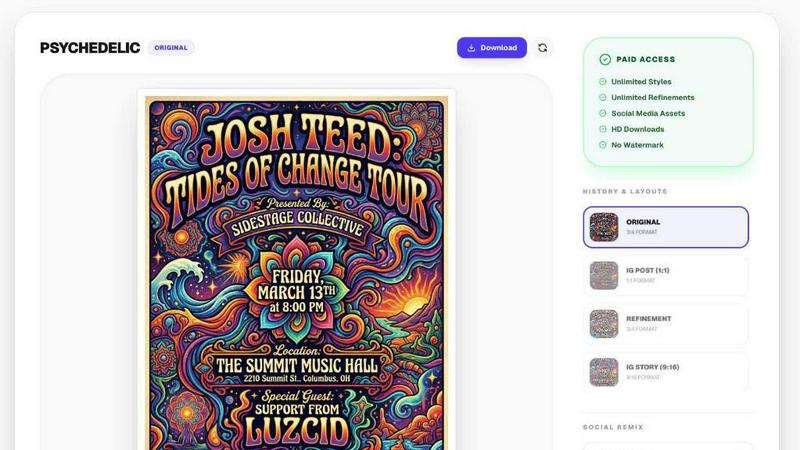
Turn any event link into a stunning, AI-generated flyer and social post in seconds.
Last updated: March 18, 2026
Visual Comparison
Dokie AI

EVENTFLYER.AI
Feature Comparison
Dokie AI
AI Generate PPT
With the AI Generate feature, users can simply describe their presentation topic in plain text and receive a complete slide deck in return. The AI generates professional layouts, charts, and compelling content tailored to your topic, making it easy for anyone to create an impressive presentation instantly.
AI Beautify PPT
The AI Beautify option allows users to upload existing presentations for enhancement. Dokie AI intelligently fixes layouts, applies professional styling, and enhances the overall design while preserving the original content, ensuring your slides look visually appealing and cohesive.
Speech Notes Generation
Dokie AI offers a unique feature that generates detailed speaker notes for each slide. This functionality assists presenters in delivering their message with confidence by providing them with comprehensive talking points that enhance their engagement with the audience.
Multi-Format Conversions
Dokie AI supports various document-to-PPT conversions, including PDF to PPT, Word to PPT, and even HTML to PPT. This versatility allows users to transform different content formats into professional slide presentations seamlessly, saving time and effort in the process.
EVENTFLYER.AI
Intelligent Social Remixing
This core feature sets EVENTFLYER.AI apart from basic template tools. Once your primary event poster is generated, the AI doesn't just crop it. It intelligently reflows all design elements—text, graphics, logos—to perfectly fit specific platform dimensions like Instagram Stories (9:16), square posts (1:1), and website banners (16:9). This ensures your brand and event information look purpose-built for every channel, maintaining perfect consistency and saving you hours of manual reformatting work.
One-Click Event URL Processing
The tool eliminates manual data entry. You can paste a URL from any major event publishing website, including Eventbrite, Partiful, Luma, and Facebook. The AI instantly scans the page and automatically extracts all critical event information: the event title, date, time, location, and description. This not only saves time but also prevents typos and errors, ensuring your flyer is always accurate and ready for publication in moments.
Designer-Curated AI Themes
Move beyond generic templates. EVENTFLYER.AI offers a library of over 20 unique visual themes that are crafted by professional designers to capture specific energies and audiences. Whether your event is a rock concert, a tech conference, a minimalist art gallery opening, or a vibrant community festival, you can select a theme that instantly communicates the right mood and attracts your target attendees.
Fast & Free Flyer Generation
The platform is built for speed and accessibility. The core promise is to deliver a professional, unique poster in about 30 seconds from the moment you paste your link. This "fast and free" model lowers the barrier to high-quality design, making it an indispensable tool for small businesses, solo promoters, and non-profits who need to create compelling visuals quickly and without upfront investment in design software or freelancers.
Use Cases
Dokie AI
Business Presentations
Dokie AI is ideal for business professionals who need to create persuasive presentations for meetings, pitches, or conferences. With its ability to generate polished slides quickly, users can focus on their strategy and delivery rather than design.
Educational Lectures
Educators can use Dokie AI to create engaging slide decks for classroom lectures. The AI's capability to structure content effectively helps teachers present complex topics in a clear and visually appealing manner, enhancing student understanding.
Marketing Campaigns
Marketers can benefit from Dokie AI by creating visually striking presentations for campaigns, product launches, or client presentations. The tool's beautification feature ensures that marketing materials are not only informative but also eye-catching.
Workshops and Trainings
For trainers conducting workshops, Dokie AI provides an efficient way to generate training materials. By using the Speech Notes feature, trainers can enhance their delivery and ensure that all key points are covered during their sessions.
EVENTFLYER.AI
Nightlife & Entertainment Promotion
Bar owners, club promoters, and DJs can instantly create eye-catching flyers for weekly events, special guest nights, or themed parties. By pasting the Facebook Event URL, they can generate a bold, energetic poster and have all the social media assets (Stories, posts) ready to launch a coordinated marketing campaign across all platforms within minutes, driving ticket sales and attendance.
Community & Non-Profit Event Marketing
Community organizers and non-profit teams often operate with limited budgets and design resources. EVENTFLYER.AI allows them to create professional, trustworthy flyers for fundraisers, workshops, or community clean-ups. The automatic formatting ensures their message looks polished on every channel, helping to build credibility and maximize turnout for their cause without any design expertise.
Corporate & Networking Events
Professionals hosting webinars, conferences, or networking mixers can use the corporate and minimalist themes to create sleek, on-brand materials. The tool ensures a consistent professional image from the LinkedIn event page to the Instagram promotion, enhancing the event's perceived value and streamlining the promotional workflow for marketing teams or solo entrepreneurs.
Independent Creators & Educators
Artists, musicians, fitness instructors, and educators hosting workshops, gallery shows, or classes can promote their events with ease. They can quickly turn a Partiful or Luma event page into a beautiful flyer that reflects their personal brand, then instantly share the correctly sized graphics across their Instagram, website, and email newsletters to engage their audience effectively.
Overview
About Dokie AI
Dokie AI is an innovative presentation maker designed for business professionals, educators, marketers, and startup founders who want to create stunning presentations without needing advanced design skills. Leveraging the power of Claude Opus 4.6, Dokie AI automates the entire presentation creation process, from content structuring to typography and visual design. This means users can focus on their message while Dokie AI handles the aesthetics. With features like Generate, Beautify, Speech, and document-to-PPT conversions, Dokie AI streamlines workflow, eliminates the hassle of templates, and ensures that every presentation is polished and professional. Whether you are preparing for a high-stakes business pitch, a classroom lecture, or a marketing campaign, Dokie AI is the ultimate solution for creating impactful presentations quickly and easily.
About EVENTFLYER.AI
EVENTFLYER.AI is a mobile-first, AI-powered graphic design tool built for event creators who need professional, on-brand promotional materials in seconds, not hours. It transforms the tedious process of designing event flyers into a seamless, automated experience. Simply paste the URL of your event from platforms like Eventbrite, Partiful, Luma, or Facebook, and the AI instantly extracts all key details: the event title, date, time, and description. You then choose from over 20 designer-curated visual themes to match your event's unique vibe, from pop art and minimalist to techno and corporate. Within about 30 seconds, a unique, print-ready poster is generated. The platform's standout innovation is "Intelligent Social Remixing," which automatically and perfectly adapts your core design into every required format—Instagram Stories, square posts, website banners—maintaining 100% visual consistency across all channels with zero manual resizing or editing. Perfect for bar owners, club promoters, non-profits, and community organizers, EVENTFLYER.AI delivers a professional edge without the professional price tag, allowing you to design less and promote more effectively from anywhere.
Frequently Asked Questions
Dokie AI FAQ
What types of presentations can I create with Dokie AI?
With Dokie AI, you can create a wide range of presentations including business proposals, educational lectures, marketing materials, and training workshops, all tailored to meet your specific needs.
How does the AI Beautify feature work?
The AI Beautify feature analyzes your existing presentation and automatically enhances its design. It adjusts layouts, applies professional styling, and ensures that the overall visual presentation is cohesive and attractive while maintaining your content.
Can I convert documents and other files into PPT using Dokie AI?
Yes, Dokie AI supports multiple formats for conversion into PowerPoint presentations, including PDF, Word, HTML, and even YouTube videos, allowing for versatile content creation.
Is Dokie AI suitable for beginners with no design experience?
Absolutely! Dokie AI is specifically designed for users who may not have design skills. Its intuitive AI-driven features make it easy for anyone to create professional presentations effortlessly.
EVENTFLYER.AI FAQ
What event platforms does EVENTFLYER.AI support?
EVENTFLYER.AI works with a wide range of event publishing websites. Specifically mentioned are Eventbrite, Partiful, Luma, and Facebook Events. The AI is designed to extract data from any public event URL, making it a versatile tool for events listed on most major platforms.
How does the "Intelligent Social Remixing" work?
After your main flyer is created, our AI doesn't just crop the image. It analyzes the layout and strategically repositions text, graphics, and logos to fit perfectly into different aspect ratios like Instagram Stories (9:16) and square posts (1:1). This intelligent adaptation maintains readability, visual hierarchy, and brand consistency across all formats automatically.
Are the generated flyers truly unique?
Yes. While you choose from designer-curated themes, the AI uses the specific details from your event URL (title, date, imagery from the source) to create a unique composition for each flyer. The combination of your event data and the selected theme ensures you get a custom design, not a generic template filled out by hand.
Is EVENTFLYER.AI really free to use?
Based on the provided content, the platform is promoted as a "Fast & Free Event Flyer Generator." This indicates that core functionality—pasting a URL, generating a flyer, and accessing the social remixing features—is available without cost, making professional design accessible to everyone.
Alternatives
Dokie AI Alternatives
Dokie AI is a cutting-edge AI presentation maker designed to help users create professional-quality PowerPoint slides quickly and effortlessly. It caters to a diverse range of users, including business professionals, educators, marketers, and startup founders, by leveraging advanced AI technology to automate content structure, layout, typography, and visual design. While Dokie AI is highly regarded for its innovative features, users often seek alternatives due to reasons such as pricing structures, specific feature sets, or platform compatibility that better align with their unique needs and workflows. When considering an alternative to Dokie AI, it's essential to evaluate several factors. Look for tools that offer similar AI-driven capabilities, ease of use, and customization options. Pricing plans should also be assessed to ensure they fit within your budget, while the overall user experience and support should be considered to facilitate seamless integration into your presentation creation process.
EVENTFLYER.AI Alternatives
EVENTFLYER.AI is an automated graphic design tool in the marketing and event promotion space. It specializes in transforming a simple event webpage URL into a unique, ready-to-use flyer and a full suite of social media graphics in under a minute. This app-centric approach saves significant time for creators who need to promote events quickly. Users often explore alternatives for various reasons. Some may have specific budget constraints or need a different pricing model. Others might require more advanced design control, integration with other software platforms, or a tool that focuses on a broader range of marketing assets beyond just event promotions. When evaluating other options, consider your core needs. Look for the balance between automation and creative control, the quality and range of design templates, and crucially, whether the tool automatically adapts your design for different social media formats. The best alternative will fit seamlessly into your mobile workflow and deliver professional results without a steep learning curve.