
iGPT vs Threat Watch
Side-by-side comparison to help you choose the right AI tool.

iGPT gives your AI agents secure, instant access to email context and answers.
Last updated: March 1, 2026

Threat Watch
Instantly check your cybersecurity health and get actionable insights to stay protected.
Last updated: March 1, 2026
Visual Comparison
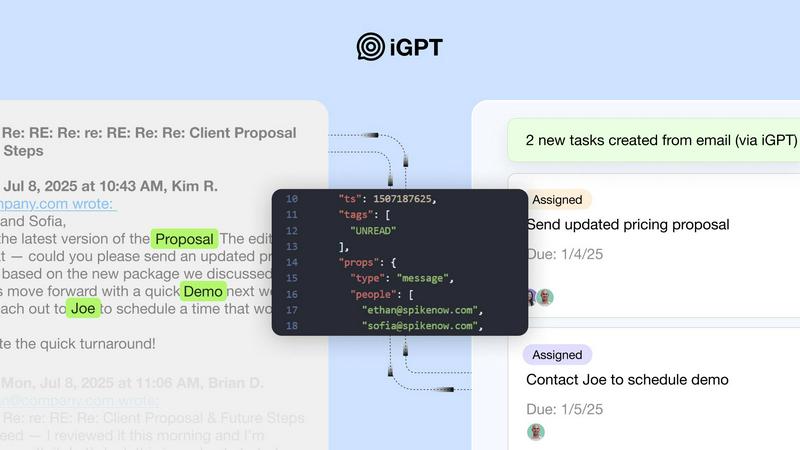
iGPT
Threat Watch
Feature Comparison
iGPT
Unified Intelligence Endpoint
Replace complex multi-step pipelines with a single API call. Instead of managing separate systems for retrieval, context building, and prompting, you send one natural language request. iGPT's pipeline automatically performs hybrid search, thread reconstruction, and optimal context shaping, delivering a ready-to-use, structured response in one seamless operation, dramatically reducing development time and complexity.
Deep Email & Attachment Processing
iGPT doesn't just read subject lines. It deeply indexes the full content of email conversations, automatically reconstructing threads across time and participants. Crucially, it also processes attachments—extracting text, data, and structure from documents, PDFs, and spreadsheets—and integrates that information into the overall context, providing a complete view of the conversation.
Context Engineering Framework (CEF)
This proprietary technology optimizes how information is retrieved and presented to your LLM. iGPT automatically selects, scores, and reranks the most relevant snippets from emails and attachments, shaping the perfect context window for your query. This eliminates the need for manual prompt engineering and tuning, ensuring high-quality, reliable outputs every time.
Enterprise-Grade Security & Audit
Built for the enterprise, iGPT enforces strict security protocols. It offers OAuth-only processing with Role-Based Access Control (RBAC), ensures zero data retention where inputs and outputs are never stored, and provides a full audit trail. Your data is never used to train models, keeping your company's sensitive communications fully under your control.
Threat Watch
Unified Mobile Dashboard
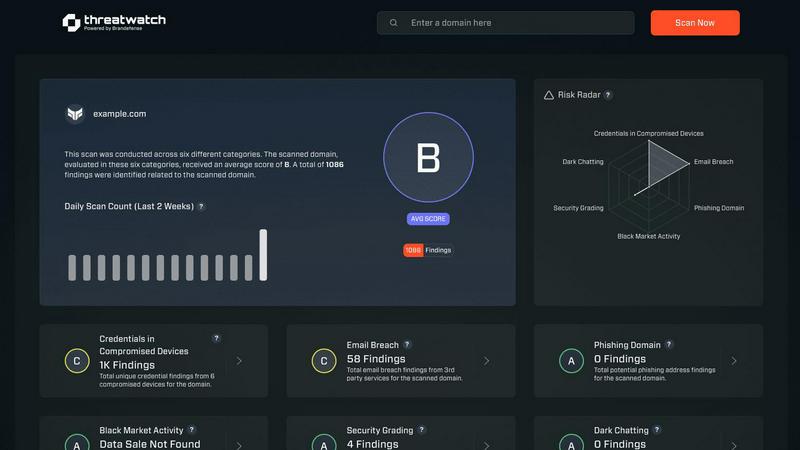
Gain instant, panoramic visibility into your cybersecurity health from a single, intuitive dashboard optimized for your phone. This centralized view consolidates alerts, risk scores, and critical insights across all monitored categories, eliminating the need to switch between disparate tools. Designed for quick comprehension on a smaller screen, it allows you to assess your organization's entire risk posture at a glance, anytime and anywhere.
Real-Time Exposure Detection
Continuously scan and analyze multiple threat vectors in real-time, including dark web markets, breach databases, and phishing campaigns. The platform automatically identifies if your corporate credentials, employee emails, or sensitive company data are being traded or discussed by malicious actors. This proactive surveillance turns your mobile device into an early-warning system, alerting you to exposures the moment they are discovered.
Automated Risk Prioritization
Stop wasting time on false positives or low-severity alerts. Threat Watch's intelligent engine automatically analyzes and prioritizes discovered threats based on their contextual relevance to your specific organization. It evaluates the potential impact and likelihood of exploitation, presenting you with a clear, actionable list of what needs immediate attention, so you can focus your efforts where they matter most.
On-the-Go Mitigation Workflow
Execute response actions directly from your mobile device to contain threats at speed. The app provides integrated, one-touch workflows to guide you through mitigation steps, such as forcing password resets for compromised accounts or isolating potentially breached devices. This seamless functionality ensures you can act decisively from a meeting, during a commute, or outside of the office, dramatically reducing your mean time to respond (MTTR).
Use Cases
iGPT
AI-Powered Email Assistants
Build intelligent agents that can draft replies, prioritize inboxes, and take action based on a complete understanding of long email threads and attached files. These assistants operate with full context, knowing the history, decisions, and commitments made across the entire conversation, not just the latest message.
Customer Support Copilots
Empower support teams with agents that instantly rebuild a customer's full story. The copilot can analyze long support tickets, understand tone shifts, and reference information buried in attachments (like invoices or screenshots), providing agents with concise summaries and suggested next steps to resolve issues faster.
Automated Workflow Orchestration
Turn email conversations into structured actions. Automatically extract tasks, deadlines, approvals, and decisions from threads and convert them into tickets in project management tools like Jira or Asana. Flag stalled conversations or missed commitments to keep projects moving forward without manual oversight.
Compliance & Relationship Intelligence
Automate the audit trail by tracing feedback, approvals, and key rationale back to the original email and attachment source. For sales and success teams, build CRM agents that extract deal momentum, stakeholder sentiment, and critical decisions directly from email exchanges to keep records accurate and actionable.
Threat Watch
Proactive Security Posture Management for CISOs
Chief Information Security Officers (CISOs) and business leaders can maintain continuous oversight of organizational risk without being tied to a desktop. The mobile-first dashboard provides an executive summary of security health, enabling informed decision-making and board reporting on-the-fly. It empowers leaders to demonstrate proactive risk management and validate security investments with real-time data.
Rapid Incident Response for Security Analysts
Security operations center (SOC) analysts can triage and respond to alerts from anywhere. When a critical alert about stolen credentials surfaces, analysts receive an immediate push notification. They can then use the app to investigate the exposure's context, assess its priority, and initiate containment protocols within minutes, all before even reaching their desk, significantly accelerating incident response.
Third-Party and Supply Chain Risk Monitoring
IT teams can extend their visibility beyond their immediate network to monitor for breaches involving vendors and partners. By tracking third-party domains and email addresses, Threat Watch alerts you if a supplier's compromised credentials could provide a backdoor into your systems. This allows for proactive communication and enforcement of security requirements before an attack chain is completed.
Employee Security Awareness and Training
Use actionable intelligence from Threat Watch to drive targeted security training. When the platform detects that employee credentials have appeared in a phishing list or breach, security teams can immediately notify the affected individuals with specific, contextual guidance. This turns a generic training exercise into a timely, personalized security lesson that has a far greater impact on behavior.
Overview
About iGPT
iGPT is the definitive email intelligence API, engineered to solve the critical bottleneck that email poses for modern AI applications. Email is the central nervous system of business, but its unstructured, threaded, and attachment-heavy nature has traditionally broken most AI systems. iGPT transforms this chaos into trusted, actionable context for AI agents and enterprise workflows. It acts as a secure, auditable gateway that allows developers to integrate deep email understanding into their applications without the massive engineering overhead of parsing, chunking, and indexing. With a single, unified API call, iGPT handles the entire complexity of retrieval, context shaping, and reasoning across your entire email corpus. This means teams can instantly build powerful features into sales platforms, customer success tools, compliance systems, and custom AI agents, moving from raw, messy email data to context-aware answers and automations in seconds. Built with enterprise-grade security and compliance from the ground up, iGPT is for developers and organizations that need to leverage their most valuable communication data reliably and at scale.
About Threat Watch
Threat Watch is the definitive mobile command center for your organization's cybersecurity health. Built from the ground up for smartphones and tablets, it delivers a unified, real-time view of your digital risk posture directly into the hands of IT teams, security professionals, and business leaders. This platform moves beyond passive monitoring by actively analyzing your assets, vulnerabilities, and exposures across multiple critical fronts, including compromised credentials, breached accounts, phishing addresses, and dark web content. The core value is unparalleled speed and clarity: transform overwhelming data into a clear, actionable picture. Identify lurking threats, prioritize them based on your unique environment, and execute mitigation strategies faster than ever. With its intuitive, app-centric dashboard designed for on-the-go management, Threat Watch enables a decisive shift from reactive alert chasing to proactive, informed risk management, ensuring you're always one step ahead of potential breaches.
Frequently Asked Questions
iGPT FAQ
How does iGPT handle data privacy and security?
iGPT is built with a foundational commitment to security. It employs a zero-data retention policy for inferences, meaning your prompts and email data are processed in memory and never stored. Access is controlled via OAuth and strict Role-Based Access Control (RBAC). Furthermore, iGPT has a zero-data training guarantee—your data is never used to train or improve any AI models.
What makes iGPT different from using a generic LLM API on email text?
Generic LLMs lack deep understanding of email structure. iGPT specializes in the email domain, automatically handling the complexity of threading, participant management, and attachment integration. It performs sophisticated retrieval and context shaping (via its CEF) before reasoning, which yields far more accurate, relevant, and cited answers than feeding raw text to a base model, saving you from extensive engineering work.
How quickly can I integrate iGPT and start getting results?
Integration is designed to be immediate. You can connect your email data sources, and iGPT begins indexing automatically. With the provided SDKs and a live playground to test queries, developers can go from sign-up to receiving contextual answers from their email data in a matter of minutes, not weeks.
Does iGPT support structured output for automation?
Yes, absolutely. The API allows you to define an output schema in your request. iGPT will return a structured JSON response formatted to your exact specifications, making the output instantly usable for downstream automation, database insertion, or triggering other workflows without any additional parsing.
Threat Watch FAQ
How does Threat Watch discover my company's exposed data?
Threat Watch employs a sophisticated, automated scanning engine that continuously monitors a vast array of sources. This includes underground forums, dark web marketplaces, paste sites, public breach databases, and phishing kit repositories. Our system uses digital fingerprints of your organization (like domain names and key asset identifiers) to find and flag relevant exposures, ensuring you only see alerts that matter to you.
Is the Threat Watch app secure to use on a personal mobile device?
Absolutely. Security is our foundation. The Threat Watch app uses strong, end-to-end encryption for all data in transit and at rest. It also supports robust multi-factor authentication (MFA) and integrates with mobile device management (MDM) solutions. Access is strictly controlled via role-based permissions, ensuring that sensitive findings are only visible to authorized personnel on registered, secure devices.
What kind of threats can Threat Watch actually help me mitigate?
Threat Watch is specifically designed to uncover and help mitigate threats stemming from digital exposure. This includes credential compromise (passwords for sale), account takeovers, phishing campaigns targeting your domain, sensitive corporate data leaked on the dark web, and mentions of your infrastructure in hacker forums. It provides the intelligence and tools to reset credentials, block threats, and secure assets before they are exploited.
Can Threat Watch integrate with our existing security tools?
Yes, Threat Watch is built to fit into your existing security ecosystem. It offers seamless integrations with popular Security Information and Event Management (SIEM) systems, Identity and Access Management (IAM) platforms, and IT service management (ITSM) ticketing systems like ServiceNow. This allows alerts and risk data to flow directly into your central workflows, enabling automated response actions and enriched correlation.
Alternatives
iGPT Alternatives
iGPT is a business intelligence API that transforms unstructured email data into secure, actionable context for AI agents and enterprise applications. It solves the core problem of making complex email threads and attachments usable for automated workflows. Users often explore alternatives for various reasons, such as budget constraints, specific feature requirements not covered, or the need for a solution that integrates with a different tech stack or platform. It's a common step in finding the right fit for a project's unique needs. When evaluating options, focus on capabilities like deep email and attachment processing, security compliance, ease of integration, and the ability to handle real-world, messy email data at scale. The goal is to move from raw data to reliable, context-aware answers without excessive engineering overhead.
Threat Watch Alternatives
Threat Watch is a mobile-first cybersecurity health and business intelligence platform. It provides IT and security teams with a real-time, actionable view of their organization's digital risk directly from a smartphone or tablet, moving beyond traditional monitoring to proactive management. Users often explore alternatives for various reasons. These can include budget constraints, the need for specific integrations with existing security tools, or a requirement for a desktop-centric workflow instead of a mobile-first approach. Some organizations may also seek solutions with different reporting structures or more specialized feature sets. When evaluating other options, consider your core needs. Key factors include the platform's primary interface (mobile vs. desktop), the scope of its monitoring capabilities, the speed and clarity of its alerts, and how well it prioritizes risks for your specific environment. The goal is to find a solution that delivers actionable intelligence in a format that fits your team's workflow.