
AI Photo Generator vs Imgezy
Side-by-side comparison to help you choose the right AI tool.

AI Photo Generator
Create stunning, photorealistic AI photos from text or your own images in seconds, no design skills needed.
Last updated: March 11, 2026

Imgezy
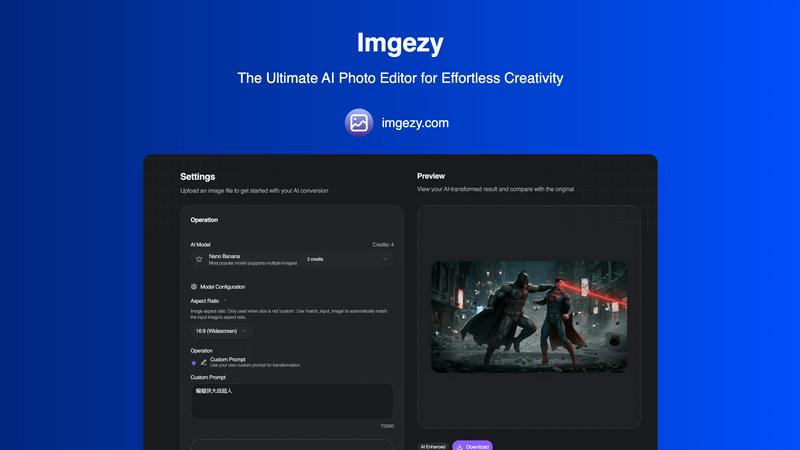
Imgezy is an AI photo editor that transforms your images instantly with just a few taps.
Last updated: February 28, 2026
Visual Comparison
AI Photo Generator

Imgezy
Feature Comparison
AI Photo Generator
Ultra-Fast, Multi-Model Generation
Choose from a curated selection of top AI models like Flux, Ideogram, Qwen, and Midjourney to match your specific need for speed, realism, or style. Our optimized cloud infrastructure processes your requests in seconds, not minutes, allowing for rapid iteration and A/B testing of visual concepts directly from your mobile or desktop browser without any lag.
Text-to-Image with High Prompt Fidelity
Describe your vision in natural language, detailing subjects, lighting, composition, and mood. Our platform is fine-tuned to interpret these prompts with high accuracy, delivering images that closely match your intent. It's perfect for generating product scenes, portraits, and campaign visuals with realistic lighting and material details right from the first prompt.
Advanced Image-to-Image Editing
Go beyond text by uploading a reference photo. This powerful workflow lets you restyle, edit, or completely transform existing images using natural language instructions. Change backgrounds, adjust composition, modify colors, or alter the scene's mood while preserving the core structure and identity of your original asset for brand consistency.
Free-First, Browser-Based Editor
Start creating immediately with no installation or commitment. The entirely browser-based AI photo editor offers a free plan to test prompts, compare model outputs, and refine concepts. This user-centric approach lets you learn the tool and produce initial assets before using production credits for final, high-resolution, commercially licensed batches.
Imgezy
Conversational AI Editing
Edit photos using simple language, not complex tools. Just type a command like "remove the trash can" or "change the background to a beach at sunset" and Imgezy's AI understands and executes your vision instantly. This removes all technical barriers, letting your creativity lead the way without any design skills required.
Flawless Object Removal
Don't let photobombers or distracting elements ruin your perfect shot. Our AI intelligently identifies and removes any unwanted object, person, or blemish from your photo. It then reconstructs the background with pixel-perfect accuracy, leaving no trace behind for a clean, natural-looking result every time.
Instant Background Replacement
Transform the context of any photo in seconds. Swap out a boring office wall for a tropical paradise, a cloudy sky for a golden hour glow, or any background you can imagine. The AI seamlessly blends your subject into the new environment, creating professional composites that look authentic and stunning.
Smart Photo Enhancement & Repair
Automatically enhance your images to make them pop. Imgezy's AI can adjust colors, improve lighting, and sharpen details with a single command. It also features smart repair tools to automatically fix damaged, blurry, or low-quality areas, restoring clarity and vibrancy to your precious memories.
Use Cases
AI Photo Generator
Social Media & Content Creation
Generate unique, eye-catching thumbnails, story graphics, and post visuals that stand out in crowded feeds. Content creators can produce a constant stream of copyright-free, on-brand assets for YouTube, Instagram, and TikTok without relying on stock photos or complex design software, all from a mobile device.
Marketing & Advertising Campaigns
Marketers and entrepreneurs can quickly produce stunning, professional visuals for ads, website banners, email campaigns, and presentations. The tool enables fast variant generation for A/B testing, allowing teams to ideate and finalize campaign visuals on a tight budget and timeline.
Professional Portraits & Personal Branding
Transform a simple selfie into a polished, professional headshot for LinkedIn, company websites, or speaker profiles. The AI Face Generator specialization ensures character-consistent, high-quality facial outputs that enhance personal and team branding without the cost of a photoshoot.
Product Visualization & E-commerce
Create realistic product photography and scene mockups for online stores and catalogs. Generate images of products in various settings, with different props or lighting, to showcase items in context and drive sales, even before a physical prototype or photoshoot is available.
Imgezy
Social Media Content Creation
Create eye-catching, professional-looking posts for Instagram, TikTok, or Facebook in seconds. Quickly remove distractions from selfies, replace bland backgrounds with trendy settings, and enhance image quality to stand out in any feed and grow your audience with consistently high-quality visuals.
E-commerce Product Photography
Elevate your online store without a studio budget. Easily remove distracting backgrounds from product shots and place items on clean white or branded backgrounds. You can also fix minor imperfections on products, ensuring your listings look polished and trustworthy to potential customers.
Travel & Lifestyle Blogging
Perfect your travel photos by removing unwanted tourists or modern signage from historic sites. Instantly change a gloomy sky to a bright blue one or enhance the colors of a landscape to match the vibrant experience. Tell better visual stories without spending hours editing on a laptop.
Personal Photo Restoration & Enhancement
Breathe new life into old or damaged personal photos. Use the smart repair feature to fix scratches, tears, or blurriness. Colorize black and white images, remove unwanted former objects from family portraits, and enhance precious memories to preserve them in their best light for generations.
Overview
About AI Photo Generator
AI Photo Generator is a cutting-edge, browser-based creative platform designed to transform your ideas into stunning visual reality with just a few taps. It leverages a suite of advanced AI models to generate professional-grade, photorealistic images from simple text descriptions or by editing your existing photos. The core mission is to democratize high-end visual creation, making it accessible to everyone from complete beginners to professional teams, without requiring any technical design skills. Whether you need a unique social media graphic, a product mockup, or a creative portrait, this tool provides a seamless, mobile-first experience that prioritizes speed, quality, and creative control. With a free plan to start, you can experiment and generate copyright-free visuals instantly, scaling up to commercial-grade outputs as your needs grow.
About Imgezy
Imgezy is the future of photo editing, reimagined for the mobile-first creator. It's an AI-powered photo editor that transforms complex editing tasks into a simple, conversational experience. Forget about navigating confusing menus or mastering intricate tools. With Imgezy, you achieve professional-grade results by simply describing the change you want to see. Whether you need to remove an unwanted object, instantly swap a dull background for a stunning vista, or enhance colors and lighting, Imgezy's advanced artificial intelligence handles it all in seconds. Built for anyone who values stunning visuals without the steep learning curve, it's the perfect tool for social media enthusiasts, travel bloggers, e-commerce sellers, and content creators. Trusted by over 200,000 users, Imgezy delivers pixel-perfect accuracy and stunning results directly from your device, making powerful photo editing accessible, intuitive, and incredibly fast. It's the only AI photo editor you'll ever need, putting creative power directly in your hands.
Frequently Asked Questions
AI Photo Generator FAQ
Is there a free plan available?
Yes, AI Photo Generator offers a free-to-start plan that allows you to experience the core text-to-image and image-editing functionalities. This is perfect for testing prompts, exploring different AI models, and generating initial concepts without any financial commitment.
Can I use the generated images for commercial purposes?
Yes, images generated on the platform, depending on the plan and model used, are typically cleared for commercial use. This means you can use them in advertising, on your website, in products, and for other business purposes. Always check the specific licensing terms for the model you select.
How does the Image-to-Image feature work?
You start by uploading a reference photo. Then, you provide text instructions on what you want to change, such as "change the background to a beach" or "make the style look like an oil painting." The AI uses your original image as a structural guide and applies your edits to create a new, transformed version.
What makes this different from other AI image generators?
Our platform distinguishes itself with a mobile-first, user-experience-focused design that simplifies the workflow. It provides direct access to multiple state-of-the-art AI models in one place, offers both text and robust image-based editing, and is built for speed and commercial utility, all starting with a free, accessible entry point.
Imgezy FAQ
How does Imgezy's AI editing work?
Imgezy uses advanced artificial intelligence models, like the popular Nano Banana model, to understand your text-based instructions. You upload a photo and describe the edit you want. The AI analyzes the image, interprets your command, and applies complex edits—such as object removal or background generation—automatically, delivering results in just seconds.
Do I need any design experience to use Imgezy?
No, absolutely not. Imgezy is specifically designed for users with zero design or editing experience. The conversational interface means you don't need to learn any tools. If you can describe what you want to see changed in your photo, you can use Imgezy to achieve professional-level edits.
What image formats does Imgezy support?
Imgezy supports all major image formats, including JPG, PNG, and WebP. You can easily drag and drop your photo or select a file directly from your mobile device or computer to get started with your AI-powered transformation.
Are my edited images high quality?
Yes. Imgezy is built to deliver maximum quality with the best detail and accuracy. You can download your edited photos in full, high resolution without any loss of quality, ensuring your images look perfect whether viewed on a phone screen or printed.
Alternatives
AI Photo Generator Alternatives
AI Photo Generator is a leading platform in the AI image generation category, transforming text prompts and existing photos into professional digital art. It’s designed to make high-end visual creation accessible to everyone, regardless of technical skill. Users often explore alternatives for various reasons. Some may need a different pricing model, specific features not offered, or a platform better suited for a particular device or operating system. The search for the right tool is highly personal and depends on individual project needs and workflow. When evaluating other options, consider key factors like the quality and speed of image generation, the diversity of artistic styles available, and how well the tool integrates into your creative process. It's also wise to assess the overall user experience, especially if you plan to use it frequently on a mobile device.
Imgezy Alternatives
Imgezy is a leading AI photo editor in the mobile app space, designed to transform images through simple text commands. It's part of a growing category of apps that use artificial intelligence to automate complex photo edits, making professional results accessible to everyone. Users often explore alternatives for various reasons. Some may be looking for different pricing models or subscription plans. Others might need specific features not offered, prefer a desktop or web-based platform over a mobile app, or simply want to compare the AI quality and user experience before committing to one editor. When choosing an alternative, consider your primary needs. Look at the core editing capabilities, especially the AI's accuracy for tasks like object removal. Evaluate the user interface for ease of use, check the supported platforms, and understand the cost structure. The best choice aligns with your specific workflow and the type of edits you do most often.