
Imgezy vs RemoveTexts
Side-by-side comparison to help you choose the right AI tool.

Imgezy
Imgezy is an AI photo editor that transforms your images instantly with just a few taps.
Last updated: February 28, 2026

RemoveTexts
RemoveTexts is a free AI app that erases any text from your images in seconds with just a tap.
Last updated: March 11, 2026
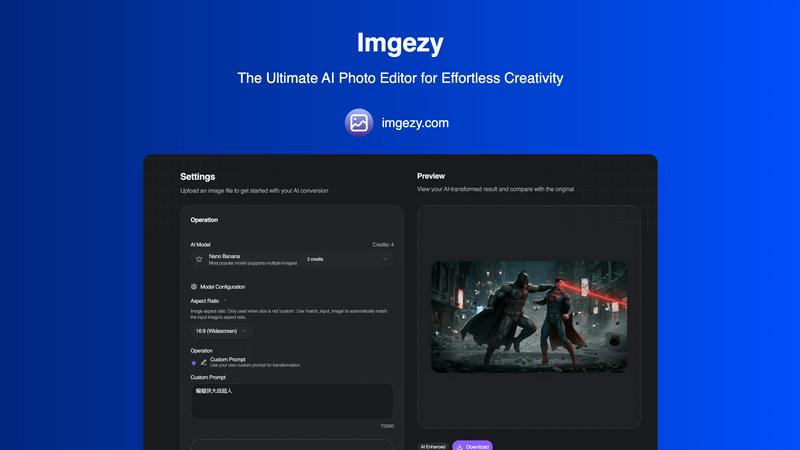
Visual Comparison
Imgezy
RemoveTexts

Feature Comparison
Imgezy
Conversational AI Editing
Edit photos using simple language, not complex tools. Just type a command like "remove the trash can" or "change the background to a beach at sunset" and Imgezy's AI understands and executes your vision instantly. This removes all technical barriers, letting your creativity lead the way without any design skills required.
Flawless Object Removal
Don't let photobombers or distracting elements ruin your perfect shot. Our AI intelligently identifies and removes any unwanted object, person, or blemish from your photo. It then reconstructs the background with pixel-perfect accuracy, leaving no trace behind for a clean, natural-looking result every time.
Instant Background Replacement
Transform the context of any photo in seconds. Swap out a boring office wall for a tropical paradise, a cloudy sky for a golden hour glow, or any background you can imagine. The AI seamlessly blends your subject into the new environment, creating professional composites that look authentic and stunning.
Smart Photo Enhancement & Repair
Automatically enhance your images to make them pop. Imgezy's AI can adjust colors, improve lighting, and sharpen details with a single command. It also features smart repair tools to automatically fix damaged, blurry, or low-quality areas, restoring clarity and vibrancy to your precious memories.
RemoveTexts
Paint to Remove
Take complete control with the intuitive brush tool. Simply paint over the specific text, watermark, or element you want to erase. The AI then works only on the selected areas, giving you pixel-perfect precision. This is perfect for when you only need to remove a certain caption or logo while keeping the rest of the image perfectly intact, all with a few taps on your screen.
Auto Remove All Text
Let the AI handle everything with a single click. This powerful mode automatically scans your entire image, detects every piece of text—regardless of language or font—and removes it all at once. It seamlessly reconstructs the background for each removed element, making it the ultimate tool for quickly cleaning screenshots, memes, or photos cluttered with multiple text overlays in seconds.
Edit & Replace Text
Go beyond simple removal and actively edit your images. This innovative feature allows you to select existing text and replace it with new words. The AI doesn't just overlay new text; it matches the original font style, color, and lighting, making the new text look like it was part of the original image. It’s perfect for updating prices, changing names, or correcting information without starting from scratch.
Remove Objects
While built for text, our AI is equally powerful at removing any unwanted object. Whether it's a stray person in the background, an unsightly trash can, a logo, or any other visual distraction, you can brush over it and watch the AI erase it completely. The technology fills in the space by intelligently analyzing the surrounding pixels, leaving a natural and seamless result.
Use Cases
Imgezy
Social Media Content Creation
Create eye-catching, professional-looking posts for Instagram, TikTok, or Facebook in seconds. Quickly remove distractions from selfies, replace bland backgrounds with trendy settings, and enhance image quality to stand out in any feed and grow your audience with consistently high-quality visuals.
E-commerce Product Photography
Elevate your online store without a studio budget. Easily remove distracting backgrounds from product shots and place items on clean white or branded backgrounds. You can also fix minor imperfections on products, ensuring your listings look polished and trustworthy to potential customers.
Travel & Lifestyle Blogging
Perfect your travel photos by removing unwanted tourists or modern signage from historic sites. Instantly change a gloomy sky to a bright blue one or enhance the colors of a landscape to match the vibrant experience. Tell better visual stories without spending hours editing on a laptop.
Personal Photo Restoration & Enhancement
Breathe new life into old or damaged personal photos. Use the smart repair feature to fix scratches, tears, or blurriness. Colorize black and white images, remove unwanted former objects from family portraits, and enhance precious memories to preserve them in their best light for generations.
RemoveTexts
Cleaning Product Photos for E-Commerce
Online sellers can instantly remove watermarks, price tags, or promotional text from product images to create a clean, professional catalog. This helps in presenting products without distractions, leading to better customer focus and higher conversion rates on marketplaces like Amazon, Etsy, or Shopify stores.
Preparing Professional Screenshots and Presentations
Professionals and students can clean up software screenshots, UI mockups, or presentation slides by removing irrelevant menus, pop-ups, watermarks, or personal data. This results in polished, distraction-free visuals that communicate ideas clearly and maintain a professional appearance in reports and decks.
Creating Clean Social Media Content
Content creators and social media managers can repurpose images by removing dated captions, subtitles, meme text, or platform-specific overlays. This allows for the creation of fresh, on-brand visuals from existing assets, saving hours of design work and enabling more consistent and engaging content across all channels.
Redacting Sensitive Information
Individuals and professionals in legal, real estate, or administrative fields can use RemoveTexts to quickly and securely redact personal information like names, addresses, license plate numbers, or confidential data from documents and photos before sharing them, ensuring privacy and compliance with ease.
Overview
About Imgezy
Imgezy is the future of photo editing, reimagined for the mobile-first creator. It's an AI-powered photo editor that transforms complex editing tasks into a simple, conversational experience. Forget about navigating confusing menus or mastering intricate tools. With Imgezy, you achieve professional-grade results by simply describing the change you want to see. Whether you need to remove an unwanted object, instantly swap a dull background for a stunning vista, or enhance colors and lighting, Imgezy's advanced artificial intelligence handles it all in seconds. Built for anyone who values stunning visuals without the steep learning curve, it's the perfect tool for social media enthusiasts, travel bloggers, e-commerce sellers, and content creators. Trusted by over 200,000 users, Imgezy delivers pixel-perfect accuracy and stunning results directly from your device, making powerful photo editing accessible, intuitive, and incredibly fast. It's the only AI photo editor you'll ever need, putting creative power directly in your hands.
About RemoveTexts
RemoveTexts is your go-to mobile and web app for instantly cleaning up any image by removing unwanted text. It's a powerful, AI-powered image editing tool designed for simplicity and speed. Forget about complex software like Photoshop or tedious manual selection. With RemoveTexts, you simply upload your photo, and our advanced AI does the heavy lifting. It intelligently detects and erases text—including watermarks, subtitles, date stamps, captions, and branded overlays—while seamlessly reconstructing the original background so no one can tell anything was ever there. It delivers professional, 4K-quality results in under 30 seconds. Built for creators, marketers, social media managers, designers, and anyone who needs pristine visuals, RemoveTexts requires zero design skills. Trusted by over 100,000 users worldwide who have processed more than 100,000 images, it’s the fastest way to get clean, text-free photos directly from your phone or browser.
Frequently Asked Questions
Imgezy FAQ
How does Imgezy's AI editing work?
Imgezy uses advanced artificial intelligence models, like the popular Nano Banana model, to understand your text-based instructions. You upload a photo and describe the edit you want. The AI analyzes the image, interprets your command, and applies complex edits—such as object removal or background generation—automatically, delivering results in just seconds.
Do I need any design experience to use Imgezy?
No, absolutely not. Imgezy is specifically designed for users with zero design or editing experience. The conversational interface means you don't need to learn any tools. If you can describe what you want to see changed in your photo, you can use Imgezy to achieve professional-level edits.
What image formats does Imgezy support?
Imgezy supports all major image formats, including JPG, PNG, and WebP. You can easily drag and drop your photo or select a file directly from your mobile device or computer to get started with your AI-powered transformation.
Are my edited images high quality?
Yes. Imgezy is built to deliver maximum quality with the best detail and accuracy. You can download your edited photos in full, high resolution without any loss of quality, ensuring your images look perfect whether viewed on a phone screen or printed.
RemoveTexts FAQ
How does RemoveTexts work?
RemoveTexts uses advanced deep learning inpainting technology, similar to AI models pioneered by leading tech companies. When you paint over text or use auto-remove, the AI analyzes the pixels surrounding the selected area. It then intelligently reconstructs the background by generating new pixels that blend seamlessly with the original image, making the text disappear without a trace.
What image formats and sizes are supported?
The tool supports common web and mobile image formats including JPG, PNG, and WebP. You can upload images up to 10MB in size. The output maintains the original quality and resolution, with support for high-quality 4K results, ensuring your cleaned images look sharp and professional.
Is RemoveTexts really free to use?
Yes, RemoveTexts offers a free online tool that allows you to upload images and remove text without any cost. You can process your images and download the results with no watermarks. The website mentions active premium features, indicating there may be additional advanced capabilities available.
What can't I use RemoveTexts for?
RemoveTexts is designed for ethical editing. It does not support the removal of logos or trademarks for copyright infringement, nor does it support processing NSFW (Not Safe For Work) content. The tool is intended for personal, professional, and creative use to clean and edit your own images or those you have permission to modify.
Alternatives
Imgezy Alternatives
Imgezy is a leading AI photo editor in the mobile app space, designed to transform images through simple text commands. It's part of a growing category of apps that use artificial intelligence to automate complex photo edits, making professional results accessible to everyone. Users often explore alternatives for various reasons. Some may be looking for different pricing models or subscription plans. Others might need specific features not offered, prefer a desktop or web-based platform over a mobile app, or simply want to compare the AI quality and user experience before committing to one editor. When choosing an alternative, consider your primary needs. Look at the core editing capabilities, especially the AI's accuracy for tasks like object removal. Evaluate the user interface for ease of use, check the supported platforms, and understand the cost structure. The best choice aligns with your specific workflow and the type of edits you do most often.
RemoveTexts Alternatives
RemoveTexts is an AI-powered image editing tool that specializes in removing text and objects from any image in seconds. It belongs to the category of automated, user-friendly photo editing software designed for quick, professional-grade results without the complexity of traditional programs like Photoshop. Users often explore alternatives for various reasons. Some may seek different pricing models, such as a one-time purchase versus a subscription. Others might need specific features like batch processing, integration with other platforms, or support for different file formats. Platform availability, like a dedicated mobile app versus a web tool, is also a common deciding factor. When choosing an alternative, consider the core functionality you need. Look for reliable AI that can cleanly remove text and inpaint the background. Evaluate the user experience, especially on mobile if that's your primary device. Also, check output quality, processing speed, and the overall value relative to the cost to find the best fit for your workflow.