
LinkedInPro vs RemoveTexts
Side-by-side comparison to help you choose the right AI tool.
Get a polished LinkedIn headshot from any casual photo in seconds with AI.
Last updated: February 28, 2026

RemoveTexts
RemoveTexts is a free AI app that erases any text from your images in seconds with just a tap.
Last updated: March 11, 2026
Visual Comparison
LinkedInPro
RemoveTexts

Feature Comparison
LinkedInPro
AI-Powered Studio Transformation
Our advanced AI engine is the core of LinkedInPro. It intelligently analyzes your uploaded photo to professionally enhance lighting, smooth skin tones, sharpen focus, and adjust color balance. It goes beyond simple filters to rebuild the image with a natural, photorealistic quality that looks like it was taken in a professional studio, ensuring you always put your best face forward.
One-Click Style & Background Customization
Tailor your headshot to match your industry and personal brand with ease. Choose from a curated library of professional backgrounds, from classic office settings to modern minimalist designs. Further personalize your look by selecting different virtual attire options, ensuring your headshot is appropriate and impactful for your specific professional field.
Mobile-First, Frictionless Upload
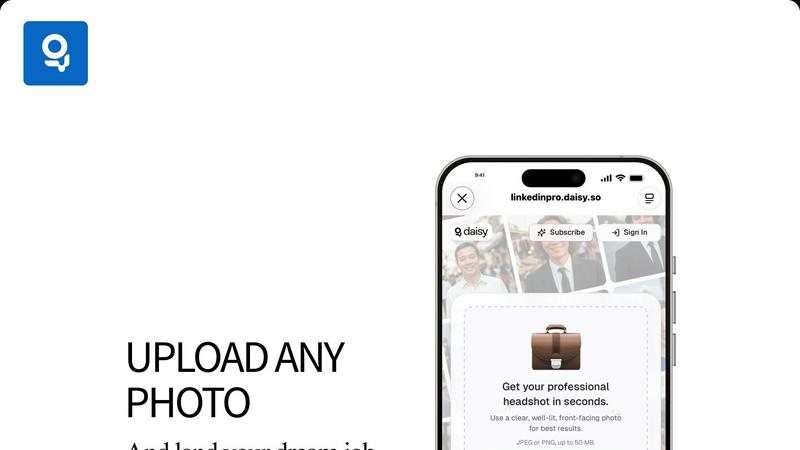
The entire process is optimized for your mobile device. Simply tap "Upload from Device" or "Take a Photo" directly within the app. We support JPEG and PNG files up to 50 MB, giving you the flexibility to use high-quality source images. The interface is clean, guided, and requires zero technical knowledge, making professional headshot creation truly effortless.
Secure & Private Processing
Your privacy is paramount. LinkedInPro processes your images with enterprise-grade security protocols. We are committed to data protection, and your original photos and generated headshots are handled with strict confidentiality, as outlined in our clear Privacy Policy. You can trust that your professional image is in safe hands.
RemoveTexts
Paint to Remove
Take complete control with the intuitive brush tool. Simply paint over the specific text, watermark, or element you want to erase. The AI then works only on the selected areas, giving you pixel-perfect precision. This is perfect for when you only need to remove a certain caption or logo while keeping the rest of the image perfectly intact, all with a few taps on your screen.
Auto Remove All Text
Let the AI handle everything with a single click. This powerful mode automatically scans your entire image, detects every piece of text—regardless of language or font—and removes it all at once. It seamlessly reconstructs the background for each removed element, making it the ultimate tool for quickly cleaning screenshots, memes, or photos cluttered with multiple text overlays in seconds.
Edit & Replace Text
Go beyond simple removal and actively edit your images. This innovative feature allows you to select existing text and replace it with new words. The AI doesn't just overlay new text; it matches the original font style, color, and lighting, making the new text look like it was part of the original image. It’s perfect for updating prices, changing names, or correcting information without starting from scratch.
Remove Objects
While built for text, our AI is equally powerful at removing any unwanted object. Whether it's a stray person in the background, an unsightly trash can, a logo, or any other visual distraction, you can brush over it and watch the AI erase it completely. The technology fills in the space by intelligently analyzing the surrounding pixels, leaving a natural and seamless result.
Use Cases
LinkedInPro
The Active Job Seeker
For individuals applying to new roles, a standout LinkedIn profile is non-negotiable. LinkedInPro allows job seekers to instantly generate a polished, trustworthy headshot that makes a strong first impression on recruiters and hiring managers, increasing profile views and interview callbacks without delay or expense.
The Entrepreneur & Startup Founder
Entrepreneurs need to project credibility and vision. LinkedInPro enables founders, solopreneurs, and small business owners to create a consistent and professional image for their company website, investor decks, and social media, building brand authority and trust with their audience from day one.
The Networking Professional
For those attending virtual conferences, webinars, or actively networking on platforms like LinkedIn, a current and professional headshot is essential. LinkedInPro makes it easy to update your photo regularly to reflect your current appearance, ensuring you are always ready to connect and engage with your network professionally.
The Freelancer or Consultant
Freelancers rely on their personal brand to attract clients. A high-quality headshot on profiles (Upwork, personal website) builds immediate trust. LinkedInPro provides an affordable, instant solution for consultants across fields to present a competent, approachable, and professional image that wins more business.
RemoveTexts
Cleaning Product Photos for E-Commerce
Online sellers can instantly remove watermarks, price tags, or promotional text from product images to create a clean, professional catalog. This helps in presenting products without distractions, leading to better customer focus and higher conversion rates on marketplaces like Amazon, Etsy, or Shopify stores.
Preparing Professional Screenshots and Presentations
Professionals and students can clean up software screenshots, UI mockups, or presentation slides by removing irrelevant menus, pop-ups, watermarks, or personal data. This results in polished, distraction-free visuals that communicate ideas clearly and maintain a professional appearance in reports and decks.
Creating Clean Social Media Content
Content creators and social media managers can repurpose images by removing dated captions, subtitles, meme text, or platform-specific overlays. This allows for the creation of fresh, on-brand visuals from existing assets, saving hours of design work and enabling more consistent and engaging content across all channels.
Redacting Sensitive Information
Individuals and professionals in legal, real estate, or administrative fields can use RemoveTexts to quickly and securely redact personal information like names, addresses, license plate numbers, or confidential data from documents and photos before sharing them, ensuring privacy and compliance with ease.
Overview
About LinkedInPro
LinkedInPro is the ultimate mobile-first AI tool for creating a powerful professional image. It transforms your everyday photos into premium, studio-quality headshots in seconds, directly from your smartphone or tablet. Designed for the modern professional on the go, it eliminates the need for costly photoshoots, complicated editing software, or professional photography skills. Whether you're a job seeker, entrepreneur, freelancer, or executive, LinkedInPro empowers you to instantly elevate your LinkedIn profile, resume, and personal website with a headshot that conveys confidence and competence. Its core value lies in unparalleled accessibility and customization, allowing anyone to craft a polished visual identity that aligns perfectly with their personal brand, all through an intuitive, app-centric experience that prioritizes speed and simplicity.
About RemoveTexts
RemoveTexts is your go-to mobile and web app for instantly cleaning up any image by removing unwanted text. It's a powerful, AI-powered image editing tool designed for simplicity and speed. Forget about complex software like Photoshop or tedious manual selection. With RemoveTexts, you simply upload your photo, and our advanced AI does the heavy lifting. It intelligently detects and erases text—including watermarks, subtitles, date stamps, captions, and branded overlays—while seamlessly reconstructing the original background so no one can tell anything was ever there. It delivers professional, 4K-quality results in under 30 seconds. Built for creators, marketers, social media managers, designers, and anyone who needs pristine visuals, RemoveTexts requires zero design skills. Trusted by over 100,000 users worldwide who have processed more than 100,000 images, it’s the fastest way to get clean, text-free photos directly from your phone or browser.
Frequently Asked Questions
LinkedInPro FAQ
What kind of photo should I upload for the best results?
For optimal AI enhancement, upload a clear, well-lit, front-facing photo. Ensure your face is fully visible without heavy shadows, hats, or sunglasses. A photo taken against a simple, uncluttered background will yield the most professional and natural-looking transformed headshot.
How long does it take to generate a headshot?
The AI processing is incredibly fast. Once you upload a suitable photo, LinkedInPro typically generates your enhanced, studio-quality headshot in a matter of seconds, allowing you to review and download your new professional image almost instantly.
Is my data and privacy secure with LinkedInPro?
Absolutely. LinkedInPro uses secure, encrypted processing for all uploaded images. We have a strict Privacy Policy governing how your data is handled, and we do not claim ownership of your generated headshots. Your privacy and security are our top priorities.
Can I customize the AI-generated headshot?
Yes, customization is a key feature. After the AI enhances your photo, you can explore and apply different professional backgrounds and virtual attire options to match your desired style and industry, giving you full control over your final professional look.
RemoveTexts FAQ
How does RemoveTexts work?
RemoveTexts uses advanced deep learning inpainting technology, similar to AI models pioneered by leading tech companies. When you paint over text or use auto-remove, the AI analyzes the pixels surrounding the selected area. It then intelligently reconstructs the background by generating new pixels that blend seamlessly with the original image, making the text disappear without a trace.
What image formats and sizes are supported?
The tool supports common web and mobile image formats including JPG, PNG, and WebP. You can upload images up to 10MB in size. The output maintains the original quality and resolution, with support for high-quality 4K results, ensuring your cleaned images look sharp and professional.
Is RemoveTexts really free to use?
Yes, RemoveTexts offers a free online tool that allows you to upload images and remove text without any cost. You can process your images and download the results with no watermarks. The website mentions active premium features, indicating there may be additional advanced capabilities available.
What can't I use RemoveTexts for?
RemoveTexts is designed for ethical editing. It does not support the removal of logos or trademarks for copyright infringement, nor does it support processing NSFW (Not Safe For Work) content. The tool is intended for personal, professional, and creative use to clean and edit your own images or those you have permission to modify.
Alternatives
LinkedInPro Alternatives
LinkedInPro is an AI-powered tool in the productivity and management category that transforms casual photos into polished professional headshots. It's designed to help users quickly elevate their LinkedIn profile without a photoshoot. Users often explore alternatives for various reasons. Some may be looking for different pricing models, specific feature sets like more background options, or a platform that integrates with other professional tools. Others might prioritize mobile app convenience over a web-based service. When choosing an alternative, consider your core needs. Look for a tool that balances ease of use with high-quality, authentic results. Evaluate the range of styles offered, the speed of processing, and the overall value for your specific professional branding goals.
RemoveTexts Alternatives
RemoveTexts is an AI-powered image editing tool that specializes in removing text and objects from any image in seconds. It belongs to the category of automated, user-friendly photo editing software designed for quick, professional-grade results without the complexity of traditional programs like Photoshop. Users often explore alternatives for various reasons. Some may seek different pricing models, such as a one-time purchase versus a subscription. Others might need specific features like batch processing, integration with other platforms, or support for different file formats. Platform availability, like a dedicated mobile app versus a web tool, is also a common deciding factor. When choosing an alternative, consider the core functionality you need. Look for reliable AI that can cleanly remove text and inpaint the background. Evaluate the user experience, especially on mobile if that's your primary device. Also, check output quality, processing speed, and the overall value relative to the cost to find the best fit for your workflow.