
MeetingMind vs Zovo
Side-by-side comparison to help you choose the right AI tool.

MeetingMind
MeetingMind captures, transcribes, and summarizes your Zoom meetings automatically, ensuring you never miss a detail.
Last updated: March 1, 2026

Unlock 20 privacy-first Chrome extensions for developers and writers, all from one dedicated solo developer.
Last updated: February 28, 2026
Visual Comparison
MeetingMind
Zovo

Feature Comparison
MeetingMind
Automatic Detection
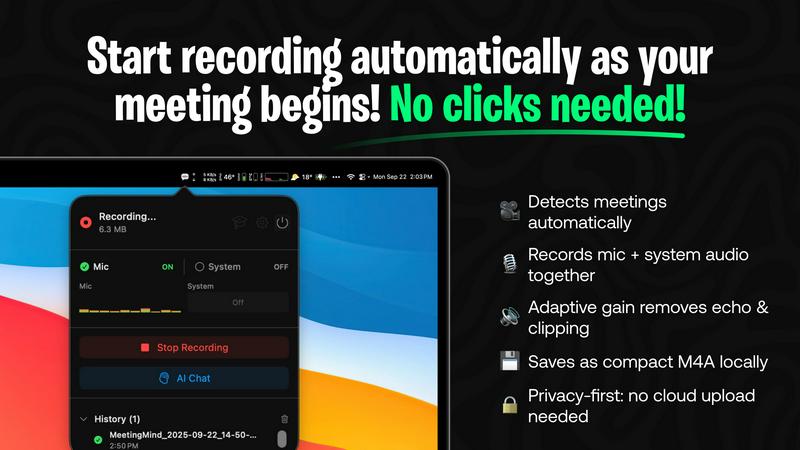
MeetingMind automatically detects Zoom meetings without requiring any clicks from the user. This feature ensures that your meetings are recorded effortlessly, allowing you to stay focused on the discussion rather than managing recording settings.
Comprehensive Recording
The tool captures both microphone and system audio, delivering a complete record of what was discussed during your meetings. This adaptive gain feature ensures that all voices are heard clearly, providing a faithful representation of the meeting dialogue.
AI Assistant Integration
With MeetingMind, you have the option to choose between a local AI assistant or a cloud-based service for generating summaries and insights. This flexibility allows users to customize their experience based on their preferences for speed and data privacy.
Markdown Export
Once your meeting concludes, MeetingMind generates AI-driven summaries and transcripts that are saved in a clean, formatted markdown file. This makes it easy to reference, share, or integrate into other documents, enhancing accessibility and collaboration.
Zovo
BeLikeNative
BeLikeNative is Zovo's flagship extension that helps users write like native speakers with just a keystroke. Supporting 80 languages, it simplifies communication for non-native speakers, making it an invaluable tool for anyone who writes in a foreign language. The extension adjusts tone, style, and phrasing, enabling users to convey their messages more effectively and naturally.
Tab Suspender Pro
Tab Suspender Pro helps manage browser memory usage by automatically suspending inactive tabs. This feature is especially beneficial for users who tend to keep many tabs open, as it reduces memory consumption, enhances browser performance, and prolongs battery life on laptops. It ensures a smoother browsing experience without manual tab management.
Clipboard History Pro
This extension keeps a history of copied items, allowing users to retrieve previously copied text and images easily. With Clipboard History Pro, you can access up to 100 items, making it a reliable tool for anyone who regularly copies and pastes information. It saves time and enhances productivity by reducing the need to recopy frequently used items.
Form Filler Pro
Form Filler Pro streamlines the process of filling out online forms by auto-generating random data or using previously saved information. This feature is particularly useful for users who frequently register for services or complete surveys, as it saves time and minimizes the frustration often associated with tedious form filling.
Use Cases
MeetingMind
Efficient Team Meetings
Teams can use MeetingMind to streamline their meetings by automatically capturing discussions and action items. This ensures everyone stays on the same page, enhancing accountability and follow-up on tasks.
Remote Work Collaboration
For remote teams, MeetingMind serves as a vital tool to bridge communication gaps. It allows team members to revisit conversations and decisions, fostering a collaborative environment even when working from different locations.
Client Consultations
Consultants and freelancers can leverage MeetingMind during client meetings to ensure no detail is missed. The ability to access transcripts and summaries allows for better follow-up and client management, ultimately improving service delivery.
Academic Discussions
Researchers and educators can utilize MeetingMind to record lectures, seminars, or academic discussions. The searchable transcripts make it easy to reference specific points, aiding in study and research efforts.
Zovo
Enhancing Language Skills
For users learning a new language, BeLikeNative provides instant rewrites that make it easier to compose messages and documents. This application is perfect for students, professionals, or anyone looking to improve their writing skills in a foreign language, enabling them to communicate more confidently.
Boosting Productivity
Tab Suspender Pro is ideal for busy professionals who juggle multiple projects. By automatically suspending inactive tabs, it allows users to focus on the task at hand without being distracted by unnecessary tabs, thus enhancing overall productivity and efficiency.
Streamlining Copying and Pasting
Clipboard History Pro is beneficial for writers, researchers, and anyone who frequently needs to copy text from various sources. By maintaining a history of copied items, users can quickly retrieve and paste information, making their workflow smoother and more efficient.
Simplifying Online Registrations
Form Filler Pro is particularly useful for users who often sign up for online services or complete surveys. By auto-filling forms with generated or saved data, it saves time and reduces the likelihood of errors, allowing users to navigate the web more seamlessly.
Overview
About MeetingMind
MeetingMind is an innovative intelligent meeting assistant crafted specifically for individuals and teams who seek to maximize productivity during meetings. Designed to seamlessly integrate with Zoom, MeetingMind automatically detects and records meetings without the need for manual intervention, allowing users to concentrate on what truly matters: the conversation. This powerful tool excels at transforming spoken dialogue into searchable and interactive notes, delivering real-time, speaker-attributed transcripts in a clean markdown format. MeetingMind is ideal for professionals, teams, and organizations aiming to enhance meeting efficiency and accountability. With its on-device AI technology, users can fully engage in discussions while benefiting from instant AI-generated summaries, action items, and the ability to query the conversation live. Prioritizing privacy and security, MeetingMind processes all data locally on your Mac, ensuring that sensitive information remains confidential and secure.
About Zovo
Zovo is a comprehensive suite of 20 Chrome extensions developed by a dedicated solo developer with over a decade of experience and an impressive track record of earning over $400K on Upwork, boasting a 100% success rate. The flagship extension, BeLikeNative, empowers more than 3,300 users to write like native speakers, offering one-keystroke rewrites in as many as 80 languages. The diverse collection of tools includes essential utilities such as Tab Suspender Pro, JSON Formatter Pro, Clipboard History Pro, and Form Filler Pro, among others. Each extension prioritizes user privacy, ensuring that no data leaves your device—there are no investors, no data harvesting, and no corporate interference. Users actively participate in shaping the roadmap by voting on features, fostering a community-driven approach to development. With new extensions rolling out monthly and early access for members, Zovo caters to users who seek powerful, privacy-first tools for their browsers. Many of these tools are also available for free online at zovo.one, making Zovo a compelling choice for anyone looking to enhance their browsing experience without compromising on privacy.
Frequently Asked Questions
MeetingMind FAQ
How does MeetingMind ensure my data privacy?
MeetingMind processes all data locally on your Mac, meaning that your meetings and sensitive information never leave your device, ensuring maximum privacy and security.
Can I use MeetingMind for meetings other than Zoom?
Currently, MeetingMind is designed to work specifically with Zoom meetings. Future updates may include support for additional platforms, but as of now, Zoom integration is its primary focus.
What is the benefit of using the local AI assistant vs. the cloud option?
Choosing the local AI assistant means your data stays on your device, enhancing privacy. The cloud option may offer faster processing times but involves sending data to external servers, which some users may prefer to avoid.
Is there a limit to the free version of MeetingMind?
Yes, the free version of MeetingMind allows for 60 minutes of recording per day. This is perfect for short meetings or daily standups, with the option to upgrade for unlimited recording capabilities.
Zovo FAQ
Is Zovo free to use?
Zovo offers many extensions for free, allowing users to access essential features without any cost. For additional capabilities, users can upgrade to a Pro subscription.
How does Zovo ensure my privacy?
Zovo is built with privacy in mind. All extensions run locally on your device, meaning no data is collected, stored, or transmitted. This guarantees that your browsing activity remains private and secure.
Can I suggest new features for Zovo extensions?
Absolutely! Zovo encourages user feedback and suggestions. You can submit feature requests directly, and the most requested features are prioritized for development.
How often are new extensions released?
New extensions are released monthly, with early access provided to members. This ensures that users can benefit from the latest tools and features as soon as they become available.
Alternatives
MeetingMind Alternatives
MeetingMind is an intelligent meeting assistant that specializes in enhancing productivity by automatically capturing every detail of your Zoom meetings. This innovative tool falls under the productivity and management category, providing seamless recording, transcription, and AI-generated summaries to ensure that users can engage fully in discussions without worrying about taking notes. Users often seek alternatives to MeetingMind for various reasons, such as pricing, specific features, or compatibility with different platforms. When choosing an alternative, it is essential to consider factors like automatic recording capabilities, transcription accuracy, ease of use, and the level of privacy and security offered to safeguard sensitive meeting information. A well-rounded alternative should cater to the unique needs of your team while enhancing overall meeting efficiency.
Zovo Alternatives
Zovo is a suite of 20 privacy-first Chrome extensions designed for developers and writers, providing tools that enhance productivity and streamline various tasks. With extensions like Tab Suspender, JSON Formatter, and Clipboard History, Zovo caters to users looking for efficient ways to manage their workflow without compromising their privacy. The platform is built on a foundation of user feedback, ensuring that the features evolve according to the needs of its community. Users often seek alternatives to Zovo for reasons such as pricing, feature sets, or specific platform compatibility. When evaluating alternatives, it's essential to consider the core functionalities offered, the level of privacy protection, and the overall user experience. Additionally, look for platforms that prioritize user input in their development roadmap, as this fosters a more tailored and satisfying experience.