
Metricgram vs Pullsy
Side-by-side comparison to help you choose the right AI tool.

Metricgram
Metricgram is your all-in-one app to manage, automate, and analyze your Telegram community with ease.
Last updated: February 28, 2026

Pullsy’s AI organizes your inbox and drafts replies in your tone.
Last updated: February 28, 2026
Visual Comparison
Metricgram
Pullsy

Feature Comparison
Metricgram
Comprehensive Analytics Dashboard
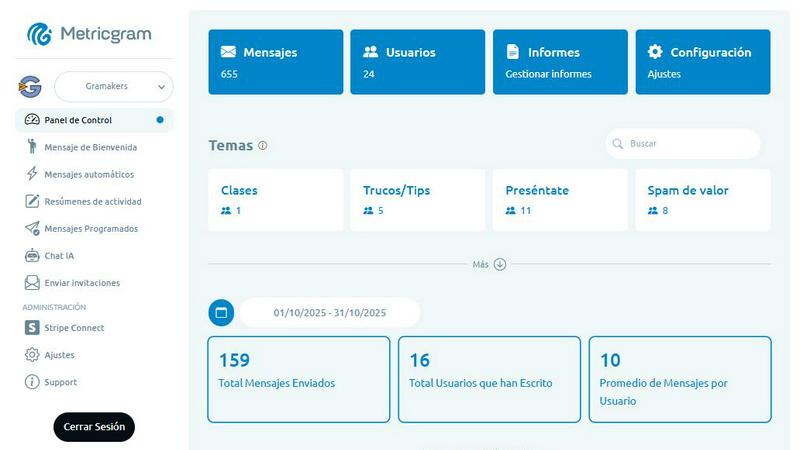
Gain instant, crystal-clear insights into your community's health and activity directly from a mobile-optimized dashboard. Track vital metrics like total messages sent, most active users, and daily/weekly/monthly engagement trends. Filter data by specific dates to analyze campaign performance. Access a complete member list with details like subscription status and message count, plus a full message history, ensuring you never miss a beat in your community's conversations, all from the palm of your hand.
Stripe Connect for Automated Access
Seamlessly automate your paid community's membership management. By linking your Stripe account, Metricgram handles the entire subscription lifecycle automatically. It sends access links to new paying members, removes those whose subscriptions lapse, and sends smart notifications to both you and the member about expiring subscriptions. Fully customize the process, including email templates and grace periods, turning complex admin work into a completely hands-off, reliable system.
AI-Powered Chatbots & Assistants
Elevate your group's interaction 24/7 with intelligent automation. Connect your OpenAI API key to deploy a custom AI assistant trained on your community's knowledge. This feature allows you to automate responses to common questions, provide instant support, and enrich member experience with intelligent conversation. It’s like having a knowledgeable co-manager always online to engage your community, answer queries, and keep the conversation flowing effortlessly.
Automated Messaging & Summaries
Save time and boost engagement with a suite of smart messaging tools. Set up personalized welcome messages for new members, both in-group and via private chat. Create automatic replies for specific keywords to instantly answer FAQs. Schedule messages to be sent at optimal times, and generate daily, weekly, or monthly activity summaries that condense group discussions into digestible highlights, keeping members informed and engaged without requiring them to scroll through endless chat history.
Pullsy
Smart Inbox & Intelligent Organization
Pullsy's AI automatically scans and labels your incoming emails to highlight your most important messages, filtering out the noise. It surfaces critical updates, action items, and time-sensitive documents in a clear "Day at a Glance" dashboard. This means you start your day with clarity, focusing only on what requires your attention without manually sorting through hundreds of messages. The system learns what matters to you, ensuring you never miss a crucial client request or an internal leadership update.
AI-Drafted Replies in Your Tone
Go beyond generic responses. Pullsy drafts complete, context-aware email replies by intelligently identifying the intent behind each message. It detects questions needing answers, tasks to confirm or decline, scheduling needs, and even follow-ups on broken promises. You can choose from preset tones like Professional, Friendly, or Quick, and the AI adapts to your writing style over time. With one-click sending after a quick review, you maintain authentic communication without the typing time.
"Ask Pullsy" & Inbox Chat
This is your smart search and insight engine. Instead of endlessly scrolling, you can chat with your inbox directly. Ask Pullsy to summarize long email threads, review and extract key points from attached PDFs, or find specific information buried in past conversations. It's a faster, more intuitive way to search, filter, and understand your email history, helping you find what matters effortlessly and keep your inbox clear with intelligent insights.
Enterprise-Grade Security & Integrations
Your data's security is foundational. Pullsy is built with enterprise-grade protections, including Google OAuth verification, CASA completion, and GDPR compliance, with SOC Type 2 certification in process. It seamlessly connects to Gmail, Outlook, and your calendar, with Slack integration coming soon. This secure, integrated approach means Pullsy works within your existing workflow without compromising sensitive information.
Use Cases
Metricgram
Managing a Premium Paid Telegram Group
For creators monetizing their expertise, Metricgram is indispensable. It automates the entire subscriber journey: granting instant access upon payment via Stripe, sending a personalized onboarding sequence, and managing removals if payments fail. The dashboard tracks engagement of paying members, ensuring you deliver value, while scheduled content and summaries keep the group active and valuable, justifying the subscription fee and reducing churn.
Growing a Large Public Community
Community managers of large, free groups use Metricgram to maintain order and quality at scale. Automated welcome messages set community rules and culture. AI chatbots handle common member questions instantly, any time of day. Activity summaries keep occasional visitors in the loop and encourage re-engagement. The analytics help identify top contributors and track which topics drive the most interaction, guiding content strategy.
Providing Consistent Member Support
For groups centered around a product, service, or course, Metricgram streamlines support. Automatic replies can instantly answer frequent technical questions or direct members to resources. The AI assistant can be trained on official documentation to provide accurate, instant answers. This ensures members receive immediate help, reducing frustration and freeing up the admin's time for more complex, high-priority issues.
Content Planning & Community Engagement
Creators and marketers use Metricgram to plan and automate their communication strategy. They can schedule announcements, prompts, or weekly challenges in advance to maintain a consistent posting schedule. By analyzing the "most active users" and "activity by messages" metrics, they can identify and reward brand advocates. Scheduled private messages can be used for targeted outreach or feedback collection, making engagement strategic and efficient.
Pullsy
The Overwhelmed Entrepreneur
Entrepreneurs wearing multiple hats get bombarded with emails from clients, vendors, and team members. Pullsy helps them instantly identify high-priority emails, like a closing document that needs signing tomorrow, and drafts professional, tone-appropriate replies to common inquiries. This cuts down email management from hours to minutes, freeing up time to focus on strategic growth instead of inbox admin.
The Busy Sales Professional
For salespeople, timely responses are everything. Pullsy ensures no lead goes cold by highlighting new prospect emails and drafting friendly, prompt follow-ups. It can quickly summarize a long negotiation thread before a call and extract key details from a client's RFP PDF. This allows the professional to stay responsive and deeply informed without constant inbox monitoring.
The Small Team Project Manager
Managing team communication and project updates via email is chaotic. Pullsy helps project managers by automatically surfacing important messages like "All Hands" meeting updates or task confirmations from team members. It can draft clear, action-oriented replies to delegate work or confirm deadlines, keeping projects moving and ensuring critical communications are never buried.
The Executive with Back-to-Back Meetings
Executives have little time between meetings for email. Pullsy's "Day at a Glance" provides a personalized summary of urgent items and upcoming meetings. They can use "Ask Pullsy" to get a rapid briefing on a lengthy thread related to their next call and send one-click replies to confirm schedules or provide quick approvals, maintaining control and responsiveness on the go.
Pricing Comparison
Metricgram
Metricgram offers a straightforward and risk-free approach to getting started. You can sign up for a full-featured free trial without requiring any credit card details. This trial lasts for 5 days, giving you ample time to connect your Telegram group, explore the analytics dashboard, and set up automations like welcome messages and Stripe integration. After the trial period, you only pay if you wish to continue using the platform. Specific paid plan tiers and pricing are available on the Metricgram website, following the "Sign up free" prompt to view the current options tailored for different community sizes and needs.
Pullsy
Pullsy offers a free 14-day trial with no credit card required to start, allowing you to fully experience its features risk-free. You can cancel the trial at any time. For specific pricing plans and tier details after the trial period, please visit the official Pullsy website's "Pricing" page for the most current and detailed information on subscription options.
Overview
About Metricgram
Metricgram is the ultimate mobile-first command center for Telegram community managers and creators. Built from the ground up for the app-centric user, it transforms the complex task of managing active Telegram groups and channels into a seamless, automated, and insightful experience. Whether you're nurturing a free public community or running a premium paid membership group, Metricgram provides the powerful toolkit you need to engage members, save countless hours on manual tasks, and make data-driven decisions to foster growth. Its core value lies in unifying essential functions—analytics, automation, and AI—into one intuitive dashboard accessible right from your phone. By automating welcome sequences, member access, repetitive replies, and scheduled content, it frees you to focus on building genuine relationships. With deep integration capabilities like Stripe for subscriptions and OpenAI for intelligent chatbots, Metricgram is designed for creators who are serious about scaling their community's impact and revenue directly from their mobile device.
About Pullsy
Pullsy is an AI-powered inbox assistant designed to give busy professionals, entrepreneurs, and small teams their time back by transforming email from a daily burden into a streamlined, intelligent workflow. It directly integrates with the tools you already use, like Gmail and Microsoft 365, to act as a smart layer over your existing inbox. The core value proposition is simple: stop letting email run your day. Pullsy achieves this by intelligently organizing your incoming messages to surface what truly matters, automatically drafting context-aware email replies in your unique voice, and providing powerful tools to instantly summarize threads and extract key information. Instead of spending hours sorting, writing, and searching, users can move through their inbox up to 3x faster. With a clean, intuitive interface and a focus on user experience, Pullsy empowers you to review AI-suggested actions, make quick tweaks, and send with confidence, all from a mobile-friendly or desktop view. The platform includes a free 14-day trial, making it easy to experience how AI can turn a chaotic inbox into a clear, actionable command center for your day.
Frequently Asked Questions
Metricgram FAQ
How do I connect my Telegram group to Metricgram?
Connecting your group is a quick and simple process designed for mobile. After signing up for your free trial, you'll be guided through a few intuitive steps within the Metricgram app. Essentially, you'll make our provided bot an administrator in your Telegram group. This grants the necessary, secure permissions for Metricgram to read messages (for analytics and triggers) and send messages (for automation), all without compromising your group's security or privacy.
Does Metricgram work with paid Telegram groups and subscriptions?
Absolutely. This is one of Metricgram's core strengths. Through its native Stripe Connect integration, it fully automates membership for paid groups. When a user subscribes via your Stripe payment link, Metricgram automatically sends them a private invite link to the group. It continuously syncs with your Stripe account to remove members who cancel and send expiration reminders, creating a completely hands-off subscription management system.
Can I customize the automated messages and bots?
Yes, extensive customization is a key feature. You have full control over the content of all automated messages, including welcome messages, automatic replies, and scheduled posts. You can choose to send them in the group or as private messages. Furthermore, you can deploy a custom-named bot for these actions to maintain your brand's professionalism. For AI replies, you can train the assistant with your own data for tailored responses.
What happens after the 5-day free trial ends?
The 5-day trial gives you full access to all of Metricgram's features to test it thoroughly with your community. You do not need a credit card to sign up. If you decide Metricgram is valuable for your community management, you can choose a paid plan to continue using the service seamlessly after the trial ends. If not, you can simply let the trial expire with no charges or obligations.
Pullsy FAQ
What is Pullsy and how does it work?
Pullsy is an AI-powered inbox management tool that connects to your Gmail, Outlook, and calendar (with Slack coming soon). Once connected, its AI automatically organizes your incoming messages, highlights what's important based on context and urgency, and suggests full email replies tailored to the content. You review, tweak if needed, and send, allowing you to clear your inbox much faster with significantly less mental load and manual effort.
Is Pullsy safe to use?
Absolutely. Your data security is Pullsy's top priority. The platform is built with enterprise-grade security measures. It is Google OAuth Verified, has completed CASA, and is GDPR compliant. Furthermore, Pullsy is currently undergoing the SOC Type 2 certification process, which is a rigorous audit of its security controls. Your information remains protected and private.
Can Pullsy draft replies for me?
Yes, drafting intelligent replies is a core function. Pullsy doesn't just write generic text; it analyzes each email to detect specific needs—like questions, tasks, or scheduling requests—and then drafts a context-aware response that addresses those actions directly. You can select your preferred tone (Professional, Friendly, Quick) and send it with one click after a personal review.
What tools can I integrate with Pullsy?
Pullsy seamlessly integrates with the most common workplace tools to fit into your existing flow. It currently connects directly with Gmail and Microsoft 365 (Outlook) for email, as well as your calendar for meeting context. The team has also announced that integration with Slack is coming very soon, further extending its capability to streamline your communication hubs.
Alternatives
Metricgram Alternatives
Metricgram is a powerful AI assistant and management platform designed for Telegram community creators. It combines analytics, automated messaging, and payment integrations into a single dashboard to help managers grow and engage their groups effectively. Users often explore alternatives for various reasons. They might need a different pricing structure, require specific features not offered, or seek a tool that integrates with other platforms beyond Telegram. The needs of a small private group can differ greatly from those of a large, monetized community. When evaluating other options, consider your core requirements. Key factors include the depth of analytics, the flexibility of automation, ease of use, and the quality of customer support. The right tool should align with your community's size, goals, and your own technical comfort level.
Pullsy Alternatives
Pullsy is an AI-powered inbox assistant designed to streamline email management for busy professionals and teams. It belongs to the category of email productivity tools, helping users organize their inbox, draft replies, and extract key information quickly. Users often explore alternatives for various reasons. This could be due to budget constraints, a need for different feature sets like advanced integrations or team collaboration tools, or compatibility with specific email platforms beyond Gmail and Outlook. It's a natural part of finding the perfect workflow fit. When evaluating other options, consider your core needs. Look for tools that address your biggest email pain points, whether that's AI drafting, smart categorization, or robust search. Prioritize a clean user experience, strong security for your data, and a pricing model that aligns with your long-term use, starting with a free trial when possible.