
NanoBanana 2 vs Nanobananapro
Side-by-side comparison to help you choose the right AI tool.

NanoBanana 2
NanoBanana 2 is an advanced AI photo editing tool that enhances images with professional quality and intuitive, real-time processing.
Last updated: March 18, 2026

Nanobananapro
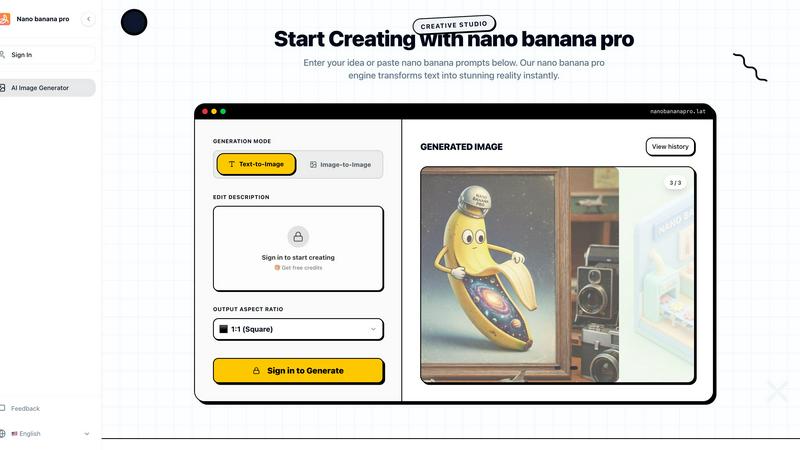
Nano Banana Pro transforms your ideas into stunning 4K AI images and edits for social graphics and manga in seconds.
Last updated: March 1, 2026
Visual Comparison
NanoBanana 2

Nanobananapro
Feature Comparison
NanoBanana 2
Smart Auto-Enhancement
Smart Auto-Enhancement uses advanced algorithms to analyze images and apply optimal enhancements automatically. This feature saves users time and effort by eliminating the need for manual adjustments, ensuring that every photo looks its best with minimal intervention.
Intelligent Retouching
The Intelligent Retouching feature leverages AI to understand the context of each image, allowing for natural and refined edits. This capability is particularly valuable for portrait photography, where preserving skin texture and features is essential.
Batch Processing
Batch Processing allows users to edit multiple images simultaneously, making it an essential tool for professionals who need to process large volumes of content. This feature significantly speeds up workflows, ensuring consistency and quality across all images.
Advanced Color Correction
Advanced Color Correction provides professional-grade color grading powered by deep learning algorithms. This feature allows users to achieve stunning color accuracy and vibrancy, enhancing the overall visual appeal of their images.
Nanobananapro
Text-to-Image Generation
Nanobananapro's text-to-image generation feature allows users to turn written descriptions into stunning visuals in mere moments. Simply input your idea, and watch as the AI interprets the text and creates a high-quality image that encapsulates your vision.
Image Restoration
With the photo restoration feature, users can effortlessly repair and upscale old images to 4K quality. Nanobananapro automatically fixes scratches and enhances details, making it an invaluable tool for those looking to preserve cherished memories.
Style Transfer
The style transfer capability enables users to upload reference images and blend styles seamlessly. This feature is particularly useful for maintaining brand consistency across various projects, as it utilizes the advanced Nano Banana 2 technology to deliver a polished look.
Customization Options
Nanobananapro offers a variety of customization options, allowing users to choose aspect ratios and upload reference photos for more tailored results. This flexibility ensures that each generated image meets the specific needs of the creator, enhancing the overall user experience.
Use Cases
NanoBanana 2
Professional Photography
Professional photographers can leverage NanoBanana 2 to enhance their portfolio images quickly. The AI-driven tools allow for seamless retouching and adjustments, ensuring that each photo meets industry standards without extensive manual work.
Social Media Content Creation
Content creators can use NanoBanana 2 to produce eye-catching visuals for their social media platforms. The quick editing capabilities enable them to maintain a consistent aesthetic while efficiently managing their content calendar.
E-commerce Product Images
E-commerce businesses can benefit from NanoBanana 2 by enhancing product images to attract customers. The tool's auto-enhancement and color correction features help create visually appealing listings that can drive sales.
Graphic Design Projects
Graphic designers can incorporate NanoBanana 2 into their workflow for quick image manipulation and enhancement. The model’s features streamline the design process, allowing for more creativity and less time spent on editing tasks.
Nanobananapro
Indie Game Development
Indie developers can harness Nanobananapro to quickly generate concept art and marketing materials. The ability to create high-quality visuals rapidly allows developers to focus on other aspects of their projects, saving time and resources.
Manga and Comic Creation
Manga artists benefit from the instant colorization feature, which allows them to bring their sketches to life with consistent styles. This capability streamlines the creative process, enabling artists to produce finished works more efficiently.
Social Media Content Creation
Marketers can leverage Nanobananapro to design eye-catching graphics for social media platforms like Instagram and Twitter. The tool's ability to create viral visuals helps brands stand out in the crowded digital landscape.
Educational Content Development
Educators and content creators can use Nanobananapro to generate engaging infographics and visual aids. This feature allows for the quick production of informative graphics that enhance learning experiences and make complex topics more accessible.
Overview
About NanoBanana 2
NanoBanana 2 is a cutting-edge AI image editing model that represents the next evolution in photo enhancement technology. Building on the original NanoBanana, this advanced tool is designed for photographers, graphic designers, and content creators who demand high-quality results with minimal effort. Its powerful AI-driven capabilities allow users to automate the image editing process while maintaining professional standards. With features like intelligent retouching, smart auto-enhancement, and one-click processing, NanoBanana 2 enables users to transform their images in a fraction of the time traditionally required. The model's focus on user experience ensures that even those with limited technical skills can achieve impressive results. Whether you are looking to enhance portraits, create stunning visuals for social media, or streamline your editing workflow, NanoBanana 2 provides an efficient and effective solution.
About Nanobananapro
Nanobananapro is a state-of-the-art, web-based AI creative studio that empowers modern creators to produce stunning visuals with ease. Utilizing the advanced Nano Banana 2 technology, this platform transforms text descriptions and reference images into high-quality images instantly. Its mobile-first design and intuitive interface ensure that users—from digital artists to marketers—can access professional-grade image generation directly from their browsers without the need for complex software installations. With Nanobananapro, content creators can streamline their creative workflows, whether they are drafting concepts, restoring old photos, or crafting engaging social media posts. The platform's core value proposition lies in its ability to seamlessly blend advanced AI models with user-centric design, allowing anyone from novices to professionals to go from a rough idea to a polished 4K masterpiece in just seconds, all at an affordable price point.
Frequently Asked Questions
NanoBanana 2 FAQ
How does NanoBanana 2 improve image quality?
NanoBanana 2 improves image quality through advanced AI algorithms that automatically enhance various aspects such as color, sharpness, and detail, resulting in professional-grade outputs.
Is NanoBanana 2 suitable for beginners?
Yes, NanoBanana 2 is designed with user experience in mind, making it accessible for beginners. Its intuitive interface and one-click editing options allow users of all skill levels to achieve high-quality results.
What types of images can I edit with NanoBanana 2?
You can edit a variety of image types with NanoBanana 2, including photos in JPEG, PNG, and WEBP formats. The tool is versatile enough for portraits, landscapes, and product images.
Can I use NanoBanana 2 for batch editing?
Absolutely! NanoBanana 2 features batch processing capabilities that allow users to edit multiple images at once, making it an efficient choice for professionals managing large volumes of work.
Nanobananapro FAQ
What is Nanobananapro?
Nanobananapro is an AI-powered creative studio that allows users to generate high-quality visuals from text descriptions and reference images, offering tools for image restoration, style transfer, and more.
How do I use Nanobananapro on this site?
Using Nanobananapro is simple. Just describe your idea or browse the prompts library, customize your input, and click generate to create stunning visuals in seconds.
Is Nanobananapro free to use?
Nanobananapro offers a free trial with credits to get started. Users can explore its features and upgrade to a paid plan as needed for additional capabilities and higher quality outputs.
Do I own the images I create with Nanobananapro?
Yes, users retain ownership of the images they create using Nanobananapro, allowing for personal and commercial use without restrictions.
Alternatives
NanoBanana 2 Alternatives
NanoBanana 2 is a cutting-edge AI image editing model that represents the evolution of its predecessor, offering enhanced capabilities for powerful photo editing. It falls under the category of AI assistants, designed to streamline the photo enhancement process with intelligent image processing. Users often seek alternatives to NanoBanana 2 for various reasons, including pricing considerations, specific feature requirements, or compatibility with different platforms. When exploring alternatives, it's essential to look for features that align with your editing needs, usability across devices, and overall value for money. Consider factors such as the ease of use, available tools, and the quality of AI-driven enhancements to ensure you find the right fit for your photo editing tasks.
Nanobananapro Alternatives
Nanobananapro is a state-of-the-art web-based AI creative studio that allows users to generate stunning 4K images and edit photos effortlessly. Positioned in the AI Assistants category, it caters primarily to content creators, digital artists, and marketers looking to produce high-quality visuals quickly and effectively. As users explore their creative options, they often seek alternatives to Nanobananapro due to factors like pricing, specific feature sets, or platform compatibility. When choosing an alternative, it's essential to consider the ease of use, the quality of output, and whether the tool aligns with your creative needs. Look for platforms that offer robust text-to-image generation capabilities, intuitive interfaces, and specialized features that cater to your particular artistic style or project requirements to ensure a seamless creative experience.