
Octopods vs Playwriter
Side-by-side comparison to help you choose the right AI tool.

Octopods
Octopods unifies all your customer chats into one simple inbox.
Last updated: February 28, 2026

Playwriter
Playwriter lets your agents control Chrome seamlessly with AI, utilizing existing sessions and full Playwright API without bot detection.
Last updated: March 18, 2026
Visual Comparison
Octopods
Playwriter

Feature Comparison
Octopods
Native CRM Conversations
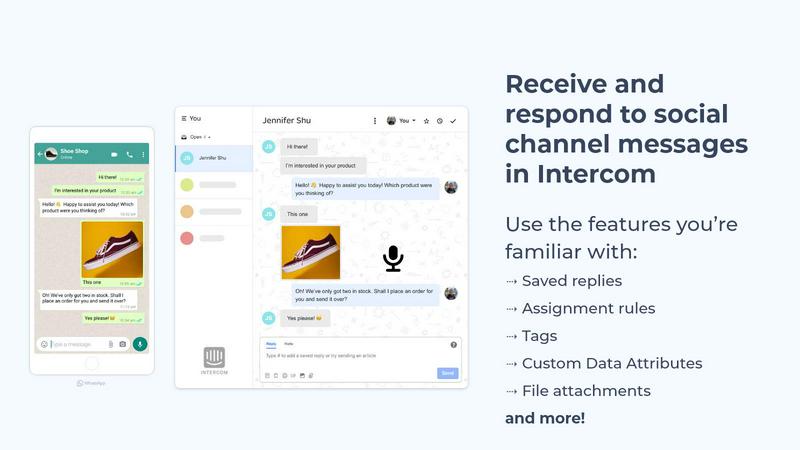
Octopods doesn't just forward messages; it creates fully native conversation threads within Intercom and HubSpot. This deep integration allows your team to use every feature of your CRM as if the chat originated there. You can apply tags for organization, use saved replies for efficiency, trigger automation workflows, leverage AI-powered suggestions, and assign conversations using your existing rules—all from a single, unified interface. This seamless experience is designed to maximize productivity and maintain a consistent workflow.
Rich Media Support Across Channels
Communicate with customers the way they expect. Octopods fully supports the sending and receiving of rich media attachments across all connected messaging channels. This includes images, videos, audio files, documents, and even GIFs. Whether a customer sends a photo of a product issue on WhatsApp or your sales team shares a brochure via Telegram, all media is seamlessly delivered and stored within the native CRM conversation, keeping the context intact and the experience smooth.
Proactive Outbound Messaging
Move beyond reactive support and initiate conversations to drive engagement and sales. Octopods enables proactive outbound messaging using pre-approved templates on channels like WhatsApp. This allows teams to send timely notifications, appointment reminders, promotional offers, or follow-up messages directly from their Intercom or HubSpot dashboard, leveraging the power of popular messaging apps for higher open and response rates.
Automatic Contact Matching & Custom Attributes
Keep your customer data clean and actionable. Octopods automatically matches incoming messages to existing contacts in your CRM using phone numbers or other identifiers, preventing duplicate contact records. Furthermore, it supports Custom Data Attributes, allowing you to sync important customer data or conversation metadata. This enables powerful filtering, segmentation, and personalization, so you can tailor your service and automation based on specific customer attributes.
Playwriter
Real Browser Session Access
Playwriter connects your AI agents directly to your existing Chrome session, providing them with access to all your logins, extensions, and cookies. This unique feature eliminates the need for the agent to start fresh, avoiding bot detection issues and unnecessary memory usage.
Full Playwright API Integration
With Playwriter, agents gain access to the complete Playwright API through a single execution tool. This means you can run any Playwright code without the hassle of multiple wrappers or schema bloat, allowing for streamlined automation and enhanced functionality.
Collaborative Real-Time Interaction
Playwriter enables real-time collaboration between you and your AI agents within the same browser. You can observe the agent's actions, intervene when necessary, and solve challenges like captchas or consent walls, ensuring a human touch when it matters most.
Advanced Debugging and Snapshot Features
The platform includes a robust debugger that supports breakpoints, live code editing, and network interception. Additionally, Playwriter offers accessibility snapshots that are significantly smaller in size, making it easier to manage and share visual data without sacrificing quality.
Use Cases
Octopods
Omnichannel Customer Support
Centralize all customer inquiries from WhatsApp, Instagram DM, SMS, and more into one Intercom or HubSpot inbox. Support agents can manage conversations from every channel in a single queue, using the same tools and workflows. This eliminates app-switching fatigue, reduces response times, and ensures a consistent, high-quality support experience regardless of how the customer chooses to reach out.
Sales & Lead Engagement
Capture and nurture leads directly on the messaging apps they use daily. When a prospect messages your business Instagram or WhatsApp number, Octopods creates a contact and conversation in HubSpot. Sales reps can then engage instantly, share catalogs, answer questions, and move leads through the pipeline using familiar CRM automation and tracking, all from their primary sales workspace.
Transactional Notifications & Alerts
Automate critical, high-open-rate communications. Operations and marketing teams can use Octopods to send order confirmations, shipping updates, appointment reminders, and security alerts via WhatsApp or SMS templates. These messages are sent directly from the CRM, allowing for easy tracking and ensuring they are part of the customer's official communication history.
Community & Social Media Management
Manage public-facing interactions efficiently. For teams handling social media and community engagement, Octopods can bring direct messages from platforms like Instagram and Facebook Messenger into a shared team inbox. This allows for organized assignment, collaboration using internal notes, and the use of saved replies to ensure brand voice consistency across all public and private interactions.
Playwriter
Automated Testing
With Playwriter, you can automate the testing of web applications directly within your existing browser session. This allows for comprehensive testing scenarios that are more reflective of real-world user experiences.
Data Scraping
Utilize Playwriter's capabilities to scrape data from websites efficiently. By leveraging your actual browser session, you can bypass common restrictions and capture content that traditional scraping methods might miss.
Performance Monitoring
Agents can monitor web performance in real-time, setting breakpoints and intercepting network requests to identify bottlenecks. This proactive approach helps in optimizing web applications effectively.
Collaborative Problem Solving
When agents encounter issues like captchas or unexpected prompts, Playwriter allows you to step in and resolve problems instantly. This ensures that your workflows remain uninterrupted while leveraging the power of automation and human oversight.
Overview
About Octopods
Octopods is the ultimate messaging hub for modern customer-facing teams. It seamlessly connects over 18 popular messaging channels—including WhatsApp, Telegram, Instagram, LINE, Viber, SMS, and WeChat—directly into your existing Intercom or HubSpot inbox. This eliminates the chaos of juggling multiple apps and logins. Unlike basic integrations that create clunky, external threads, Octopods creates native conversations inside your CRM. This means your support, sales, and operations teams can use all the powerful tools they already rely on—like tags, saved replies, assignment rules, automation workflows, and AI features—without any context switching. The value proposition is clear: centralize all customer conversations in one familiar, powerful workspace to respond faster, provide consistent service, and never miss a message, no matter where it comes from. Designed for mobile-first teams who need to reach customers on their preferred platforms, Octopods offers a secure, official partner setup that takes just minutes, with a firm commitment to privacy as no conversation data is retained on its servers.
About Playwriter
Playwriter is an innovative tool designed to enhance the functionality of AI agents by enabling them to interact with your actual browser session. Unlike traditional AI agents that operate in isolated environments or with limited tools, Playwriter bridges that gap by allowing agents to use the browser sessions you have already established. This means all your logins, cookies, and extensions are accessible directly to the agents, eliminating common issues like bot detection and login difficulties. With a simple Chrome extension and a comprehensive CLI, Playwriter empowers users to automate repetitive tasks, debug code effectively, and collaborate seamlessly in real-time. Whether you are a developer, data analyst, or business professional, Playwriter optimizes your workflow by giving your AI agents the ability to perform complex tasks without the usual constraints.
Frequently Asked Questions
Octopods FAQ
Which messaging channels does Octopods support?
Octopods supports over 18 messaging channels, including major platforms like WhatsApp Business, Telegram, Instagram Direct, Facebook Messenger, LINE, Viber, SMS, and WeChat. The complete and updated list is available on their website, with ongoing efforts to integrate new channels based on customer demand and global usage trends.
How does the integration with Intercom and HubSpot work?
Octopods is an official app partner for both Intercom and HubSpot. The integration is deep and native. After a quick installation from your CRM's app marketplace, Octopods syncs your connected channels. Incoming messages create native conversation threads inside your CRM inbox, and outgoing messages are sent directly from it. All CRM features like tags, automation, and AI tools work seamlessly with these conversations.
Is my customer conversation data secure with Octopods?
Yes, security and privacy are paramount. Octopods operates on a strict data privacy model. It acts as a secure conduit for messages but does not retain or store your conversation data on its servers. All message content flows directly between the messaging channel and your Intercom or HubSpot account, which are platforms with their own robust security and compliance certifications.
Can we send proactive messages and broadcasts?
Absolutely. Octopods enables proactive outbound messaging on supported channels like WhatsApp using pre-approved message templates. This is ideal for sending non-promotional, transactional notifications such as order updates, appointment reminders, or shipping alerts. It's a powerful way to engage customers with high-open-rate messages directly from your CRM workflow.
Playwriter FAQ
How does Playwriter ensure security for my browser session?
Playwriter operates entirely on your local machine, connecting through WebSocket relays without relying on external servers. This means no sensitive data leaves your device, ensuring your session remains secure.
Can I use Playwriter with other automation tools?
Yes, Playwriter is designed to work seamlessly with various MCP clients such as Cursor, Claude, and VS Code. This flexibility allows you to integrate Playwriter into your existing automation workflows easily.
What programming skills are required to use Playwriter?
While basic knowledge of JavaScript and familiarity with Playwright are beneficial, Playwriter is designed to be user-friendly. The included skills and documentation help guide users of all levels in utilizing the tool effectively.
Is there any limit to the number of agents I can run with Playwriter?
Playwriter supports multiple agents working simultaneously in the same browser session. The relay multiplexes sessions, allowing for efficient management of resources without performance degradation.
Alternatives
Octopods Alternatives
Octopods is a customer support tool that centralizes messaging from over 18 channels like WhatsApp and Instagram directly into Intercom or HubSpot. This eliminates the need to switch between different apps, allowing teams to manage all customer conversations from a single, familiar inbox. Users often explore alternatives for various reasons. These can include budget constraints, the need for integration with platforms other than Intercom or HubSpot, or a requirement for specific advanced features not offered. The search for the right tool is highly personal to a team's unique workflow and tech stack. When evaluating alternatives, key considerations should be the specific messaging channels you need, which core helpdesk or CRM you use, and the depth of native integration. A seamless connection that preserves your existing workflows, tags, and automation rules is often more valuable than a long list of disconnected features.
Playwriter Alternatives
Playwriter is a powerful automation tool designed to control Chrome through AI, utilizing a Command Line Interface (CLI) or a Model Control Protocol (MCP). It allows users to leverage their existing browser sessions, providing a seamless experience for automating tasks within the browser. As a part of the automation category, Playwriter stands out for its unique ability to give AI agents access to the actual browser environments, complete with logins and extensions. Users often seek alternatives to Playwriter for various reasons, including pricing, specific feature sets, or compatibility with different platforms. When exploring alternatives, it's important to consider factors such as ease of use, support for various devices, integration capabilities, and the overall flexibility of the tool. A well-rounded alternative should not only meet your immediate needs but also grow with your future automation requirements.