
Oneprofile vs Playwriter
Side-by-side comparison to help you choose the right AI tool.

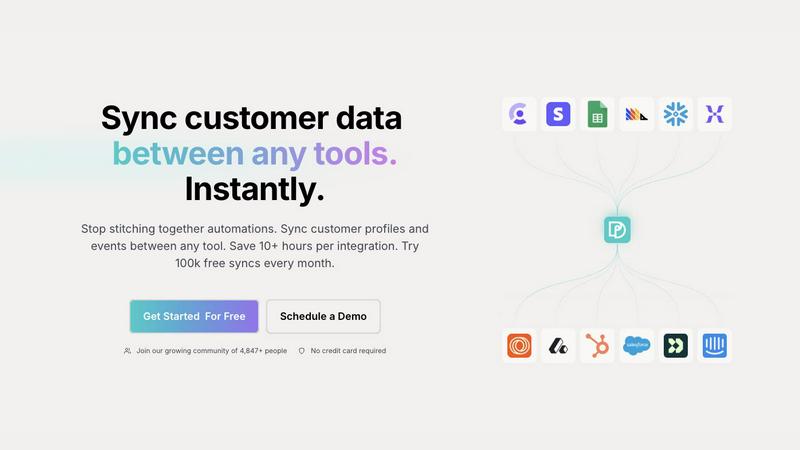
Seamlessly sync and unify customer profiles across all your tools, saving time and ensuring consistent data.
Last updated: February 28, 2026

Playwriter
Playwriter lets your agents control Chrome seamlessly with AI, utilizing existing sessions and full Playwright API without bot detection.
Last updated: March 18, 2026
Visual Comparison
Oneprofile
Playwriter

Feature Comparison
Oneprofile
Real-Time Data Synchronization
Oneprofile offers real-time synchronization of customer data across all platforms, ensuring that any changes made in one system are immediately reflected in every other tool being used. This feature eliminates the risk of outdated or inaccurate information, providing a seamless experience for teams.
Identity Resolution
The identity resolution feature ensures that there is no duplication or drift in customer profiles across different systems. Oneprofile intelligently matches identities and fields, allowing all tools to reference the same customer, thus maintaining consistency in customer data.
Custom Data Flow Control
With Oneprofile, businesses have complete control over how data moves between systems. Users can define the sync direction, whether one-way or two-way, and set specific conditions for data updates, ensuring that the synchronization process aligns with their operational needs.
Smart Field Mapping
Oneprofile simplifies the process of mapping data fields between different applications. Users can choose to automate field mapping or customize it manually, allowing for flexibility in how customer information is categorized and organized across platforms.
Playwriter
Real Browser Session Access
Playwriter connects your AI agents directly to your existing Chrome session, providing them with access to all your logins, extensions, and cookies. This unique feature eliminates the need for the agent to start fresh, avoiding bot detection issues and unnecessary memory usage.
Full Playwright API Integration
With Playwriter, agents gain access to the complete Playwright API through a single execution tool. This means you can run any Playwright code without the hassle of multiple wrappers or schema bloat, allowing for streamlined automation and enhanced functionality.
Collaborative Real-Time Interaction
Playwriter enables real-time collaboration between you and your AI agents within the same browser. You can observe the agent's actions, intervene when necessary, and solve challenges like captchas or consent walls, ensuring a human touch when it matters most.
Advanced Debugging and Snapshot Features
The platform includes a robust debugger that supports breakpoints, live code editing, and network interception. Additionally, Playwriter offers accessibility snapshots that are significantly smaller in size, making it easier to manage and share visual data without sacrificing quality.
Use Cases
Oneprofile
Marketing Automation
Marketing teams can utilize Oneprofile to ensure that their campaigns are based on the most up-to-date customer profiles and interactions. By syncing data from various sources, marketers can effectively target their audiences and personalize messaging, leading to higher engagement rates.
Customer Support Enhancement
Support teams benefit from having a unified customer view, as Oneprofile enables them to access consistent information across platforms. This ensures that representatives can provide accurate assistance, leading to improved customer satisfaction and faster resolution times.
Sales Alignment
Sales professionals can leverage Oneprofile to maintain accurate and synchronized customer records across their CRM and other sales tools. This alignment allows for better tracking of customer interactions and more informed sales strategies, ultimately driving revenue growth.
Product Analytics
Product teams can gain insights into customer behavior by utilizing Oneprofile to consolidate data from various analytics tools. This unified approach allows for a more comprehensive understanding of user interactions, informing product development and improvements.
Playwriter
Automated Testing
With Playwriter, you can automate the testing of web applications directly within your existing browser session. This allows for comprehensive testing scenarios that are more reflective of real-world user experiences.
Data Scraping
Utilize Playwriter's capabilities to scrape data from websites efficiently. By leveraging your actual browser session, you can bypass common restrictions and capture content that traditional scraping methods might miss.
Performance Monitoring
Agents can monitor web performance in real-time, setting breakpoints and intercepting network requests to identify bottlenecks. This proactive approach helps in optimizing web applications effectively.
Collaborative Problem Solving
When agents encounter issues like captchas or unexpected prompts, Playwriter allows you to step in and resolve problems instantly. This ensures that your workflows remain uninterrupted while leveraging the power of automation and human oversight.
Overview
About Oneprofile
Oneprofile is a powerful synchronization tool designed to keep customer profiles and events updated across various platforms that a business uses. It eliminates the common challenge faced by businesses when each system maintains its own version of customer data, which can lead to inconsistencies and confusion. With Oneprofile, data updates occur automatically and instantly across CRMs, analytics platforms, support systems, and marketing tools, ensuring that every stakeholder is working with the most accurate information. This tool is particularly beneficial for businesses looking to streamline operations, reduce manual data entry, and enhance collaboration among teams. By providing a unified view of customer interactions, Oneprofile empowers organizations to make informed decisions and improves customer experiences.
About Playwriter
Playwriter is an innovative tool designed to enhance the functionality of AI agents by enabling them to interact with your actual browser session. Unlike traditional AI agents that operate in isolated environments or with limited tools, Playwriter bridges that gap by allowing agents to use the browser sessions you have already established. This means all your logins, cookies, and extensions are accessible directly to the agents, eliminating common issues like bot detection and login difficulties. With a simple Chrome extension and a comprehensive CLI, Playwriter empowers users to automate repetitive tasks, debug code effectively, and collaborate seamlessly in real-time. Whether you are a developer, data analyst, or business professional, Playwriter optimizes your workflow by giving your AI agents the ability to perform complex tasks without the usual constraints.
Frequently Asked Questions
Oneprofile FAQ
How does Oneprofile ensure data accuracy?
Oneprofile maintains data accuracy through real-time synchronization across all connected systems. Any changes made in one tool are instantly reflected across others, minimizing the risk of discrepancies.
Can I customize how data is synced between systems?
Yes, Oneprofile offers flexible options for customizing data synchronization. Users can control the sync direction, set specific conditions for updates, and utilize smart field mapping for tailored data flow.
Is there a limit to the number of syncs I can perform?
With Oneprofile, users can enjoy up to 100,000 free syncs every month, allowing businesses to integrate their tools without incurring additional costs while they evaluate the platform's capabilities.
What types of tools can Oneprofile integrate with?
Oneprofile is designed to sync customer data between any tools, including CRMs, marketing platforms, analytics tools, and support systems, ensuring a comprehensive and unified customer data ecosystem.
Playwriter FAQ
How does Playwriter ensure security for my browser session?
Playwriter operates entirely on your local machine, connecting through WebSocket relays without relying on external servers. This means no sensitive data leaves your device, ensuring your session remains secure.
Can I use Playwriter with other automation tools?
Yes, Playwriter is designed to work seamlessly with various MCP clients such as Cursor, Claude, and VS Code. This flexibility allows you to integrate Playwriter into your existing automation workflows easily.
What programming skills are required to use Playwriter?
While basic knowledge of JavaScript and familiarity with Playwright are beneficial, Playwriter is designed to be user-friendly. The included skills and documentation help guide users of all levels in utilizing the tool effectively.
Is there any limit to the number of agents I can run with Playwriter?
Playwriter supports multiple agents working simultaneously in the same browser session. The relay multiplexes sessions, allowing for efficient management of resources without performance degradation.
Alternatives
Oneprofile Alternatives
Oneprofile is a powerful tool that syncs customer profiles and events across all the systems a company utilizes, including CRMs, analytics platforms, support, and marketing tools. By ensuring that customer data is consistently updated in real-time, Oneprofile eliminates the hassle of manual pipelines and broken integrations, allowing businesses to focus on what matters most—delivering exceptional customer experiences. Users often seek alternatives to Oneprofile for various reasons, including pricing, specific feature sets, or compatibility with different platforms. As businesses evolve, their data needs may change, prompting them to explore other options that better align with their operational requirements. When choosing an alternative, it's crucial to consider factors such as ease of integration, scalability, and the ability to provide accurate and timely data synchronization across all tools.
Playwriter Alternatives
Playwriter is a powerful automation tool designed to control Chrome through AI, utilizing a Command Line Interface (CLI) or a Model Control Protocol (MCP). It allows users to leverage their existing browser sessions, providing a seamless experience for automating tasks within the browser. As a part of the automation category, Playwriter stands out for its unique ability to give AI agents access to the actual browser environments, complete with logins and extensions. Users often seek alternatives to Playwriter for various reasons, including pricing, specific feature sets, or compatibility with different platforms. When exploring alternatives, it's important to consider factors such as ease of use, support for various devices, integration capabilities, and the overall flexibility of the tool. A well-rounded alternative should not only meet your immediate needs but also grow with your future automation requirements.