
Photomaxxer vs RemoveTexts
Side-by-side comparison to help you choose the right AI tool.

Photomaxxer
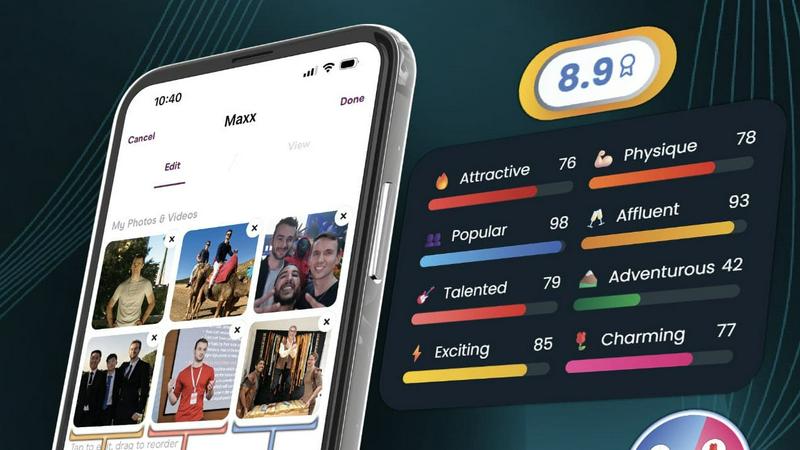
Photomaxxer's AI instantly picks your best photos to get you more matches.
Last updated: February 28, 2026

RemoveTexts
RemoveTexts is a free AI app that erases any text from your images in seconds with just a tap.
Last updated: March 11, 2026
Visual Comparison
Photomaxxer
RemoveTexts

Feature Comparison
Photomaxxer
AI Trained on Real Swipe Data
Photomaxxer isn't based on generic rules or guesswork. Its AI is uniquely trained on real swipe data from thousands of women and successful dating profiles. This means the analysis you receive reflects actual preferences and behaviors from the dating apps you use, providing feedback that is grounded in real-world results, not theory.
8 Core & 100+ Micro-Trait Analysis
The system delivers deep, comprehensive insights by evaluating your photos against 8 scientifically proven core traits for dating success. Beyond that, it analyzes over 100 underlying micro-traits per photo, from composition and expression to context and authenticity, giving you a nuanced understanding of every detail that impacts a swipe decision.
95% Accurate Success Prediction
Photomaxxer provides highly reliable feedback, rating profiles with 95% accuracy based on real dating success data. The AI doesn't just give a generic score; it predicts your actual likelihood of success on apps, telling you not just if a photo is "good," but how it will perform in the competitive real-world dating environment.
Tailored, Actionable Feedback
You receive more than just a grade. Photomaxxer tailors its feedback to your specific photos, situation, and goals. The detailed report highlights your strongest photos, explains why weaker ones fail, and provides clear, actionable steps you can take to optimize your profile immediately for more matches and better dates.
RemoveTexts
Paint to Remove
Take complete control with the intuitive brush tool. Simply paint over the specific text, watermark, or element you want to erase. The AI then works only on the selected areas, giving you pixel-perfect precision. This is perfect for when you only need to remove a certain caption or logo while keeping the rest of the image perfectly intact, all with a few taps on your screen.
Auto Remove All Text
Let the AI handle everything with a single click. This powerful mode automatically scans your entire image, detects every piece of text—regardless of language or font—and removes it all at once. It seamlessly reconstructs the background for each removed element, making it the ultimate tool for quickly cleaning screenshots, memes, or photos cluttered with multiple text overlays in seconds.
Edit & Replace Text
Go beyond simple removal and actively edit your images. This innovative feature allows you to select existing text and replace it with new words. The AI doesn't just overlay new text; it matches the original font style, color, and lighting, making the new text look like it was part of the original image. It’s perfect for updating prices, changing names, or correcting information without starting from scratch.
Remove Objects
While built for text, our AI is equally powerful at removing any unwanted object. Whether it's a stray person in the background, an unsightly trash can, a logo, or any other visual distraction, you can brush over it and watch the AI erase it completely. The technology fills in the space by intelligently analyzing the surrounding pixels, leaving a natural and seamless result.
Use Cases
Photomaxxer
Optimizing a New Profile
Before you even make your first swipe, use Photomaxxer to test the photos you plan to use. Get a data-backed ranking of your best shots and understand the ideal order for your profile gallery. Launch your new dating profile with confidence, knowing it's already optimized to attract maximum attention from the start.
Reviving a Stagnant Profile
If your matches have slowed to a trickle, Photomaxxer can diagnose the problem. Upload your current profile photos to identify which images are underperforming and acting as "swipe-left" triggers. Replace them with stronger alternatives from your camera roll based on the AI's specific feedback to quickly reignite interest.
Choosing Between Photo Options
Stuck deciding between several similar photos? Instead of asking friends, get an objective, data-driven verdict. Upload your top contenders and let Photomaxxer's AI, trained on female swipe data, tell you which one will perform better, taking the guesswork out of crafting the perfect profile.
Prepping for a Profile Refresh
Planning a seasonal update or want to keep your profile feeling fresh? Use Photomaxxer to test new candidate photos against your existing successful ones. This ensures every new photo you add meets or exceeds the quality of your current best performers, allowing for strategic updates that maintain or improve your match rate.
RemoveTexts
Cleaning Product Photos for E-Commerce
Online sellers can instantly remove watermarks, price tags, or promotional text from product images to create a clean, professional catalog. This helps in presenting products without distractions, leading to better customer focus and higher conversion rates on marketplaces like Amazon, Etsy, or Shopify stores.
Preparing Professional Screenshots and Presentations
Professionals and students can clean up software screenshots, UI mockups, or presentation slides by removing irrelevant menus, pop-ups, watermarks, or personal data. This results in polished, distraction-free visuals that communicate ideas clearly and maintain a professional appearance in reports and decks.
Creating Clean Social Media Content
Content creators and social media managers can repurpose images by removing dated captions, subtitles, meme text, or platform-specific overlays. This allows for the creation of fresh, on-brand visuals from existing assets, saving hours of design work and enabling more consistent and engaging content across all channels.
Redacting Sensitive Information
Individuals and professionals in legal, real estate, or administrative fields can use RemoveTexts to quickly and securely redact personal information like names, addresses, license plate numbers, or confidential data from documents and photos before sharing them, ensuring privacy and compliance with ease.
Overview
About Photomaxxer
Stop guessing what works on dating apps. Photomaxxer is the ultimate AI-powered dating profile assistant, designed to transform your online dating results from overlooked to irresistible. It's the world's first AI reviewer trained specifically to think like a woman, using real-life swipe data from thousands of women to analyze your photos. This tool is for any man who wants to cut through the noise and frustration of apps like Tinder, Hinge, and Bumble and start getting real, data-driven feedback. Its core mission is to turn the complex art of profile optimization into a simple, science-backed strategy. You simply upload your photos, and in just three minutes, you receive an immediate, precise assessment of how your profile will perform. Photomaxxer identifies exactly which images attract matches and which ones hold you back, helping you to 5X your matches using the photos you already have on your phone. It replaces outdated advice and conjecture with actionable insights, permanently improving your dating app success rate.
About RemoveTexts
RemoveTexts is your go-to mobile and web app for instantly cleaning up any image by removing unwanted text. It's a powerful, AI-powered image editing tool designed for simplicity and speed. Forget about complex software like Photoshop or tedious manual selection. With RemoveTexts, you simply upload your photo, and our advanced AI does the heavy lifting. It intelligently detects and erases text—including watermarks, subtitles, date stamps, captions, and branded overlays—while seamlessly reconstructing the original background so no one can tell anything was ever there. It delivers professional, 4K-quality results in under 30 seconds. Built for creators, marketers, social media managers, designers, and anyone who needs pristine visuals, RemoveTexts requires zero design skills. Trusted by over 100,000 users worldwide who have processed more than 100,000 images, it’s the fastest way to get clean, text-free photos directly from your phone or browser.
Frequently Asked Questions
Photomaxxer FAQ
How does Photomaxxer work?
The process is simple and takes about three minutes. First, you upload the photos you use or are considering for your dating profile. Next, our proprietary AI, trained on real female swipe data from successful profiles, analyzes each image against over 100 traits. Finally, you instantly receive a detailed report grading your photos and providing tailored, actionable feedback to improve your profile.
What makes Photomaxxer different from other photo raters?
Photomaxxer is uniquely trained to think like a woman by analyzing real swipe data, not just generic aesthetics. It predicts real-life dating success with 95% accuracy, not just a vague score. We provide deep, tailored feedback on why a photo works or doesn't, based on 8 core and 100+ micro-traits, giving you a science-backed strategy instead of simple opinions.
Is my data and privacy protected?
Absolutely. We take your privacy seriously. Uploaded photos are processed securely and are not shared publicly. We use the data solely to provide you with the analysis service. For full details on how we handle your information, please refer to our comprehensive Privacy Policy available on our website.
What if I don't have professional photos?
Photomaxxer is designed to work with the photos you already have on your phone. The AI analyzes authenticity and appeal in real-world contexts. Often, the best photos for dating profiles are candid and genuine. Our feedback will help you identify which of your existing casual or smartphone photos have the most potential and how to use them effectively.
RemoveTexts FAQ
How does RemoveTexts work?
RemoveTexts uses advanced deep learning inpainting technology, similar to AI models pioneered by leading tech companies. When you paint over text or use auto-remove, the AI analyzes the pixels surrounding the selected area. It then intelligently reconstructs the background by generating new pixels that blend seamlessly with the original image, making the text disappear without a trace.
What image formats and sizes are supported?
The tool supports common web and mobile image formats including JPG, PNG, and WebP. You can upload images up to 10MB in size. The output maintains the original quality and resolution, with support for high-quality 4K results, ensuring your cleaned images look sharp and professional.
Is RemoveTexts really free to use?
Yes, RemoveTexts offers a free online tool that allows you to upload images and remove text without any cost. You can process your images and download the results with no watermarks. The website mentions active premium features, indicating there may be additional advanced capabilities available.
What can't I use RemoveTexts for?
RemoveTexts is designed for ethical editing. It does not support the removal of logos or trademarks for copyright infringement, nor does it support processing NSFW (Not Safe For Work) content. The tool is intended for personal, professional, and creative use to clean and edit your own images or those you have permission to modify.
Alternatives
Photomaxxer Alternatives
Photomaxxer is an AI-powered dating profile assistant that analyzes your photos to help you get more matches on apps like Tinder and Hinge. It belongs to the category of AI assistants specifically designed for dating app optimization, using real swipe data to provide science-backed feedback. Users often explore alternatives for various reasons. Some may be looking for different pricing models or subscription plans. Others might seek tools that offer broader features, like profile text analysis or compatibility matching, or they may need an app available on a different mobile platform. When choosing an alternative, focus on what matters for your dating app success. Look for tools that provide clear, actionable insights, not just generic scores. Prioritize services with a strong foundation in real user data, as this leads to more accurate and effective recommendations for your profile photos.
RemoveTexts Alternatives
RemoveTexts is an AI-powered image editing tool that specializes in removing text and objects from any image in seconds. It belongs to the category of automated, user-friendly photo editing software designed for quick, professional-grade results without the complexity of traditional programs like Photoshop. Users often explore alternatives for various reasons. Some may seek different pricing models, such as a one-time purchase versus a subscription. Others might need specific features like batch processing, integration with other platforms, or support for different file formats. Platform availability, like a dedicated mobile app versus a web tool, is also a common deciding factor. When choosing an alternative, consider the core functionality you need. Look for reliable AI that can cleanly remove text and inpaint the background. Evaluate the user experience, especially on mobile if that's your primary device. Also, check output quality, processing speed, and the overall value relative to the cost to find the best fit for your workflow.