
QRelix vs RemoveTexts
Side-by-side comparison to help you choose the right AI tool.

QRelix is a free app that creates dynamic, trackable QR codes with real-time analytics in print-ready SVG format.
Last updated: March 11, 2026

RemoveTexts
RemoveTexts is a free AI app that erases any text from your images in seconds with just a tap.
Last updated: March 11, 2026
Visual Comparison
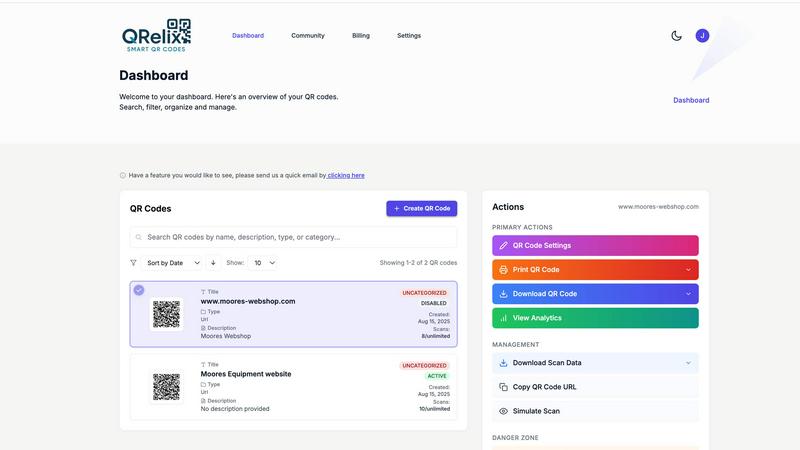
QRelix
RemoveTexts

Feature Comparison
QRelix
Dynamic QR Codes & Real-Time Updates
Never worry about a broken link or outdated information again. QRelix's dynamic QR codes are the heart of the platform. You can update the destination URL, file, or content linked to your QR code at any moment from your dashboard. This means a code printed on a permanent menu, product package, or billboard can be changed in seconds, allowing for agile marketing, error correction, and A/B testing without any reprinting costs or waste.
Advanced Real-Time Analytics Dashboard
Track the performance of every campaign with precision. The QRelix dashboard provides detailed, real-time analytics for every scan. See total scan volume, pinpoint scan locations on a map, identify the device types (iOS, Android) and operating systems used, and analyze the time and date of each access. This data is crucial for measuring campaign ROI, understanding audience behavior, and optimizing your placement and messaging for better engagement.
High-Resolution Customization & Branding
Create QR codes that are an extension of your brand, not an eyesore. The platform offers deep design customization. You can change the colors of the QR code dots and background, add a central logo, and adjust the style to ensure it matches your marketing materials. The finished product exports as a 300 DPI SVG file, a vector format that guarantees perfect, sharp printing at any size on business cards, posters, flyers, or packaging.
Mirrored QR & Password Protection
Two powerful features for control and versatility. The unique Mirrored QR feature allows you to take any existing QR code (even one you didn't create) and "mirror" it through QRelix. This lets you apply your own branding and, most importantly, gain access to the scan analytics for that code. Additionally, you can enable password protection on your codes, restricting access to specific content, offers, or documents to only those with the password, adding a layer of security.
RemoveTexts
Paint to Remove
Take complete control with the intuitive brush tool. Simply paint over the specific text, watermark, or element you want to erase. The AI then works only on the selected areas, giving you pixel-perfect precision. This is perfect for when you only need to remove a certain caption or logo while keeping the rest of the image perfectly intact, all with a few taps on your screen.
Auto Remove All Text
Let the AI handle everything with a single click. This powerful mode automatically scans your entire image, detects every piece of text—regardless of language or font—and removes it all at once. It seamlessly reconstructs the background for each removed element, making it the ultimate tool for quickly cleaning screenshots, memes, or photos cluttered with multiple text overlays in seconds.
Edit & Replace Text
Go beyond simple removal and actively edit your images. This innovative feature allows you to select existing text and replace it with new words. The AI doesn't just overlay new text; it matches the original font style, color, and lighting, making the new text look like it was part of the original image. It’s perfect for updating prices, changing names, or correcting information without starting from scratch.
Remove Objects
While built for text, our AI is equally powerful at removing any unwanted object. Whether it's a stray person in the background, an unsightly trash can, a logo, or any other visual distraction, you can brush over it and watch the AI erase it completely. The technology fills in the space by intelligently analyzing the surrounding pixels, leaving a natural and seamless result.
Use Cases
QRelix
Restaurant Digital Menus & Contactless Ordering
Modernize the dining experience effortlessly. Restaurants can generate QR codes for their digital menus, linking directly to an online menu or ordering system. Placed on tables or posters, these codes enable contactless browsing and ordering. The dynamic feature allows for instant menu updates (daily specials, price changes) without reprinting table tents. Analytics show peak engagement times, helping to optimize staff scheduling.
Event Management & Engagement
Streamline event logistics and boost attendee interaction. Event organizers can use QR codes for quick ticket check-in, linking to digital schedules, speaker bios, feedback surveys, or exclusive post-event content. A single code on promotional materials can be dynamically updated post-event to link to photo galleries or replay videos, extending engagement and measuring overall interest from initial advertisement to post-event follow-up.
Retail Product Storytelling & Inventory
Bridge the gap between the physical shelf and digital information. Retailers can place small QR codes on product packaging or shelf tags. When scanned, these can link to detailed product information, demonstration videos, customer reviews, or complementary items. For inventory, codes can link to real-time stock levels or instruction manuals. The tracking data reveals which products generate the most digital engagement.
Personal Networking with Smart vCards
Leave a lasting, updatable digital impression. Professionals can create a QR code linked to a dynamic vCard (digital business card). When scanned, it instantly saves your contact details to the user's phone. The powerful advantage is that if you change your phone number, job title, or website later, you can update your vCard information in QRelix, and every previously printed QR code will automatically point to the new, correct details.
RemoveTexts
Cleaning Product Photos for E-Commerce
Online sellers can instantly remove watermarks, price tags, or promotional text from product images to create a clean, professional catalog. This helps in presenting products without distractions, leading to better customer focus and higher conversion rates on marketplaces like Amazon, Etsy, or Shopify stores.
Preparing Professional Screenshots and Presentations
Professionals and students can clean up software screenshots, UI mockups, or presentation slides by removing irrelevant menus, pop-ups, watermarks, or personal data. This results in polished, distraction-free visuals that communicate ideas clearly and maintain a professional appearance in reports and decks.
Creating Clean Social Media Content
Content creators and social media managers can repurpose images by removing dated captions, subtitles, meme text, or platform-specific overlays. This allows for the creation of fresh, on-brand visuals from existing assets, saving hours of design work and enabling more consistent and engaging content across all channels.
Redacting Sensitive Information
Individuals and professionals in legal, real estate, or administrative fields can use RemoveTexts to quickly and securely redact personal information like names, addresses, license plate numbers, or confidential data from documents and photos before sharing them, ensuring privacy and compliance with ease.
Overview
About QRelix
QRelix is the ultimate mobile-first platform for creating, managing, and tracking dynamic QR codes. Designed for marketers, business owners, event planners, and retail teams, it transforms static links into powerful, interactive touchpoints. With over 20 QR code types, you can connect to virtually anything: websites, files, Wi-Fi networks, contact details (vCards), social media profiles, app stores, and even custom landing pages. The core power of QRelix lies in its dynamic codes; you can change the destination URL or content at any time without ever needing to reprint the physical QR code. This is paired with robust, real-time analytics that show you exactly when, where, and how your codes are being scanned. Every code is fully customizable with your brand's colors and logo, and exports in a crisp, print-ready 300 DPI SVG format perfect for everything from business cards to billboards. Best of all, QRelix offers a powerful suite of enterprise-grade features with a completely free starting tier, requiring no credit card to begin. It's the all-in-one app-centric solution for anyone looking to bridge the physical and digital worlds seamlessly.
About RemoveTexts
RemoveTexts is your go-to mobile and web app for instantly cleaning up any image by removing unwanted text. It's a powerful, AI-powered image editing tool designed for simplicity and speed. Forget about complex software like Photoshop or tedious manual selection. With RemoveTexts, you simply upload your photo, and our advanced AI does the heavy lifting. It intelligently detects and erases text—including watermarks, subtitles, date stamps, captions, and branded overlays—while seamlessly reconstructing the original background so no one can tell anything was ever there. It delivers professional, 4K-quality results in under 30 seconds. Built for creators, marketers, social media managers, designers, and anyone who needs pristine visuals, RemoveTexts requires zero design skills. Trusted by over 100,000 users worldwide who have processed more than 100,000 images, it’s the fastest way to get clean, text-free photos directly from your phone or browser.
Frequently Asked Questions
QRelix FAQ
What makes a QR code "dynamic"?
A dynamic QR code is one where the destination content (like a URL) can be changed after the code has been created and printed. With QRelix, the code itself remains the same, but it points to a short, redirecting link that you control. You can log into your dashboard anytime and update where that redirect goes, meaning the physical code never needs to be replaced, saving time and resources.
Is QRelix really free to use?
Yes, QRelix offers a fully-featured free plan to get started. You can sign up without a credit card, create dynamic QR codes, customize them with your branding, and access analytics. This free tier is designed to be powerful enough for most individual and business needs. The platform operates on a freemium model, meaning additional advanced features or higher volume needs may be available in paid tiers.
What file format do I get for printing?
QRelix provides QR codes in 300 DPI SVG (Scalable Vector Graphics) format. This is a print-ready, vector-based file type. Unlike pixel-based formats (like PNG or JPG), an SVG can be scaled to any size--from a tiny business card to a massive billboard--without any loss of quality or sharpness, ensuring your codes always look professional and scan perfectly.
Can I track scans from a QR code I didn't originally create?
Yes, through the unique Mirrored QR feature. If you have a physical QR code (e.g., on a competitor's flyer or a public document) that you want to track or rebrand, you can use QRelix to create a "mirror" of it. This creates a new, dynamic code that redirects to the same target but is now housed in your QRelix dashboard, allowing you to apply your branding and, critically, view all the scan analytics for it.
RemoveTexts FAQ
How does RemoveTexts work?
RemoveTexts uses advanced deep learning inpainting technology, similar to AI models pioneered by leading tech companies. When you paint over text or use auto-remove, the AI analyzes the pixels surrounding the selected area. It then intelligently reconstructs the background by generating new pixels that blend seamlessly with the original image, making the text disappear without a trace.
What image formats and sizes are supported?
The tool supports common web and mobile image formats including JPG, PNG, and WebP. You can upload images up to 10MB in size. The output maintains the original quality and resolution, with support for high-quality 4K results, ensuring your cleaned images look sharp and professional.
Is RemoveTexts really free to use?
Yes, RemoveTexts offers a free online tool that allows you to upload images and remove text without any cost. You can process your images and download the results with no watermarks. The website mentions active premium features, indicating there may be additional advanced capabilities available.
What can't I use RemoveTexts for?
RemoveTexts is designed for ethical editing. It does not support the removal of logos or trademarks for copyright infringement, nor does it support processing NSFW (Not Safe For Work) content. The tool is intended for personal, professional, and creative use to clean and edit your own images or those you have permission to modify.
Alternatives
QRelix Alternatives
QRelix is a dynamic QR code generator and analytics platform designed for marketing teams. It allows users to create trackable, customizable codes that can be updated after printing, with detailed insights into scan performance. Users often explore alternatives for various reasons. Some may need a different pricing model or a specific feature not offered, while others might seek a platform that integrates more deeply with their existing app ecosystem or business software stack. When evaluating other options, consider core needs like dynamic code functionality, the depth of real-time analytics, customization limits for branding, and the quality of export formats for your print materials. The ideal platform should fit seamlessly into your mobile-first workflow.
RemoveTexts Alternatives
RemoveTexts is an AI-powered image editing tool that specializes in removing text and objects from any image in seconds. It belongs to the category of automated, user-friendly photo editing software designed for quick, professional-grade results without the complexity of traditional programs like Photoshop. Users often explore alternatives for various reasons. Some may seek different pricing models, such as a one-time purchase versus a subscription. Others might need specific features like batch processing, integration with other platforms, or support for different file formats. Platform availability, like a dedicated mobile app versus a web tool, is also a common deciding factor. When choosing an alternative, consider the core functionality you need. Look for reliable AI that can cleanly remove text and inpaint the background. Evaluate the user experience, especially on mobile if that's your primary device. Also, check output quality, processing speed, and the overall value relative to the cost to find the best fit for your workflow.